
An offline root CA never serves live traffic, so “downtime” isn’t really about the root itself going down. It’s about what happens downstream while you’re renewing it: subordinate CAs that depend on chaining to a valid root, relying parties checking revocation status, and clients whose trust store hasn’t caught up yet. Get the sequencing wrong and you can technically complete a root renewal without a single error message, and still cause a trust-chain gap that surfaces as validation failures days or weeks later. This is the practical operations playbook for avoiding that.
For subordinate CA renewal specifically, and for the exact error codes that show up when renewals go wrong, see Common ADCS Certificate Authority Renewal Errors and Fixes.
TL;DR: Key Takeaways
- “No downtime” means no trust-chain interruption, not root server uptime: the operational risk during an offline root renewal is entirely about publication and propagation timing for the new certificate and CRL, not about the root itself being unavailable.
- Reusing the existing key pair is the default choice for most renewals: a certificate-only renewal is lower-risk and doesn’t require re-establishing trust in a new key. Reserve a full rekey for a documented reason like key compromise or cryptographic weakness.
- A standalone offline root can’t publish itself to Active Directory: you have to manually transfer the renewed certificate to a domain-connected system and publish it explicitly, this step is easy to forget precisely because it doesn’t happen automatically the way it does for a domain-joined CA.
- Root CRL validity has to cover your actual power-on cadence: an offline root’s CRL only gets refreshed when the root is physically powered on for a ceremony, so its validity period needs to comfortably exceed the interval until the next scheduled ceremony, not just meet a generic policy minimum.
- Rollback stops being simple the moment anything downstream references the new certificate: validate thoroughly before you consider the renewal final, because reverting after subordinate CAs or relying parties have started depending on the new root requires a deliberate re-publication of the old one, not an undo button.
What “No Downtime” Actually Means for an Offline Root
A subordinate or issuing CA has to stay online to process enrollment requests, so its renewal windows are a genuine availability concern. An offline root is different: it’s kept powered off and air-gapped between scheduled ceremonies specifically because it never needs to answer a live request. Nothing about renewing it requires the root itself to be reachable by anything except during the brief window you deliberately power it on.
The actual risk during a root renewal lives entirely in the handoff: the moment between generating the renewed certificate and having it fully published, propagated to relying parties, and validated end to end. If a subordinate CA needs to chain to the root during that window, or if a relying party’s trust store hasn’t received the update yet when it needs to validate a certificate, that’s where a real interruption happens, even though nothing about the root’s own operational state changed. Treat this entire process as a publication and propagation exercise with a signing ceremony in the middle, not the other way around.
Prechecks
- Confirm the root’s current remaining validity and your actual renewal timeline: don’t wait until the root is close to expiration to start this process, since every step below, backup, ceremony scheduling, publication, and validation, takes real elapsed time you want available as buffer.
- Check every subordinate CA’s certificate validity against the root’s renewed validity: a subordinate CA’s certificate can never exceed its parent’s remaining validity, confirm the renewal you’re planning actually gives your subordinates enough runway rather than immediately constraining them again.
- Review your
RenewalValidityPeriodandRenewalValidityPeriodUnitsregistry settings: check these withcertutil -getreg ca\RenewalValidityPeriodandcertutil -getreg ca\RenewalValidityPeriodUnitsbefore the ceremony, confirming the renewed certificate’s validity period matches your actual policy intent rather than a stale default.
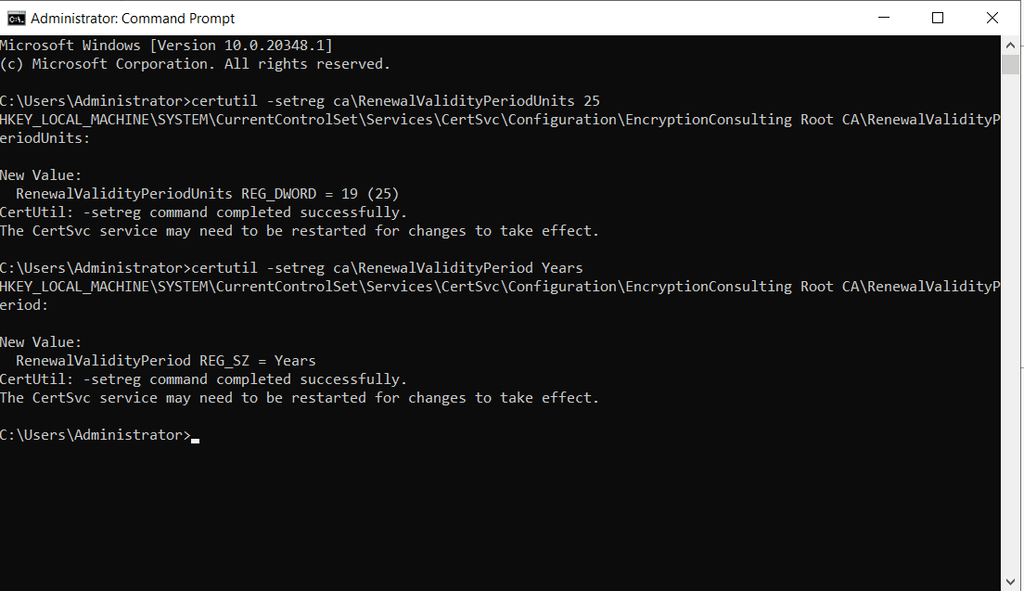
- Decide deliberately between reusing the existing key pair and generating a new one: reusing keys (a certificate-only renewal) is the lower-risk default. A full rekey is a much larger undertaking with hierarchy-wide implications and should only happen for a specific, documented reason.
- Confirm your CAPolicy.inf settings are current if you use one to control key length, validity period, or other renewal-time parameters, an outdated CAPolicy.inf can silently apply settings you no longer intend.
- Confirm ceremony witnesses and any required quorum are scheduled and available, per your CP/CPS, before you commit to a ceremony date, rescheduling a root ceremony because a required witness wasn’t available is a preventable delay.
- Verify your secure removable media is tested and clean before the ceremony, this is the transfer mechanism between the air-gapped root and any domain-connected system, and it deserves the same scrutiny as any other part of the process.
Backup
- Take a full CA backup before any renewal action, not after: run
certutil -backup <path>to capture the certificate, private key, and CA database as they exist right now, before you touch anything.
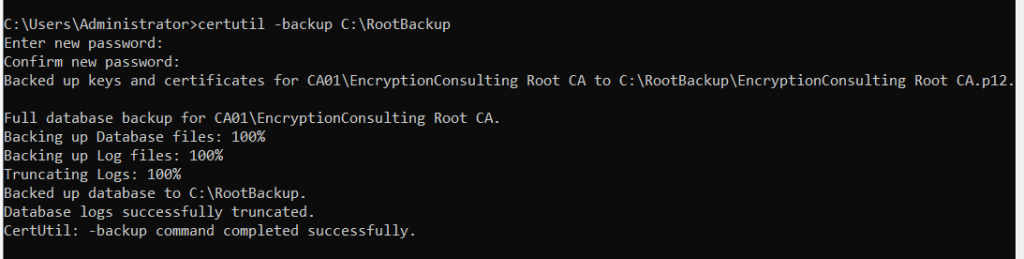
- Verify the backup is actually restorable, not just present: a backup file that exists but fails on restore is not a backup. Test-restore it in an isolated lab environment if you haven’t validated your backup and restore process recently.
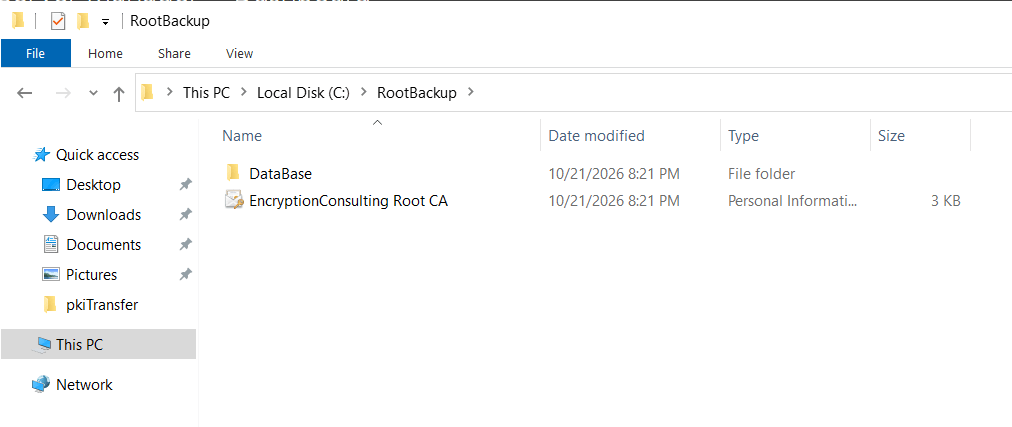
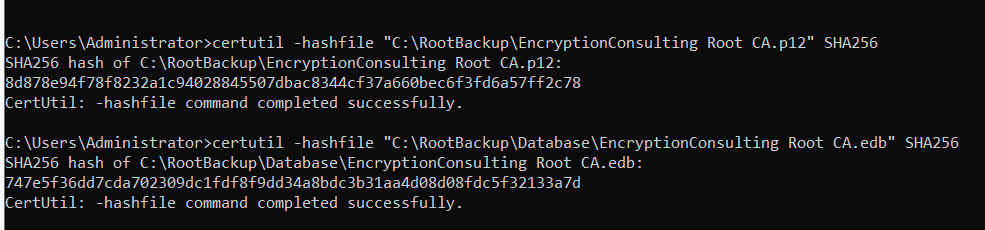
- Document the backup with a checksum and store it per your key custody policy: generate and record a hash of the backup file, and store it according to whatever offline, access-controlled storage your organization’s key management policy requires, this becomes part of your audit evidence later.
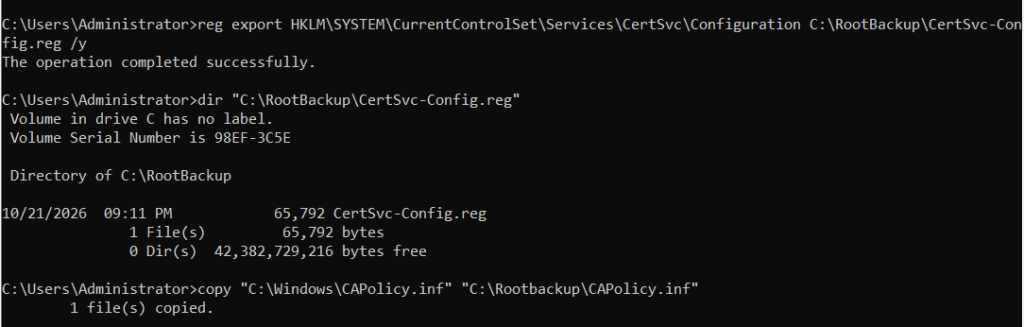
- Back up the CA’s registry configuration separately, capturing CAPolicy.inf, publication URLs, and other configuration that lives outside the certificate and database backup itself, so a full recovery doesn’t depend on reconstructing configuration from memory.
Certificate Renewal
- Choose your renewal method: console or command line: in the Certification Authority console, right-click the CA, select All Tasks, then Renew CA Certificate.
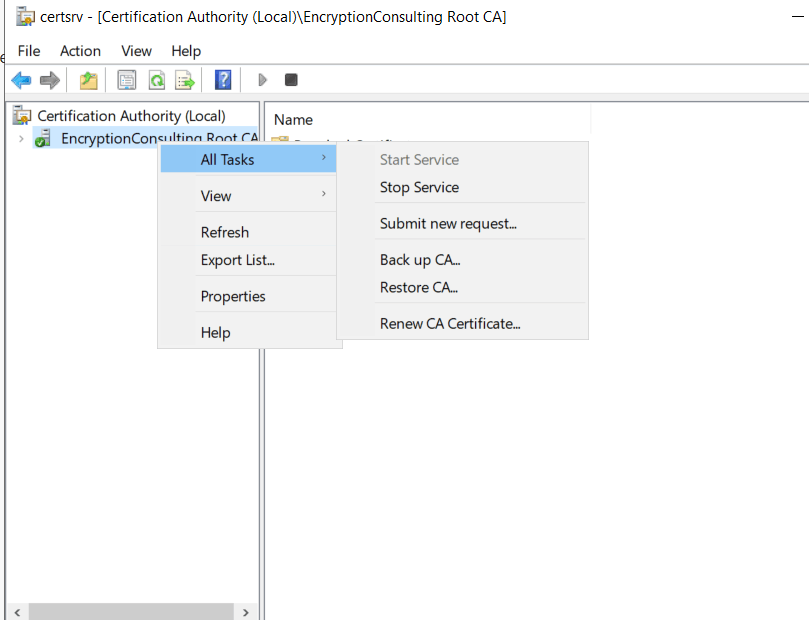
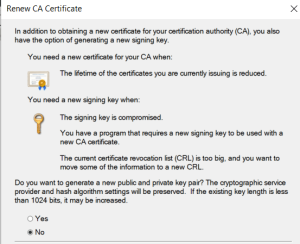
- Answer “No” to generating a new key pair if you’re reusing existing keys. Equivalently,
certutil -renewCert ReuseKeysperforms the same certificate-only renewal from the command line, orcertutil -renewCertalone if you’re deliberately generating a new key pair.
- Confirm the renewal actually stops and restarts Certificate Services correctly as part of this process, this is expected behavior, not a failure, the console will prompt you to confirm stopping the service before proceeding.
- Locate the renewed certificate output, by default in the CA’s
CertEnrollfolder, and confirm its properties (validity period, key usage, subject) match what you expect before moving to the next step. - Run
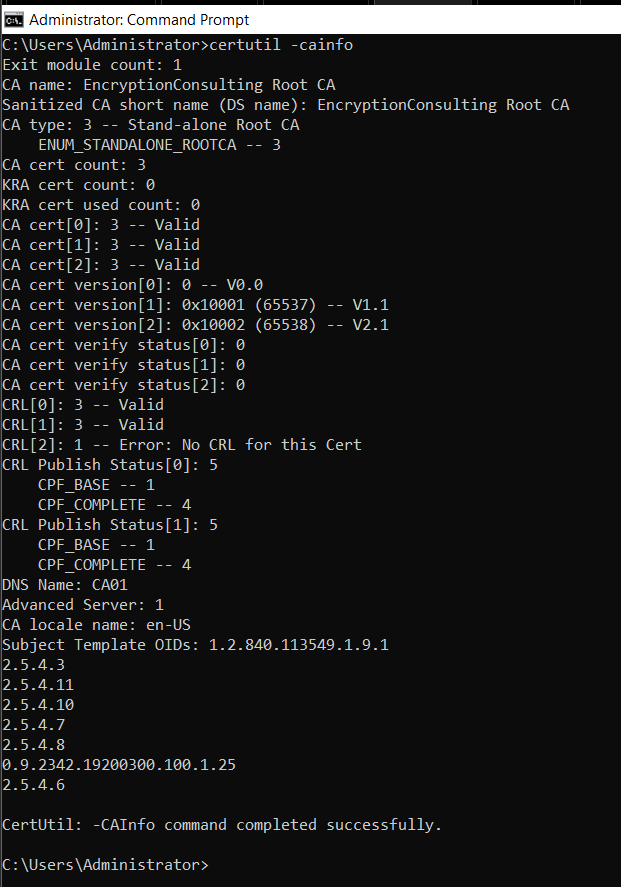
certutil -cainfobefore and after the renewal and retain both outputs, this gives you a clear before-and-after record of the CA’s state and is genuinely useful both for troubleshooting and for audit evidence later.
AIA Publication
- Remember that a standalone offline root cannot publish itself to Active Directory: unlike a domain-joined enterprise CA, a standalone root has no automatic mechanism to push its renewed certificate into AD. This step is easy to forget precisely because it doesn’t happen on its own.
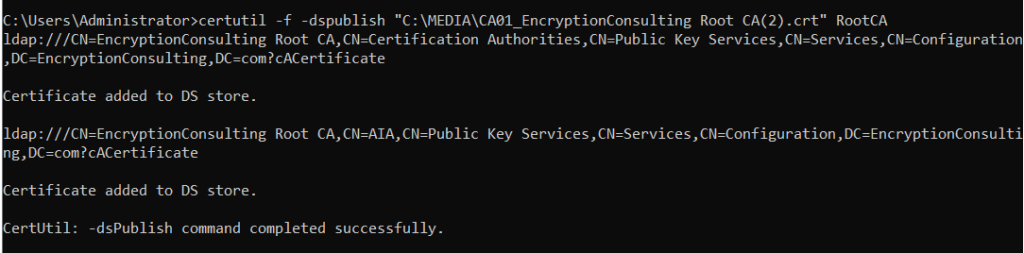
- Transfer the renewed certificate to a domain-connected system and publish it explicitly: run
certutil -f -dspublish <path to certificate> RootCAfrom an elevated session with Enterprise Admin rights, which places the certificate into the AD Configuration container that domain clients read from.
- Update your HTTP AIA endpoint with the new certificate file, alongside the AD publication, if your CDP/AIA infrastructure serves certificates over HTTP (which it should, per current best practice), this is a separate action from the AD publish step and both need to happen.
- Keep the old root certificate available at its existing AIA location for as long as any certificate issued by the previous root version remains unexpired, don’t remove or overwrite it the moment the new one is published, relying parties validating older certificates still need to be able to chain to it.
Trust Validation
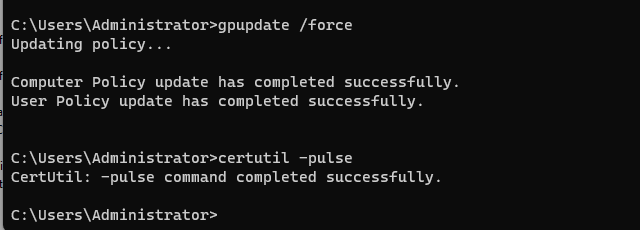
- Understand the propagation timeline for domain-joined clients: after AD publication, clients receive the updated root certificate through normal Group Policy processing, which defaults to happening within roughly eight hours. Force this immediately for validation purposes with
gpupdate /forceon a test client, or a reboot, rather than waiting for the default cycle.
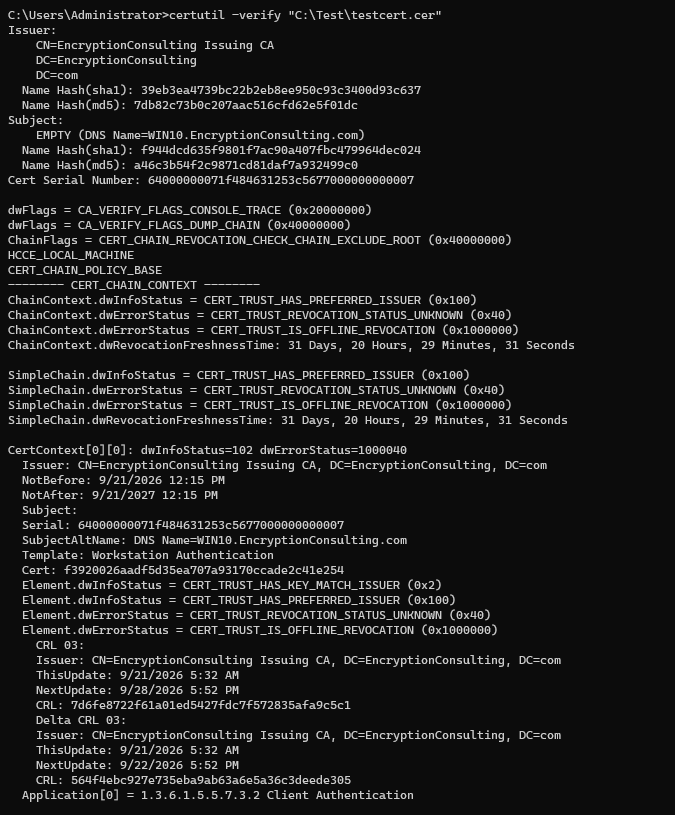
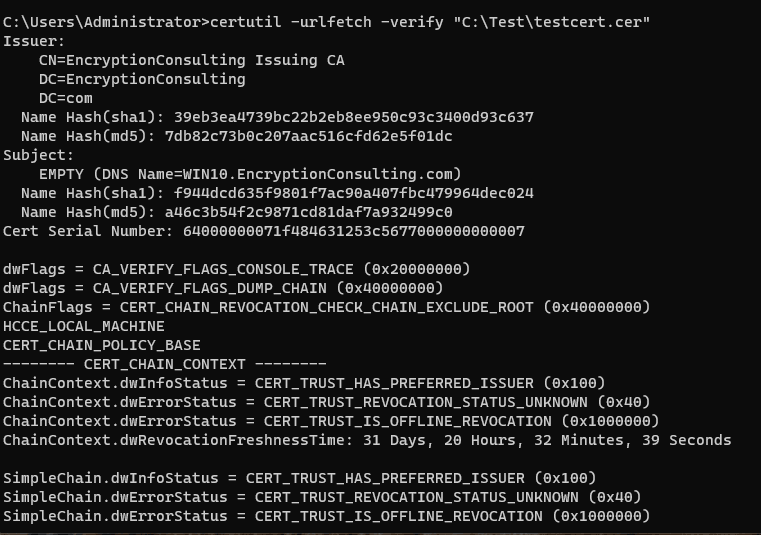
- Validate the full chain end to end with
certutil, usingcertutil -verifyandcertutil -urlfetch -verifyagainst a real certificate to confirm chain-building and revocation checking both succeed with the renewed root in place, not just that the certificate file itself looks correct.
- Use
pkiview.mscto check overall PKI health, confirming the root, AIA, and CDP all show healthy status from an elevated Enterprise Admin session, rather than checking each component individually and hoping they add up correctly.

- Don’t assume non-domain or external relying parties are covered by AD publication, systems outside your domain, partner organizations, or external validation services that trust your root explicitly will need the updated root certificate delivered to them through whatever separate process you use for external trust relationships.
CRL Renewal
- Publish a fresh CRL as part of the same ceremony, not as an afterthought: an offline root’s CRL only updates when the root is powered on, so this is your opportunity to refresh it, don’t treat certificate renewal and CRL renewal as separable tasks that can happen on different schedules.
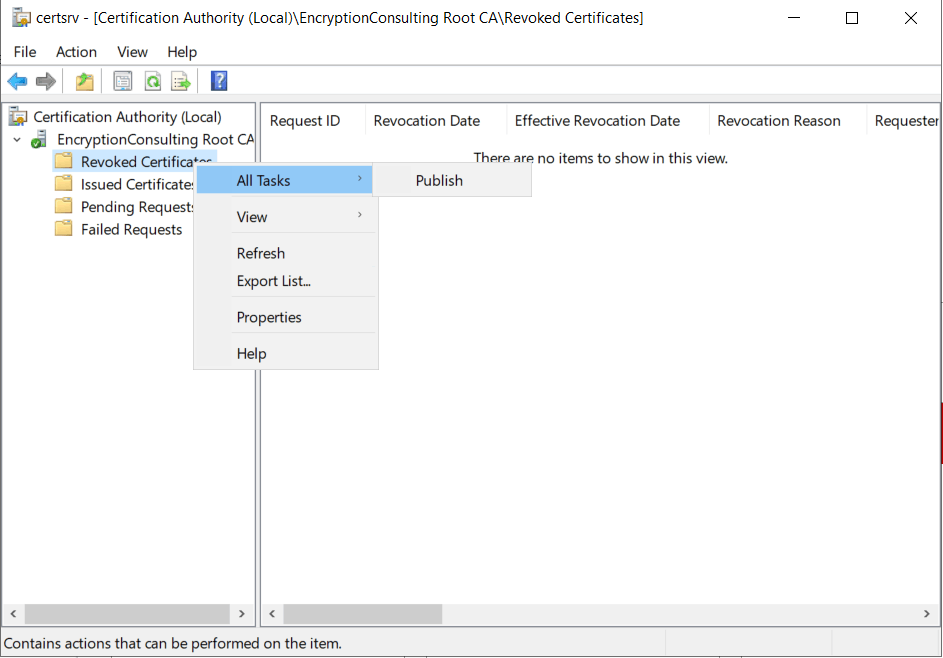
- Set CRL validity to comfortably exceed your actual root power-on cadence, not just a generic policy minimum. If your root is only brought online annually for scheduled maintenance, a CRL valid for six months creates a predictable, entirely avoidable outage in between ceremonies.
- Verify the published CRL is actually reachable at every configured CDP location, using
certutil -url http://<your-cdp>/CertEnroll/RootCA.crl(or the equivalent for each configured distribution point) to confirm retrieval succeeds, not just that the file was copied to the expected server.
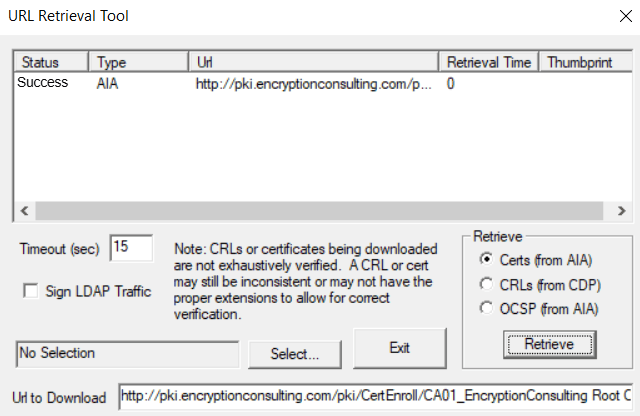
- Confirm delta CRLs, if you use them, are published and reachable alongside the base CRL, a healthy base CRL with a missing or stale delta CRL still produces confusing validation behavior for relying parties expecting both.
Rollback
- Rollback is straightforward before anything downstream references the new certificate or CRL: if you catch a problem during trust validation, before subordinate CAs or relying parties have started depending on the renewed root, you can simply not proceed with decommissioning the old certificate and continue investigating.
- Rollback becomes deliberate re-publication, not an undo, once downstream systems have started using the new root: at that point, reverting means explicitly re-publishing the old root certificate and CRL back to their AIA/CDP locations and confirming clients pick it back up, the same propagation mechanics as the forward change, just in reverse.
- Define your go/no-go checkpoint before you decommission or archive anything from the old root’s active state: specifically, don’t consider the old root certificate and CRL “retired” until trust validation has fully passed against the new one, keep both live and available until you’re genuinely confident.
- Keep the old root certificate, key, and CRL retrievable for the full remaining validity of every certificate issued under it, regardless of how the renewal itself goes, this isn’t specific to a rollback scenario, it’s a standing requirement for as long as those certificates remain unexpired anywhere in your environment.
Audit Evidence
- Maintain a signed ceremony log documenting every step performed, by whom, and when: this should align with whatever ceremony script format your CP/CPS specifies, and needs witness signatures where your policy requires them.
- Retain video recording of the ceremony if your CP/CPS calls for it, consistent with how you’d document a full key-generation ceremony, even though a certificate-only renewal is a lighter-weight event than a root key ceremony.
- Preserve backup checksums and the before-and-after
certutil -cainfooutput as part of your evidence package, these give you a concrete, verifiable record of the CA’s state at each stage rather than relying on the ceremony log’s narrative alone. - Capture confirmation of AD publication and CRL publication, screenshots or logged command output showing the
dspublishoperation succeeded and the CRL retrieval checks passed at every CDP, these are the pieces most likely to be requested during a compliance audit specifically because they’re the steps most often forgotten. - Document chain of custody for any removable media used to transfer files to and from the offline root, consistent with your organization’s media handling policy, and retain all of this evidence according to your CP/CPS’s specified retention period.
How Encryption Consulting Can Help
A root CA renewal ceremony combines a genuinely infrequent, high-stakes technical procedure with strict audit and evidentiary requirements, exactly the kind of event where getting outside expertise involved reduces both operational risk and the chance of a compliance gap.
Encryption Consulting’s PKI Services team supports offline root CA renewals directly:
- Ceremony planning and facilitation: scripting the full renewal procedure against your specific CP/CPS requirements, including witness coordination and evidentiary documentation, before ceremony day.
- Pre-renewal readiness assessment: validating subordinate CA validity dependencies, backup integrity, and CAPolicy.inf configuration ahead of time, so the ceremony itself proceeds without surprises.
- Publication and propagation validation: confirming AIA and CDP publication succeeded and trust propagated correctly to both domain-joined and external relying parties before you consider the renewal complete.
- Audit evidence packaging: assembling ceremony logs, backup verification records, and publication confirmation into a compliance-ready package aligned to your retention requirements.
- Rollback and contingency planning, so your go/no-go checkpoints and reversal procedure are defined and rehearsed before the ceremony, not improvised if something doesn’t validate cleanly.
If you have an offline root CA renewal coming up, or want a second set of eyes on your ceremony procedure before you commit to a date, our PKI Services team can plan and facilitate it end to end.
Conclusion
Renewing an offline root CA without downtime isn’t really about the root at all, it’s about making sure every subordinate CA and relying party that depends on that root experiences a clean, validated handoff to the new certificate and CRL before the old ones are retired. Work through prechecks and a verified backup before you touch anything, publish deliberately since a standalone root can’t do it automatically, validate trust end to end before you consider the job done, and keep your audit evidence complete throughout. The technical renewal itself is a handful of commands; the discipline around publication, validation, and evidence is what actually determines whether it goes smoothly.
Related reading: Common ADCS Certificate Authority Renewal Errors and Fixes · ADCS CRL Partitioning: Architecture and Implementation Guide · The Ultimate Windows ADCS Migration and Modernization Guide · Complete Guide to Strong Certificate Mapping Enforcement in ADCS · AD CS Template Hardening: ESC1-ESC16 Defense Playbook · Education Center: Microsoft AD CS
Have an offline root CA renewal on your calendar, or need help planning the ceremony? Talk to our PKI Services team about facilitating your renewal end to end. Encryption Consulting is ISO/IEC 27001:2022 and SOC 2 certified.
FAQ
Does renewing an offline root CA cause downtime?
Not to your active PKI services, since an offline root doesn’t serve live traffic in the first place. The real risk is a trust-chain interruption: if the new root certificate or CRL isn’t published and propagated correctly before the old one lapses or before subordinate CAs need to reference it, revocation checking and chain-building can fail for relying parties even though the root itself was never technically “down.”
How do you publish a renewed offline root CA certificate to Active Directory?
Since a standalone offline root isn’t domain-joined and can’t auto-publish, transfer the renewed certificate to a domain-connected admin workstation and run certutil -f -dspublish <path to certificate> RootCA to push it into the AD Configuration container, from which it distributes to domain-joined clients through normal Group Policy processing.
Should you reuse the existing key pair or generate a new one when renewing a root CA?
Reusing the existing key pair (a certificate-only renewal) is the lower-risk, more common choice and doesn’t require re-establishing trust in a new key. Generating a new key pair is a full rekey ceremony with significantly more downstream impact, including re-issuance considerations for the entire hierarchy, and should only be done with a documented, deliberate reason such as a compromised or weak key.
How long should a renewed root CA’s CRL be valid for?
Long enough to comfortably cover the interval until the root is next scheduled to be powered on, since an offline root’s CRL is typically only refreshed during scheduled maintenance windows or ceremonies, not continuously. Publishing a CRL with validity shorter than your actual root power-on cadence creates a predictable future outage.
Can you roll back a root CA renewal after the new certificate has been published?
Rollback is straightforward before the new root certificate and CRL have been published to AIA/CDP and referenced by any downstream activity. Once relying parties or subordinate CAs have started depending on the new root certificate or CRL, reverting requires deliberately re-publishing the old root certificate and CRL rather than a simple undo, so validate thoroughly before that point rather than after.