
A CA renewal that goes wrong doesn’t fail quietly. Every certificate the CA issues afterward depends on that renewal completing correctly, and when it doesn’t, the failure modes range from a CA service that simply won’t restart to a chain-building failure that surfaces weeks later on a completely unrelated system. Most renewal troubleshooting content walks through the happy path once and stops. This one is built the other way: start from the symptom you’re actually looking at, and work through exact, documented error codes across every layer that can cause a renewal to fail.
This post is part of our broader AD CS operational series, including ADCS CRL Partitioning: Architecture and Implementation Guide and The Ultimate Windows ADCS Migration and Modernization Guide.
TL;DR: Key Takeaways
- Most renewal failures fall into one of seven categories: provider mismatches, missing or inaccessible keys, registry misconfiguration, validity period conflicts, signing certificate chain problems, HSM-specific issues, and permission gaps. Diagnosing the category first narrows the fix dramatically.
- Reusing existing keys through a Key Storage Provider fails silently if KeySpec is wrong: a KeySpec value of 2 instead of the expected 0 causes the renewal dialog to skip the expected prompts entirely and the CA service to restart into failure, with no obvious error pointing at the actual cause.
- Validity period errors aren’t always rejected outright: a subordinate CA’s renewed certificate that exceeds its parent’s remaining validity gets silently truncated rather than failing, which can leave you with a much shorter validity period than you intended without any error at all.
- Permission failures often succeed locally and fail in Active Directory: a renewal can complete on the CA server itself while still failing to publish correctly to the AIA, CDP, or Enrollment Services containers in AD, breaking chain-building for every domain client without any error on the CA console.
- HSM-backed renewals fail differently than software-key renewals: key container naming collisions and transient token communication errors are specific to HSM-backed CAs and need their own diagnostic path rather than being treated as generic key errors.
Start Your Diagnosis Here: The Decision Tree
Work through these branch points in order. Each one points you to the section with the exact errors and fixes for that category.
- Did Certificate Services fail to start after the renewal, rather than the renewal operation itself failing? Go to Registry Errors first, this is the most common cause of a post-renewal service start failure.
- Did the renewal dialog skip expected prompts, or did the CA service restart into an immediate failure when reusing existing keys? Go to Provider Errors, this is a strong signal of a CSP/KSP KeySpec mismatch.
- Did you get an explicit “Keyset does not exist” or similar key-not-found error? Go to Key Errors.
- Is your CA backed by a hardware security module specifically? Go to HSM Errors before assuming a generic key or provider problem, HSM-backed CAs fail in their own specific ways.
- Did the renewal complete, but the resulting certificate has an unexpectedly short validity period, or did you get a policy module denial referencing overlap or validity? Go to Validity Period Errors.
- Are you seeing chain-building failures, or a “position of trust cannot be established” style error, after renewal? Go to Signing Certificate and Chain Errors.
- Did you get an explicit access denied error, or does the renewal succeed locally but not propagate correctly to Active Directory or to clients? Go to Permission Errors.
Provider Errors
- Symptom: renewing with existing keys through a KSP skips the expected save/send prompts and the CA service restarts into failure: this is a documented issue where the certificate’s
KeySpecproperty is set to2(AT_SIGNATURE) instead of the expected0for a Key Storage Provider. The renewal wizard behaves as if a legacy CSP were in use even though a KSP is actually configured. - Diagnose it: run
certutil -v -store my > c:\temp\machine.txtand inspect theCERT_KEY_PROV_INFO_PROP_IDsection for the CA’s certificate entries, confirming theProviderfield shows a Key Storage Provider and checking the actualKeySpecvalue.
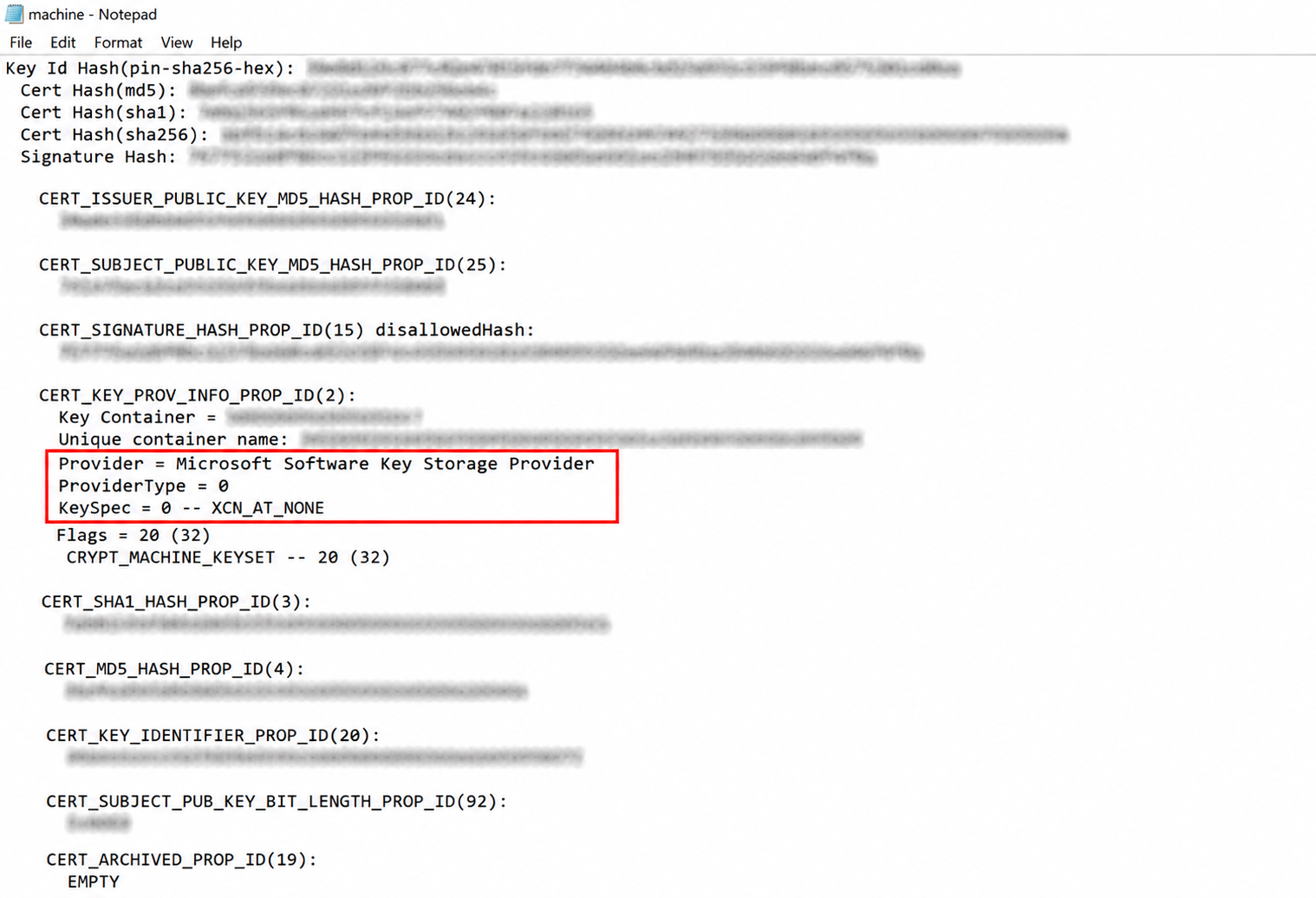
- Fix it: back up the CA and its private key first, then correct the KeySpec value using a properties INF file with
certutilto update the stored key provider information from2to0. Don’t attempt this without a verified backup, you’re editing the metadata binding the CA to its own private key.
Key Errors
- Symptom: “Keyset does not exist” (error
0x80090016,NTE_BAD_KEYSET): the certificate references a key container that CryptoAPI cannot locate. This shows up during renewal, during signing operations, or when binding a certificate response to a previously generated request. - Diagnose it: use
certutil -store myto inspect the certificate’s key container name and confirm it against what actually exists in the relevant key store, local machine keyset, or HSM partition. A mismatch between the container name the certificate expects and what’s actually present confirms this diagnosis.
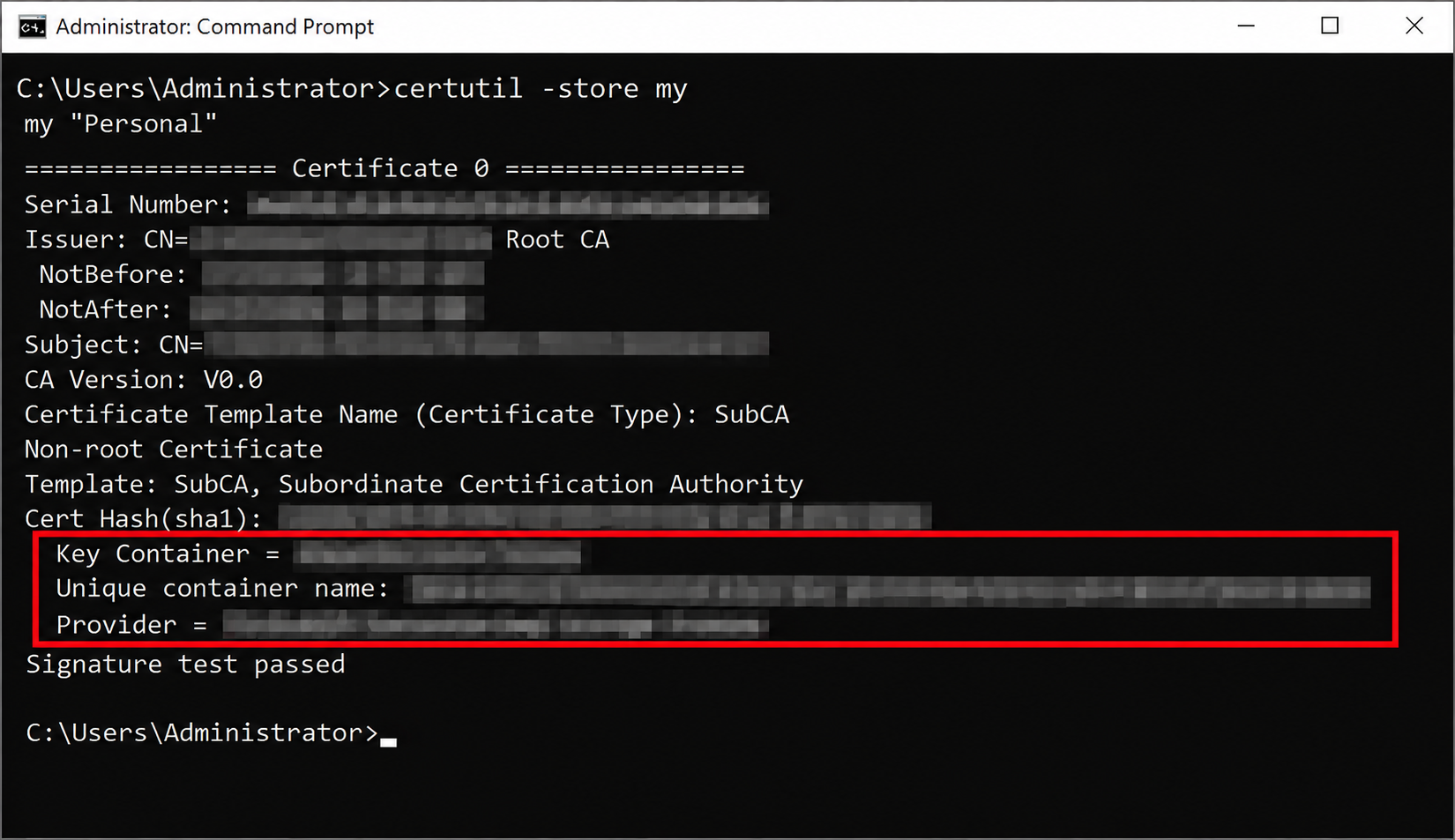
- Fix it: if the key container was deleted or the certificate was moved to a different machine without its corresponding key, there’s no way to recover the original key pair, you’ll need to generate a new key pair as part of the renewal instead of reusing keys. If the key genuinely still exists but isn’t accessible (wrong CSP/KSP installed, HSM token not connected), resolve the accessibility issue first before assuming the key is actually lost.
Registry Errors
- Symptom: Certificate Services won’t start after renewal, error
0x80090011(NTE_NOT_FOUND, “Object was not found”), Event ID 100: the event log shows “Could not load or verify the current CA certificate. CA-Server Object was not found.” This indicates the CA’s active certificate index in its registry configuration doesn’t correspond to a certificate actually present in the local machine store. - Diagnose it: confirm the renewed certificate is actually present and complete in the local machine certificate store, and cross-check it against the CA’s registry configuration under
HKLM\SYSTEM\CurrentControlSet\Services\CertSvc\Configuration\{CA name}.
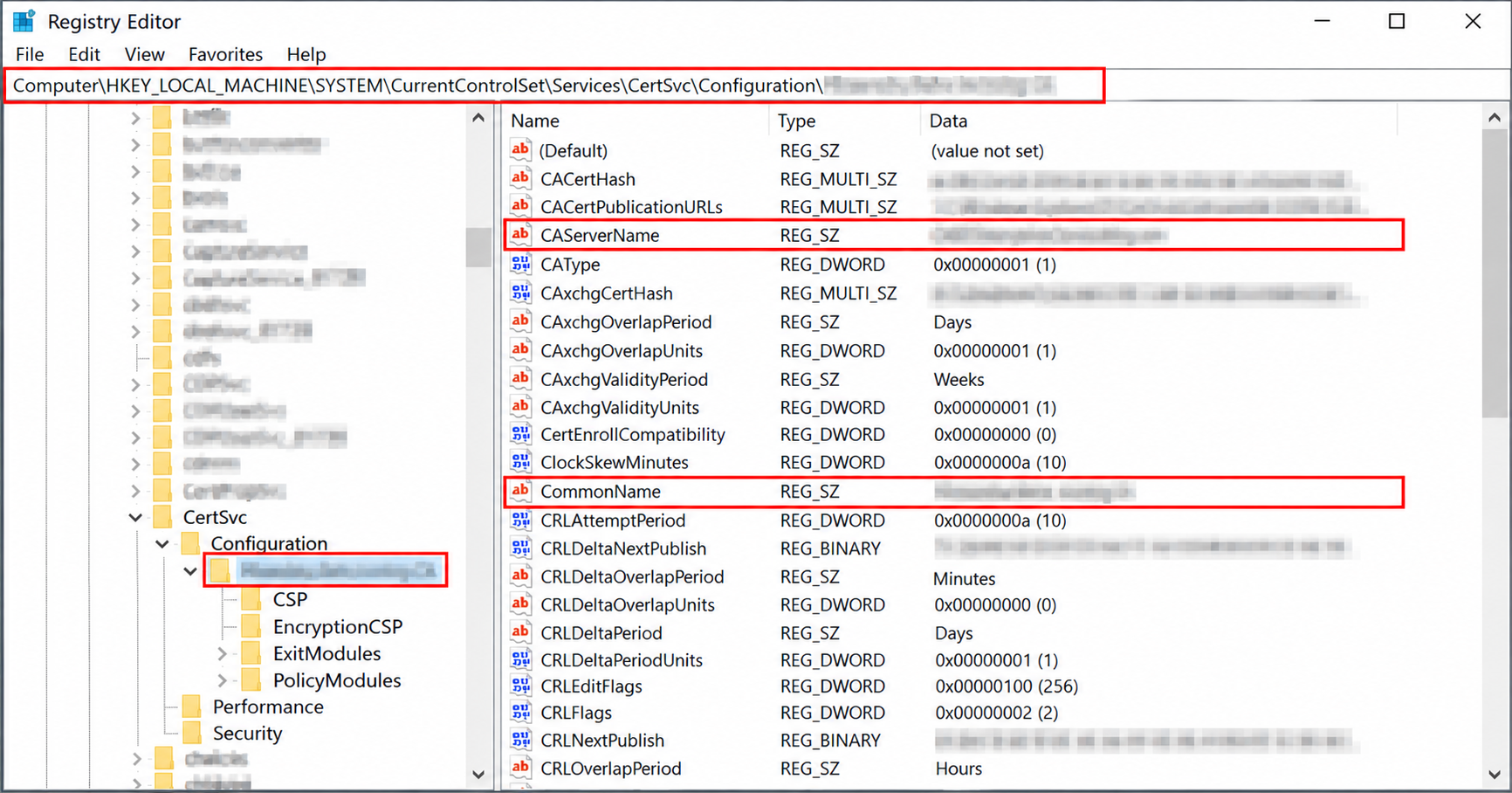
- Fix it: if the certificate is present but the index is wrong, correcting the registry index to point at the correct certificate resolves it. If the certificate itself is missing or incomplete, you’ll need to reinstall the renewed CA certificate from a verified backup or reissue it.
- Symptom: the expected renewal request (
.req) file is never generated, with no error logged anywhere: this happens when theRequestFileNameregistry value has been customized to point at a drive or path that no longer exists on the server, a leftover from a past configuration change that nobody revisited. - Fix it: check the
RequestFileNameregistry value under the CA’s configuration key, confirm the target path actually exists and is writable, and reset it to a valid location if it isn’t.
Validity Period Errors
- Symptom: certificate renewal denied by policy module, Event ID 53, error
0x80094814(CERTSRV_E_CERT_TYPE_OVERLAP): the exact message reads “Renewing a certificate with the [Template] Certificate Template failed because the renewal overlap period is longer than the certificate validity period.” This occurs when a certificate template’s configured renewal overlap window exceeds the CA certificate’s own remaining validity.
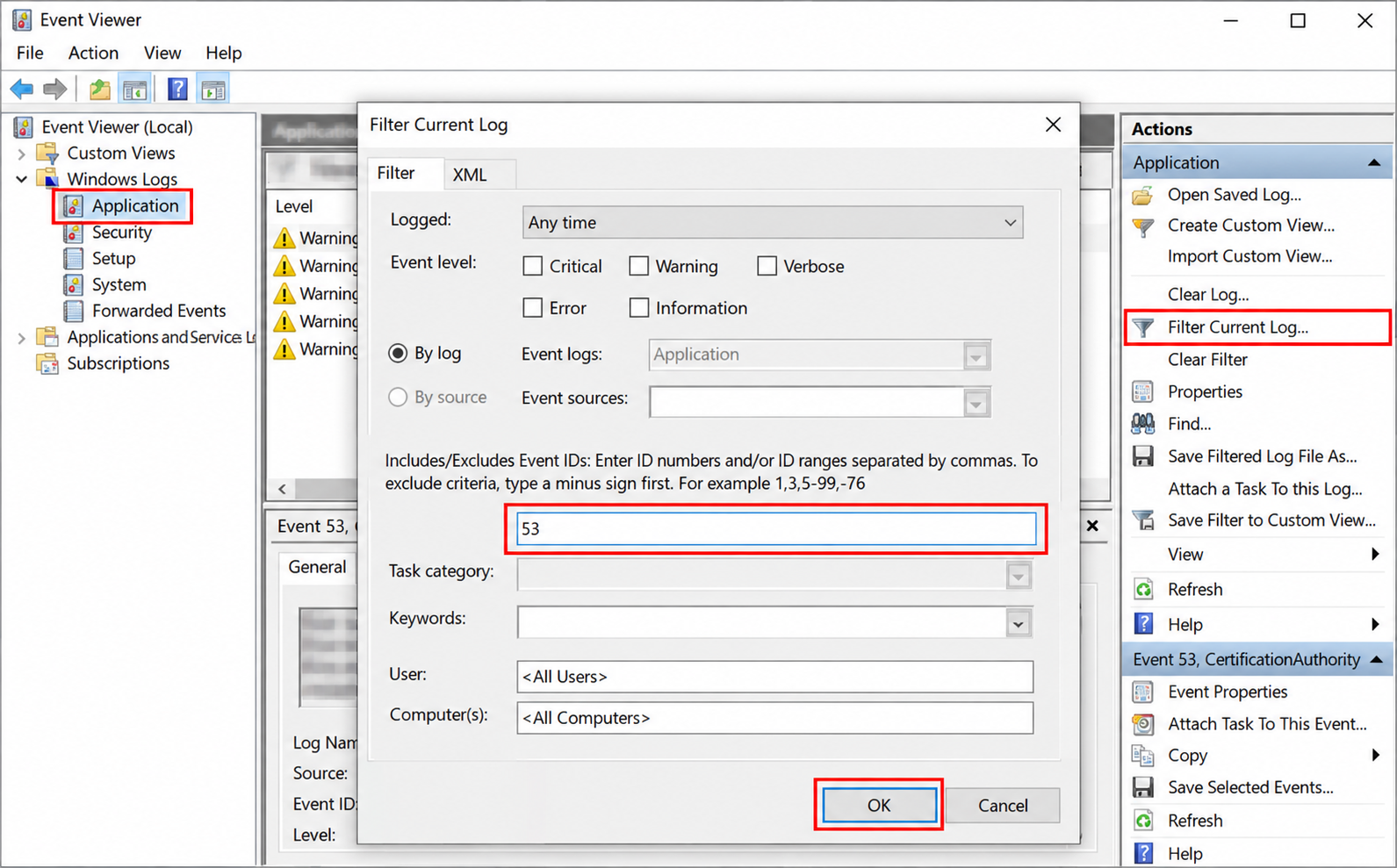
- Fix it: either reconfigure the affected template’s renewal overlap period to something shorter than the CA’s remaining validity, or renew the CA certificate itself if it’s genuinely approaching expiration, the underlying cause is almost always an aging CA certificate rather than a template misconfiguration in isolation.
- Symptom: a subordinate CA renewal completes without error, but the resulting certificate has a shorter validity period than requested: this isn’t a bug, a subordinate CA’s certificate validity is always constrained to fall within its parent CA’s remaining validity period. If you request a 10-year renewal but your root or intermediate CA only has 3 years of validity remaining, the issued certificate is silently truncated to match, it doesn’t fail or warn you.
- Fix it: check the remaining validity of every CA above the one you’re renewing before requesting a renewal period, and plan parent CA renewals ahead of subordinate CA renewals whenever a mismatch exists.
Signing Certificate and Chain Errors
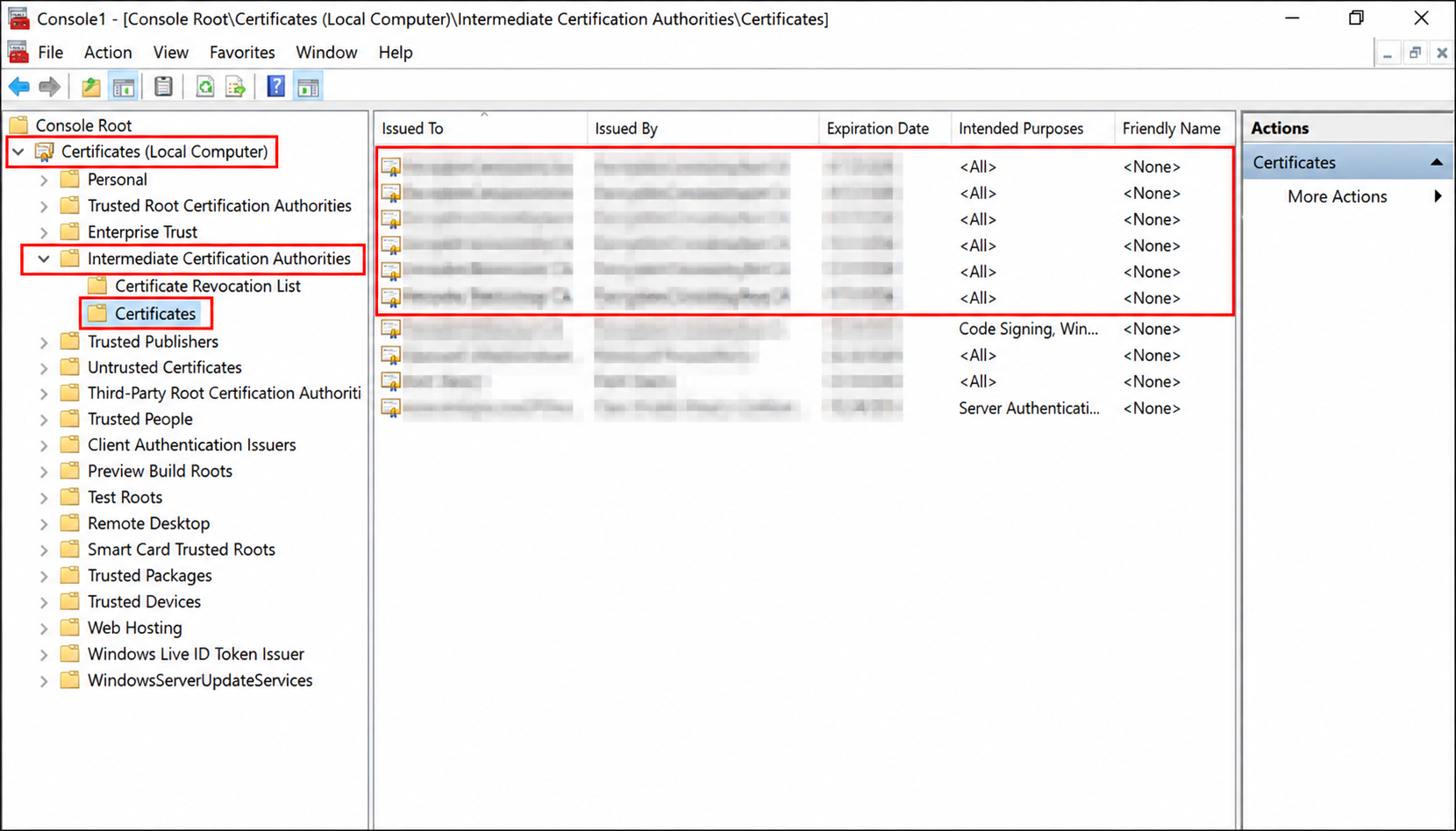
- Symptom: “A valid certification authority (CA)… cannot be located, or the CA does not support this operation, or the CA is not trusted”: despite the generic wording, this frequently indicates a position-of-trust problem, the issuing chain can’t be validated because an intermediate CA certificate isn’t present in the correct certificate store.
- Diagnose it: confirm every intermediate CA certificate in the chain is present in the Intermediate Certification Authorities store on the affected system, this store is normally populated automatically from the AIA container in Active Directory on domain clients, so also check that the AIA container itself has the correct, current certificates published.
- Fix it: republish the correct intermediate certificates to the AIA container if they’re missing or stale, and manually push the corrected chain to affected clients if automatic AD-based population isn’t working as expected.
- Symptom: a subordinate CA renewal request can’t be completed because the parent CA’s own certificate is expired or about to expire: a subordinate CA cannot be issued a certificate with any validity extending past its parent’s own expiration, if the parent itself needs renewal first, the subordinate’s renewal request is effectively blocked until that happens.
- Fix it: renew CAs top-down through your hierarchy, root first, then intermediates, then issuing CAs, checking each parent’s remaining validity before attempting to renew anything beneath it.
HSM Errors
- Symptom: “Object already exists” (error
0x8009000f,NTE_EXISTS) during renewal with new keys, often paired with “you do not have write access permission to the key container”: this occurs when the new key container name the CA attempts to create on the HSM collides with an existing container, commonly from a previous failed renewal attempt or leftover test key generation. - Fix it: use your HSM vendor’s key management tooling to locate and remove the conflicting container (after confirming it’s genuinely not in use), or explicitly specify a different CA key container name for the renewal if your HSM and CA configuration allow it.
- Symptom: “Bad Data” (error
0x80090005,NTE_BAD_DATA) during CSR submission or signing on an HSM-integrated CA, which clears up after a service restart: this is commonly a transient HSM client-to-appliance communication issue rather than a genuine data corruption problem, particularly on subordinate CAs communicating with a remote HSM.
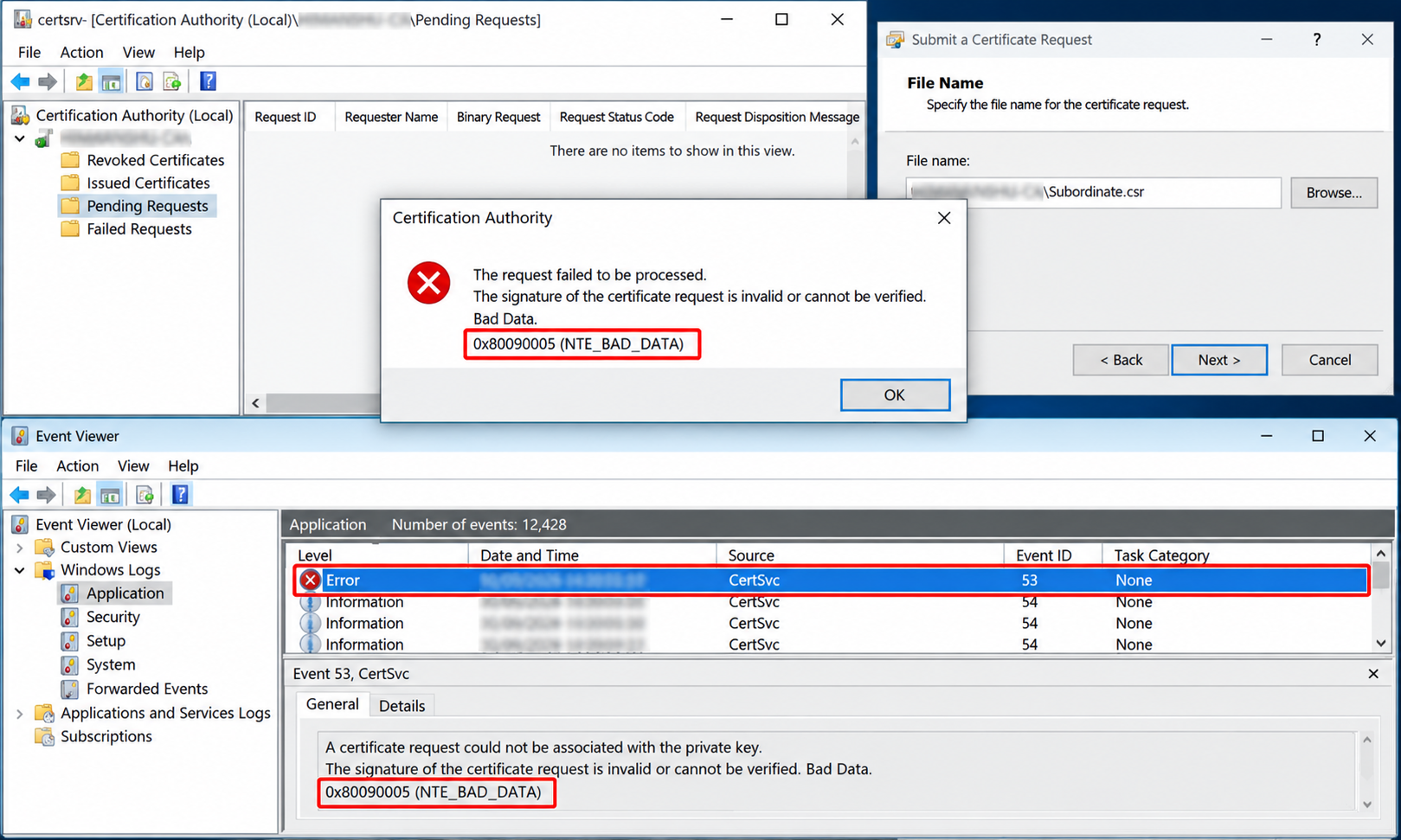
- Fix it: if restarting Certificate Services resolves it, treat this as a signal to check your HSM client software’s session handling and network connectivity to the HSM appliance rather than ignoring it as a one-off; a transient error that recurs is worth escalating to your HSM vendor with connection logs from the affected window.
Permission Errors
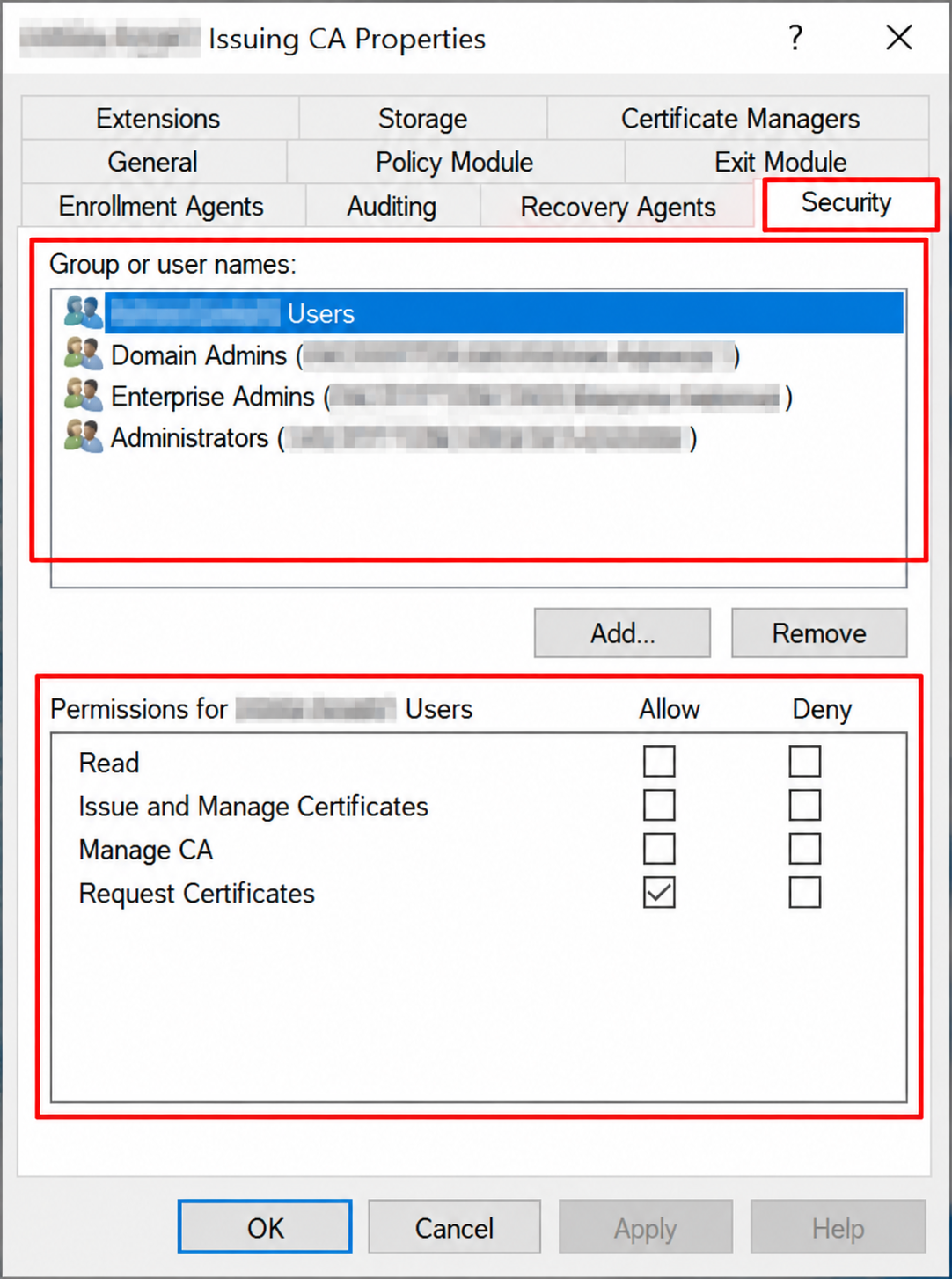
- Symptom: “Access is denied” (error
0x80070005,E_ACCESSDENIED) on a renewal, resubmit, or certificate completion operation: this typically means the account performing the operation lacks the “Issue and Manage Certificates” permission on the CA object itself, not a file system or key permission issue. - Fix it: in the Certification Authority console, check the CA’s Security properties and confirm the account performing the renewal has the appropriate management permission assigned, rather than assuming local administrator rights on the server are sufficient on their own.
- Symptom: RPC/DCOM access denied during a remote renewal or enrollment operation, error
0x800706ba(RPC_S_SERVER_UNAVAILABLE) or annca_s_fault_access_deniedfault in a network trace: this points to a DCOM launch and access permission problem on the CA server, distinct from the CA’s own object-level security settings. - Fix it: verify DCOM permissions for Certificate Services on the CA server, and confirm the requesting account or computer has the necessary launch and access rights, this is a Windows-level DCOM configuration issue, not something fixed from within the Certification Authority console.
- Symptom: renewal completes on the CA server itself, but chain-building or CRL retrieval fails for clients afterward: this often indicates the renewal succeeded locally while failing to publish correctly to Active Directory, caused by incorrect permissions on the Enrollment Services, AIA, CDP, or Certification Authorities containers. These containers depend on specific group memberships, typically the Cert Publishers group and the CA computer account’s own object permissions, functioning correctly.
- Fix it: confirm the CA computer account has the expected Full Control permissions on its own objects within the AIA and CDP containers, and that the Cert Publishers group has the expected access at the container level, rather than assuming AD publication succeeded just because the local renewal reported success.
Quick Reference: Error to Category
| Error or Symptom | Category |
|---|---|
| Renewal with reused keys skips prompts, CA restarts into failure | Provider (CSP/KSP KeySpec mismatch) |
| 0x80090016, NTE_BAD_KEYSET, “Keyset does not exist” | Key |
| 0x80090011, NTE_NOT_FOUND, Event ID 100 on service start | Registry |
| Renewal .req file never generated, no error logged | Registry (RequestFileName) |
| 0x80094814, CERTSRV_E_CERT_TYPE_OVERLAP, Event ID 53 | Validity Period |
| Subordinate CA validity silently shorter than requested | Validity Period (parent constraint) |
| “Position of trust cannot be established” | Signing Certificate / Chain |
| 0x8009000f, NTE_EXISTS, key container creation failure | HSM |
| 0x80090005, NTE_BAD_DATA, resolves on service restart | HSM |
| 0x80070005, E_ACCESSDENIED on renew/resubmit | Permission (CA object) |
| 0x800706ba, RPC_S_SERVER_UNAVAILABLE, nca_s_fault_access_denied | Permission (DCOM) |
| Renewal succeeds locally, fails to propagate to clients | Permission (AD container ACLs) |
How Encryption Consulting Can Help
A CA renewal failure at the wrong moment, when a root or issuing CA’s certificate is genuinely about to expire, is one of the highest-pressure situations in PKI operations, and it’s exactly when a misdiagnosed error costs the most time.
Encryption Consulting’s PKI Services team supports this directly:
- Renewal planning and pre-validation: checking parent CA validity, template overlap configuration, and provider/key health before you schedule a renewal, so the errors on this list get caught before they happen rather than during a live outage.
- Emergency renewal troubleshooting: diagnosing and resolving failed renewals, including HSM-backed CAs, key provider mismatches, and AD publication failures, when a renewal has already gone wrong and time is limited.
- HSM-integrated CA support: coordinating directly with HSM vendor tooling for key container conflicts, session issues, and renewal-with-new-keys scenarios that generic AD CS guidance doesn’t cover.
- Permission and AD publication audits: confirming your CA’s AD container permissions and DCOM configuration are correct before they cause a renewal to silently fail to propagate.
- Hierarchy-wide renewal sequencing, for organizations managing multi-tier CA hierarchies, so root, intermediate, and issuing CA renewals happen in the correct order with validity constraints accounted for upfront.
If you’re facing a CA renewal that isn’t behaving as expected, or want to validate your renewal readiness before a CA certificate’s expiration becomes urgent, our PKI Services team can diagnose it directly or help you plan ahead of time.
Conclusion
CA renewal failures rarely announce their actual cause clearly, a generic “Access is denied” or “Object was not found” message can point to a provider mismatch, a registry misconfiguration, an HSM communication issue, or a permissions gap, and guessing wrong wastes time you often don’t have. Work the decision tree from your actual symptom, match it against the exact error codes in the relevant section, and validate the fix against a real test renewal before you consider the issue closed.
Related reading: ADCS CRL Partitioning: Architecture and Implementation Guide · The Ultimate Windows ADCS Migration and Modernization Guide · ADCS Changes in 2025 and 2026: What PKI Teams Need to Implement · Complete Guide to Strong Certificate Mapping Enforcement in ADCS · AD CS Template Hardening: ESC1-ESC16 Defense Playbook · Education Center: Microsoft AD CS
Dealing with a CA renewal failure right now, or want to validate your renewal readiness ahead of time? Talk to our PKI Services team about diagnosing or pre-validating your CA renewal. Encryption Consulting is ISO/IEC 27001:2022 and SOC 2 certified.
FAQ
Why does CA certificate renewal fail silently when reusing existing keys with a KSP provider?
This is commonly caused by the certificate’s KeySpec property being set to 2 (AT_SIGNATURE) instead of the expected 0 for a Key Storage Provider. Check this with certutil -v -store my and correct it using a properties INF file with certutil, after backing up the CA and its private key.
What does “Keyset does not exist” (NTE_BAD_KEYSET) mean during CA operations?
This means the CA certificate’s key container reference points to a private key that CryptoAPI cannot locate, commonly because the key container was deleted, the certificate was moved to a different machine without its key, or an HSM token or partition the key depends on isn’t currently accessible.
Why won’t Certificate Services start after a CA renewal with error 0x80090011?
Error 0x80090011 (NTE_NOT_FOUND, “Object was not found”) on service start typically means the CA’s active certificate index in its registry configuration doesn’t match a certificate actually present in the local machine store, often because a renewed certificate wasn’t fully installed or an index was corrupted.
What causes the CERTSRV_E_CERT_TYPE_OVERLAP renewal error?
Error 0x80094814 (CERTSRV_E_CERT_TYPE_OVERLAP) occurs when a certificate template’s configured renewal overlap period is longer than the CA certificate’s remaining validity period. Reconfigure the template’s renewal overlap setting or renew the CA certificate itself to resolve it.
Can a subordinate CA’s renewed certificate have a longer validity period than its parent CA?
No. A subordinate CA’s certificate validity is always constrained to fall within its issuing parent’s remaining validity period. If you request a 10-year renewal but the parent CA only has 3 years of validity left, the issued certificate is silently truncated to match, not rejected outright, which is why checking parent validity before renewal matters.