- What Causes CipherTrust Manager Backup Errors?
- Common Error Scenarios and Root Causes
- How to Fix the CipherTrust Manager Backup Error (Step-by-Step)
- Backup Ownership and Scheduling Responsibility
- Rotation Triggers for Backup Encryption Keys
- Access Policy: Who Can Trigger or Restore a Backup
- Audit Evidence for Backup Success and Failure
- Platform Comparison: Manual Backup vs. Automated/Scheduled Backup
- Incident Response If a Backup Failure Is Discovered During a DR Event
- Error Symptom, Likely Cause, and Fix
- Limitations
- What Would Encryption Consulting Recommend?
- Frequently Asked Questions
- Conclusion
Quick answer: A CipherTrust Manager backup error, most often codeDesc: NCERRInvalidParamValue with “Specified backup key does not exist for scope (system)”, means the backup key encrypting the job is missing or not set as default on the node running the backup. CipherTrust Manager never replicates backup keys across cluster nodes automatically.
Key takeaways:
- The most common error, codeDesc NCERRInvalidParamValue, means the backup key is not present and set as default on the node handling the scheduled job.
- CipherTrust Manager backups and backup keys are never copied to other cluster nodes automatically; every node needs the same default key uploaded by hand.
- Quorum policies must be disabled before a backup runs, and CipherTrust Manager allows only one backup or restore job at a time.
- A system backup cannot be restored directly onto a live cluster node; the cluster remove and rebuild method is required instead.
- Backup keys deserve the same lifecycle discipline as any other cryptographic key: clear ownership, rotation triggers, access controls, and audit evidence.
Published: March 2023. Updated: August 2026. Reviewed by Encryption Consulting’s Key Management Engineering team.
A failed CipherTrust Manager backup is not a cosmetic error. It means that if the appliance is lost, corrupted, or needs to be rebuilt, there is no verified way to bring the keys, policies, and audit history back. This guide walks through why the backup error happens, how to fix it on a live cluster, and the operational discipline, ownership, rotation, access control, audit evidence, that keeps it from happening again.
What Causes CipherTrust Manager Backup Errors?
Most CipherTrust Manager backup errors come down to one of three root causes: a missing or mismatched backup key on the node running the job, a policy precondition that was not cleared before the backup started, or a version and restore compatibility limit. CipherTrust Manager treats every backup as a node-local artifact encrypted with a specific key, and it does not sync backups or backup keys across a cluster on its own. According to Thales’s own documentation, “backups and backup keys are not automatically copied to other nodes in a cluster. They only exist on a node where they are created or copied to.” Once that behavior is understood, most backup “errors” turn out to be key-distribution gaps rather than a broken feature.
Consider a four-node CipherTrust Manager cluster (thales01.ec.com, thales02.ec.com, thales03.ec.com, thales04.ec.com). Per the standard procedure, you create a system backup schedule on one node, and that schedule metadata replicates to the others. The backup key does not. If the scheduled job happens to fire on a node that never received the key, the job fails.
Common Error Scenarios and Root Causes
Error
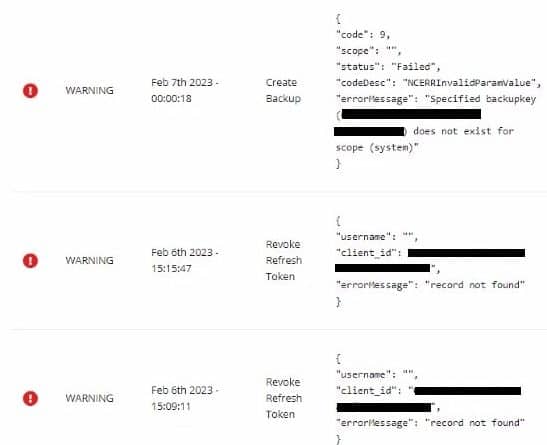
codeDesc: NCERRInvalidParamValue
errorMessage: Specified backup key does not exist for scope (system)
This is the scenario Encryption Consulting sees most often, and it is the focus of the step-by-step fix below. The primary reason for this error is that scheduled backups run on whichever node picks up the job, and if that node does not have the backup key present and marked as default, the job cannot encrypt the backup file, so it fails.
A handful of other backup and restore failures show up regularly enough to be worth documenting alongside it, all confirmed against Thales’s CipherTrust Manager admin documentation:
- Backup job fails silently with no file produced. Thales’s documentation states that “all quorum policies must be disabled before creating a backup.” A quorum policy left enabled on the node blocks the job before it can run.
- Backup completes, but restore fails with a key error. The backup key used at restore time does not match the key that encrypted the file. This happens when an admin grabs whatever backup key is handy on a different node instead of the one active on the source node at backup time.
- Restore is rejected on an existing cluster node. System backups are not designed to restore onto a live clustered node. Thales’s guidance is to use the cluster remove and rebuild method instead of a direct restore in that case.
- Restore is rejected across a version boundary. CipherTrust Manager backups restore, by default, to the next three minor releases forward (for example, a 2.6 backup restores cleanly to 2.7, 2.8, or 2.9). Restoring an older backup than that requires a
--forceoption, and Thales recommends involving support before using it. - Backup or restore command fails with a busy or locked error. Only one backup or restore operation can run at a time on CipherTrust Manager. A second job started while one is already in progress will be rejected.
- A backup tied to an HSM root of trust becomes unusable. System backups can optionally be tied to an HSM root of trust key for extra protection, but if that HSM key is later deleted, the backup that depended on it can never be restored.
How to Fix the CipherTrust Manager Backup Error (Step-by-Step)
The fix for the NCERRInvalidParamValue backup key error is to create one default system backup key and push it to every node in the cluster, so the schedule succeeds no matter which node the job lands on. The steps below assume the schedule was originally created from thales01.ec.com.
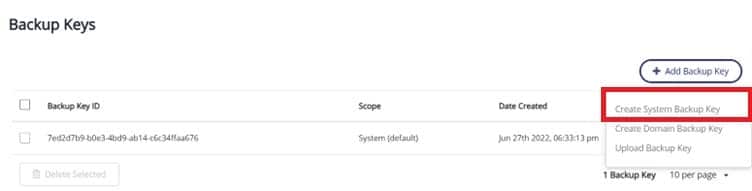
On thales01.ec.com, navigate to Backup Keys under Admin Settings.
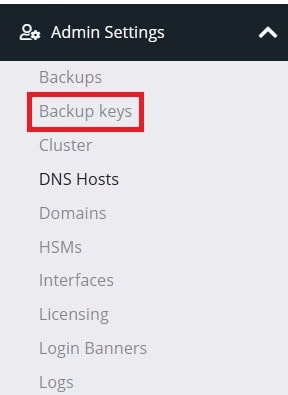
Create a new system backup key and set it as the default.
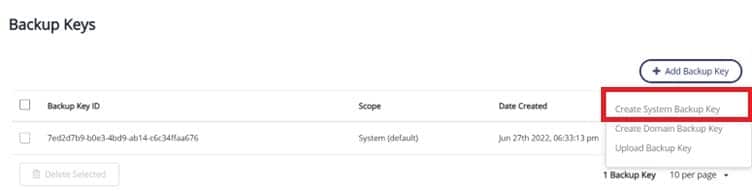
Download the newly created system backup key so it can be uploaded to the other CipherTrust Manager cluster nodes.
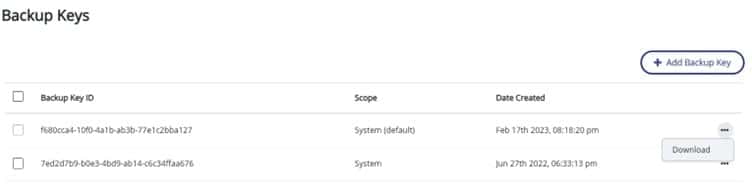
Enter a password for the backup key and click “Download.”
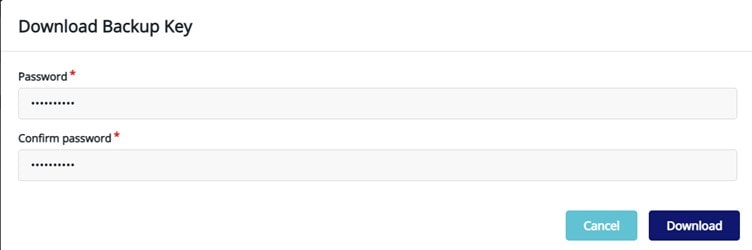
Follow this path to upload the system backup key on every CipherTrust Manager cluster node: Admin Settings > Backup Keys > Add Backup Key > Upload Backup Key. Choose the downloaded file and enter the password from the previous step.
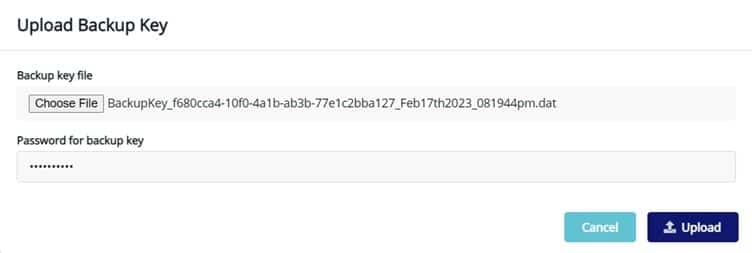
Once the upload succeeds, click the overflow icon and select “Make Default” on each node.
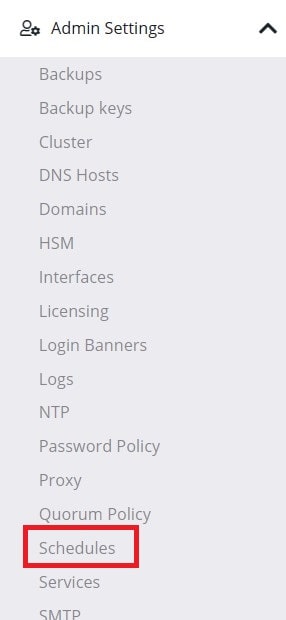
Navigate to Admin Settings > Schedules to configure a system-level backup.
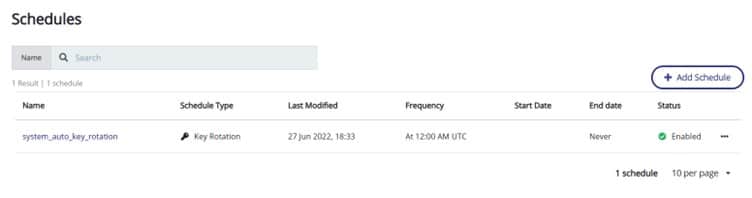
Click “Add Schedule.”
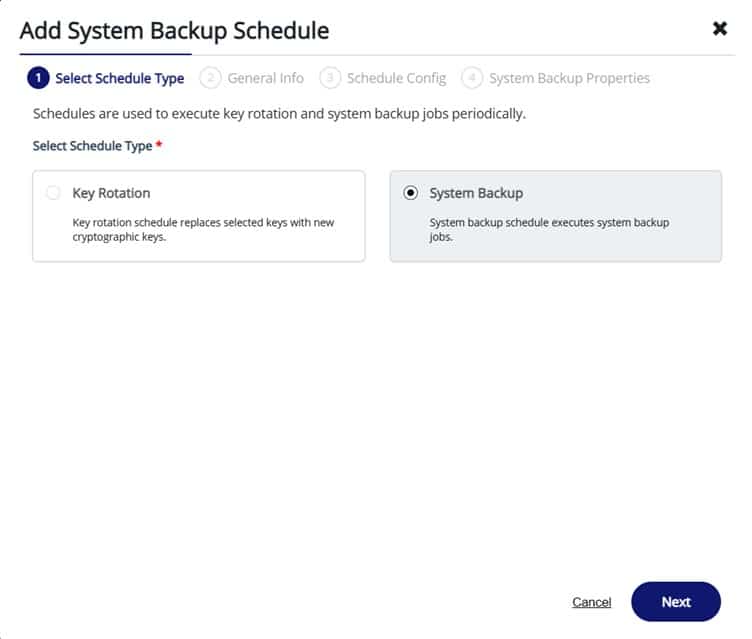
Select “System Backup” and click “Next.”
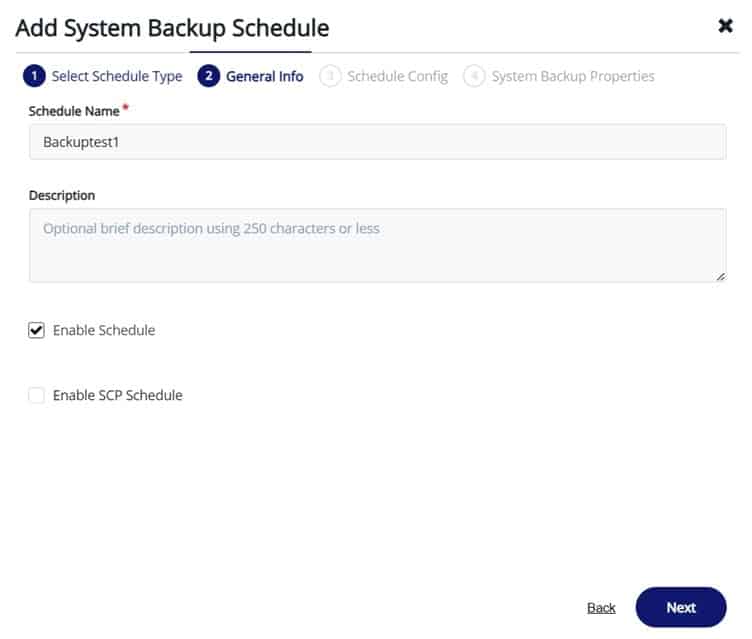
Enter a schedule name and click “Next.”
Set the backup frequency and click “Next.”
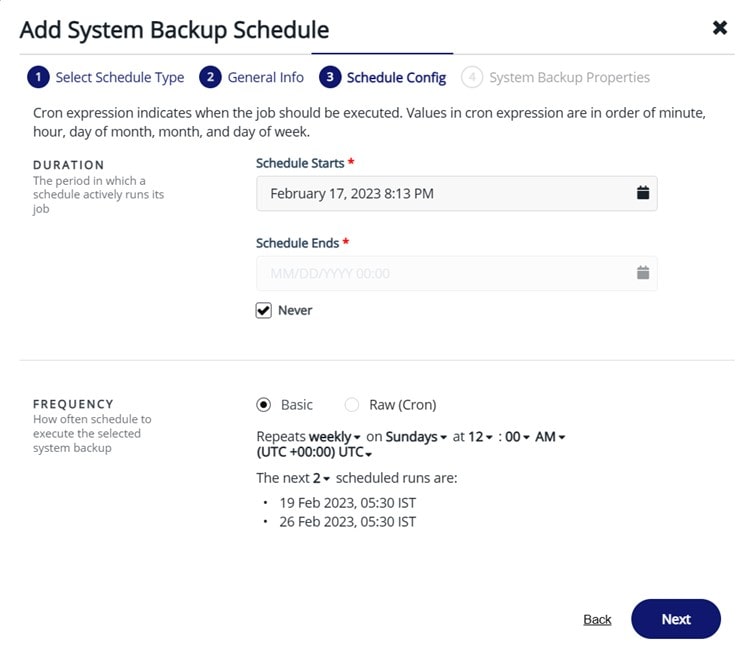
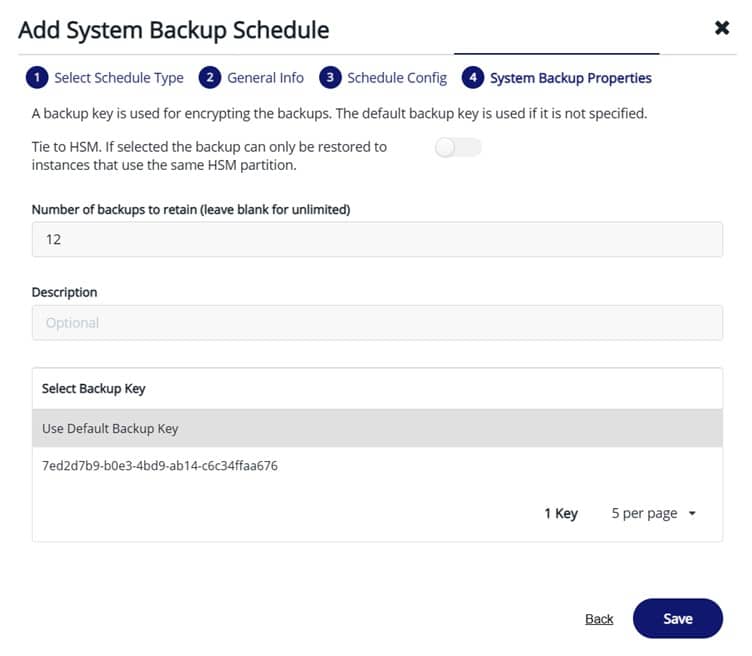
Set the number of backups to retain and select “Use default backup key.” Using the default key is what lets the schedule succeed no matter which cluster node the job runs on, since the same key is now present everywhere.
If the job still fails after every node has the same default key, disable any active quorum policies before the next scheduled run and confirm no other backup or restore job is already in progress on that node.
Backup Ownership and Scheduling Responsibility
The NCERRInvalidParamValue error is usually a symptom of a missing owner, not just a missing key. When no single person is accountable for confirming that a backup schedule succeeded, key-distribution gaps go unnoticed until a restore is actually needed. A workable ownership model for a CipherTrust Manager cluster includes:
- A named backup owner (individual or on-call rotation) responsible for every node in the cluster, not just the node the schedule was created on.
- A documented runbook that lists which node currently holds which default backup key, updated any time a node is added, rebuilt, or removed.
- A recurring check, weekly at minimum, that confirms the last scheduled backup actually completed on every node, not just the node it happened to run on.
- A clear escalation path when a scheduled backup fails twice in a row, rather than letting failure notifications pile up unread.
Rotation Triggers for Backup Encryption Keys
A backup key is a cryptographic key like any other CipherTrust Manager key, and it should be rotated on defined triggers rather than left in place indefinitely. Encryption Consulting recommends rotating the system backup key when any of the following occur:
- An administrator who had access to the backup key file or its password leaves the team or changes roles.
- A restore fails because the wrong backup key was used, which often indicates the key inventory is out of date.
- A cluster node is decommissioned or replaced, since its local copy of the backup key needs to be retired along with it.
- The organization’s broader key rotation policy calls for it, on the same cadence applied to other long-lived cryptographic material.
- A backup key was tied to an HSM root of trust key that is itself being rotated or retired, since Thales’s documentation confirms an HSM-tied backup cannot be restored once that root of trust key is deleted.
After rotating, the new default key still has to be pushed to every cluster node manually, the same way the original key was distributed in the fix above. Rotating on one node and forgetting the others simply recreates the original error under a new key.
Access Policy: Who Can Trigger or Restore a Backup
CipherTrust Manager’s access model is built on domains and role-based groups, and backup-related actions should be scoped tightly within it. Thales’s own documentation is explicit that log downloads from the root domain are limited to specific groups: “only the users who are part of System Admins and Admin groups can download the logs from the root domain.” The same principle applies to backup creation and restore, which touch every domain’s keys at once for a system backup.
A sound access policy for backup operations keeps the group that can create or upload backup keys small and separate from day-to-day key management users, requires a second approver before a restore is executed against a production cluster, and never leaves a shared, undocumented backup key password sitting in a chat message or ticket. Restore is the higher-risk action of the two: a bad restore can roll back keys, policies, and users to a stale state across the whole system.
Audit Evidence for Backup Success and Failure
A backup schedule that “usually works” is not evidence of anything to an auditor. CipherTrust Manager’s system logs record administrative actions, configuration changes, and both successful and failed operations, which is the raw material for backup audit evidence. Logs can be pulled from the GUI under Admin Settings > Logs or via the ksctl logs download command line tool, and downloaded logs are integrity-protected with a SHA-256 hash signed by an asymmetric key pair, verifiable with OpenSSL.
For an auditable backup process, route these logs to a central SIEM or log store rather than relying on the CipherTrust Manager console alone, retain evidence of every scheduled backup’s completion status for the length of the organization’s compliance retention window, and keep a separate record of every backup key rotation and every restore event, including who approved it. This evidence is what turns “we have backups” into a defensible answer during an audit or after an incident.
Platform Comparison: Manual Backup vs. Automated/Scheduled Backup
CipherTrust Manager supports both an on-demand manual backup and a recurring schedule. The two are not interchangeable operationally, and most organizations need both.
| Factor | Manual Backup | Automated / Scheduled Backup |
|---|---|---|
| Trigger | Run by an admin before a planned change, upgrade, or maintenance window | Runs on a defined interval regardless of whether an admin is watching |
| Consistency | Depends on someone remembering to run it | Consistent as long as the backup key and quorum preconditions are correctly set on the node the job lands on |
| Error visibility | Failure is seen immediately by the admin who ran it | Failure can go unnoticed for a full cycle unless alerting or a review process is in place |
| Audit trail | One-off event, easy to document individually | Needs a recurring log review process to prove ongoing coverage |
| Best used for | Pre-change and pre-upgrade snapshots | Routine disaster-recovery coverage between changes |
Incident Response If a Backup Failure Is Discovered During a DR Event
The worst time to discover a CipherTrust Manager backup has been silently failing is in the middle of a disaster recovery event, when there is no time left to fix the underlying key-distribution gap first. If that happens, work through it in this order:
- Identify every node in the cluster and check each one individually for a usable, recent backup file. Because backups are node-local, a healthy backup can exist on a node other than the one that just failed.
- Confirm which backup key encrypted the most recent usable backup, and locate that exact key file and password rather than assuming any “default” key on hand will work.
- If only a domain-scoped backup is available and a full system restore is not possible, restore the domain-scoped backup first to recover keys and policies for that domain, since domain-scoped backups can be restored on any clustered node.
- If the target is an existing, live cluster node, do not attempt a direct system restore onto it. Use the cluster remove and rebuild method, or engage Thales support for guidance on the safest sequence for that environment.
- Once service is restored, treat the incident as the trigger for a full backup key audit across every node, not just the one that failed, and correct the key distribution gap that caused the original silent failure.
Encryption Consulting’s Encryption Advisory Services team can run this kind of DR tabletop exercise against a live CipherTrust Manager cluster before it becomes a real incident, so the gaps show up in a drill instead of during an actual outage.
Error Symptom, Likely Cause, and Fix
| Error Symptom | Likely Cause | Fix |
|---|---|---|
| codeDesc: NCERRInvalidParamValue, “Specified backup key does not exist for scope (system)” | Backup key was not uploaded and set as default on the node handling the scheduled job | Create and download the system backup key, upload it to every cluster node, and set it as default on each one |
| Scheduled backup produces no file and no clear error | A quorum policy was left enabled on the node before the job ran | Disable all quorum policies before running or scheduling the backup |
| Backup completes, but restore fails with a key mismatch | The backup key used for restore is not the exact key that encrypted the file on the source node | Locate and use the specific backup key file that was active on the source node at backup time |
| Restore is rejected on an existing cluster node | System backups are not designed to restore onto a live clustered node | Use the cluster remove and rebuild method instead of a direct restore |
| Restore rejected across a version boundary | The backup is more than three minor releases older than the running CipherTrust Manager version | Use the –force restore option only after consulting Thales support, or restore through an intermediate version first |
| Backup or restore command fails with a busy or locked error | Another backup or restore job is already running, and only one is allowed at a time | Wait for the in-flight job to finish before starting a new one |
Limitations
- Backups and backup keys are node-local by design; there is no built-in automatic replication across a CipherTrust Manager cluster, so key distribution has to be managed manually every time a schedule or key changes.
- A system backup cannot be restored directly onto a node that is still part of a live cluster; recovering a clustered environment requires the remove and rebuild path.
- Restore compatibility only extends forward three minor releases by default, which limits how long an old backup stays practically restorable without support involvement.
- Only one backup or restore job can run at a time, which can create a bottleneck during a large-scale recovery involving multiple domains.
- Tying a backup to an HSM root of trust key adds protection but also adds a hard failure mode: if that HSM key is deleted, the backup becomes permanently unrestorable.
What Would Encryption Consulting Recommend?
Fixing the immediate NCERRInvalidParamValue error is a five-minute task once the cause is understood. The recurring problem we see across CipherTrust Manager deployments is that backup keys are treated as a one-time setup step instead of an ongoing lifecycle, no named owner, no rotation cadence, and no audit trail until a restore is actually needed and fails.
Encryption Consulting’s HSM-as-a-Service gives organizations a managed operational layer around platforms like CipherTrust Manager, including consistent backup key distribution, monitored scheduling, and evidence collection, without adding headcount dedicated to appliance administration. For organizations that want to assess and formalize their current key management and backup practices first, our Encryption Advisory Services team can run a gap assessment against the ownership, rotation, access, and audit criteria outlined above and build a runbook specific to your cluster topology.
Frequently Asked Questions
Why does CipherTrust Manager say “Specified backup key does not exist for scope (system)”?
This error means the node that picked up the scheduled backup job does not have the backup key present and marked as default. CipherTrust Manager does not automatically copy backup keys between cluster nodes, so unless the same default key is uploaded to every node, a job that lands on a node without it will fail with this exact message.
Are CipherTrust Manager backup keys replicated across cluster nodes automatically?
No. Thales’s documentation states plainly that backups and backup keys are not automatically copied to other nodes in a cluster and only exist on the node where they were created or manually uploaded. Every node in the cluster needs the same default backup key uploaded to it separately.
Can a CipherTrust Manager system backup be restored directly onto a cluster node?
No. System backups are not designed to restore onto a node that is still part of a live cluster. Thales recommends the cluster remove and rebuild method in that scenario. Domain-scoped backups are different and can be restored on any clustered node.
How often should CipherTrust Manager backup encryption keys be rotated?
There is no single Thales-mandated interval, so this should follow the organization’s broader key rotation policy plus event-based triggers: after personnel changes with access to the key, after a restore failure tied to a key mismatch, before decommissioning a node, or after any suspected exposure of the backup key file or password.
What happens if a CipherTrust Manager backup is tied to an HSM root of trust key that gets deleted?
According to Thales’s documentation, a backup tied to the HSM can never be restored if the HSM root of trust key it depends on is manually deleted. Any organization tying backups to an HSM root of trust should treat that key’s own lifecycle and deletion controls as part of the backup strategy, not a separate concern.
Conclusion
The NCERRInvalidParamValue backup key error is easy to fix once you know CipherTrust Manager will not distribute backup keys across a cluster on its own. The harder, more durable fix is operational: assign a named owner for backup schedules, set real rotation triggers for the backup key, restrict who can trigger or restore a backup, and keep audit evidence that proves the schedule actually ran, not just that it was configured to. Teams that put that discipline in place stop discovering backup failures during an actual disaster recovery event, which is the only time they are genuinely expensive to find.
For related CipherTrust Manager issues, see our guides on the CipherTrust Manager clustering error and the CipherTrust Manager web interface certificate error, or our overview of integrating a Thales HSM with CipherTrust Manager on-premises. If ongoing administration is the real bottleneck, our breakdown of why teams bring in dedicated CipherTrust Manager support covers the broader operational picture.
References
- Thales Docs, “Backups,” CipherTrust Manager 2.9 Administration Guide, thalesdocs.com
- Thales Docs, “Backups,” CipherTrust Manager 2.10 Administration Guide, thalesdocs.com
- Thales Docs, “System Logs,” CipherTrust Manager Administration Guide, thalesdocs.com
- What Causes CipherTrust Manager Backup Errors?
- Common Error Scenarios and Root Causes
- How to Fix the CipherTrust Manager Backup Error (Step-by-Step)
- Backup Ownership and Scheduling Responsibility
- Rotation Triggers for Backup Encryption Keys
- Access Policy: Who Can Trigger or Restore a Backup
- Audit Evidence for Backup Success and Failure
- Platform Comparison: Manual Backup vs. Automated/Scheduled Backup
- Incident Response If a Backup Failure Is Discovered During a DR Event
- Error Symptom, Likely Cause, and Fix
- Limitations
- What Would Encryption Consulting Recommend?
- Frequently Asked Questions
- Conclusion