- What Is Session Hijacking?
- How Does Session Hijacking Work?
- How Should You Classify Session and Token Sensitivity?
- How Do You Encrypt Session Tokens and Choose Secure Storage?
- What Access Controls Limit the Damage From a Stolen Session?
- What Does Good Session Lifecycle Governance Look Like?
- What Should Recovery and Incident Response Look Like If Hijacking Is Detected?
- How Do You Monitor for Anomalous Session Behavior?
- How Does Session Security Map to Compliance Requirements?
- Limitations
- What Would Encryption Consulting Recommend?
- Frequently Asked Questions
- Conclusion
Quick answer: Session hijacking is an attack where someone steals or predicts a valid session ID and uses it to impersonate an already logged-in user without needing a password. It bypasses login controls entirely and can expose regulated data. The fix: encrypt tokens in transit, set secure cookie flags, keep sessions short, and rotate IDs on privilege change.
Key takeaways:
- Session hijacking bypasses passwords and MFA by stealing an already authenticated session, not by cracking credentials.
- The most common entry points are XSS-stolen cookies, unencrypted network sniffing, and session fixation.
- Secure, HttpOnly, and SameSite cookie flags plus TLS in transit block most theft techniques outright.
- Short session lifetimes, re-authentication for sensitive actions, and ID rotation on login limit the damage even when a token leaks.
- Continuous monitoring for anomalous session behavior is the safety net for the attacks that get through anyway.
Published: July 26, 2024. Updated: August 2026. Reviewed by Encryption Consulting’s PKI and Application Security team.
What Is Session Hijacking?
Session hijacking is an attack in which an adversary takes over a valid, already authenticated web session by stealing or guessing the unique session identifier that a server uses to recognize a logged-in user, then reuses that identifier to impersonate the victim without ever entering a password. Because the session is already trusted by the server, the attack sidesteps login forms, passwords, and in many cases multi-factor authentication entirely.
A few terms come up constantly in this topic, so it is worth defining them plainly before going further:
- Session ID (session token): a random string a server issues to a client after login so it can recognize the same user on every subsequent request, since HTTP itself does not remember anything between requests.
- Cookie: the small piece of data a browser stores and automatically resends to a website, most commonly used to carry the session ID between the browser and the server.
- TLS (Transport Layer Security): the encryption protocol behind HTTPS that protects data, including session cookies, while it travels across the network.
- MITM (man-in-the-middle): an attack position where the adversary sits between the user and the server and can read or alter traffic passing between them, one of the ways a session ID can be captured.
- XSS (cross-site scripting): a web application flaw that lets an attacker run their own script in a victim’s browser, commonly used to read and exfiltrate session cookies.
Session hijacking is sometimes called cookie hijacking or cookie side-jacking, since a session cookie is the most common thing being stolen. It is closely related to, but distinct from, a generic MITM attack: a MITM attack describes the attacker’s network position, while session hijacking describes what the attacker does with that position, namely stealing and reusing a live session. OWASP classifies broken session management under Identification and Authentication Failures, one of its persistent top web application risk categories.
How Does Session Hijacking Work?
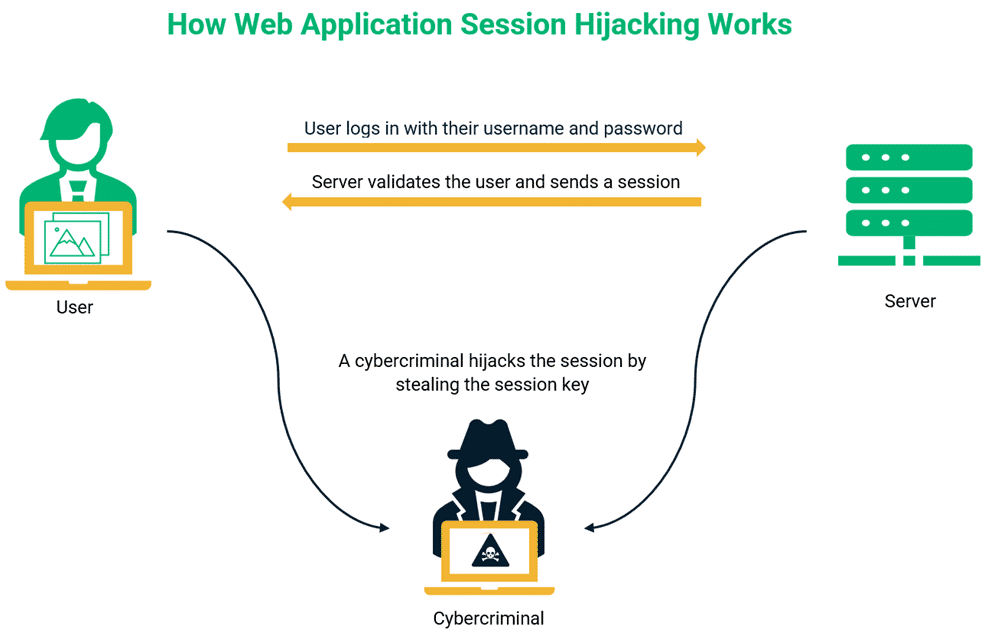
Session hijacking works by capturing a valid session identifier and replaying it before the server has any reason to doubt it belongs to someone else. The attack generally follows the same five steps regardless of which capture technique is used:
- Reconnaissance. The attacker identifies a target application and looks for weak points in how it issues, stores, or transmits session identifiers, such as missing cookie flags or predictable ID patterns.
- Session ID capture. The attacker obtains a live session ID through one of several methods: injecting a script via XSS to read the cookie, sniffing unencrypted or downgraded traffic on a shared network, tricking a user into using an attacker-supplied ID (session fixation), or guessing a weak ID outright.
- Token replay. The attacker inserts the stolen session ID into their own browser or client, typically by setting the matching cookie.
- Session impersonation. The server sees a familiar, still-valid session identifier and treats the request as coming from the legitimate, already authenticated user, with no re-authentication challenge triggered.
- Exploitation. The attacker acts with the victim’s privileges for as long as the session stays valid, reading data, changing settings, or initiating transactions, often before the victim or any monitoring system notices anything unusual.
The table below maps the most common capture techniques to how each one actually works and the single defense that most directly closes it.
| Attack Technique | How It Works | Primary Defense |
|---|---|---|
| Cross-site scripting (XSS) | Attacker injects a script into a vulnerable page; the script reads the session cookie via JavaScript and sends it to the attacker. | HttpOnly cookie flag, so client-side script cannot read the cookie at all, plus strict input sanitization and a Content Security Policy. |
| Session sniffing (network capture) | Attacker on the same unencrypted or downgraded network captures session cookies in transit using packet-capture tools. | TLS everywhere, the Secure cookie flag, and HSTS to prevent any fallback to plain HTTP. |
| Session fixation | Attacker supplies a known session ID to the victim in advance, then reuses it once the victim authenticates against it. | Regenerate the session ID on every authentication and privilege change; never accept a client-supplied session ID as valid before login. |
| Predictable or brute-forced session ID | Attacker guesses or iterates through weak, low-entropy session identifiers until one matches an active session. | Generate session IDs with a cryptographically secure random number generator at 64 bits of entropy or more. |
| Man-in-the-browser (session malware) | Malware on the victim’s own device reads or manipulates session data directly, independent of network or server controls. | Endpoint protection, short session lifetimes, and re-authentication for sensitive actions to limit what a compromised endpoint can do. |
| Cross-site request without SameSite | A malicious site triggers requests that ride along on the victim’s existing session cookie because the browser sends it automatically. | SameSite=Strict or Lax on the session cookie, so it is not attached to cross-site requests. |
A real-world example of how far session hijacking can reach: CVE-2024-53704, disclosed in early 2025, was an authentication bypass in SonicWall’s SonicOS SSL VPN component that let a remote, unauthenticated attacker hijack active VPN sessions outright, gaining access to a victim’s Virtual Office bookmarks, NetExtender configuration, and private network access. The Zero Day Initiative rescored it to a critical 9.8 CVSS, and weeks after a patch shipped, thousands of internet-facing appliances were still unpatched, a reminder that session hijacking is not a theoretical web-app-only concept but a real cause of enterprise network breaches.
How Should You Classify Session and Token Sensitivity?
Not every session carries the same risk, so defenses should scale with what a hijacked session would actually expose. Classify sessions into tiers before deciding how long they should last or how often to re-authenticate:
| Session Tier | Example | Recommended Handling |
|---|---|---|
| Public / anonymous | Browsing a public marketing site or knowledge base | Minimal session state; low risk if intercepted |
| Standard authenticated | Viewing a user profile, non-financial account settings | Standard idle timeout, Secure and HttpOnly cookie flags |
| Sensitive / regulated data | Sessions touching PII, PCI cardholder data, or protected health data | Short idle timeout, SameSite=Strict, monitored for anomalies |
| Privileged / administrative | Admin consoles, payment initiation, key management interfaces | Shortest lifetime, mandatory re-authentication for sensitive actions, session ID rotation on privilege change |
How Do You Encrypt Session Tokens and Choose Secure Storage?
Encrypt every session token in transit with TLS, and store it in an HttpOnly, Secure cookie rather than in a location JavaScript or local storage can reach. There is no meaningful “tokenization” choice for session identifiers the way there is for stored card data; the equivalent decision here is where and how the token lives once it is issued, and getting that choice wrong is what makes most hijacking techniques possible in the first place.
- Transport: enforce TLS 1.2 or higher on every request that carries a session cookie, and use HSTS so browsers refuse to fall back to plain HTTP even if a link or redirect points there.
- Storage location: use an HttpOnly cookie, not
localStorageorsessionStorage, for the session token, since anything readable by JavaScript is also readable by an XSS payload. - Cookie flags: set
Secure(HTTPS only),HttpOnly(no JavaScript access), andSameSite=StrictorLax(no automatic cross-site attachment) on every session cookie, per the OWASP Session Management Cheat Sheet. - Entropy and length: generate session IDs with a cryptographically secure random number generator providing at least 64 bits of entropy, which OWASP notes would take an attacker on the order of hundreds of years to brute force at realistic guess rates.
- Cookie name prefixes: where supported, use the
__Host-prefix, which forces the browser to enforceSecure, no cross-domain scope, andPath=/on the cookie.
Certificate and key infrastructure sits underneath all of this: TLS termination is only as trustworthy as the certificates and private keys behind it. CertSecure Manager automates certificate lifecycle management so TLS endpoints never run on an expired or misconfigured certificate, and HSM-as-a-Service protects the private keys backing that TLS termination in hardware, rather than in software that a compromised server could expose.
What Access Controls Limit the Damage From a Stolen Session?
Short session lifetimes and mandatory re-authentication for sensitive actions limit how much an attacker can do even after successfully stealing a session ID. Per NIST SP 800-63B, reauthentication timing should scale with assurance level: at AAL1, reauthenticate at least once every 30 days; at AAL2, at least every 12 hours or after 30 minutes of inactivity, whichever comes first; at AAL3, at least every 12 hours or after 15 minutes of inactivity, with reauthentication requiring both authentication factors again. OWASP’s general guidance is similar in spirit: idle timeouts of 2 to 5 minutes for high-value applications and 15 to 30 minutes for lower-risk ones, with an absolute session timeout of 4 to 8 hours regardless of activity, enforced server-side rather than trusted to the client.
Beyond timeouts, require a fresh authentication challenge, such as a password re-entry or a step-up MFA prompt, before high-impact actions: changing account email or password, adding a payment method, granting administrative privileges, or exporting sensitive data. A stolen session that cannot pass that second gate is far less useful to an attacker even if the underlying token is valid.
What Does Good Session Lifecycle Governance Look Like?
Session lifecycle governance means treating issuance, rotation, and invalidation as deliberate, enforced steps rather than side effects of the login form. Three moments matter most:
- Issuance: generate a brand-new, high-entropy session ID at successful login; never reuse or extend a pre-authentication session ID into an authenticated one, which is exactly what session fixation exploits.
- Rotation: regenerate the session ID after any privilege level change, such as a password reset, role change, or step-up authentication, using framework-level calls like
session_regenerate_id(true)in PHP or an equivalent session-invalidation call in your framework. - Invalidation: destroy the session on both the client and the server at logout, expose a visible logout control on every authenticated page, and expire sessions server-side on timeout rather than relying on the cookie’s own expiry, since a stolen cookie does not respect a client-side clock.
What Should Recovery and Incident Response Look Like If Hijacking Is Detected?
If a session hijacking attempt is confirmed, invalidate every active session for the affected account immediately and force re-authentication before any session is trusted again. From there, a practical response sequence looks like this:
- Revoke all active sessions and tokens tied to the affected account, server-side, not just the one session that showed the anomaly.
- Force a password reset and, where available, rotate any linked API keys or long-lived tokens the account had issued.
- Review the account’s recent activity log for actions taken during the hijacked window and reverse or flag anything unauthorized.
- Check for the underlying capture vector, such as an unpatched XSS flaw, a missing cookie flag, or a compromised endpoint, and close it before restoring normal access.
- Notify the affected user and, if regulated data was exposed, follow your organization’s breach notification obligations under the applicable framework.
How Do You Monitor for Anomalous Session Behavior?
Continuous monitoring catches the hijacking attempts that slip past preventive controls by watching for behavior a legitimate session would not produce. Useful signals include:
- A single session ID used from two geographically distant IP addresses within an implausibly short window.
- A sudden change in user agent or device fingerprint mid-session, without a corresponding new login.
- An authenticated session that suddenly performs high-privilege actions it has never performed before for that account.
- Repeated, rapid session ID guesses or malformed session tokens hitting the login or session-validation endpoint, a sign of brute-force probing.
- Traffic to known session-hijacking tooling patterns, which intrusion detection and prevention systems can flag against known attack signatures.
None of this replaces prevention; it is the layer that assumes prevention will occasionally fail and shortens the time an attacker has an active, unnoticed session.
How Does Session Security Map to Compliance Requirements?
Session management controls are not optional extras under most security frameworks; they are named, specific requirements. The table below maps the controls covered above to where each one is required.
| Control | OWASP | NIST SP 800-63B | PCI DSS 4.0 |
|---|---|---|---|
| Session ID entropy and generation | Session Management Cheat Sheet: 64+ bits of entropy via CSPRNG | Session secrets bound to approved cryptographic authenticators | Requirement 6, secure development and cryptography practices |
| Cookie security attributes | Secure, HttpOnly, SameSite required on session cookies | Not cookie-specific, but requires protected session bindings | Requirement 6.2, secure coding to prevent session flaws |
| Idle and absolute timeout | 2 to 5 minutes idle for high-value apps; 4 to 8 hours absolute | Reauthentication after 15 to 30 minutes idle depending on AAL | Requirement 8.2.8, reauthenticate after 15 minutes idle |
| Re-authentication for sensitive actions | Step-up authentication before high-impact actions | Full reauthentication with both factors at AAL3 | Requirement 8, strong authentication controls for user access |
| Session invalidation on logout | Server-side destruction, not client-side only | Session termination on logout expected | Requirement 8, access revoked when no longer needed |
Limitations
No single control here fully eliminates session hijacking risk. TLS protects a session cookie in transit but does nothing against an XSS flaw that reads the cookie directly in the browser. Cookie flags like HttpOnly and SameSite stop specific theft techniques but cannot stop a session that is stolen through malware already running on the victim’s device. Short timeouts and re-authentication reduce the window of exposure but add real friction for legitimate users, and overly aggressive timeouts push people toward workarounds like staying permanently logged in on a shared device. Monitoring for anomalous behavior helps catch what prevention misses, but it is probabilistic, not certain, and a patient attacker who mimics the victim’s usual location and device can evade it for a time. Treat these controls as layered, not as a single fix, and revisit them as your application’s threat model changes.
What Would Encryption Consulting Recommend?
Start with the controls that block the most common capture techniques outright, then layer in monitoring and governance rather than trying to do everything at once. In practice, we point clients toward this sequence: enforce TLS everywhere with automated certificate lifecycle management so expired or misconfigured certificates never create a gap for downgrade attacks; set Secure, HttpOnly, and SameSite on every session cookie as a baseline, non-negotiable configuration change; regenerate session IDs on login and on every privilege change; and scale idle timeouts and re-authentication requirements to the sensitivity tier of the session, not a single organization-wide default.
Where the underlying issue is fragmented certificate and key management across many applications, rather than a single application’s session code, PKI-as-a-Service gives teams a managed way to issue and rotate the TLS certificates that make encrypted sessions possible in the first place, without each application team reinventing certificate lifecycle handling on its own. For organizations managing this in-house, our related guide on the most common SSL/TLS attacks and how certificate lifecycle management helps mitigate them covers the transport-layer side of this problem in more depth; that post focuses on the certificate and protocol attacks that precede or enable interception, while this one focuses on what happens to the session itself once an attacker has a foothold, so read them together rather than as duplicates.
Frequently Asked Questions
Is session hijacking the same as session fixation? No. Session fixation is one specific technique for getting a session hijacked: the attacker sets a known session ID on the victim in advance and waits for them to authenticate against it. Session hijacking is the broader outcome, taking over any valid session, which can be reached through fixation, XSS-based cookie theft, network sniffing, or several other techniques.
Does HTTPS alone stop session hijacking? No. TLS protects the session cookie while it travels over the network, which blocks sniffing-based hijacking, but it does nothing against a session cookie stolen client-side through an XSS flaw or malware already on the user’s device. HTTPS is necessary but not sufficient on its own.
How long should a session cookie actually last? It depends on what the session can access. OWASP’s general guidance is an idle timeout of 2 to 5 minutes for high-value applications and 15 to 30 minutes for lower-risk ones, with an absolute session lifetime of 4 to 8 hours regardless of activity. PCI DSS 4.0’s Requirement 8.2.8 specifically calls for reauthentication after 15 minutes of idle time for in-scope systems.
Does multi-factor authentication protect against session hijacking? MFA protects the login itself, not an already established session. Once a user has authenticated and a session cookie exists, an attacker who steals that cookie is impersonating an already-authenticated session and never has to pass the MFA check at all. That is precisely why session lifetime, rotation, and re-authentication for sensitive actions matter as a separate layer from MFA.
What is the very first thing to do if we suspect an active session hijacking attack? Invalidate the affected session, and every other active session on that account, server-side immediately, then force a fresh login. Acting on the single suspicious session alone is not enough if the attacker has also captured or could reuse other valid tokens tied to the same account.
Conclusion
Session hijacking succeeds by exploiting the trust a server places in a session ID, not by breaking a password. The defense is layered rather than singular: encrypt sessions in transit with TLS, lock cookies down with Secure, HttpOnly, and SameSite flags, keep sessions short and re-authenticate for sensitive actions, rotate session IDs on every privilege change, and monitor for the anomalies that slip past all of the above. No single control closes every path, which is exactly why session security has to be governed as a full lifecycle, from issuance through invalidation, rather than configured once and left alone.
References
- OWASP, Session Management Cheat Sheet
- OWASP, Top 10: A07:2021 Identification and Authentication Failures
- NIST, SP 800-63B Digital Identity Guidelines, Authentication and Lifecycle Management
- PCI Security Standards Council, FAQ on PCI DSS Requirement 8.2.8
- Bishop Fox, Analysis of CVE-2024-53704, SonicWall SSL VPN Session Hijacking
- MDN Web Docs, Set-Cookie header, including the SameSite attribute
- What Is Session Hijacking?
- How Does Session Hijacking Work?
- How Should You Classify Session and Token Sensitivity?
- How Do You Encrypt Session Tokens and Choose Secure Storage?
- What Access Controls Limit the Damage From a Stolen Session?
- What Does Good Session Lifecycle Governance Look Like?
- What Should Recovery and Incident Response Look Like If Hijacking Is Detected?
- How Do You Monitor for Anomalous Session Behavior?
- How Does Session Security Map to Compliance Requirements?
- Limitations
- What Would Encryption Consulting Recommend?
- Frequently Asked Questions
- Conclusion