- What Is a CSR and Why Does It Matter?
- Why Generate the CSR's Key Pair Inside an HSM Instead of in Software?
- Overview of Luna Cloud HSM by Thales: Features and Benefits
- How to Generate a CSR Using Luna Cloud HSM: Step-by-Step Process
- How Do You Get the CSR Signed and Installed?
- Who Owns the Private Key This CSR Generates?
- When Should You Rotate the Certificate This CSR Produces?
- Who Should Be Allowed to Trigger CSR Generation?
- What Audit Evidence Should CSR Generation Produce?
- Software-Generated CSR vs. HSM-Generated CSR: How Do They Compare?
- What Happens If a CSR or Private Key Is Mishandled?
- Limitations
- What Would Encryption Consulting Recommend?
- Frequently Asked Questions
- Conclusion
A Certificate Signing Request (CSR) is the message a server or application sends to a Certificate Authority (CA) to request an SSL/TLS or code signing certificate. Generating that CSR using Luna Cloud HSM changes where the private key half of the request lives: instead of sitting in a software keystore, it is generated and held inside a Thales-managed, FIPS 140-3 validated hardware boundary. This guide covers what a CSR is, why the key pair belongs in an HSM rather than in software, and the full step-by-step process for generating, signing, and governing a CSR using Luna Cloud HSM.
Quick answer: A CSR is a PKCS#10 (RFC 2986) formatted message containing a public key and subject details, sent to a CA to request a certificate. Generating it using Luna Cloud HSM means Thales’s cloud HSM service creates and holds the matching private key inside a FIPS 140-3 validated boundary, so the key never exists as an exportable file on the requesting server.
Key takeaways:
- A CSR bundles the public key, subject (CN, O, OU, L, S, C), and signature algorithm; the private key it is paired with must never leave the system that generated it.
- Luna Cloud HSM (Thales Data Protection on Demand) generates that private key inside a FIPS 140-3 Level 3 validated boundary and never exposes it in the clear, even to administrators.
- Generation runs through the Luna Cloud HSM Service Client, the SafeNet Key Storage Provider (KSP), a request.inf file, and the Windows certreq utility.
- Rotate the resulting certificate on a defined schedule; CA/Browser Forum ballot SC-081v3 caps public TLS certificate validity at 200 days from March 2026, 100 days from March 2027, and 47 days from March 2029.
- Treat CSR generation as a key-ceremony-adjacent event: log who triggered it, on which partition, under which role, and retain that evidence for audit.
Published: June 2023. Updated: August 2026. Reviewed by Encryption Consulting’s PKI and HSM Services team.
What Is a CSR and Why Does It Matter?
A CSR is a block of encoded text sent to a Certificate Authority when requesting a certificate. It is generated on, or on behalf of, the system where the certificate will be installed, and it follows the PKCS#10 syntax defined in RFC 2986. The CSR carries the identifying information that will end up in the certificate, such as the organization name, common name (the domain or subject the certificate protects), locality, and country, along with the public key that the CA will bind to that identity.
Generating a CSR produces two artifacts, not one. The CSR itself contains the public key and is sent to the CA in the open. The private key is generated at the same moment and never leaves the system, HSM, or key store that created it. The CA never sees the private key and does not need to; it only verifies the request and signs the public key into a certificate. If the private key is ever exposed, copied, or guessable, the certificate built on top of that CSR is no longer trustworthy, regardless of how correctly the CSR itself was formatted.
Why Generate the CSR’s Key Pair Inside an HSM Instead of in Software?
A CSR generated with OpenSSL or a Windows certificate snap-in creates the private key in software, typically in a keystore file or the OS certificate store protected only by file permissions and, at best, a passphrase. That key is copyable. A backup job, a misconfigured share, a compromised admin account, or a piece of malware with local access can walk off with it, and once it is copied, there is no way to prove it was not copied.
Generating the same key pair inside Luna Cloud HSM changes that calculus. The private key is created inside a Thales HSM partition and marked non-exportable; every signing operation happens inside the module boundary, and the key material itself never crosses into server memory or disk in a usable form. This is the practical difference between “the key is protected” and “the key cannot leave,” and it is the reason HSM-backed CSR generation is the default expectation for public CA root and issuing keys, code signing keys, and any certificate whose compromise would let an attacker impersonate the organization. It also satisfies the hardware key protection requirements found in PCI DSS, and it is what keeps a Luna Cloud HSM deployment inside a FIPS 140-3 validated boundary rather than a software-only one.
Overview of Luna Cloud HSM by Thales: Features and Benefits
Luna Cloud HSM is a Hardware Security Module (HSM) service from Thales, delivered through Thales Data Protection on Demand (DPoD). Instead of racking and managing physical HSM appliances, an organization provisions a Luna Cloud HSM service and connects to it over the internet as a partition. It removes the hardware procurement and data center overhead of a traditional HSM while keeping the same tamper-resistant key protection.
An HSM is a dedicated device with specialized cryptographic processors built to generate, store, and use encryption keys inside an isolated, tamper-resistant boundary. Luna Cloud HSM brings that protection to a cloud delivery model: the same key isolation as a physical HSM, with the scalability and lower upfront cost of a managed service.
The main features of Luna Cloud HSM are:
-
Robust Security
Luna Cloud HSM leverages Thales’s encryption and key management capabilities inside a FIPS 140-3 validated, tamper-resistant boundary designed for a high level of cloud data protection.
-
Scalability
As cryptographic needs grow, Luna Cloud HSM scales with them. There is no additional HSM hardware to buy or install.
-
High Availability
Luna Cloud HSM supports high availability and automatic failover to help maintain business continuity, including deployment across multiple regions to mitigate local outages.
-
Compliance
Luna Cloud HSM helps meet regulatory requirements tied to cryptographic operations and key management, including PCI DSS, GDPR, and HIPAA, with built-in auditing and logging.
-
Interoperability
Luna Cloud HSM supports a range of cryptographic APIs and libraries, including PKCS#11, Java (JCE), Microsoft CryptoAPI, and Microsoft CNG, so it integrates with a broad set of applications and services.
Check the full list of Supported Client Platforms for Luna Cloud HSM on Thales’s documentation site. Current client platform support includes Red Hat Enterprise Linux 7/8 and CentOS 7/8 on Linux, and Windows Server 2012 R2 through Windows Server 2019 plus Windows 10 on Windows, connecting through PKCS#11, Java Cryptography Architecture, OpenSSL, Microsoft CAPI, or Microsoft CNG.
How to Generate a CSR Using Luna Cloud HSM: Step-by-Step Process
The workflow below reflects the way CSR generation against a Windows-based CA typically runs against a Luna Cloud HSM (DPoD) service: provision a service client on the DPoD service, install and register it on the requesting machine, register the SafeNet Key Storage Provider, then build and submit the CSR. Screenshots below are from a live Thales DPoD tenant and a Microsoft ADCS environment; your console labeling may vary slightly by DPoD version.
Step 1: Install the Luna Cloud HSM Service Client
-
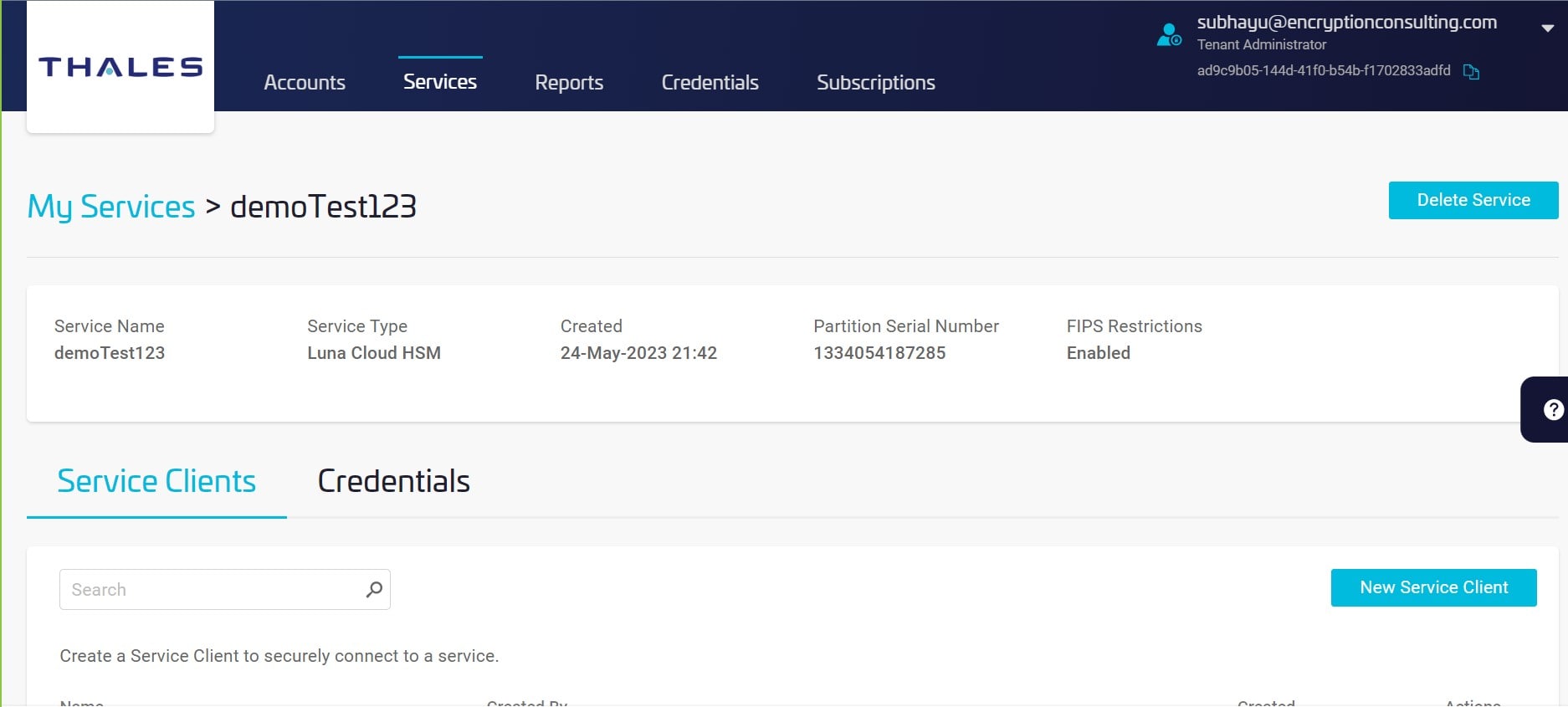
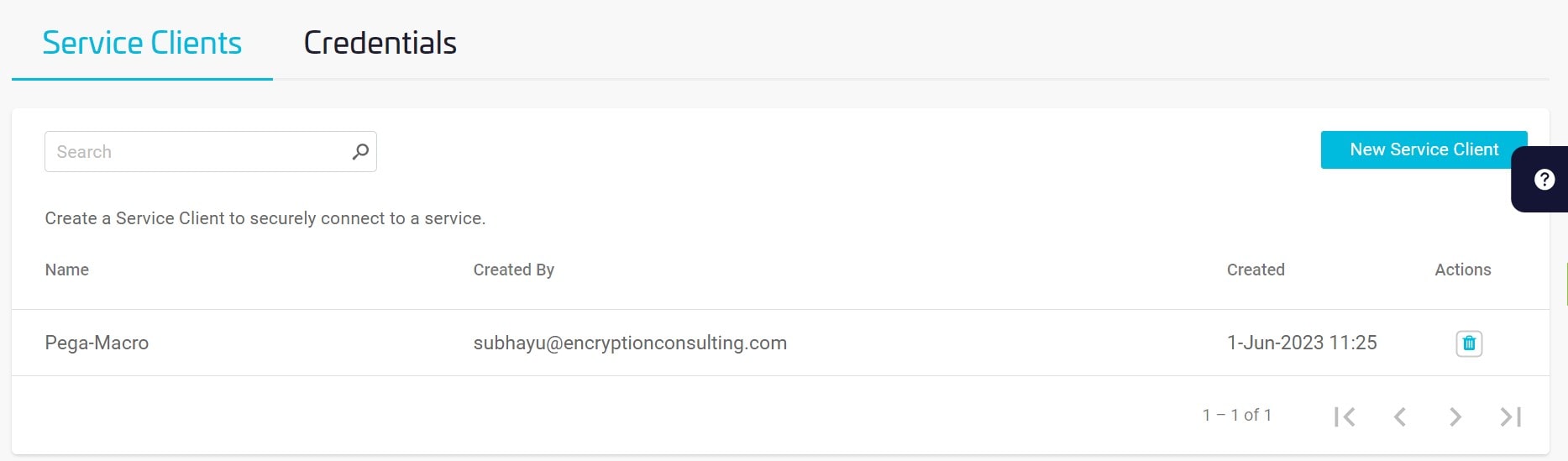
Access the Service Page and click the service or the partition name you want to generate a client for.
-
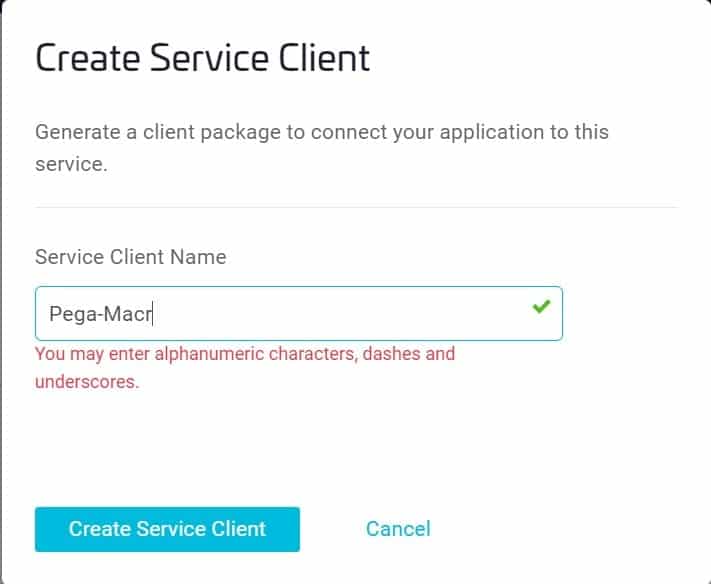
Click New Service Client, then the Create Service Client window displays.
-
In the Create Service Client window, enter a Client Name (for example, Pega-Macro) and select Create Service Client.
Step 2: Configure the Installed Service Client
- A new client package (for example, setup-PKI-Luna.zip) is generated and available for download and installation on the client machine.
- The client package is a zip file containing the connection material needed to reach the HSM partition. See the Client Contents section of the Thales documentation for a full breakdown of what it includes.
- Transfer the client package to the target machine using an approved method such as SCP, PSCP, WinSCP, or FTPS.
- Unzip setup-PKI-Luna.zip using the Windows GUI or a command-line unzip tool.
- Decompress the cvclient-min.zip file it contains.
- Extract cvclient-min.zip within the directory created in the previous step; that location is required for the setenv command below. Do not extract it into a new cvclient-min.zip subdirectory.
-
Set the environment variable. Open an Administrator Command Prompt (right-click Command Prompt and select Run as Administrator), then execute the setenv command from the extracted client directory:

Step 3: Configure the SafeNet Key Storage Provider (KSP)
-
The system needs access to the SafeNet Key Storage Provider (KSP). Copy the SafeNetKSP.dll file from the downloaded Luna Cloud HSM Service Client to C:\Windows\System32.
Note: Failure to copy the SafeNetKSP.dll file means the SafeNet Key Storage Providers will not be available during integration. For example, if configuring Microsoft Active Directory Certificate Services, the SafeNet Key Storage Providers will not appear as options when configuring Cryptography for the CA.
- Run KspConfig.exe.
- Navigate to the KSP installation directory.
- Double-click Register or View Security Library.
-
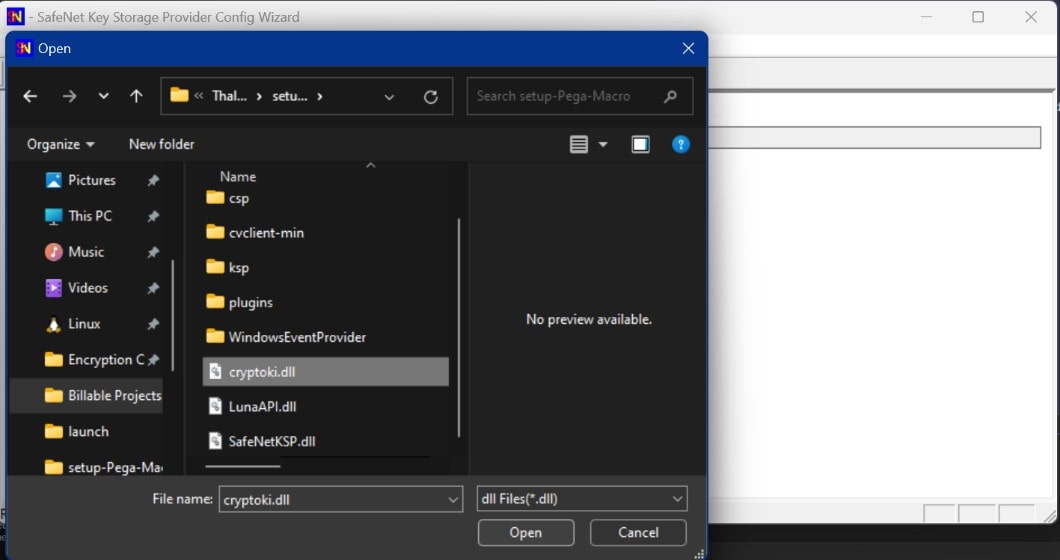
Click Browse. Select the cryptoki.dll file from the Luna Cloud HSM Service Client, then click Register.
-
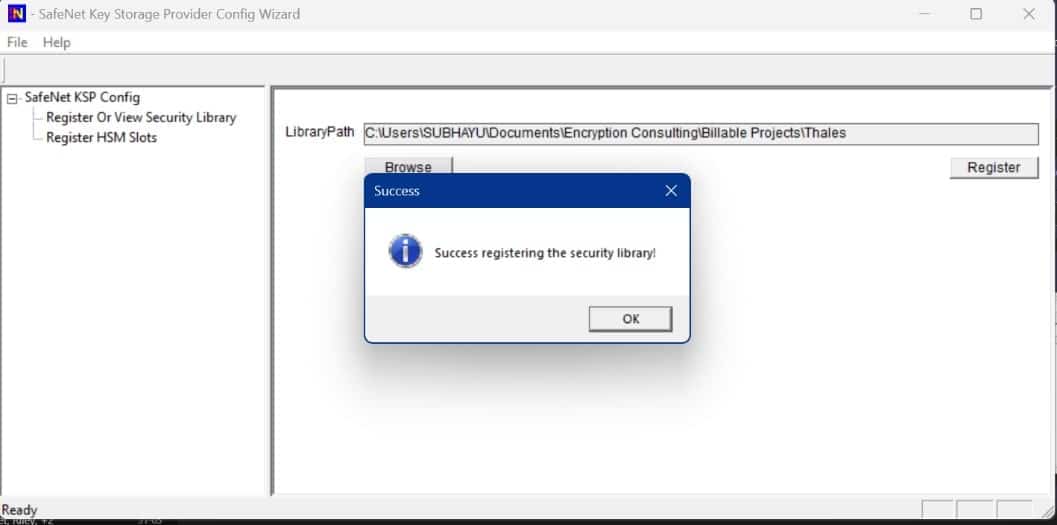
On successful registration, a Success! message displays. Click OK.
- Double-click Register HSM Slots.
-
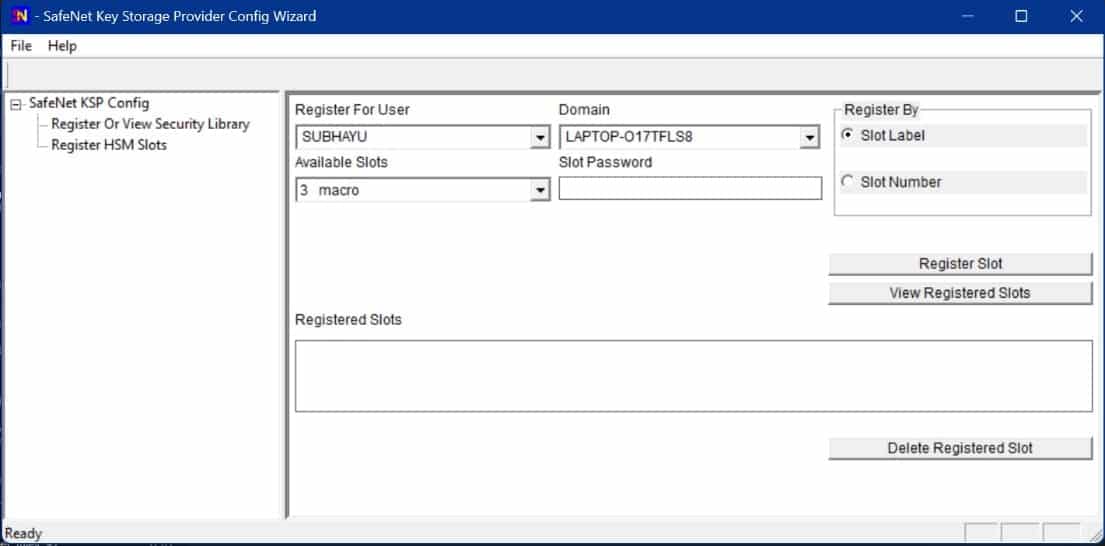
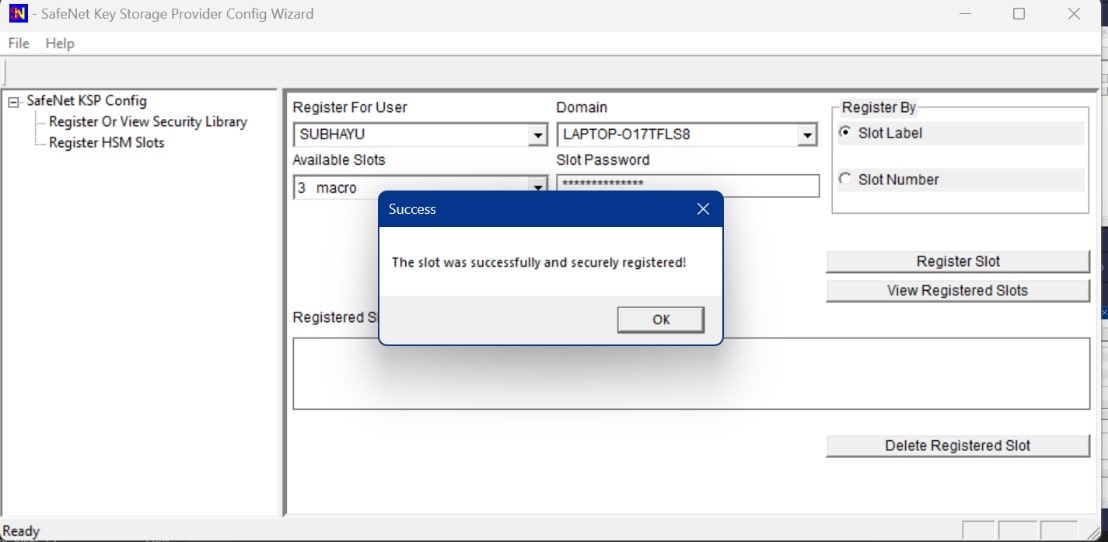
Register the HSM for the Administrator user. Open the Register For User drop-down and select Administrator, open the Domain drop-down and select the domain, open the Available Slots drop-down and select the service label, enter the Slot Password, and click Register Slot.
-
On successful registration, a Success! message displays. Click OK.
-
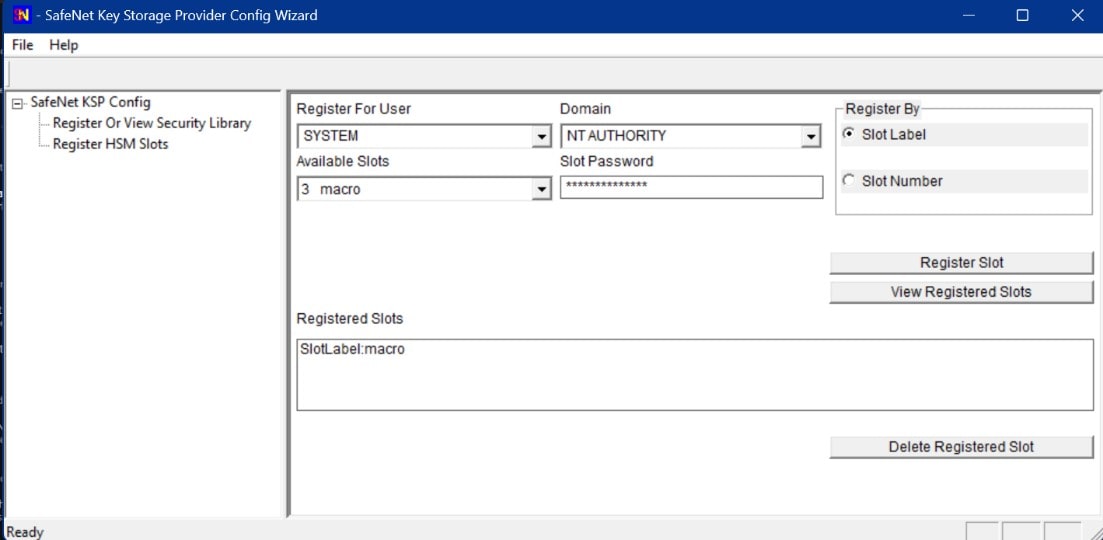
Register the HSM for the System user. Open the Register For User drop-down and select SYSTEM, open the Domain drop-down and select NT AUTHORITY, open the Available Slots drop-down and select the service label, enter the Slot Password, and click Register Slot.
-
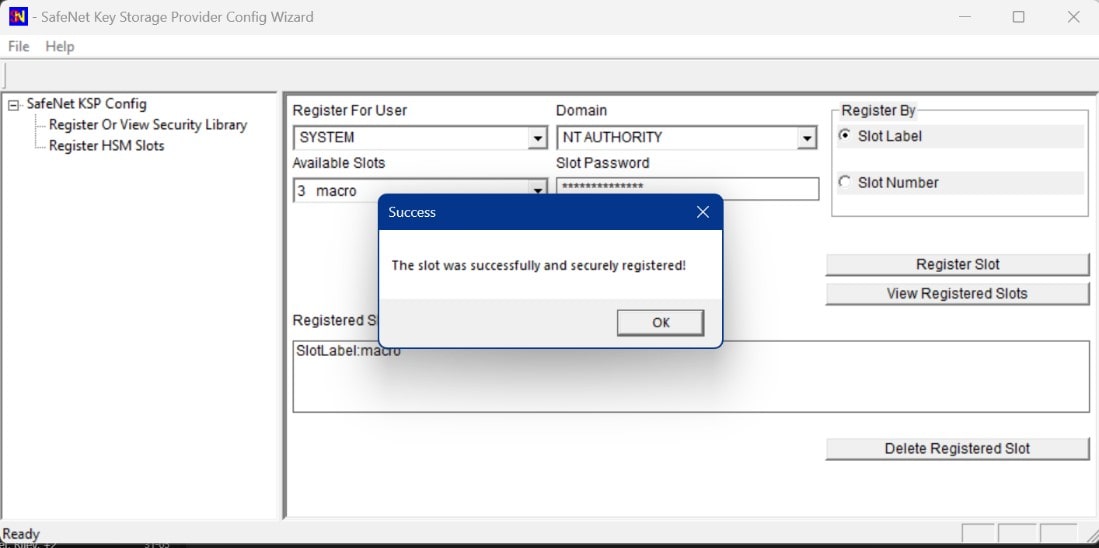
On successful registration, a Success! message displays. Click OK.
Step 4: Generate the CSR in the Service Client
-
Create a file named request.inf and populate it to generate a request for an SSL certificate bound to an RSA key. Example contents:
        [Version]


        Signature = "$Windows NT$"


        [NewRequest]


        Subject = "C=US, S=Dallas, L=Texas, O=Encryption Consulting LLC, OU=Dev, [email protected], CN=ECIssued"


        HashAlgorithm = SHA256


        KeyAlgorithm = RSA


        KeyLength =2048


        ProviderName = "Safenet Key Storage Provider"


        KeyUsage = 0xf0


        MachineKeySet =True


        [EnhancedKeyUsageExtension]


        OID=1.3.6.1.5.5.7.3.1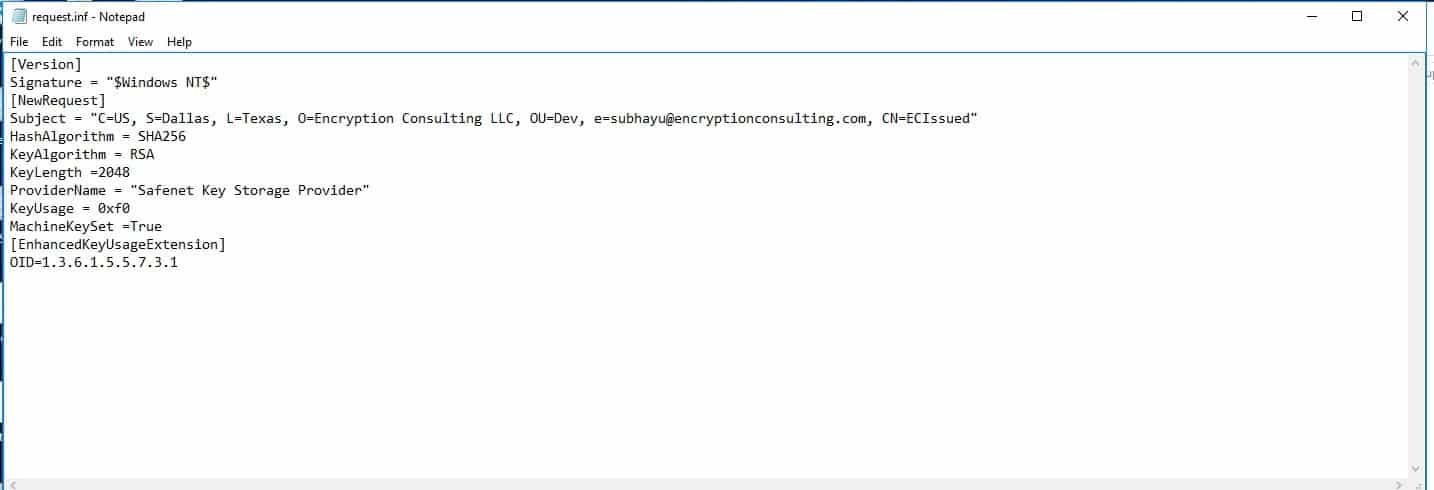
Note: The Subject’s Common Name (CN) above is an example value and should be replaced with the actual subject for the certificate being requested.
The parameters are:
-
Signature
“$Windows NT$” specifies that the INF file is intended for use with Windows NT and later versions of Windows.
-
Subject
- C is the two-letter country code for the certificate request’s distinguished subject name (DN). This parameter should be present in the subject DN.
- S is the state name for the certificate request’s distinguished subject name (DN). This parameter should be present in the subject DN.
- L is the locality, typically the city, for the distinguished subject name of the certificate request. This parameter may be present in the Subject DN.
- O is the organization name for the certificate request’s distinguished subject name (DN). This parameter should be present in the subject DN.
- OU is the organizational unit name for the certificate request’s distinguished subject name (DN). This parameter may be present in the subject DN.
- e is the contact email address associated with the request.
- CN is the common name for the certificate request’s distinguished subject name (DN). This parameter should be present in the subject DN.
-
HashAlgorithm
SHA256 sets the hashing algorithm to SHA-256, the current standard choice.
-
KeyAlgorithm
RSA sets the key algorithm to RSA, a widely used public key algorithm.
-
KeyLength
2048 sets the key length to 2048 bits, the current baseline for RSA keys in public TLS certificates.
-
ProviderName
“SafeNet Key Storage Provider” specifies the Cryptographic Service Provider (CSP) to use. The CSP is the software library that implements the cryptographic functions; here it routes key generation and signing to the Luna Cloud HSM partition through the SafeNet KSP.
-
KeyUsage
0xf0 specifies the key’s purpose in the certificate. In hexadecimal, 0xf0 corresponds to binary 11110000, representing Digital Signature (0x80), Key Encipherment (0x20), Data Encipherment (0x10), and Key Agreement (0x08) key usages.
-
MachineKeySet
True stores the private key in the local computer’s certificate store rather than the current user’s store.
-
EnhancedKeyUsageExtension
OID=1.3.6.1.5.5.7.3.1 specifies the intended certificate usage. That OID represents “Server Authentication,” meaning the certificate is intended for authenticating servers in SSL/TLS communications.
-
- Open a new command prompt window as an administrator.
- Navigate to the path containing request.inf and press Enter.
-
Generate the certificate request with the following command:
certreq -new request.inf request.req
This command creates a new CSR file named request.req based on the configuration in request.inf, with the private key generated and held inside the Luna Cloud HSM partition. Send request.req to the Certificate Authority to request the certificate.
How Do You Get the CSR Signed and Installed?
Once request.req exists, it has to reach the CA and come back as an installed certificate still bound to the private key sitting in the HSM partition. There are two common paths against a Microsoft CA.
Path A: Submitting the Request Directly
-
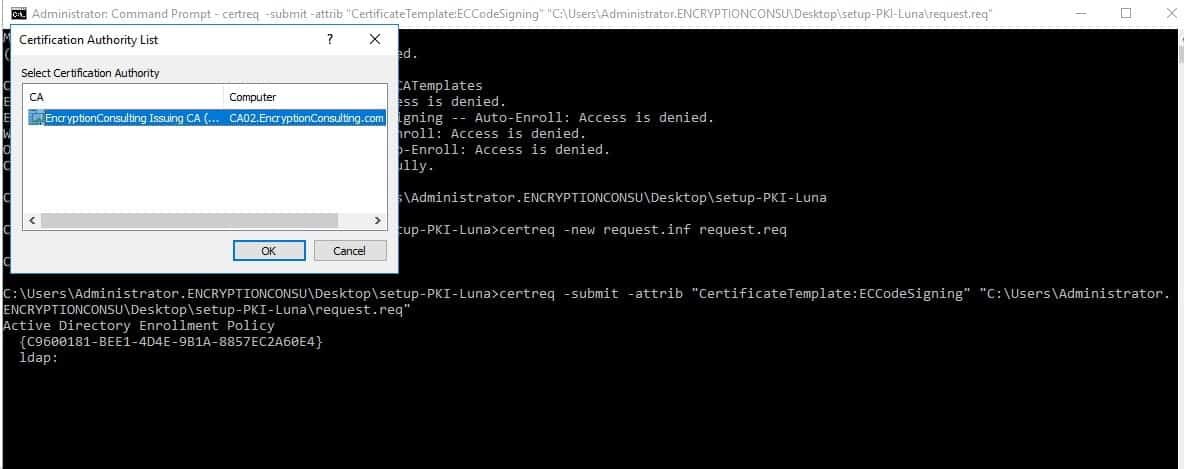
Transfer the CSR file to the Issuing CA and execute:
certreq -submit -attrib "CertificateTemplate:<Template Name>" "C:\MacroSign.csr"In this example, Template Name is “EncryptionConsuCodeSigning”.
-
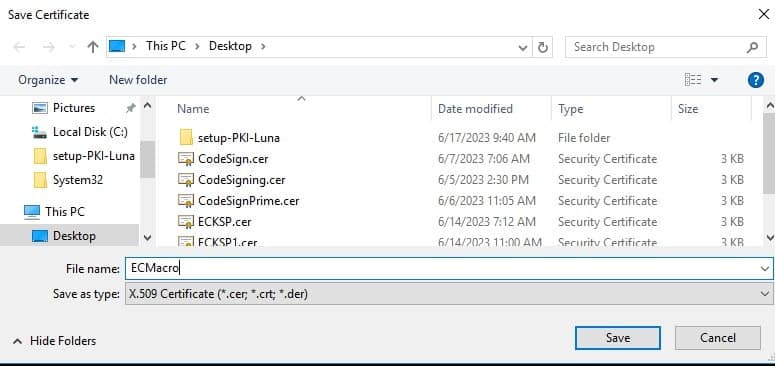
After selecting the Certificate Authority from the list, save the resulting certificate with an appropriate name and a .crt or .cer extension.
-
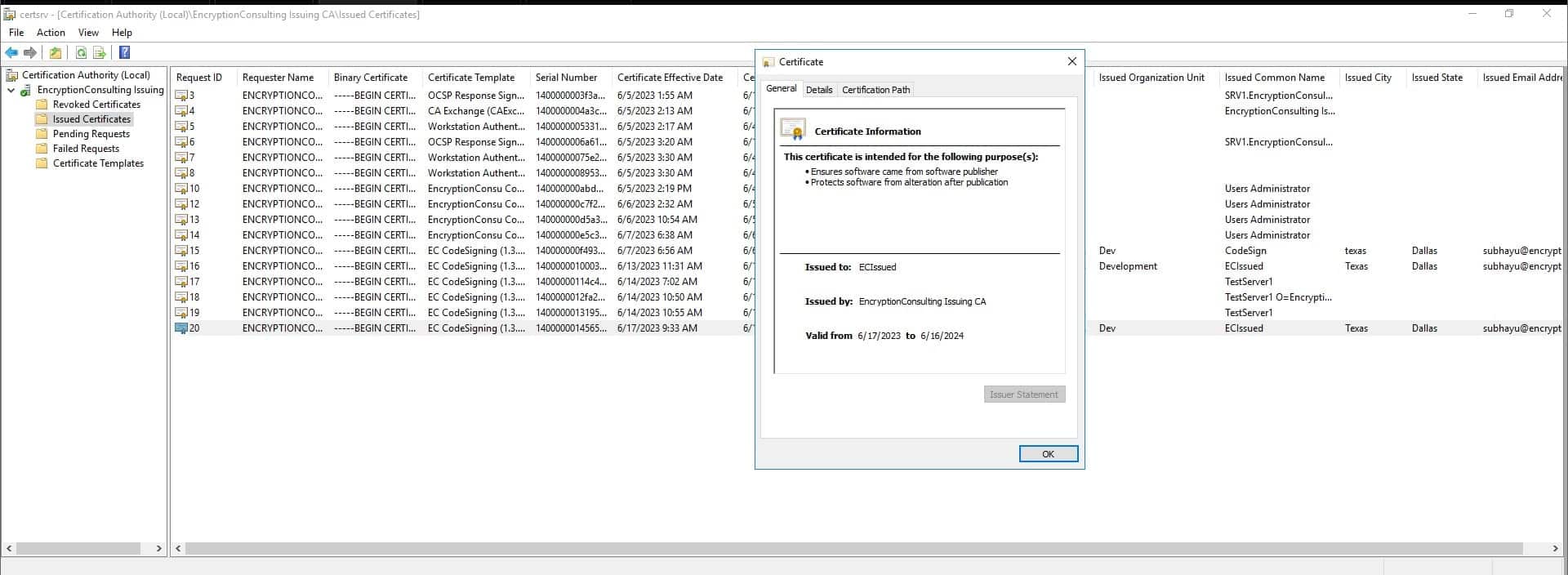
On successful execution, the certificate appears inside Issued Certificates in Certification Authority.
-
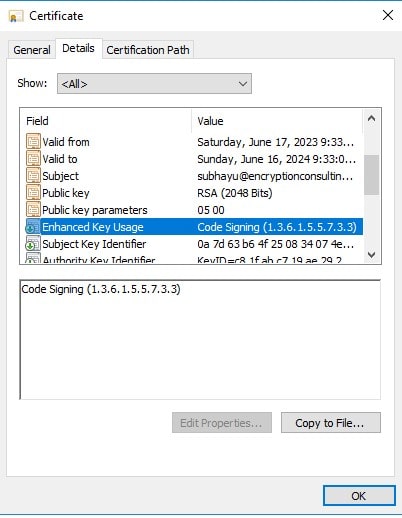
Confirm that “Code Signing” (or the expected usage) appears in the Enhanced Key Usage attribute of the newly issued certificate.
Path B: Submitting via Web Enrollment
-
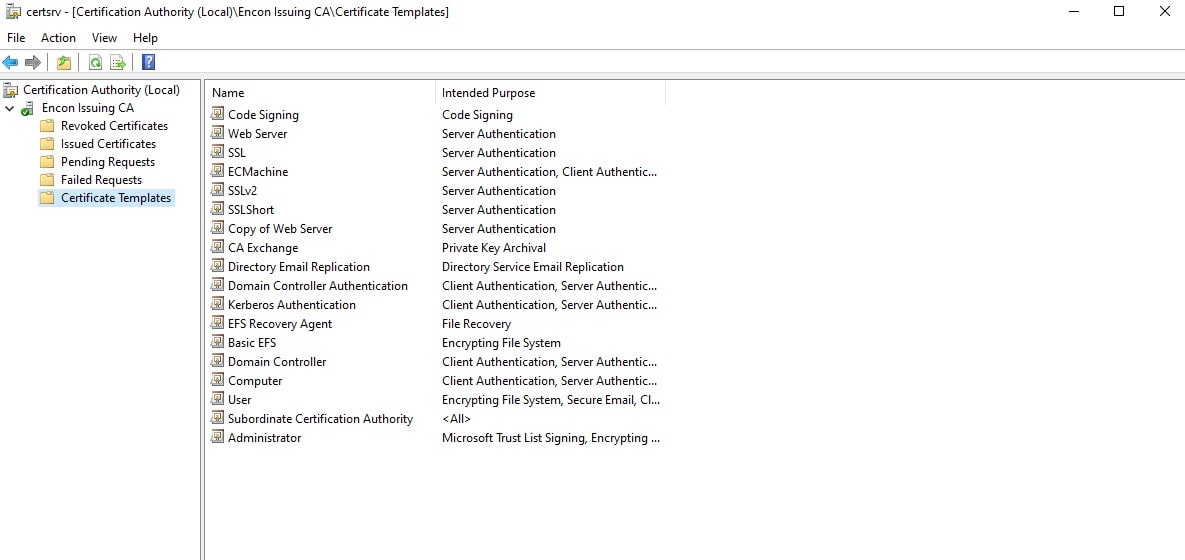
Review the available templates in the Certificate Authority.
-
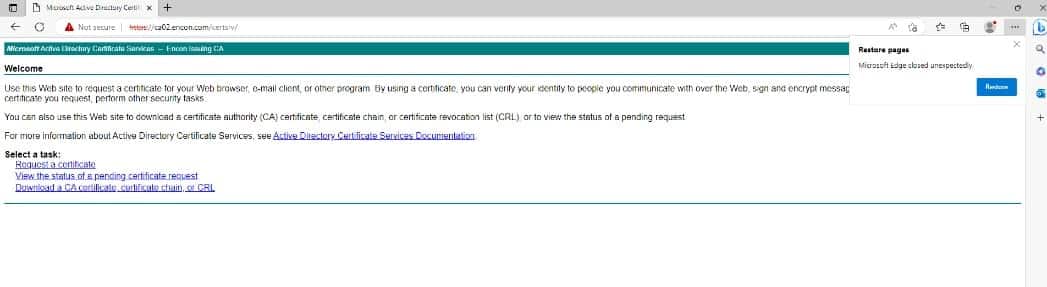
Open the CA’s web enrollment page and select the appropriate template, for example “Code Signing.”
-
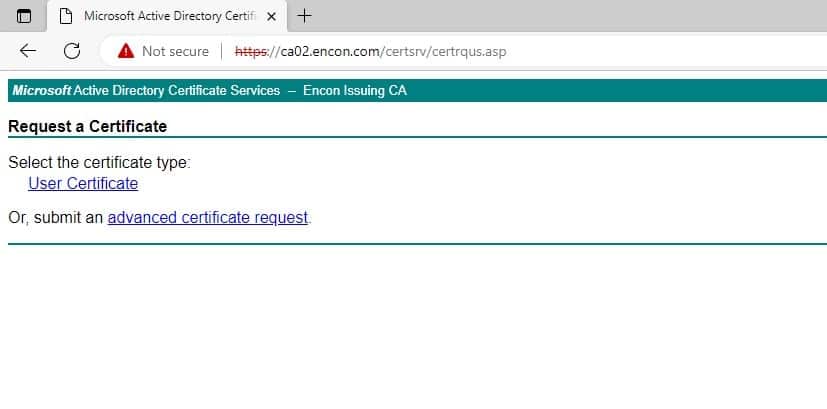
Select Request a Certificate, then Advanced Certificate Request.
-
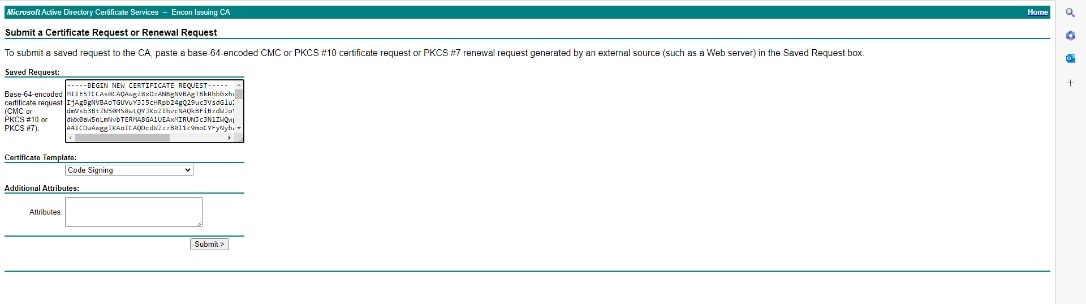
Paste the contents of the CSR into Saved Request, select the correct Certificate template, and click Submit.
-
Choose Download Certificate chain rather than the single certificate, and download it to the local system.
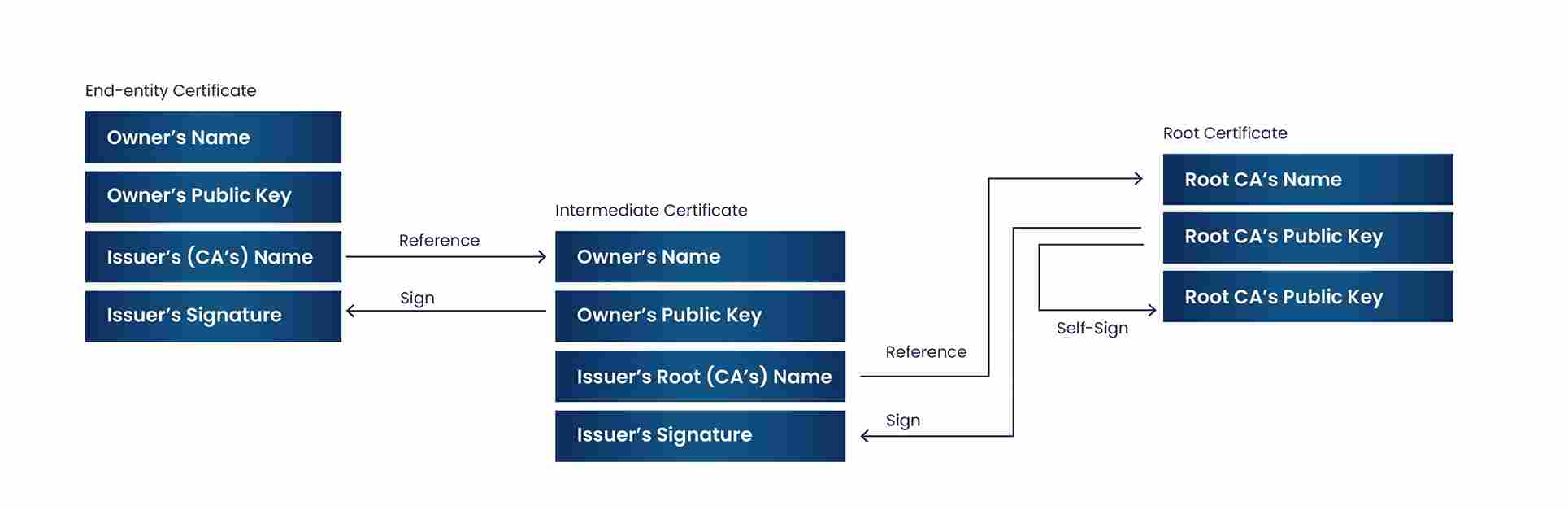
-
This is what the certificate chain looks like once downloaded.

Binding the Certificate Back to Its Private Key
-
Accept and install the certificate so it is available within the Windows environment.
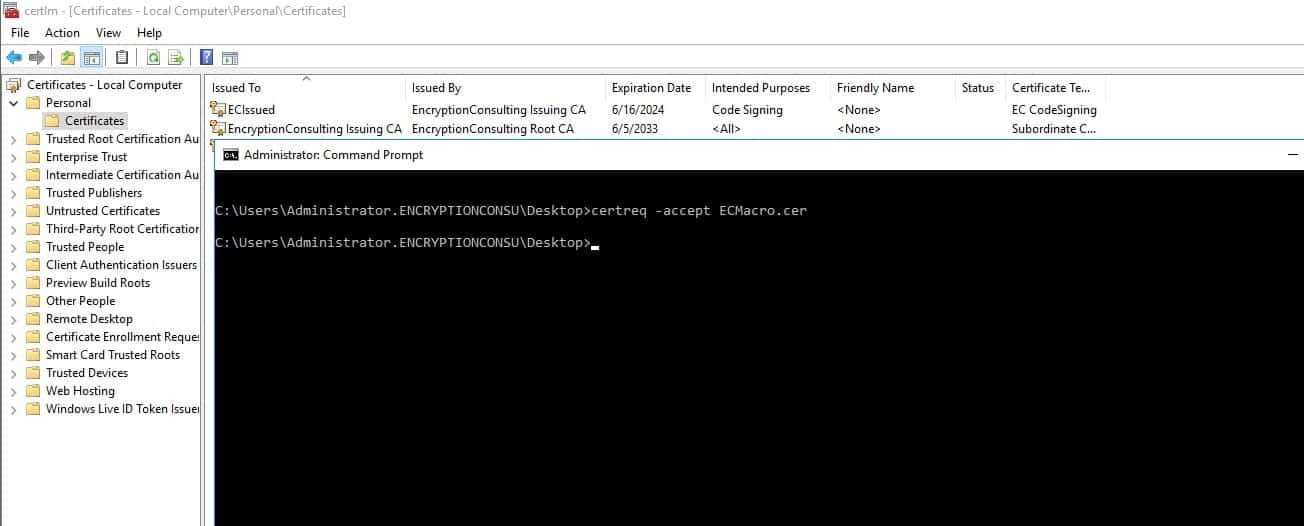
-
Add the certificate to the “Personal” store of Certificates – Local Computer using:
certutil -store MY "<thumbprint of the certificate>"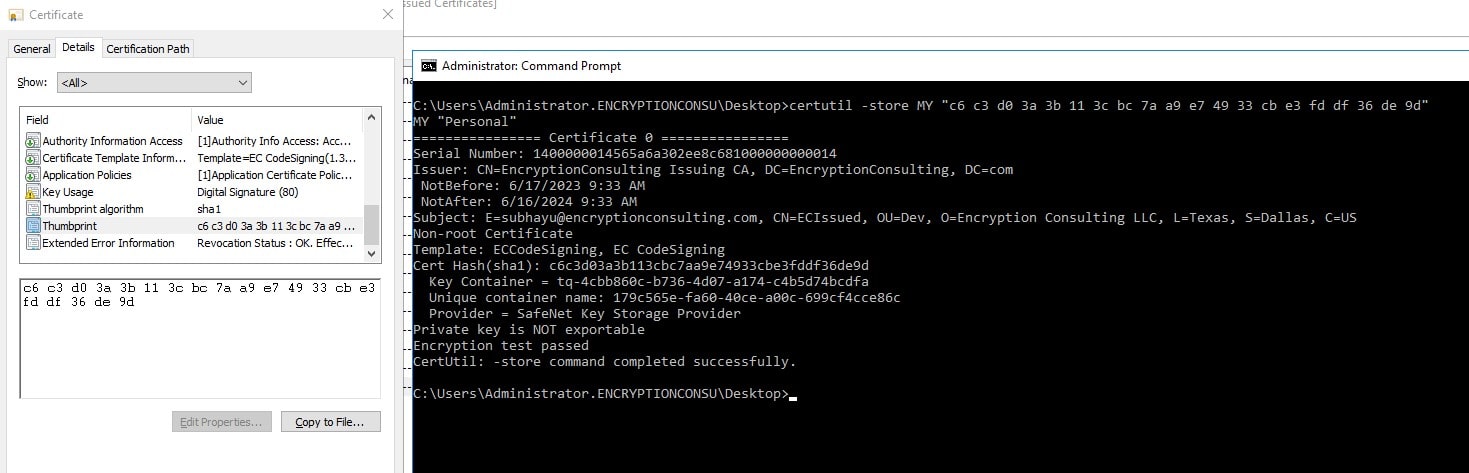
Who Owns the Private Key This CSR Generates?
The private key generated alongside a Luna Cloud HSM CSR belongs to the HSM partition it was created in, not to the individual who ran certreq. In practice, that means three roles need to be assigned and kept separate: a partition owner (usually the PKI or HSM services team) who controls which applications and users can reach the partition; an application or service owner who consumes the resulting certificate and is accountable for renewing it before expiry; and an HSM administrator who manages the partition’s crypto officer and crypto user roles but does not necessarily have visibility into what certificates the partition is being used for. Document that ownership in your CP/CPS or key management policy before generating production keys, not after an incident forces the question.
When Should You Rotate the Certificate This CSR Produces?
Rotate the certificate, and generate a fresh CSR against a new key pair, on whichever of these triggers comes first: the CA/Browser Forum validity ceiling, a compromise or suspected compromise of the key or the system it was bound to, a change in the subject the certificate identifies (a renamed service, a decommissioned host, a changed SAN list), or a scheduled cryptographic refresh tied to algorithm or key-length policy. Public TLS certificates are on a shrinking validity clock under CA/Browser Forum ballot SC-081v3: maximum validity drops to 200 days starting March 2026, 100 days starting March 2027, and 47 days starting March 2029. Manually running through the steps above every 47 days is not a plan; it is worth automating renewal against a Luna Cloud HSM backed CA through PKI-as-a-Service rather than repeating this workflow by hand on every cycle.
Who Should Be Allowed to Trigger CSR Generation?
CSR generation against an HSM partition should not be open to every server administrator who happens to have network access to the DPoD service client. Restrict it along three lines: partition-level access, so only the service accounts and named administrators registered against that specific HSM slot can request key generation; role separation, so the person who can create a new service client is not automatically the person who can approve the resulting certificate template on the CA; and change control, so a new CSR against a production partition goes through the same approval path as any other production key material request, not an ad hoc ticket. Where the certificate protects a root or issuing CA key rather than an end-entity service, treat CSR generation as part of a formal key ceremony with defined custodian roles, not a routine administrative task.
What Audit Evidence Should CSR Generation Produce?
Because CSR generation against Luna Cloud HSM creates a new private key inside a regulated cryptographic boundary, it should leave the same kind of evidence trail as a key ceremony, scaled to the risk of what the certificate protects. At minimum, retain the DPoD service client creation record, the identity of who registered the HSM slot and when, the request.inf content used (with the subject and key parameters it specified), the certreq output and resulting CSR file, the CA’s decision to issue against a specific template, and the final certificate’s thumbprint tied back to the issuing event. For anything feeding a SOC 2, PCI DSS, or ISO/IEC 27001 audit, that trail needs to be retrievable on demand and tied to a named individual, not just “someone on the PKI team.” Auditors reviewing HSM-backed key material consistently ask for this chain; missing pieces of it are one of the more common findings in PKI audits.
Software-Generated CSR vs. HSM-Generated CSR: How Do They Compare?
The CSR file that comes out of either path looks identical to a CA; the difference is entirely in where and how the private key exists before and after that file is created.
| Factor | Software-Generated CSR | HSM-Generated CSR (Luna Cloud HSM) |
|---|---|---|
| Where the private key exists | OS keystore or a file on disk | Inside a FIPS 140-3 validated hardware partition, non-exportable |
| Exposure to backup or file-copy exfiltration | Possible; the key file can be copied | Not possible; the key never leaves the module boundary |
| Setup effort | Low; a single OpenSSL or certreq command | Higher; requires a provisioned HSM partition, service client, and KSP registration |
| Typical use case | Internal test certificates, short-lived dev/test TLS, low-risk internal services | Public TLS on production domains, code signing keys, CA issuing and root keys, regulated environments |
| Compliance fit | Rarely sufficient alone for PCI DSS hardware key protection or CA/Browser Forum root/issuing key requirements | Meets hardware key protection requirements referenced by PCI DSS and CA/Browser Forum Baseline Requirements for CA keys |
| Audit trail | Limited to OS or application logs, if any | Partition-level logging tied to a named service client and slot registration |
As a rule of thumb: if the certificate’s compromise would let someone impersonate your organization, sign malicious code as you, or issue fraudulent downstream certificates, generate the CSR’s key pair in an HSM. If it is a disposable internal test certificate that will be replaced within days, software generation is a reasonable trade-off.
What Happens If a CSR or Private Key Is Mishandled?
A leaked CSR by itself is a minor exposure; it only contains public information. A leaked, copied, or improperly exported private key is a different severity of incident, because it lets someone else present themselves as the certificate’s legitimate holder. If a private key tied to a CSR generated through this process is suspected of exposure, the response follows the same shape as any key compromise: revoke the associated certificate with the CA immediately and request revocation status be published (CRL/OCSP), rotate to a newly generated key pair rather than reusing the compromised one, review the HSM partition’s access and slot registration logs to determine how the exposure happened, and notify any downstream systems or relying parties that trusted the revoked certificate. Because an HSM-generated key never exists outside the partition in the first place, the most common real-world “compromise” scenario for HSM-backed certificates is not key theft but a mishandled CSR request, template misconfiguration on the CA, or an over-permissioned service client, which is why the access policy and audit evidence controls above matter as much as the generation step itself.
Limitations
Luna Cloud HSM CSR generation is not a drop-in replacement for a five-minute OpenSSL command. It requires a provisioned DPoD tenant and partition, a correctly installed service client, and KSP registration before the first CSR can be generated, which adds real setup time on the first pass. Client platform support is also narrower than a general-purpose OpenSSL workflow: current Luna Cloud HSM clients target specific Linux and Windows Server versions rather than every OS a certificate might need to be issued from. A few practical issues also come up often enough to call out directly:
- KSP registration fails in Windows. This usually happens when Windows Update is missing a step that verifies the SafeNet DLLs are signed by a certificate chaining back to a trusted root. If the Luna client host has internet access, update the trust store manually with certutil, or transport the required root certificate to an air-gapped host and add it with certutil -addstore.
- The certificate template’s Subject is not showing on the issued certificate. This is usually a CA template configuration issue rather than an HSM issue; duplicate the relevant certificate template on the CA, set Key Usage and Enhanced Key Usage explicitly under the template’s Extensions tab, and reissue the template before requesting again.
- The private key does not appear attached to the certificate after issuance. Try a certutil repairstore pass against the certificate’s store before assuming the key was lost; in most cases the key is still present in the HSM partition and the local certificate store simply lost the association.
What Would Encryption Consulting Recommend?
Manually walking through service client installation, KSP registration, and request.inf files on every host is a reasonable way to learn how Luna Cloud HSM backed CSR generation works, but it does not scale past a handful of certificates, and it puts the audit evidence described above on individual administrators to collect and retain by hand. Two EC services close that gap directly. PKI-as-a-Service automates certificate enrollment, renewal, and revocation against an HSM-backed CA, so the manual CSR-then-certreq cycle above happens through policy-driven automation instead of a person repeating it every 47 to 200 days as validity periods shrink. HSM-as-a-Service handles the partition provisioning, high-availability configuration, and key custody controls that sit underneath Luna Cloud HSM, so the private key protection this article describes is managed to a defined SLA rather than configured once and left alone. Both are backed by EC’s ISO/IEC 27001:2022 and SOC 2 aligned operating practices, which is what most of the audit evidence questions above are really asking for in the first place.
If the immediate need is a one-off CSR rather than a full managed HSM, EC’s free CSR Generator and OpenSSL CSR and Certificate Decoder are useful starting points before committing to an HSM-backed workflow.
Frequently Asked Questions
Does the CA ever see the private key generated for a Luna Cloud HSM CSR?
No. Only the CSR, which contains the public key and subject information, is sent to the CA. The private key is generated inside the HSM partition and is never transmitted, exported, or visible to the CA at any point in the process.
Can Luna Cloud HSM generate CSRs for algorithms other than RSA?
Yes. The request.inf workflow shown above uses RSA because it remains the most common choice for TLS server certificates, but Luna Cloud HSM partitions support ECC key generation as well through the same PKCS#11, KSP, or JCE interfaces, depending on what the requesting application and CA template accept.
Is Luna Cloud HSM the same thing as a physical Luna Network HSM?
No. Luna Network HSM is Thales’s on-premises appliance; Luna Cloud HSM is the equivalent capability delivered as a service through Thales Data Protection on Demand. Both use the same underlying HSM technology and PKCS#11 interface, but Luna Cloud HSM removes the hardware procurement and data center management overhead.
Do I need a Luna Cloud HSM partition for every certificate, including internal test certificates?
No. HSM-backed generation is worth the setup overhead for certificates whose compromise carries real consequences, such as public TLS, code signing, and CA keys. Low-risk, short-lived internal test certificates are commonly generated in software instead, as covered in the comparison table above.
What happens to certificates already issued from a Luna Cloud HSM key when the partition is deleted?
Deleting the HSM partition removes the private key, which makes any certificate tied to that key permanently unusable for signing or decryption once the certificate itself expires or is revoked. Back up partition contents according to Thales’s documented backup procedures before deleting or migrating a partition, and revoke any certificates still relying on keys in a partition scheduled for deletion.
Conclusion
A CSR is what lets a Certificate Authority build a certificate around your public key without ever touching your private key. Generating that CSR using Luna Cloud HSM keeps the private key inside a FIPS 140-3 validated boundary from the moment it is created, which is why HSM-backed generation is the expected practice for public TLS, code signing, and CA keys rather than an optional hardening step. The mechanics, service client installation, KSP registration, request.inf configuration, and CA submission, are only half the picture. Ownership, rotation cadence against the CA/Browser Forum’s shrinking validity schedule, access control over who can trigger generation, and audit evidence retention are what turn a one-time technical exercise into a certificate program that survives an audit and an incident review.
References
- What Is a CSR and Why Does It Matter?
- Why Generate the CSR's Key Pair Inside an HSM Instead of in Software?
- Overview of Luna Cloud HSM by Thales: Features and Benefits
- How to Generate a CSR Using Luna Cloud HSM: Step-by-Step Process
- How Do You Get the CSR Signed and Installed?
- Who Owns the Private Key This CSR Generates?
- When Should You Rotate the Certificate This CSR Produces?
- Who Should Be Allowed to Trigger CSR Generation?
- What Audit Evidence Should CSR Generation Produce?
- Software-Generated CSR vs. HSM-Generated CSR: How Do They Compare?
- What Happens If a CSR or Private Key Is Mishandled?
- Limitations
- What Would Encryption Consulting Recommend?
- Frequently Asked Questions
- Conclusion