- Quick Answer: What Is SFTP, and When Should You Use It?
- What Is SFTP, and How Is It Different From FTP and FTPS?
- How Does an SFTP Session Authenticate and Encrypt a Transfer?
- Which Algorithms Should You Use for SFTP Today?
- What Is the Threat Model for an SFTP Deployment?
- What Are the Performance and Interoperability Trade-offs?
- What Are the Key Management Dependencies for SFTP at Scale?
- Numbered Workflow: Deploying an SFTP Server the Right Way
- What Are the Limitations of SFTP?
- Decision Table: SFTP vs. FTPS vs. Managed File Transfer
- Our Recommendation
- Conclusion
- Frequently Asked Questions
Every file transfer method that touches sensitive data eventually gets evaluated against the same question: does this protect the file in transit as well as it protects the file at rest? SFTP, the SSH File Transfer Protocol, is one of the few answers to that question that has held up for over two decades without a fundamental redesign. It is not, despite the name, an encrypted version of FTP; it is a completely different protocol that happens to solve the same problem FTP was built for.
This guide covers what SFTP actually is and how it differs from FTP and FTPS, how an SFTP session authenticates and encrypts a transfer, which algorithms and key types you should be running today, the threat model around an exposed SFTP server, the performance and interoperability trade-offs against other transfer methods, the key management work SFTP depends on but does not do for you, a concrete deployment walkthrough, and where SFTP falls short on its own.
Quick Answer: What Is SFTP, and When Should You Use It?
SFTP is a file transfer protocol that runs entirely inside an encrypted SSH connection, giving you authenticated, confidential file transfer over a single TCP port without the separate control and data channels that make FTP and FTPS harder to secure and to route through a firewall. It matters because any organization still using plain FTP is sending file contents and credentials in cleartext, and any organization using FTPS is managing a more firewall-hostile, certificate-dependent alternative for the same result SFTP gives with one open port. The recommended action is to standardize on SFTP for server-to-server and automated file exchange wherever both endpoints support SSH, reserve FTPS only for the (increasingly rare) partners who cannot support SFTP, and retire plain FTP entirely.
What Is SFTP, and How Is It Different From FTP and FTPS?
SFTP is not FTP running over an encrypted tunnel. It is a distinct protocol, designed from the ground up by the IETF’s SECSH working group as a subsystem of SSH version 2, sharing none of FTP’s wire format or command set. It runs at the application layer, on top of the encrypted, authenticated transport that SSH itself provides, which is why an SFTP session is really just an SSH session with a file-transfer channel multiplexed inside it. Despite years of development, SFTP was never finalized as an RFC; the most recent Internet-Draft, draft-ietf-secsh-filexfer-13, is the closest thing to a formal specification, and it is what nearly every SFTP client and server, including OpenSSH’s, implements in practice.
SFTP vs. FTPS: Ports and Firewall Behavior
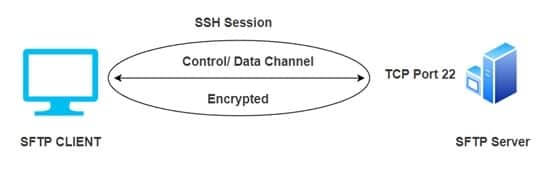
FTPS is FTP with TLS added on top, and it inherits FTP’s two-channel design: a control connection on port 21 (explicit FTPS) or port 990 (implicit FTPS), plus a separate data connection negotiated dynamically from a configurable passive port range. Because the control channel is encrypted, a firewall cannot read the negotiation to open the matching data port automatically the way it can with plaintext FTP, so administrators have to manually align passive port ranges on both the server and the firewall, a common source of “login succeeds, transfer hangs” support tickets. SFTP avoids this entirely: authentication, directory listing, and file transfer all happen inside the single SSH connection on port 22, so a firewall only needs one rule.
SFTP vs. Plain FTP: Why Cleartext FTP Should Be Retired
Plain FTP sends usernames, passwords, and file contents in cleartext, which means anyone positioned on the network path, a compromised switch, a rogue access point, an intermediate ISP, can read or capture everything in the session with no active attack required. There is no legitimate reason left to run plain FTP for anything touching real credentials or data; the only justification that still holds up is transferring genuinely public, non-sensitive files where confidentiality was never a requirement in the first place.
How Does an SFTP Session Authenticate and Encrypt a Transfer?
Authentication Methods: Password, Public Key, and Certificates
SFTP inherits its authentication options directly from SSH. A client can authenticate with a username and password, with a public/private key pair, where the server holds only the public key and the client proves possession of the private key through a signed challenge, or with an SSH certificate signed by a trusted certificate authority, which lets an organization grant and revoke access without touching every server’s authorized-keys file individually. For any automated or unattended transfer, public key or certificate authentication is the only option that avoids storing a plaintext password in a script or configuration file.
What Happens During an SFTP Connection
- The client opens a TCP connection to the server, typically on port 22.
- The SSH transport layer negotiates a key exchange algorithm, a cipher, and a MAC, then derives a shared session key.
- The client verifies the server’s host key against a known-hosts record; on first connection with no prior record, most clients prompt to trust the key on sight, which is a real risk covered in the threat model below.
- The client authenticates with a password, a key pair, or a certificate.
- The client requests the SFTP subsystem, opening a dedicated channel inside the already-encrypted SSH session.
- File operations, listing, uploading, downloading, renaming, deleting, all pass as binary SFTP protocol messages over that channel.
Every part of this exchange after the initial TCP connection happens inside SSH’s own encryption. There is no separate SSL or TLS layer involved at any point, which is the source of a common mix-up: SFTP is secured by SSH, not SSL. FTPS is the protocol that uses SSL/TLS.
Which Algorithms Should You Use for SFTP Today?
Because SFTP’s security is entirely inherited from SSH, algorithm selection is an SSH server configuration question, not an SFTP-specific one. For a modern OpenSSH deployment, that means key exchange limited to curve25519-sha256 and the ECDH curves, ciphers limited to chacha20-poly1305 and the AES-GCM or AES-CTR modes, and MACs limited to the ETM (encrypt-then-MAC) variants of HMAC-SHA2. Legacy algorithms such as diffie-hellman-group1-sha1, arcfour, and CBC-mode ciphers should be disabled outright; they exist in older configurations for backward compatibility with clients that should themselves be retired.
Host and user key type matters just as much as the negotiated session algorithms. Ed25519 is the current default recommendation for new SSH keys, RSA at 4096 bits remains the fallback where a client cannot support Ed25519, and ECDSA is generally not recommended for newly generated keys. DSA keys are deprecated and disabled outright in modern OpenSSH. Our guide on comparing SSH key algorithms covers the security and performance trade-offs between RSA, ECDSA, and Ed25519 in more depth.
What Is the Threat Model for an SFTP Deployment?
- Unverified host keys: a client that accepts a server’s host key on first connection without out-of-band verification has no protection against a man-in-the-middle substituting a different server on that first connection.
- Key sprawl: SSH key pairs accumulate across servers, scripts, and CI/CD pipelines with no central inventory, so a compromised workstation or repository can expose a private key with access to production file transfer far longer than anyone expects.
- Credential stuffing and brute force: an SFTP server exposed to the internet on port 22 is a constant target for automated password-guessing, which is a strong argument for disabling password authentication entirely once key or certificate-based access is in place.
- Legacy algorithm downgrade: a server still offering deprecated key exchange or cipher options can be forced into a weaker negotiation by a client, or an attacker, that only supports those options.
- Overly broad shell access: an SFTP account that also has a full interactive shell gives an attacker far more than file transfer if the credential is compromised; restricting the account to the SFTP subsystem alone limits the blast radius.
Most of these risks are key lifecycle problems rather than protocol weaknesses. Our guide on SSH key management covers the governance side of this in detail.
What Are the Performance and Interoperability Trade-offs?
SFTP’s single-connection design is its biggest interoperability advantage and its most common performance criticism. Because everything multiplexes over one channel, a single SFTP session historically processed requests somewhat more conservatively than FTPS’s ability to open multiple parallel data connections for very large or very numerous files; modern SFTP clients and servers close most of this gap with request pipelining, issuing multiple read or write requests without waiting for each response, but a naive or older SFTP client that waits for each acknowledgment before sending the next request will move data noticeably slower than a well-tuned FTPS transfer using parallel streams. On interoperability, SFTP’s dependency on SSH is generally an advantage, since SSH clients and servers are near-universal on Linux and Unix systems and well supported on Windows, but it does mean any legacy system that only speaks plain FTP or a proprietary transfer protocol will need a gateway or a client upgrade rather than a simple configuration change.
What Are the Key Management Dependencies for SFTP at Scale?
SFTP’s security model assumes something it does not itself provide: disciplined key management. That includes generating keys with approved algorithms and sizes, storing private keys in hardware-backed storage rather than flat files on disk wherever the risk warrants it, rotating keys on a defined schedule rather than leaving them valid indefinitely, maintaining a central inventory of which key has access to which server so an offboarded employee or decommissioned integration cannot leave a live credential behind, and verifying host keys through a trusted out-of-band channel before first connection rather than accepting them on faith. None of this is enforced by the SFTP protocol itself; it depends entirely on the operational process around it. Encryption Consulting’s SSH Secure is built specifically to manage this lifecycle, from discovery of existing keys to automated rotation and centralized policy enforcement.
Numbered Workflow: Deploying an SFTP Server the Right Way
As a concrete example, here is how a finance team might stand up an automated, key-based SFTP exchange with an external reporting partner, rather than a manual, password-based one.
- Generate a dedicated Ed25519 key pair for the integration, separate from any individual employee’s personal key.
- Create a service account on the SFTP server restricted to the SFTP subsystem, with no interactive shell, chrooted to a directory containing only the files this partner is authorized to see.
- Install the public key in that account’s authorized-keys file and disable password authentication for the account entirely.
- Configure the server’s allowed key exchange, cipher, and MAC lists to the modern set described above, and confirm the partner’s client supports them before cutover.
- Share the server’s host key fingerprint with the partner through a verified, out-of-band channel, not the same email thread carrying the private key or credentials.
- Point the partner’s automated job at the service account using the private key, with no password fallback configured anywhere in the script.
- Enable logging on both sides and alert on authentication failures, unexpected source IPs, and any attempted shell access on the service account.
- Put the key on a rotation schedule and record it in a central inventory so it is not forgotten when the integration eventually changes owners.
What Are the Limitations of SFTP?
- No built-in content inspection: SFTP transfers a file securely but does not scan it for malware or sensitive data; that has to come from a separate control in front of or behind the transfer.
- Client feature variance: because SFTP was never finalized as an RFC, resume behavior, extension support, and error handling differ slightly between client and server implementations, which occasionally surfaces as compatibility issues between older and newer software.
- Trust-on-first-use risk: if host keys are not pre-provisioned and verified out of band, the first connection to a new server carries a real, if often overlooked, man-in-the-middle risk.
- Single-connection throughput ceiling: a single SFTP session on an unoptimized client can move data more slowly than a multi-stream transfer method for very large files, unless the client supports request pipelining or the transfer is parallelized across multiple SFTP sessions.
- It is not a substitute for key governance: SFTP is only as secure as the keys and accounts behind it; a well-configured server with poorly managed keys is still a significant exposure.
Decision Table: SFTP vs. FTPS vs. Managed File Transfer
| Situation | Recommended approach |
|---|---|
| Both endpoints support SSH and a single firewall rule is preferred | SFTP with key or certificate-based authentication |
| A partner’s platform only supports FTP over TLS | FTPS, with passive port ranges explicitly aligned between server and firewall |
| Only genuinely public, non-sensitive files are being shared | Plain FTP is technically usable, but SFTP costs little extra and removes the exception entirely |
| Dozens of partners need governed, auditable, revocable access at scale | A managed file transfer platform layered on top of SFTP, with centralized key and certificate lifecycle management |
| An automated job currently uses a stored plaintext password | Migrate to Ed25519 key-based or certificate-based authentication before anything else |
| Very large files need maximum throughput over a high-latency link | Use a pipelining-capable SFTP client, or parallelize across multiple SFTP sessions, rather than switching to FTPS purely for speed |
Our Recommendation
Standardize on SFTP with certificate-based or key-based authentication for anything automated, and treat password authentication as a temporary state you are actively migrating away from, not a steady-state configuration. The protocol itself has been solid for over two decades; nearly every real-world SFTP incident traces back to key management, not to a flaw in SFTP. That means the highest-leverage work is rarely the SFTP server configuration itself: it is knowing which keys exist, where they live, who they grant access to, and whether they are still needed. Encryption Consulting’s SSH Secure handles exactly that discovery, rotation, and governance layer, and our SSH key management guide is a good next read if that inventory does not already exist in your environment.
Conclusion
SFTP earns its place as the default choice for secure file transfer by doing one thing well: moving files over a single, strongly authenticated, encrypted connection without the operational overhead FTPS inherits from FTP’s two-channel design. It is not a magic fix for file security on its own, since it depends entirely on the algorithm choices and key management discipline behind it, but it removes an entire category of exposure that plain FTP still carries. For teams that also work with SSH beyond file transfer, our overview of everything you need to know about SSH and our comparison of Secure Copy Protocol (SCP), another SSH-based transfer method with its own trade-offs, are both useful next steps.
Frequently Asked Questions
Is SFTP the same as FTPS?
No. SFTP is a distinct protocol built on SSH that uses a single port and connection for everything. FTPS is standard FTP with TLS encryption added, keeping FTP’s separate control and data channels, which is why it needs more firewall configuration than SFTP.
Does SFTP encrypt data at rest or only in transit?
Only in transit. SFTP protects a file while it moves between client and server; once the file lands on disk at either end, it is stored in whatever format it arrived in unless a separate encryption-at-rest control, such as full-disk encryption or file-level encryption, is applied.
What port does SFTP use, and can it be changed?
SFTP runs over SSH, which defaults to TCP port 22. The port can be changed in the SSH server configuration, and some organizations do so to reduce automated scanning noise, but this is obscurity, not a security control on its own, and should not replace proper authentication and algorithm hardening.
Can SFTP be automated without storing a password?
Yes, and it should be. Key-based or certificate-based authentication lets an automated job connect without a password ever appearing in a script or configuration file, which is the standard approach for any unattended SFTP transfer.
Is plain FTP ever still acceptable?
Only for transferring files that were never sensitive in the first place and where credentials are not meaningfully protected either way. For anything involving personal data, financial information, or business-confidential files, plain FTP’s cleartext transmission makes it unsuitable, and SFTP is the direct replacement.
- Quick Answer: What Is SFTP, and When Should You Use It?
- What Is SFTP, and How Is It Different From FTP and FTPS?
- How Does an SFTP Session Authenticate and Encrypt a Transfer?
- Which Algorithms Should You Use for SFTP Today?
- What Is the Threat Model for an SFTP Deployment?
- What Are the Performance and Interoperability Trade-offs?
- What Are the Key Management Dependencies for SFTP at Scale?
- Numbered Workflow: Deploying an SFTP Server the Right Way
- What Are the Limitations of SFTP?
- Decision Table: SFTP vs. FTPS vs. Managed File Transfer
- Our Recommendation
- Conclusion
- Frequently Asked Questions