

- Key Takeaways
- Prerequisites Before You Automate IIS Certificate Renewal
- Step-by-Step: Automating IIS Certificate Renewal with CertSecure Manager
- Manual vs. Automated IIS Certificate Renewal
- IIS Certificate Renewal by the Numbers
- Who Owns This: Team Responsibility and Action Matrix
- Rollback Guidance and Common Errors
- Success Metrics to Track After Implementation
- Multi-Cloud and Hybrid PKI Considerations
- Beyond Renewal: Crypto-Agility for the 47-Day Era
- How Can Encryption Consulting Help?
- What to Do Next
- Conclusion
- Frequently Asked Questions
Quick answer: Automating IIS certificate renewal means installing CertSecure Manager’s IIS Renewal Agent on the same Windows server that runs IIS, so the agent requests, issues, and binds each new certificate automatically before the old one expires, eliminating the manual steps that cause most certificate-related outages. This guide covers prerequisites, the exact configuration steps, what to do if a renewal fails, and the metrics worth tracking once automation is running.
Manual renewal was already tedious at a 398-day certificate lifetime. It is not viable at all once the CA/Browser Forum’s phased reduction reaches 47 days in 2029. Utilizing an agent-based approach, CertSecure Manager fully automates the request, issuance, renewal, and deployment of IIS certificates, so renewal stops depending on someone remembering a deadline.
Key Takeaways
- CertSecure Manager’s IIS Renewal Agent automates certificate request, issuance, renewal, and IIS binding updates, so renewals no longer depend on someone remembering a deadline.
- The CA/Browser Forum’s phased reduction caps new public TLS certificates at 200 days starting March 15, 2026, dropping to 100 days in March 2027 and 47 days by March 15, 2029.
- 45% of enterprises reported downtime from certificate-related incidents in the past year, and 37.5% traced that downtime to expired certificates (DigiCert Trust Pulse Survey, July 2, 2025).
- 76% of organizations had at least one certificate-related outage in 2025, averaging roughly $540,000 per incident once revenue loss, emergency labor, and remediation are counted (Start With Identity, February 2026).
- The same renewal-agent model extends beyond IIS to NGINX, Apache, and F5, and shorter certificate lifecycles create more frequent, low-disruption windows to roll in quantum-resistant algorithms.
Prerequisites Before You Automate IIS Certificate Renewal
Confirm each of the following before installing the IIS Renewal Agent. Skipping one of these is the most common reason a first configuration attempt stalls.
| Prerequisite | Why It’s Needed | Action |
|---|---|---|
| CertSecure Manager admin account | Required to configure the CA, template, and agent settings | Confirm login access to the CertSecure Manager frontend |
| IIS Renewal Agent installed on the IIS host | The agent performs CSR generation, issuance, and binding updates locally | Download the agent zip from the CertSecure Manager frontend and follow the bundled readme file |
| Reachable certificate authority | The agent submits renewal requests to the configured CA | Confirm outbound connectivity from the IIS host to the CA, internal or public |
| Certificate template defined | Renewal requests need a template with the correct key usage and validity period | Create or confirm the template in CertSecure Manager before configuring the agent |
| Service account permissions | The agent runs as a Windows Service and needs rights to update IIS bindings | Run the agent under an account with local admin rights on the IIS server |
| Network path to CertSecure Manager | The agent reports task status back to the CertSecure Manager server | Confirm firewall rules allow agent-to-server traffic, especially for cloud or hybrid IIS hosts |
Step-by-Step: Automating IIS Certificate Renewal with CertSecure Manager
The renewal agent can be downloaded from the CertSecure Manager frontend. The readme file, which covers installation, comes bundled with the downloaded zip file. Once the agent is installed, you can manage it from the Windows Services console. Complete the prerequisites above first, then follow the five steps below.
Step 1: Open the Agents Console and Confirm Agent Status
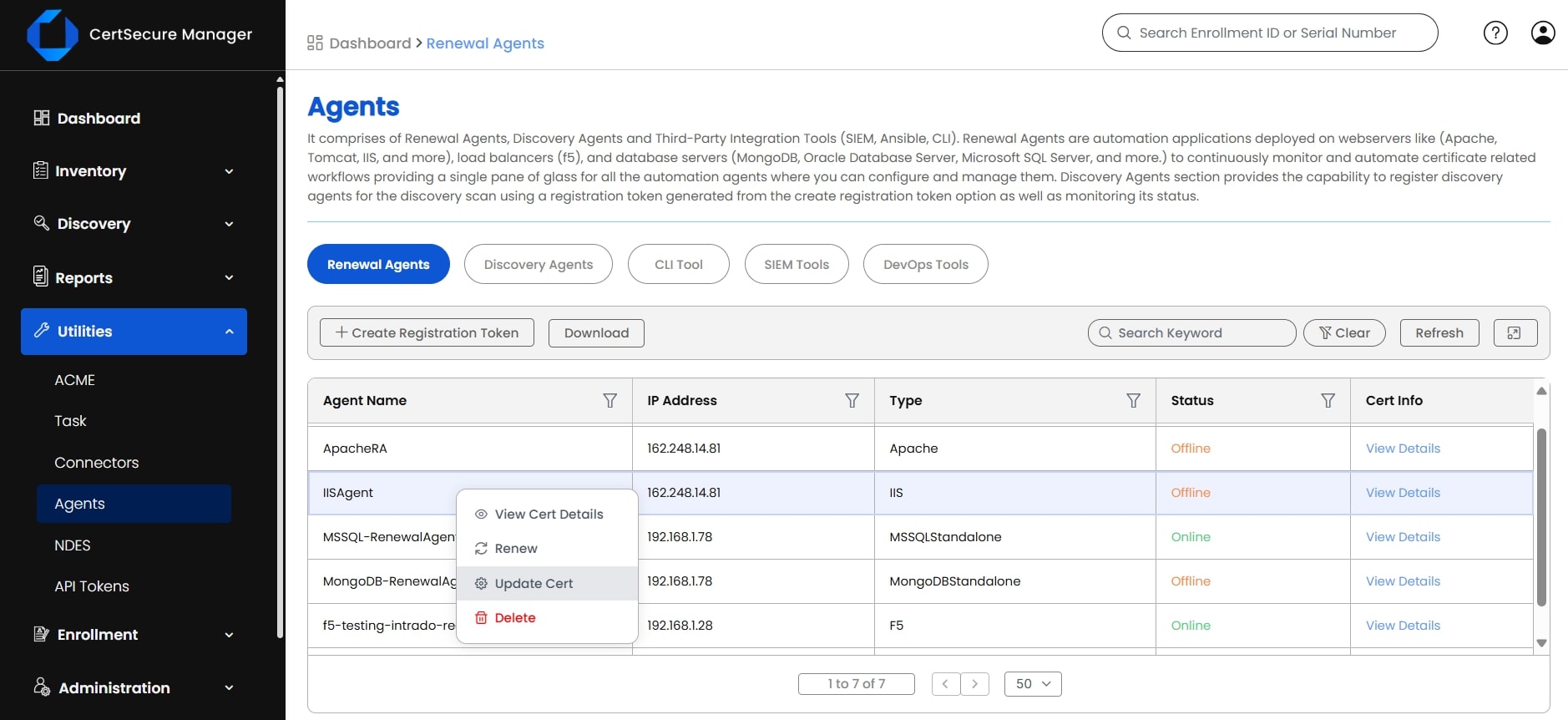
Log in to CertSecure Manager and go to Utilities, then Agents. Confirm the status of the IIS Renewal Agent, then right-click it and select Update Cert.
Step 2: Configure the Certificate Authority and Template, Then Save
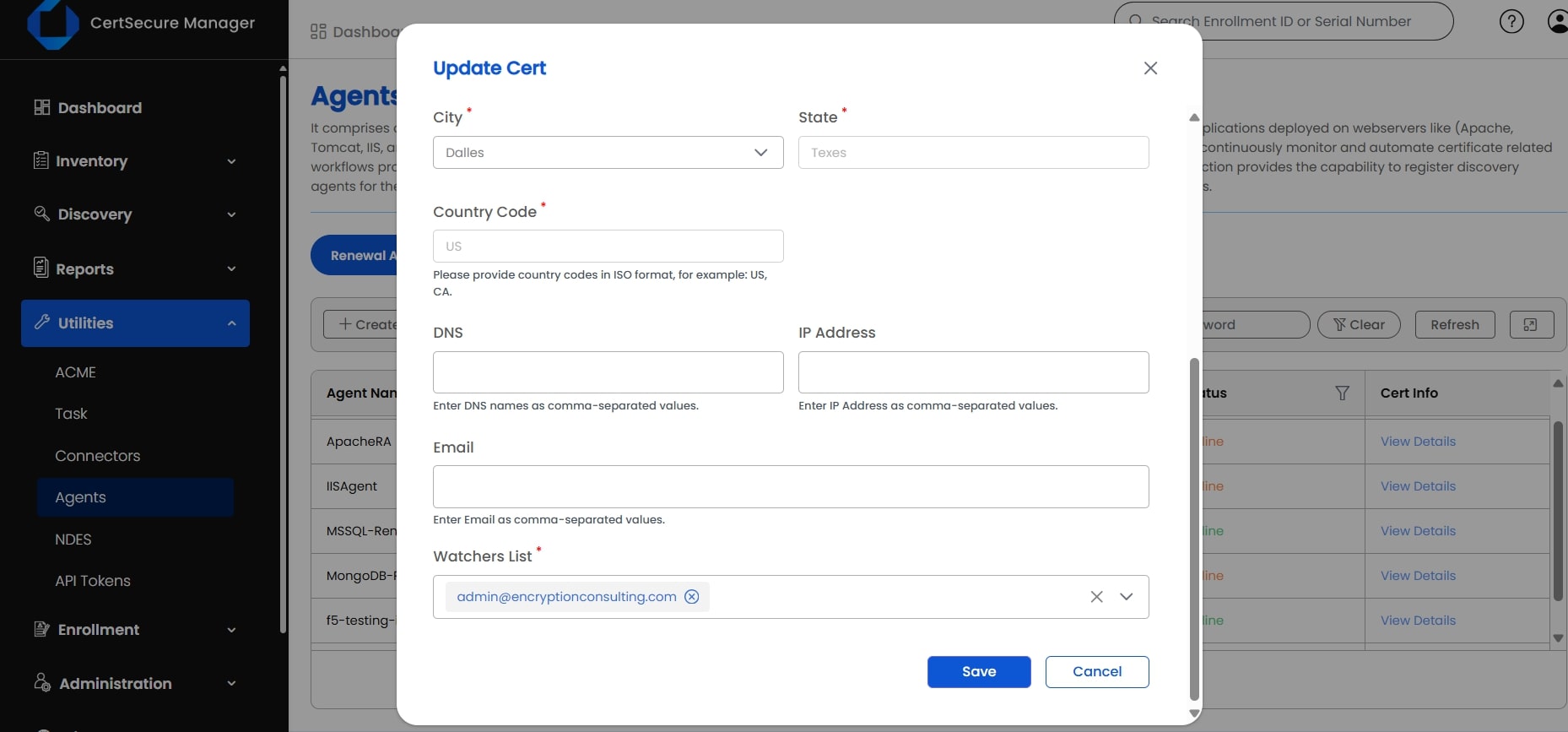
Choose the certificate authority, the certificate template, and any other required information, then click Save.
Step 3: Trigger the Renewal
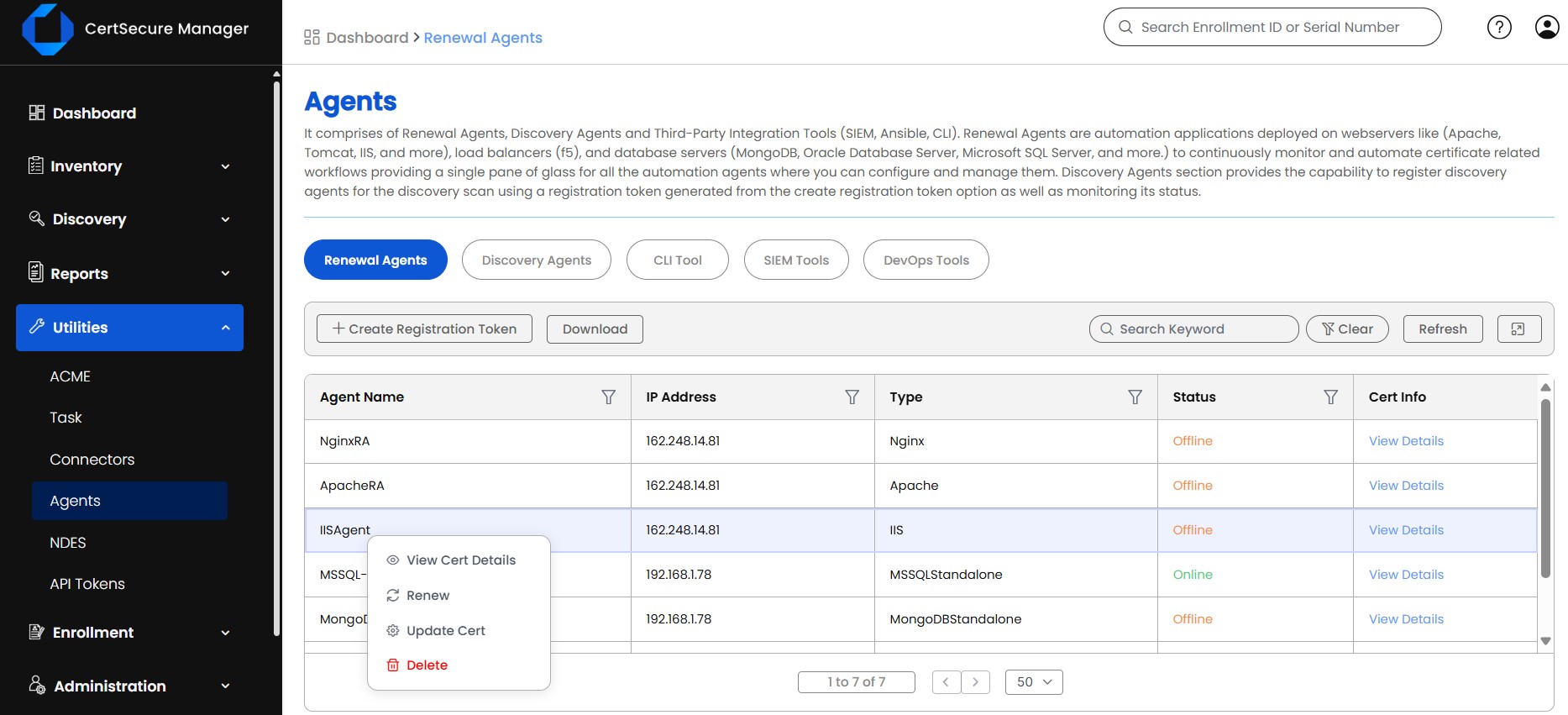
Right-click the agent again, select Renew, and confirm to trigger the renewal.
Step 4: Monitor the Renewal Task
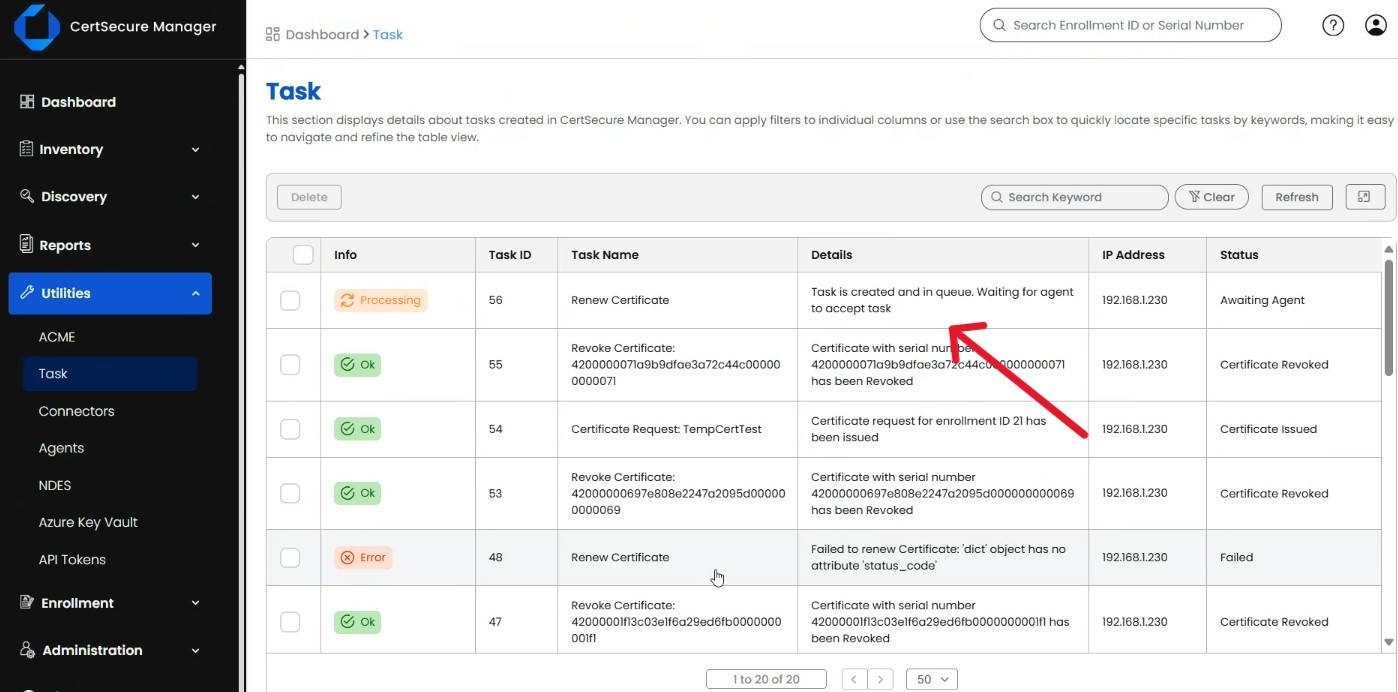
Go to Utilities, then Tasks, to monitor the renewal as it processes and confirm it completes.
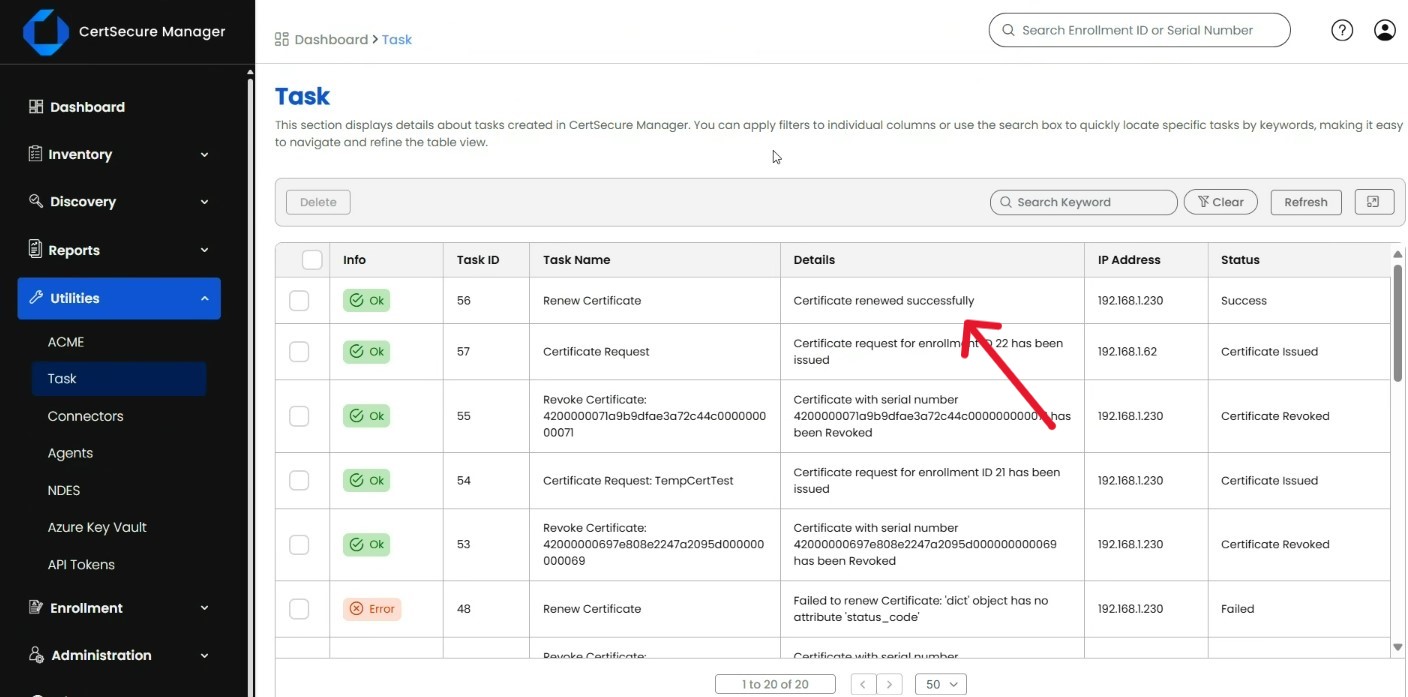
Step 5: Verify the Certificate and Check Logs if Renewal Fails
Once renewal succeeds, visit the corresponding website in your browser and confirm the certificate details. If renewal fails, check the renewal agent log file, which by default is located at the path below.
C:\CertSecure\logs\EC_IIS_RenewalAgent.logOn the IIS host itself, you can confirm which certificate is currently bound to a site from an elevated command prompt:
%windir%\system32\inetsrv\appcmd.exe list sslcertManual vs. Automated IIS Certificate Renewal
Before automation, renewing an IIS certificate means manually generating a CSR, submitting it to the CA, waiting on issuance, and updating the IIS binding by hand, roughly 30 to 60 minutes per binding, repeated every renewal cycle. After automation, the same renewal is a right-click trigger that the agent completes and logs on its own. Here is how the two approaches compare as the validity window keeps shrinking.
| Aspect | Manual Renewal | Automated Renewal (IIS Renewal Agent) |
|---|---|---|
| Time per certificate | 30-60+ minutes per binding, repeated every renewal cycle | Minutes to trigger; the agent handles CSR generation, issuance, and the IIS binding update |
| Risk of a missed renewal | High, and rises as validity windows shrink toward 47 days | Low; renewals are agent-monitored with task-level status tracking |
| Readiness for the 47-day era (2029) | Unsustainable at scale once renewals recur roughly every six weeks | Built for high-frequency reissuance without added staff time |
| Visibility across servers | Spreadsheets, calendar reminders, or tribal knowledge | Centralized view under CertSecure Manager’s Agents and Tasks screens |
| Audit and compliance evidence | Reconstructed after the fact, if at all | Task history and logs available on demand |
| Coverage beyond IIS | A separate manual process per server type | The same agent model extends to NGINX, Apache, and F5 |
IIS Certificate Renewal by the Numbers
Manual renewal is not just tedious. The data shows it is a measurable source of outages and cost across enterprise IT.
- Downtime from certificate incidents: 45% of enterprises experienced downtime from certificate-related incidents in the past year, and 37.5% of that downtime was traced directly to expired certificates (DigiCert Trust Pulse Survey, published July 2, 2025).
- Cost per outage: 76% of organizations experienced at least one certificate-related outage in 2025, at an average cost of roughly $540,000 per incident once lost revenue, emergency labor, and remediation are counted (Start With Identity machine identity analysis, published February 8, 2026).
- Reader engagement: this guide has drawn more than 2,800 reads from IT and PKI teams (Encryption Consulting internal analytics, Q3 2026), which tracks with how often IIS certificate renewal trips up teams running otherwise mature environments.
None of that is surprising once you factor in where TLS certificate validity is headed. As of March 15, 2026, the CA/Browser Forum caps newly issued public TLS certificates at 200 days (CA/Browser Forum Ballot SC-081v3, Sectigo, April 14, 2025). That maximum drops to 100 days on March 15, 2027, and to 47 days on March 15, 2029, the point most vendors mean when they talk about the “47-day certificate” era. Certificates issued before each cutoff keep their original validity until they expire naturally, but every renewal after that date follows the shorter window. At a 47-day cadence, manually walking through the steps above roughly every six weeks, per server, is not a plan; it is a guarantee that something eventually gets missed.
Who Owns This: Team Responsibility and Action Matrix
IIS certificate renewal automation touches more than one team. Use this matrix to assign ownership before you start configuring the agent.
| Team | Primary Responsibility | Action During Rollout |
|---|---|---|
| PKI team | Owns CA connections, certificate templates, and trust chain validity | Configure the agent’s CA and template settings in Utilities > Agents |
| Security team | Defines automation as policy and tracks certificate-related risk | Review the Tasks queue and investigate any renewal failures for security implications |
| Platform / infrastructure team | Installs and maintains the renewal agent on IIS hosts | Install the IIS Renewal Agent, confirm the Windows Service is running, and manage service account permissions |
| Compliance team | Confirms auditability against internal and regulatory requirements | Pull Task history as renewal evidence and track alignment to CA/Browser Forum deadlines |
Rollback Guidance and Common Errors
Rollback Guidance
If a renewal fails partway through, the existing certificate stays bound to the site until it is explicitly replaced, so a failed task does not usually take the site down on its own. If a renewal completes but the new certificate causes an unexpected problem (a broken chain, a mismatched template, or a binding pointed at the wrong site), revert the IIS binding to the previous certificate while you investigate, then re-run the renewal once the underlying cause in CertSecure Manager is corrected.
- Check Utilities > Tasks for the failure reason before taking any manual action.
- If needed, re-bind the prior certificate in IIS Manager so the site stays reachable while you troubleshoot.
- Fix the root cause (CA connectivity, template, or permissions) in CertSecure Manager before triggering Renew again.
- Confirm the site in a browser after re-running the renewal, the same verification step used in Step 5 above.
Common Errors and Fixes
- CA connectivity timeout: confirm the IIS host can reach the certificate authority over the network; check firewall and proxy rules, especially in cloud or hybrid environments.
- Misconfigured template: verify the certificate template selected in Step 2 matches the key usage and validity period the CA expects.
- Pending CA approval: some CAs require manual approval of a submitted request; check the CA console if a task stays queued longer than expected.
- Permission errors on the IIS binding update: confirm the Windows Service account running the agent has local admin rights on the IIS server.
- Agent service stopped: check the Windows Services console for the renewal agent’s status if it stops appearing in Utilities > Agents.
Most failures trace back to CA connectivity, a misconfigured template, or an approval step still pending on the CA side, and the log at C:\CertSecure\logs\EC_IIS_RenewalAgent.log records the exact failure point.
Success Metrics to Track After Implementation
Review these on a quarterly cadence, and immediately after any CA/Browser Forum, browser, or CertSecure Manager release change:
- Certificate-related downtime incidents: trending toward zero after automation is in place.
- Mean time to renew per certificate: compare the 30-60 minute manual baseline against the automated trigger-and-monitor time.
- Agent coverage: number of IIS certificates managed by the renewal agent against total IIS certificate inventory.
- Renewal task failure rate: pulled from Utilities > Tasks.
- Manual renewal tickets: reduction in IT or security tickets logged for certificate renewal after rollout.
Note: Encryption Consulting does not yet have a published first-party figure for renewal time saved, certificates under management, or ticket reduction specific to this workflow. Track the metrics above internally and add a dated, quarter-specific figure once available; this is flagged for follow-up rather than estimated here.
Multi-Cloud and Hybrid PKI Considerations
The agent-per-host model works the same way whether IIS runs on-premises, in Azure, AWS, or another cloud. A few things to plan for in multi-cloud or hybrid environments:
- Network path: confirm firewall, NSG, or security group rules allow the agent to reach the CertSecure Manager server and the configured CA across VPC or VNet boundaries.
- CA reachability: a private CA behind a VPN or a public CA reachable over the internet both work, but the network path needs to be confirmed per environment rather than assumed.
- Centralized visibility: point every agent, on-premises and cloud, at the same CertSecure Manager instance so Utilities > Agents and Tasks give one inventory view instead of siloed dashboards per cloud provider.
- Least-privilege service accounts: use a distinct service account per host rather than sharing credentials across on-prem and cloud IIS servers.
Beyond Renewal: Crypto-Agility for the 47-Day Era
Automating renewal solves the operational side of shorter certificate lifecycles, but it also creates an opening: every renewal is a chance to swap in stronger or quantum-resistant algorithms without a separate maintenance window. Taking advantage of that requires knowing which certificates, keys, and algorithms you actually have in production, which is what a cryptographic discovery and inventory platform like CBOM Secure is built for. See how that inventory work compounds over time in From CBOM Inventory to Intelligence.
Pair certificate discovery with Encryption Consulting’s PQC Center of Excellence and PQC readiness guidance, and the frequent, automated renewal cycle described above becomes the delivery mechanism for your post-quantum migration instead of a separate project competing for the same server maintenance windows.
How Can Encryption Consulting Help?
Encryption Consulting extends the power of CertSecure Manager by offering automated certificate renewal not just for IIS, but also for NGINX, Apache, and F5 environments. This reduces manual effort, eliminates configuration errors, and ensures secure certificate deployment across your infrastructure. With the CA/Browser Forum’s phased reduction already at 200 days and heading toward 47 days by March 2029, automation is no longer optional; it is essential for maintaining continuous operations.
Beyond automation, Encryption Consulting provides PKI-as-a-Service (PKIaaS) and expert PKI consulting to build, manage, and optimize secure, scalable PKI environments tailored to your needs: on-prem, hybrid, or cloud.
What to Do Next
- PKI team: confirm the CA and certificate template the renewal agent should use, and validate them against the prerequisites table above.
- Security team: add certificate-related downtime and renewal task failure rate to the metrics you already track for infrastructure risk.
- Platform team: install the IIS Renewal Agent on a non-production host first, walk through all five steps, and confirm the rollback path before rolling out broadly.
- Compliance team: confirm Task history retention meets your audit window, and map your renewal cadence against the March 2026, March 2027, and March 2029 CA/Browser Forum deadlines.
Conclusion
Automating certificate renewal for IIS using CertSecure Manager and its IIS Renewal Agent reduces manual effort while measurably improving the reliability and security of your web infrastructure. With prerequisites confirmed up front, a repeatable five-step configuration, and a clear rollback path, your certificates stay current with far less risk of an outage caused by an expired certificate. As TLS validity windows keep shrinking on the way to 47 days by 2029, that same renewal cadence also gives you a built-in checkpoint for rotating in stronger, quantum-resistant algorithms.
Frequently Asked Questions
What is the main takeaway from Automating IIS Certificate Renewal with CertSecure Manager?
The main takeaway is that manual IIS certificate renewal does not scale as TLS validity periods shrink toward 47 days by March 2029. CertSecure Manager’s IIS Renewal Agent automates certificate authority requests, issuance, and IIS binding updates, removing the recurring manual work that causes most certificate-related outages.
Why does this matter for enterprise certificate lifecycle management?
Enterprise certificate lifecycle management now has to account for renewal cycles as short as every six weeks. DigiCert’s July 2025 Trust Pulse survey found 45% of enterprises experienced certificate-related downtime in the past year, with 37.5% traced directly to expired certificates, making automation a lifecycle management requirement rather than a convenience.
What teams are responsible for acting on this guidance?
Four teams typically share responsibility: the PKI team owns certificate authority connections and templates, the platform or infrastructure team installs and maintains the renewal agent on IIS hosts, the security team monitors renewal tasks for risk, and the compliance team retains task logs as audit evidence.
What risks increase if this topic is handled manually?
Manual renewal raises the risk of missed deadlines, inconsistent IIS binding updates, and undocumented changes that fail an audit. As validity windows compress from 200 days to 100 days and eventually 47 days, a process that depends on someone remembering a date becomes a near-certain source of downtime.
How does automation reduce certificate outage risk?
The IIS Renewal Agent requests, issues, and binds each certificate through a monitored task rather than a manual checklist, so renewals happen on a consistent schedule with a visible status in Utilities and Tasks. That removes the single point of failure of one person forgetting a renewal date.
What metrics should teams track after implementation?
Track certificate-related downtime incidents, mean time to renew per certificate, the number of certificates covered by the renewal agent against total inventory, the renewal task failure rate in Utilities and Tasks, and the reduction in manually logged renewal tickets, reviewed on a quarterly cadence.
How does this connect to 47-day TLS certificate readiness?
The CA/Browser Forum’s phased schedule cuts maximum public TLS validity to 200 days in March 2026, 100 days in March 2027, and 47 days by March 2029. At a 47-day cadence, manual renewal per server becomes operationally impossible, so the automation built now is the same automation that will carry a team through the 47-day era.
How should this be handled in multi-cloud or hybrid PKI environments?
The renewal agent works the same way on any IIS host, whether it runs on-premises, in Azure, AWS, or another cloud, as long as the agent can reach the CertSecure Manager server and the configured certificate authority. Point every agent, on-prem and cloud, at the same CertSecure Manager instance to keep certificate visibility centralized instead of siloed per environment.
What prerequisites are needed before implementation?
Before configuring the agent, confirm admin access to CertSecure Manager, a certificate authority and template the agent can request against, network connectivity from the IIS host to both the CA and the CertSecure Manager server, and local admin rights for the service account running the agent.
What screenshots or configuration examples should be included?
A complete walkthrough should show the Utilities and Agents screen confirming agent status, the configuration dialog for selecting a certificate authority and template, the right-click Renew action, the Tasks screen showing renewal progress and completion, and the renewal agent log path used for troubleshooting failures.
- Key Takeaways
- Prerequisites Before You Automate IIS Certificate Renewal
- Step-by-Step: Automating IIS Certificate Renewal with CertSecure Manager
- Manual vs. Automated IIS Certificate Renewal
- IIS Certificate Renewal by the Numbers
- Who Owns This: Team Responsibility and Action Matrix
- Rollback Guidance and Common Errors
- Success Metrics to Track After Implementation
- Multi-Cloud and Hybrid PKI Considerations
- Beyond Renewal: Crypto-Agility for the 47-Day Era
- How Can Encryption Consulting Help?
- What to Do Next
- Conclusion
- Frequently Asked Questions
