

- Key Takeaways
- Prerequisites
- What Is CertSecure Manager?
- Step-by-Step Guide to Renew a Certificate on Apache Tomcat
- Before-and-After: Manual vs. Automated Renewal Workflow
- Owner and Action Matrix
- Rollback Guidance
- Common Errors and Troubleshooting
- Success Metrics to Track
- Why Manual Certificate Renewal Increases Enterprise Risk
- Multi-Cloud and Hybrid PKI Considerations
- How This Connects to PQC Readiness and Crypto Agility
- What to Do Next, by Team
- Conclusion
- Frequently Asked Questions
Quick answer: To renew a certificate on Apache Tomcat with CertSecure Manager, generate or reuse a CSR from CertSecure Manager’s enrollment console, request the certificate from the connected certificate authority, download the signed PFX, replace the keystore file referenced in server.xml, and restart Tomcat so the renewed certificate loads.
An Apache Tomcat certificate that expires unannounced can take a production application offline in minutes, and expired certificates are one of the most common causes of unplanned outages in enterprise environments. This article shows how to renew a certificate on a website running on Apache Tomcat while requesting the certificate from CertSecure Manager, and covers the manual, on-server steps needed to complete the renewal.
Key Takeaways
- Renewing a Tomcat certificate through CertSecure Manager still ends with a manual keystore swap and restart unless a Renewal Agent is deployed on the server.
- CertSecure Manager can generate the CSR, submit it to the connected CA, and produce a ready-to-deploy PFX, cutting most of the manual CA-interaction steps.
- A DigiCert survey published July 2, 2025 found that 45% of organizations experienced certificate-related downtime, and 37.5% traced it directly to expired certificates.
- Public TLS certificate validity is shrinking on a fixed CA/B Forum schedule: 200 days from March 2026, 100 days from March 2027, and 47 days from March 2029, so manual Tomcat renewals will need to happen far more often.
- Teams that automate renewal with Renewal Agents remove the recurring manual step this article walks through entirely.
Prerequisites
Confirm the following before starting the renewal:
- CertSecure Manager access: an account with enrollment permissions and a Certificate Authority already connected via a CA Connector.
- Server access: administrator or sudo-equivalent access to the Apache Tomcat host, and the file path to the existing keystore.
- Current configuration on hand: the existing
server.xmlconnector block, current keystore path, and keystore password (or a plan to rotate it). - Backup: a copy of the current keystore file and
server.xmltaken before making changes. - Maintenance window: Tomcat must restart to load the new certificate, so plan for a brief service interruption or a load-balanced failover.
- SAN and template details: confirm the Subject Alternative Names, key size, and certificate template the renewed certificate needs to match the original.
What Is CertSecure Manager?
CertSecure Manager by Encryption Consulting is a Certificate Lifecycle Management (CLM) solution built to address the challenges organizations face in managing complex PKI environments. As the number of digital certificates in an environment grows, tracking expiration dates and renewal windows by hand becomes unreliable. CertSecure Manager’s High-Availability (HA) architecture integrates public and private Certificate Authorities on one platform, whether the environment is multi-cloud, hybrid, or a mix of public and private CAs.
Renewal Agents let CertSecure Manager automate certificate renewals directly on IIS, Tomcat, and F5 load balancers, so certificates stay current without the manual steps this article describes. Its certificate discovery feature tracks every certificate deployed across an environment, regardless of where it was issued or installed, and ACME and REST API support lets application teams request and renew certificates programmatically.
Step-by-Step Guide to Renew a Certificate on Apache Tomcat
There are two ways to get a certificate for Apache Tomcat out of CertSecure Manager: generate a CSR directly inside the platform, or enroll a certificate from a CSR you already have. Either path removes most of the manual, back-and-forth steps normally required to acquire a certificate from a certificate authority (CA).
Follow these steps to renew a certificate from CertSecure Manager and deploy it on Apache Tomcat.
Open Generate Certificate in CertSecure Manager: Log in to CertSecure Manager and navigate to Generate Certificate under the Enrollment section on the left. This flow generates the certificate and downloads a PFX directly from CertSecure Manager, so a separate keystore or openssl step isn’t needed.
-
Select the CA, template, and SAN attributes: Choose the Certificate Authority, certificate template, Subject Alternative Name (SAN) entries, and any other required fields, then click Generate Certificate.
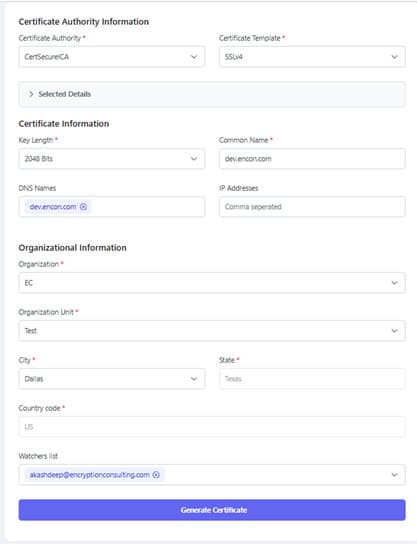
Generating a certificate for Apache Tomcat from the CertSecure Manager enrollment console. Locate and download the certificate: Go to Enrollment Inventory and find the new certificate (check the Tasks view if you need the enrollment ID). Download the PFX file, then move it to the Apache Tomcat server.
-
Replace the keystore and update server.xml if needed: Place the PFX file at the path where the current certificate and key are stored. If the path or password changes, update the keystore path and password in
server.xml. For example, if your Tomcat server keeps its PFX file on the C: drive, either place the new file at the same path or update thekeystoreFileandkeystorePassvalues to point at the new file. Restart Tomcat: Restart the Tomcat service so it loads the renewed certificate. Confirm the new expiration date in the browser or with an SSL check tool before closing the change.
Example: server.xml Keystore Configuration
A typical Tomcat HTTPS connector referencing a PFX keystore looks like this. Update keystoreFile and keystorePass to point at the renewed certificate:
<Connector port="8443" protocol="org.apache.coyote.http11.Http11NioProtocol"
           maxThreads="150" SSLEnabled="true">
    <SSLHostConfig>
        <Certificate certificateKeystoreFile="conf/renewed-cert.pfx"
                     certificateKeystorePassword="CHANGE_ME"
                     certificateKeystoreType="PKCS12" />
    </SSLHostConfig>
</Connector>Before-and-After: Manual vs. Automated Renewal Workflow
| Step | Manual renewal (this guide) | Automated with a Renewal Agent |
|---|---|---|
| CSR and enrollment | Generated in CertSecure Manager, manually submitted | Triggered automatically ahead of expiration |
| Certificate retrieval | Manually downloaded from Enrollment Inventory | Delivered directly to the server by the agent |
| Keystore replacement | Manually copied and, if needed, server.xml edited | Handled automatically by the agent |
| Service restart | Manually triggered, requires a maintenance window | Managed by the agent, minimal or zero downtime |
| Audit trail | Dependent on manual change records | Logged automatically in CertSecure Manager |
| Risk of missed renewal | Higher, depends on someone tracking the expiration date | Low, renewal is scheduled ahead of expiry |
Owner and Action Matrix
Certificate renewal on Tomcat touches more than one team. Use this matrix to assign the prerequisite work above to the right owner.
| Prerequisite / task | Owning team | Action |
|---|---|---|
| CA Connector and enrollment permissions | PKI team | Confirm CertSecure Manager is connected to the correct CA and the requester has enrollment rights |
| SAN, template, and key-size validation | Security team | Approve the certificate template and confirm it meets current policy |
| Server access, backup, and restart window | Platform / infrastructure team | Take a keystore and server.xml backup, schedule the restart window |
| Audit trail and evidence of renewal | Compliance team | Confirm the renewal is logged and retained for the next audit cycle |
| Rollback readiness | Platform / infrastructure team | Verify the previous keystore is restorable before starting |
Rollback Guidance
If the renewed certificate fails to load or breaks the connector, roll back before troubleshooting further:
- Stop the Tomcat service.
- Restore the backed-up keystore file and the original
server.xmlconnector block. - Restart Tomcat and confirm the site serves the previous, still-valid certificate.
- Re-check the SAN, template, and keystore password used in the failed attempt before retrying the renewal.
- If the original certificate is close to expiry, re-attempt the renewal in a maintenance window rather than leaving the rollback in place indefinitely.
Common Errors and Troubleshooting
| Symptom | Likely cause | Fix |
|---|---|---|
| Tomcat fails to start after restart | Incorrect keystore path or password in server.xml | Verify certificateKeystoreFile and certificateKeystorePassword match the new PFX |
| Browser still shows the old certificate | Load balancer or CDN caching the previous certificate | Clear the cache or update the certificate at the load balancer/CDN layer as well |
| SAN mismatch warning | New certificate template didn’t carry over all original SAN entries | Regenerate the CSR in CertSecure Manager with the full, current SAN list |
| Enrollment stuck in CertSecure Manager Tasks | CA Connector approval pending or CA-side validation delay | Check the CA Connector status and pending approvals in CertSecure Manager |
| PFX import fails | Wrong keystore type specified in server.xml | Confirm certificateKeystoreType is set to PKCS12 for a PFX file |
Success Metrics to Track
After implementing this workflow, track these metrics to confirm the renewal process is working and to build the case for moving to Renewal Agents:
- Mean time to renew: elapsed time from CSR generation to a live, renewed certificate on the server.
- Certificates renewed on time vs. expired unplanned: the count of renewals completed before expiry versus emergency, post-expiry fixes.
- Manual tickets tied to certificate renewal: number of help-desk or change tickets opened for Tomcat certificate work per quarter.
- Certificates under CertSecure Manager management: total count of Tomcat (and other) certificates tracked in the platform’s discovery inventory.
- Unplanned downtime incidents linked to certificates: tracked against the industry baseline, where a DigiCert survey published July 2, 2025 found 45% of organizations reported certificate-related downtime.
Encryption Consulting has not published a certificate-specific, quarter-dated benchmark (for example, renewal time saved or ticket-volume reduction) for CertSecure Manager deployments at the time of this update. If your team has internal before/after numbers from a CertSecure Manager rollout, add them here with the quarter they were measured, rather than relying on directional claims alone.
Why Manual Certificate Renewal Increases Enterprise Risk
Manual renewal, like the steps above, works, but it depends on someone remembering the expiration date, having the right access at the right time, and executing every step correctly under time pressure. That dependency is where outages come from. A DigiCert Trust Pulse survey published July 2, 2025 found that 45% of organizations experienced certificate-related downtime, and 37.5% of those outages were linked directly to expired certificates.
The risk window is also getting tighter. Under CA/B Forum Ballot SC-081v3, announced by Sectigo on April 14, 2025, maximum public TLS certificate validity drops to 200 days in March 2026, 100 days in March 2027, and 47 days by March 2029. A manual, Tomcat-by-Tomcat renewal process that’s manageable at a 398-day or one-year cadence becomes a recurring operational burden at 47 days, which is exactly why certificate automation and certificate discovery matter more with each phase of this schedule.
Multi-Cloud and Hybrid PKI Considerations
Tomcat instances rarely live in isolation. Enterprise environments often run Tomcat behind cloud load balancers, alongside on-premises AD CS, and across more than one public CA. CertSecure Manager’s HA architecture and CA Connectors are built for that reality: certificates issued from multiple public and private CAs are visible and manageable from a single console, and certificate discovery finds Tomcat and other certificates deployed across cloud, hybrid, and on-premises infrastructure, so a renewal doesn’t depend on knowing every server by name. For teams managing certificates across multiple clouds, pairing certificate discovery with CBOM Secure extends that same visibility to the broader cryptographic inventory, not just TLS certificates.
How This Connects to PQC Readiness and Crypto Agility
Here’s what we’d recommend beyond just fixing this one certificate: treat every manual Tomcat renewal as a signal, not a one-off task. Each certificate that still requires a human to generate a CSR, download a PFX, and restart a service is a certificate your organization doesn’t yet have crypto agility over. That gap matters beyond TLS. As the PQC Center of Excellence team sees repeatedly, organizations that can’t inventory and rotate their certificates quickly today will struggle to execute a post-quantum migration when it’s required. PQC readiness starts with the same certificate discovery and lifecycle automation this article’s manual steps are working around.
If you’re mapping this Tomcat certificate into a broader cryptographic inventory, the CBOM inventory-to-intelligence approach explains how to move from a static list of certificates to something a security or compliance team can actually act on.
What to Do Next, by Team
PKI Teams
- Confirm every Tomcat instance’s CA Connector and template are current before the next 47-day-schedule milestone takes effect.
- Identify which Tomcat servers are still on manual renewal and prioritize them for a Renewal Agent rollout.
Security Teams
- Review certificate templates and SAN policies used for Tomcat enrollments against current internal standards.
- Track certificate-related incidents against the DigiCert Trust Pulse benchmark (45% downtime, 37.5% from expired certificates) to gauge organizational exposure.
Platform / Infrastructure Teams
- Document the current server.xml keystore path and password management process for every Tomcat instance.
- Build the backup-and-rollback step into standard change-management runbooks, not just this one guide.
Compliance Teams
- Confirm renewal evidence (enrollment ID, approval, deployment record) is captured for audit purposes.
- Flag any Tomcat certificate still on a 398-day or annual manual cycle as a risk item ahead of the March 2026 200-day cap.
Conclusion
Following the steps above, you can renew a certificate manually for any website running on Apache Tomcat without guesswork, whether the CSR comes directly from CertSecure Manager or from a certificate you already hold. That said, manual renewal is a stopgap, not a strategy: as public TLS validity drops to 47 days by March 2029, the same steps repeated across every Tomcat instance in your environment stop scaling. Deploying a CertSecure Manager Renewal Agent on your Tomcat servers removes this manual process entirely and keeps certificates current without a scheduled restart window.
Frequently Asked Questions
What is the main takeaway from Renewing Certificate on Apache Tomcat with CertSecure Manager?
CertSecure Manager can generate the CSR, submit it to a connected CA, and produce a ready-to-deploy PFX for Apache Tomcat, but without a Renewal Agent, you still need to manually replace the keystore, update server.xml if needed, and restart Tomcat to complete the renewal.
Why does this matter for enterprise certificate lifecycle management?
Every manual renewal step is a point where a missed deadline, wrong file path, or delayed restart can cause an outage. At enterprise scale, with hundreds or thousands of certificates, manual Tomcat renewals become one of the largest sources of avoidable downtime and audit gaps in a certificate lifecycle management program.
What teams are responsible for acting on this guidance?
PKI teams own the CA Connector and enrollment configuration, security teams approve the certificate template and SAN policy, platform or infrastructure teams execute the server-side keystore change and restart, and compliance teams confirm the renewal is logged and audit-ready.
What risks increase if this topic is handled manually?
Manual handling increases the risk of missed renewal deadlines, incorrect keystore paths or passwords, unplanned outages during restart, and inconsistent audit trails. A DigiCert survey published July 2, 2025 found 45% of organizations reported certificate-related downtime, with 37.5% traced to expired certificates.
How does automation reduce certificate outage risk?
A CertSecure Manager Renewal Agent removes the manual CSR download, keystore replacement, and restart steps by handling them automatically ahead of expiration, which eliminates the dependency on a person remembering the renewal date or executing every step correctly under time pressure.
What metrics should teams track after implementation?
Track mean time to renew, the ratio of on-time renewals to unplanned expirations, manual tickets opened for certificate work per quarter, the total number of certificates under management, and certificate-related downtime incidents measured against the industry baseline.
How does this connect to 47-day TLS certificate readiness?
Under CA/B Forum Ballot SC-081v3, announced April 14, 2025, public TLS certificate validity drops to 200 days in March 2026, 100 days in March 2027, and 47 days by March 2029. A manual renewal process built for annual certificates will not scale to a 47-day cadence, making automation a prerequisite rather than an optional upgrade.
How should this be handled in multi-cloud or hybrid PKI environments?
Use CertSecure Manager’s CA Connectors and certificate discovery to keep visibility over Tomcat certificates issued from multiple public and private CAs across cloud, hybrid, and on-premises infrastructure, rather than tracking each environment’s certificates separately.
What prerequisites are needed before implementation?
You need CertSecure Manager enrollment access with a connected CA, administrator access to the Tomcat server, the current server.xml connector configuration and keystore path, a backup of the existing keystore, and an approved maintenance window for the restart.
What screenshots or configuration examples should be included?
Include the CertSecure Manager Generate Certificate screen showing the CA, template, and SAN fields, and the server.xml connector block showing the certificateKeystoreFile, certificateKeystorePassword, and certificateKeystoreType values that need to be updated after renewal.
- Key Takeaways
- Prerequisites
- What Is CertSecure Manager?
- Step-by-Step Guide to Renew a Certificate on Apache Tomcat
- Before-and-After: Manual vs. Automated Renewal Workflow
- Owner and Action Matrix
- Rollback Guidance
- Common Errors and Troubleshooting
- Success Metrics to Track
- Why Manual Certificate Renewal Increases Enterprise Risk
- Multi-Cloud and Hybrid PKI Considerations
- How This Connects to PQC Readiness and Crypto Agility
- What to Do Next, by Team
- Conclusion
- Frequently Asked Questions
