

- Key Takeaways
- Why SSL Certificates Expire
- What Happens When an SSL Certificate Expires
- How to Renew Your SSL Certificate
- How to Track Certificate Expiration Dates
- How to Check if an SSL Certificate Is Valid?
- Why Does an SSL Certificate Expire?
- What Happens When an SSL Certificate Expires?
- How to Renew Your SSL Certificate?
- How Do You Keep Track of Your SSL Certificate Expiration Date?
- How can Encryption Consulting help?
- Frequently Asked Questions
- Automate Certificate Renewals Before They Expire
Renewing an expired SSL certificate means generating a new Certificate Signing Request, completing domain validation again, and installing the newly issued certificate in place of the expired one.
To renew an expired SSL certificate, generate a fresh CSR from your server or CA portal, choose a certificate type, complete domain control validation through email, HTTP, or DNS, then download and install the reissued certificate. An expired certificate must be treated as a full reissuance, not a simple extension, since the CA re-verifies domain control every time.
Key Takeaways
- An expired certificate breaks encryption and mutual authentication immediately. Browsers block or warn on the connection the moment the certificate lapses; there is no grace period.
- Renewal is a reissuance, not an extension. The CA re-validates domain control every time, so the process is the same whether the old certificate is expired or still valid.
- Domain control validation has three methods. Email, HTTP file upload, and DNS record validation all confirm domain ownership; email is the fastest for most renewals.
- Shorter validity periods mean more frequent renewals. As certificates move toward a 47-day maximum validity under CA/Browser Forum Ballot SC-081v3, renewal shifts from an annual task to a near-constant one.
- Tracking expiration dates prevents the problem entirely. Checking the padlock icon or an account’s ‘next due date’ catches an approaching expiration before it becomes an outage.
Why SSL Certificates Expire
Certificates expire on a fixed schedule so that encryption keys and validation checks stay current rather than aging indefinitely.
A shorter certificate life limits how long a compromised key stays useful, since renewal generates a new key pair. It also forces periodic re-verification of both the domain and the encryption standard in use. Certificate lifespans have shortened steadily: 5-year certificates were once common, current publicly trusted certificates cap at 398 days, and CA/Browser Forum Ballot SC-081v3 moves that cap to 200 days in March 2026, 100 days in March 2027, and 47 days in March 2029.
What Happens When an SSL Certificate Expires
An expired certificate immediately breaks the encrypted connection and trust signal a browser relies on.
Visitors see a browser warning, commonly an exclamation mark or a broken padlock with a message that the connection is not private. Both the site and its visitors are exposed during this window, since an expired certificate no longer guarantees the identity or encryption a browser expects.
How to Renew Your SSL Certificate
Renewal follows four steps regardless of which CA or hosting provider issued the original certificate.
- Generate a new CSR. Create a fresh Certificate Signing Request from your web host or server, which validates the server’s identity for the renewed certificate.
- Choose the right certificate type. Confirm whether Domain Validated, Organization Validated, or Extended Validation still matches your site’s needs before resubmitting.
- Complete domain control validation (DCV). Validate ownership through email, an HTTP file upload, or a DNS record, whichever your CA supports and your workflow allows.
- Install the new certificate. Download the reissued certificate from the CA and install it on your server, replacing the expired one entirely.
How to Track Certificate Expiration Dates
Two simple checks catch an approaching expiration before it becomes an outage.
- Check directly from the browser. Click the padlock next to the URL, open the certificate details, and check the validity dates under the general tab.
- Check your CA account’s due date. Most CA portals display a ‘next due date’ for each certificate tied to that account.
- Use a certificate management platform. A centralized dashboard tracks expiration across every certificate an organization runs, which manual browser checks cannot do at scale.
How to Check if an SSL Certificate Is Valid?
An SSL certificate’s validity period is generally set to expire anywhere between one to three years. The validity period of the certificate entirely depends on criteria like the company policy and cost considerations.
There are multiple tools available to check the SSL certificate’s validity; in this article, we will see how you can check the certificate validity by yourself.
-
Option 1: This process is time-consuming
Run > certlm.msc > open Certificates Local Computer
Go through the list of the certificates listed in the store to make sure only the legitimate ones are installed. -
Option 2: Download the Windows sysinternals utility
Use the Windows Sysinternals utility called sigcheck > Download
Once it is downloaded and installed > run the command sigcheck -tv
Sigcheck downloads the trusted Microsoft root certificate list and provided outputs for only valid certificates.
Why Does an SSL Certificate Expire?
There has been a long debate and discussion going on regarding the question: Why do SSL certificates expire?
There are various answers to this, however, the most essential and expected response is “Security.” A shorter life certificate helps mitigate compromises of keys, as new keys are generated every time you renew the certificate. It also ensures that all certificates are using the latest security standards.
Some certificates last for a year or two, whereas others have expiry dates as low as 90 days. For many, these expiration dates can be a hassle. However, there are two reasons why limited-length certificates are necessary:
- Renewing your certificate validates your website’s identity.
- It makes sure the encryption you use is up to date, which keeps user’s data secure during transit.
Google has long argued the standard for SSL certificate expiration should be as short as one year. At one point, it was common for SSL certificates to last up to five years. It was a convenient approach, but not optimal from a security standpoint.
What Happens When an SSL Certificate Expires?
Now that you know why SSL certificates expire, you should also understand what happens when the SSL certificate expires. When you are using an expired SSL certificate, you risk your encryption and mutual authentication. The users and website both become vulnerable; it is easy for the hacker to misuse your website.
For example, a user visits your website with an expired SSL certificate, and a warning sign will be displayed. Generally, there is an exclamation mark or a lock logo in google chrome with a message saying, “your connection is not private.”
How to Renew Your SSL Certificate?
The process of renewing an SSL certificate depends on what web host or Certificate Authority (CA) you are using. However, the big picture remains the same: you will generate a certificate signing request (CSR), activate the certificate, and install it. Let us talk about each step below:
-
Step 1: Generating a New CSR (Certificate signing request)
This is the first step to renew a certificate. Generate a CSR from your web host, which validates the server’s identity. If you are using cPanel, you can navigate to the Security tab and look for SSL/TLS option > go to Certificate signing request (CSR) > generate a new CSR; below are the detailed steps:
- Log into your cPanel admin.
- From the cPanel home page, go to the Security section, and then click SSL/TLS
Under Certificate Signing Requests (CSR), click Generate, view, or delete SSL certificate signing requests. - Complete the fields in the Generate a New Certificate Signing Request (CSR) section.
- At the bottom of the form, click the Generate button.
On the new page, your CSR will display in the Encoded Certificate Signing Request section. - You will need to make a copy of the CSR to request an SSL certificate.
-
Step 2: Choose the right SSL certificate for your website
In this step, you will select a certificate you think is suitable for your site. As we know, various certificates carry different validation levels.
-
Step 3: Validate your SSL certificate
In this step, you need to confirm the ownership rights of your domain. There are three methods for domain control validation (DCV).
-
Email validation
With this method, you will renew your SSL certificate using an email associated with the domain in question.
-
HTTP validation
This validation process involves uploading a file to the server you want to install the certificate on.
-
DNS validation
Using CNAME records, you can validate your SSL certificate.
The most straightforward approach is email validation. You associate your email address with your domain and provide the same email address in the approver email field to complete the DCV. Once this is done, you will get a validation email within a few minutes.
-
-
Step 4: Install your new SSL certificate
For this step, you can refer to your installation guide or contact the hosting provider for support. However, below is an example of how to install an SSL certificate:
- Launch cPanel admin.
- In the Security section, click SSL/TLS.
- Under Certificates (CRT), click Generate, view, upload, or delete SSL certificates.
- Use the Upload Certificate section to upload the primary certificate (.crt file with randomized name) from your local machine and click Upload Certificate.
- On the new page, click Go Back.
- Scroll down to the bottom of the SSL Certificates page and click Return to SSL Manager.
- Under Install and Manage SSL for your site (HTTPS), click Manage SSL Sites.
- Scroll down to the Install an SSL Website and click Browse Certificates.
- Select the certificate that you want to activate and click Use Certificate. This will auto-fill the fields for the certificate.
- Scroll down to the bottom of the page and click Install Certificate.
- On the Successfully Installed pop up, click OK.
To learn more about SSL/TLS certificates, check out:
- https://staging.encryptionconsulting.com/education-center/ssl-tls-certificates/#validity-check
- https://staging.encryptionconsulting.com/why-to-fix-expired-ssl-certificates/
How Do You Keep Track of Your SSL Certificate Expiration Date?
You will always want to avoid a morning when you wake up and see the SSL security warning on your website.
- The quickest way to inspect your SSL certificate is directly from your browser by following the below steps:
Go to your browser> Click the padlock next to the URL > Go to Certificate > Click on the general tab > check the certificate’s validity or the expiration date.
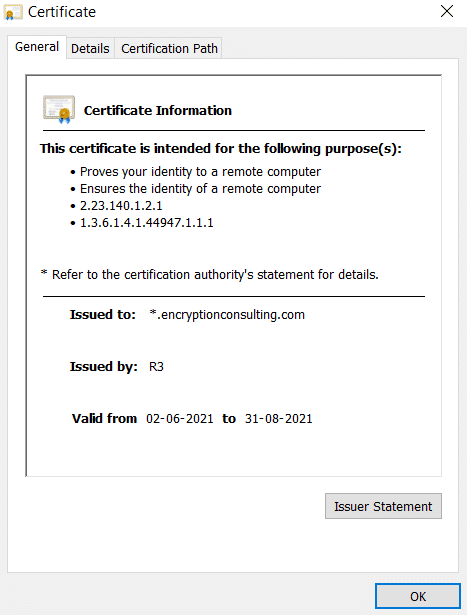
- Another way to track the SSL certificate expiration date is to log into your SSL account and check the “next due date.”
How can Encryption Consulting help?
CertSecure Manager automates the entire renewal cycle, generating a fresh CSR, completing domain validation, and installing the reissued certificate before expiration ever becomes visible to users. Alerts fire well ahead of the renewal window, tuned to the certificate’s actual validity period rather than a generic threshold. Backed by ISO/IEC 27001:2022 and SOC 2 certified practices.
Frequently Asked Questions
Can I just extend an expired SSL certificate instead of renewing it?
No. There is no extension mechanism for SSL/TLS certificates. Renewal always means the CA re-validates domain control and issues a new certificate, whether the old one expired yesterday or a year ago.
How long does SSL certificate renewal take?
Domain Validated renewal can complete in minutes once domain control is verified. Organization Validated and Extended Validation renewals take longer because the CA re-verifies business documentation, which can add several days.
What happens to visitors while my certificate is expired?
Browsers block or warn on the connection, commonly showing a message that the connection is not private. Visitors who proceed past the warning are not protected by encryption or identity verification for that session.
How do the three domain validation methods differ?
Email validation sends a confirmation to an address associated with the domain and is the fastest method. HTTP validation requires uploading a specific file to the server. DNS validation uses a CNAME or TXT record. All three confirm the same thing: that the requester controls the domain.
Will certificates need to be renewed more often going forward?
Yes. CA/Browser Forum Ballot SC-081v3 reduces maximum certificate validity to 200 days by March 2026, 100 days by March 2027, and 47 days by March 2029. Manual renewal that is manageable once a year becomes impractical at that cadence, which is why automated renewal is increasingly the default.
Automate Certificate Renewals Before They Expire
Automate certificate lifecycles with CertSecure Manager so renewal happens before expiration, not after an outage.
- Key Takeaways
- Why SSL Certificates Expire
- What Happens When an SSL Certificate Expires
- How to Renew Your SSL Certificate
- How to Track Certificate Expiration Dates
- How to Check if an SSL Certificate Is Valid?
- Why Does an SSL Certificate Expire?
- What Happens When an SSL Certificate Expires?
- How to Renew Your SSL Certificate?
- How Do You Keep Track of Your SSL Certificate Expiration Date?
- How can Encryption Consulting help?
- Frequently Asked Questions
- Automate Certificate Renewals Before They Expire