
- Quick Answer: What Is Microsoft CA Database Maintenance and Why Is It Required?
- Key Takeaways
- Who Should Care About Microsoft CA Maintenance
- Why This Matters: The Cost of Unmanaged CA Databases
- PKI Maintenance: Backup, Cleanup, Compaction, and Validation
- Why Quarterly Cleanup Is the Right Cadence
- Choosing a Cleanup Method: Manual, Scripted, or Managed
- Prerequisites, Commands, Validation Checks, and Rollback by Step
- A Practical Quarterly Cleanup Process for Microsoft CA: 10 Steps
- Beyond Quarterly Cleanup: Cryptographic Posture and Post-Quantum Readiness
- How Encryption Consulting Can Help
- Conclusion
- Frequently Asked Questions
A Microsoft Certificate Authority (CA) is one of the most critical components in an enterprise PKI environment. It is responsible for issuing, enrolling, revoking, and renewing digital certificates that support user and device authentication, data encryption, identity management, and secure communications. CA installation and administration cannot be treated as a one-time deployment task. The CA database steadily grows as it retains records of failed requests, denied requests, revoked certificates, expired certificates, and outdated CRL-related entries. Since these records are not automatically cleaned up, they accumulate over months and years, increasing database size and the amount of stale data administrators must work through during troubleshooting or audits.
In one Microsoft case study, a customer’s CA database had grown to unexpectedly large proportions over many months without the administrators noticing. The issue only came to light when the database had consumed nearly all of the 55 GB partition on which it was hosted — a Windows Server Enterprise CA database had exceeded 50 GB and was still growing. At Encryption Consulting, we treat PKI maintenance as a structured, repeatable process: backup first, then controlled cleanup, then compaction, then post-maintenance validation. This guide explains that process from start to finish.
Quick Answer: What Is Microsoft CA Database Maintenance and Why Is It Required?
Microsoft CA database maintenance is the quarterly process of backing up, cleaning, and compacting the AD CS Certificate Authority database to remove accumulated records of failed, expired, and revoked certificates that AD CS does not purge automatically. Without it, the database grows indefinitely, slowing backups, complicating audits, and risking disk exhaustion. The process uses certutil -deleterow for record removal and esentutl /d for offline compaction.
Key Takeaways
- Quarterly cleanup keeps the Microsoft CA (AD CS) database from growing unchecked, while staying controlled enough to include backup, execution, and validation on every cycle. Only 34% of organizations report having a complete and current view of their digital certificates, according to DigiCert’s 2026 Global PKI Research Report (DigiCert/Omdia, June 2026) — an unmanaged CA database makes that visibility gap worse.
- Always take a fresh database backup immediately before cleanup, and back up HSM-protected CA private keys through the HSM vendor’s own process, separately from the database backup. A database-only backup is sufficient for routine cleanup rollback; a full CA backup (including CA certificate, private key, and registry configuration) is what actually recovers the CA after a server loss.
- Use
certutil -deleterowfor targeted request or certificate cleanup, andesentutl /dfor offline compaction afterward. AD CS only needs to be stopped for the compaction step —certutil -deleterowoperates on the live database and does not require stopping the service. - Manual, scripted, and managed cleanup approaches trade off effort, error risk, and audit trail differently. The comparison table in this guide maps each method to its best-fit environment, risk profile, and audit evidence output.
- Database cleanup is operational hygiene, not cryptographic risk management. Pair it with a cryptographic posture and post-quantum readiness review using CBOM Secure for the parts of a PKI that cleanup alone does not touch — algorithm inventory, key size assessment, and PQC migration planning.
Who Should Care About Microsoft CA Maintenance
CA database maintenance is a cross-functional responsibility. Every role below has a direct stake in whether the Microsoft CA database is kept clean, backed up, and validated on a consistent quarterly cadence.
| Role | Why It Matters | Action Item |
|---|---|---|
| PKI Admins | Own the quarterly cleanup execution: backup, certutil -deleterow record removal, esentutl /d compaction, post-maintenance backup, and pkiview.msc validation; responsible for ensuring the CA database does not grow unchecked | Schedule quarterly maintenance windows; run the 10-step cleanup process in this guide; log completion evidence for each cycle; register all CA certificates in CertSecure Manager for lifecycle tracking alongside database maintenance |
| Security Architects | Own the CA database retention policy and the decision on cleanup method (manual certutil, scripted PowerShell, or managed PKI support); responsible for ensuring the cleanup approach meets security and audit requirements | Define and document the CA database retention policy including which record types and date ranges are approved for deletion; select the cleanup method using the comparison table in this guide; review cryptographic posture via CBOM Secure |
| Platform / IT Ops Teams | Own the CA server infrastructure: disk space monitoring, Windows Server patching, and VM snapshot management; most likely to encounter the operational consequences of an oversized CA database (slow backups, disk exhaustion) | Monitor CA server disk space continuously; alert when the CertLog partition reaches 70% capacity; confirm VM snapshots are available before each maintenance window as an additional rollback option |
| Compliance Teams | Must demonstrate that CA database maintenance was performed, backups were taken, and CA health was validated as part of PKI audit evidence; unmanaged CA databases create audit findings in WebTrust, SOC 2, and internal security reviews | Include quarterly CA maintenance completion evidence in audit scope; confirm pre-maintenance and post-maintenance backup records are retained; document the cleanup method and retention policy in the organization’s PKI Certificate Policy or CPS |
| CISOs | Own the risk posture for unmanaged CA database growth; a CA that fails due to disk exhaustion or whose backup cannot be restored creates a PKI outage that affects every system depending on certificate-based authentication | Require quarterly CA maintenance to be included in PKI operational reporting; fund managed PKI support for environments without dedicated PKI staff; include CA database health in enterprise PKI resilience metrics reported to the board |
Why This Matters: The Cost of Unmanaged CA Databases
The Microsoft case study above is not an outlier. Independent research on enterprise PKI shows the same pattern: certificate and CA hygiene is widely under-resourced, and the gap shows up as outages.
- Only 34% of organizations report having a complete and current view of their own digital certificates, according to DigiCert’s 2026 Global PKI Research Report, a global survey of more than 400 senior IT and security leaders conducted by independent research firm Omdia and published in June 2026. Stale CA database records are easy to miss without that visibility.
- The same report found that organizations which modernized their PKI operations saw a 60% reduction in outages and 64% improvement in certificate lifecycle automation — evidence that manual, ad hoc processes like unmanaged CA cleanup carry real operational risk.
- In SwissSign’s 2025 survey of DACH-region enterprise PKI customers, 80% of larger organizations (500+ employees) reported using Microsoft AD CS for their private PKI, and 74% had experienced a service outage caused by an expired certificate within the past five years. Since AD CS underpins that much private PKI, the health of its underlying CA database has a direct line to that outage risk.
None of this means quarterly cleanup alone prevents every outage. Certificate expiry and CA database bloat are related but separate problems. What the data does show is that PKI teams which treat maintenance as routine, not optional, consistently report fewer incidents.
PKI Maintenance: Backup, Cleanup, Compaction, and Validation
The first and most important step for PKI Maintenance is making sure you have a proper backup. You should never start cleaning up the CA database without having a rollback point, so that if something goes wrong, you can restore the system.
Microsoft ADCS allows you to back up different parts of the CA separately, and this is where people often get confused:
- A database-only backup includes the CA database and logs. This is usually enough for routine tasks like quarterly cleanup, because you’re only modifying database records.
- A full CA backup is much broader. It includes the CA database and logs, the CA certificate and private key, and related CA configuration data such as registry settings.
The distinction is important because a database backup alone cannot fully restore the CA in the event of an outage; it only helps you roll back database changes.
There is another critical point when Hardware Security Modules (HSMs) are involved. If your CA private key is stored in an HSM, you cannot back it up like a normal software key. Instead, you must follow the specific backup process defined by the HSM vendor (like Luna or nShield). Ignoring this can lead to a situation where the CA cannot be recovered.
A CA being “healthy” is beyond just issuing certificates — it also depends on whether clients can trust and validate those certificates. When a certificate is issued, clients check whether the certificate has been revoked (via CRL/OCSP at CDP locations) and who issued the certificate and how to build the chain (via AIA locations). So even if your CA is issuing certificates perfectly, it is not truly operational if these supporting services are broken or unreachable. That’s why maintenance should also include checking that CRL Distribution Points (CDP) are accessible, ensuring Authority Information Access (AIA) URLs are correct and reachable, and verifying that revocation data is being published and updated properly.
A simple and effective way to do this in Microsoft environments is using pkiview.msc on the Issuing CA, which gives a quick health view of your PKI: it shows whether CDP/AIA URLs are reachable, flags expired or missing CRLs, and highlights any chain or publication issues.
In Microsoft ADCS environments, the certutil -deleterow command provides targeted cleanup options depending on the type of data being removed. Request cleanup focuses on failed or pending requests and is based on when those requests were submitted, while certificate cleanup applies to expired or revoked certificates and is based on their expiration dates. This distinction is important because cleanup should be deliberate and guided by defined retention policies, ensuring that only unnecessary records are removed without affecting important audit or operational data.
Once the cleanup is complete, the certificate database may require compaction to reclaim unused space. The esentutl /d command performs an offline defragmentation and compaction of the ESE (Extensible Storage Engine) database. This step is particularly important after removing stale records, as it reorganizes the database and reduces its physical size, helping improve performance and optimize storage usage.
Why Quarterly Cleanup Is the Right Cadence
Quarterly cleanup provides a practical and balanced approach to CA administration. It is frequent enough to prevent long-term database buildup over time, yet controlled enough to align with a controlled maintenance process that includes review, backup, execution, and post-change validation. Instead of waiting for the CA database to become overly large or difficult to manage, administrators can regularly remove data that is no longer operationally relevant while preserving a rollback point for the maintenance window.
Quarterly maintenance also helps you stay disciplined about backups and recovery. Before you start any cleanup, you should take a fresh backup of the CA so it accurately reflects the current state of the database. If you rely on an older backup, it may no longer match the latest changes, making it less useful for recovery. The safest approach is to take a backup right before you begin cleanup — this gives you a reliable rollback point in case anything goes wrong during the maintenance activity.
Choosing a Cleanup Method: Manual, Scripted, or Managed
Not every Microsoft CA environment should run cleanup the same way. The right method depends on how many CAs you run, how much internal PKI expertise you have, and how much audit evidence you need to produce. The table below compares the three common approaches.
| Approach | Best for | Effort per cycle | Risk of human error | Audit trail |
|---|---|---|---|---|
| Manual certutil commands | A single Issuing CA with light, occasional cleanup needs | Low setup, high manual effort each cycle | Higher — cutoff dates and record types are chosen by hand each time | Manual, relies on console screenshots and admin notes |
| Scripted / PowerShell-based cleanup | Multiple CAs on a consistent quarterly cadence | Moderate setup once, low effort per cycle | Lower — repeatable logic still needs a human review step | Built in, via script logging and confirmation prompts |
| Managed PKI support (e.g., EC PKI Support Services) | Enterprises without dedicated in-house PKI staff, or multi-CA hierarchies | Minimal internal effort, vendor executes and reports | Lowest — SLA-backed and independently reviewed | Formal reporting, sized for compliance and audit needs |
For most organizations running a single Issuing CA on a genuinely quarterly cadence, a well-tested PowerShell script strikes the best balance. Environments juggling several CAs, an offline root, and limited internal PKI headcount tend to get more consistent results — and a cleaner audit trail — from managed support.
Prerequisites, Commands, Validation Checks, and Rollback by Step
Use this table before beginning the 10-step cleanup process. Each row maps a maintenance step to its prerequisite, the specific command or configuration action required, the validation check that confirms success, the common error to watch for, the rollback action, and the responsible owner.
| Step | Prerequisite | Command / Action | Validation Check | Common Error | Rollback | Owner |
|---|---|---|---|---|---|---|
| Pre-cleanup checks | Admin access to CA server; pkiview.msc installed | Open pkiview.msc; confirm AIA/CDP green; check disk space on CertLog partition | All CDP/AIA URLs show green; free disk space > 110% of current EDB file size | Red X on CDP — CRL has expired or URL is unreachable; resolve before proceeding | Resolve CDP/AIA issue before beginning cleanup; do not proceed with a broken revocation infrastructure | PKI Admin |
| Pre-maintenance backup | Certification Authority console open; sufficient disk space for backup output | Right-click CA > All Tasks > Back up CA > select certificate database and logs only | Backup files present in output directory; file size matches expected DB size | Backup fails with access denied — confirm administrative privileges and target directory permissions | N/A — this step creates the rollback point; if it fails, do not proceed | PKI Admin |
| Record cleanup (certutil) | Pre-maintenance backup confirmed; retention policy approved; date format confirmed (MM/DD/YYYY) | certutil -deleterow <Date> Cert for expired certs; certutil -deleterow <Date> Request for failed requests; certutil -deleterow "ExpiredRevokedCerts" for revoked | Output shows row count deleted; no unexpected errors; CA console still accessible | Zero rows deleted — verify date format matches CA locale; verify the record type matches the intended cleanup target | Stop AD CS; restore pre-maintenance backup from Step 2; restart AD CS; validate with pkiview.msc | PKI Admin |
| Stop AD CS | Record cleanup confirmed complete; no other CA maintenance in progress | net stop CertSvc or stop via Services MMC | Service shows Stopped in Services MMC; no active certificate enrollment requests in flight | Service fails to stop — check for hung enrollment requests; forcefully stop if needed after confirming no active requests | Restart AD CS via net start CertSvc if compaction has not yet begun | PKI Admin |
| Confirm DB path | AD CS stopped; CA Properties accessible | CA Properties > Storage tab; note exact EDB filename and path | EDB file path confirmed; file is accessible from command prompt | Wrong EDB filename used — EDB name matches the CA name, not a generic default; always verify from Storage tab | Do not run esentutl until path is confirmed | PKI Admin |
| Offline compaction (esentutl) | AD CS stopped; EDB path confirmed; free disk space > 110% of EDB file size for temp files | esentutl /d "C:\Windows\System32\CertLog\<CAName>.edb" | esentutl reports successful compaction; EDB file size reduced; no error exit code | ‘Database is in use’ error — AD CS was not fully stopped or another process has the file open; stop all processes and retry | If compaction fails midway, restore pre-maintenance backup from Step 2; restart AD CS | PKI Admin |
| Post-maintenance backup | esentutl compaction confirmed successful | Repeat backup procedure from Step 2 (database and logs only) | New backup files present; file size smaller than pre-maintenance backup, confirming compaction took effect | Backup size unchanged — compaction may not have completed; re-verify esentutl exit code | N/A — this step captures the post-cleanup state | PKI Admin |
| Restart AD CS and validate | Post-maintenance backup confirmed | net start CertSvc; then open pkiview.msc and CA console | AD CS starts without errors; pkiview.msc shows all green; CRL publication dates current | CA fails to start — check Event Viewer for database consistency errors; run esentutl /r <logprefix> to replay transaction logs if needed | If CA fails to start after esentutl, restore pre-maintenance backup and restart AD CS from backup state | PKI Admin |
A Practical Quarterly Cleanup Process for Microsoft CA: 10 Steps
A practical quarterly cleanup process for Microsoft CA should follow a defined and repeatable sequence to ensure database maintenance is carried out safely, with a clear rollback point established before any changes are made and proper validation completed after the activity concludes.
Step 1: Perform Pre-Cleanup Checks
Before starting the activity, administrators should review the health of the Issuing CA and confirm that sufficient disk space is available on the server. This is important because both backup and offline database compaction require working space. If the CA is hosted in a virtual environment, taking a VM snapshot can provide an additional rollback safeguard, subject to the organization’s operational standards.
Step 2: Take a Pre-Maintenance CA Database Backup
Once the environment has been prepared, back up the CA database before any records are deleted. This can be done from the Certification Authority console by right-clicking the CA, selecting the backup option, and choosing only certificate database and certificate database log for this maintenance task. This should be treated as a database backup for maintenance rollback, not as a full CA backup. If a full CA backup is required, the CA certificate and private key must also be backed up separately.
This step is critical because it establishes the rollback point for the cleanup activity.
Step 3: Run the Cleanup Script or certutil-Based Cleanup Process
After the backup has been taken, execute the cleanup process on the Issuing CA. Run the approved PowerShell script or cleanup command set and provide the cutoff date up to which records should be removed.
To delete expired certificates:
certutil -deleterow <Date> Cert
To delete failed certificates:
certutil -deleterow <Date> Request
To delete revoked certificates:
certutil -deleterow "ExpiredRevokedCerts"
The process should be designed to first identify matching records, display the total count, and then require explicit confirmation before deletion begins. Microsoft CA cleanup is record-type specific — request cleanup targets failed and pending requests, while certificate cleanup targets expired and revoked certificate records. Confirm exactly what is being deleted before proceeding.
Step 4: Review Cleanup Completion and Prepare for Database Maintenance
After the deletion process has completed successfully, prepare for database maintenance. The cleanup of stale rows may have reduced the logical content of the CA database, but the physical database file may still remain larger than necessary. To reclaim unused space, offline database compaction should be performed. Before that happens, confirm that the cleanup process has fully completed and no other maintenance actions are in progress on the CA.
Step 5: Stop AD CS
The Active Directory Certificate Services service must be stopped before any offline database operation is performed. Database compaction must not be performed while the CA database is actively in use. Stopping AD CS ensures that the database remains in a stable state while the maintenance activity continues.
Step 6: Confirm the CA Database Path
Once the service has been stopped, confirm the exact location of the certificate database file from the CA properties rather than relying on an assumed default path. Open the Certification Authority console, right-click the CA, select Properties, and navigate to the Storage tab.
In many environments, the certificate database is stored under:
C:\Windows\System32\CertLog
However, the actual EDB file name depends on the CA name. In the example environment, the database file is:
Encon Issuing CA.edb
Validating the live database path at this stage helps avoid running maintenance against the wrong file.
Step 7: Perform Offline Database Compaction
After confirming the correct EDB file path, navigate to the certificate database directory and run offline compaction using esentutl /d.
Example:
esentutl /d "C:\Windows\System32\CertLog\Encon Issuing CA.edb"
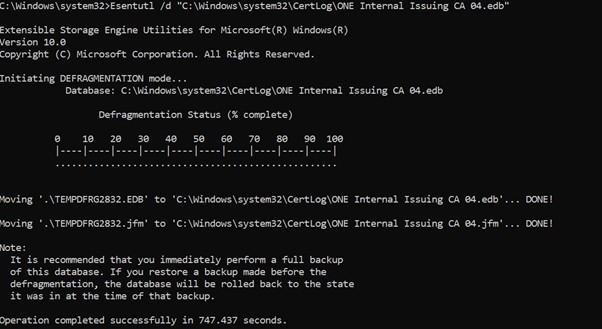
This step defragments and compacts the CA database after stale records have been removed. It is especially useful when a significant number of failed, expired, or revoked records have been deleted, as it helps reclaim unused database space and improves database hygiene.
Step 8: Take a Fresh Post-Maintenance Backup
Once compaction has completed successfully, take a new backup of the CA database. This becomes the new clean recovery point after maintenance and preserves the post-cleanup, post-compaction state of the CA database. This step is just as important as the pre-cleanup backup because it captures the CA in its updated and maintained state.
Step 9: Restart AD CS
After the post-maintenance backup has been completed, start the Active Directory Certificate Services service again. Confirm that the CA service starts normally and that there are no immediate errors related to the database, certificate services, or publication functions.
Step 10: Perform Post-Maintenance Validation
The final step is validation. After the CA has been brought back online, confirm that the CA is functioning normally, that certificate services are healthy, and that publication points remain valid. This should include checking AIA and CDP health through pkiview.msc, reviewing the CA console, and confirming that the maintenance activity has not affected normal CA operations.
Quarterly cleanup should only be considered complete once the CA has been cleaned, compacted, backed up again, restarted successfully, and validated operationally.
Beyond Quarterly Cleanup: Cryptographic Posture and Post-Quantum Readiness
Quarterly database cleanup keeps a Microsoft CA fast, backed up, and easy to audit, but it does not tell you which algorithms, key sizes, or certificate templates that CA is actually issuing — or whether those choices will still be considered safe once post-quantum migration deadlines arrive. That is a cryptographic posture question, not a database hygiene question, and it needs its own visibility layer on top of the maintenance routine above.
For CAs running on Windows Server, Modernizing ADCS: Why PKI Needs Unified Cryptographic Posture Management covers how legacy AD CS environments can get that cryptographic inventory without a disruptive rip-and-replace, using tools like CBOM Secure to surface weak or deprecated algorithms already in production. For organizations managing certificates across PKI as a Service environments alongside on-premises AD CS, CBOM Secure provides the cross-environment visibility that makes cryptographic posture management complete.
On the migration side, PQC Migration in 2026: Building a Roadmap That Survives Contact With Production walks through how Microsoft’s ML-DSA support in AD CS on Windows Server 2025 changes near-term post-quantum planning for teams running the same CA infrastructure this guide’s cleanup process covers. Begin PQC readiness planning via the PQC Readiness assessment and the PQC Center of Excellence. Treat that roadmap as the next step once your quarterly maintenance is under control, not a replacement for it.
How Encryption Consulting Can Help
Managing a Microsoft CA goes well beyond initial deployment. It demands continuous attention to database health, backup discipline, CRL publication, and regular validation activities that many organizations struggle to maintain consistently alongside their day-to-day operations.
Our PKI Assessment Services provide a comprehensive evaluation of your existing ADCS environment, identifying gaps in CA hygiene, backup practices, CRL/AIA configuration, and database health. Whether your CA database has grown unchecked over time or your maintenance processes lack structure, our team delivers a detailed risk report along with a prioritized roadmap to bring your PKI back into a healthy and auditable state.
For organizations that need ongoing support rather than a one-time review, our PKI Support Services offer subscription-based, round-the-clock assistance. This includes proactive CA maintenance, CRL monitoring, troubleshooting database issues, and guided quarterly cleanup execution, ensuring that your CA environment stays clean, compact, and operationally reliable without burdening your internal teams. CertSecure Manager complements managed support by providing continuous certificate discovery, expiry monitoring, and lifecycle automation across all CA sources, so the certificate inventory stays current between quarterly maintenance cycles.
Conclusion
Quarterly CA cleanup should not be approached as a simple deletion exercise. It is a controlled PKI maintenance activity that combines backup discipline, careful record cleanup, offline database maintenance, and post-change validation. When done properly, it improves database hygiene, keeps CA administration manageable, and supports a stronger long-term operational posture for Microsoft PKI.
For organizations running Microsoft AD CS, the best results come from treating maintenance as part of the overall PKI governance model. Backup should be deliberate, cleanup should be retention-aware, database maintenance should be performed carefully, and every maintenance cycle should end with verification that the CA is healthy and revocation publication remains intact. That is what turns routine maintenance into a reliable and repeatable PKI operational practice.
Frequently Asked Questions
What is the main takeaway from PKI Maintenance and Quarterly Cleanup for Microsoft CA?
Microsoft AD CS CA databases grow indefinitely without manual cleanup, accumulating failed, expired, and revoked certificate records that slow backup and restore times, complicate audits, and can eventually exhaust disk space. Quarterly cleanup — following the sequence of pre-maintenance backup, certutil -deleterow record removal, esentutl /d offline compaction, post-maintenance backup, AD CS restart, and pkiview.msc validation — is the controlled, repeatable process that keeps a Microsoft CA operationally healthy and auditable.
Why does Microsoft CA maintenance matter for enterprise PKI teams?
Enterprise PKI teams are directly responsible for the CA infrastructure that underpins user and device authentication, TLS, and code signing. Only 34% of organizations report having a complete and current view of their digital certificates, according to DigiCert’s 2026 Global PKI Research Report (DigiCert/Omdia, June 2026). An unmanaged CA database compounds that visibility gap: stale records make audits harder, slow backup windows, and in documented cases have consumed entire storage partitions, bringing CA operations to a halt.
What risks increase if Microsoft CA maintenance is handled manually or inconsistently?
Inconsistent or manual-only CA maintenance increases the risk of: runaway database growth that exhausts disk space (a Microsoft-documented case saw a CA database exceed 50 GB on a 55 GB partition); slow or failed backup windows caused by an oversized database; audit failures where stale records make it impossible to produce a clean certificate inventory; and missed compaction cycles that leave the database fragmented even after records are deleted.
Which teams should own Microsoft CA maintenance?
PKI admins own the quarterly cleanup execution: backup, certutil -deleterow record removal, esentutl /d compaction, post-maintenance backup, and pkiview.msc validation. Security architects own the CA database retention policy and cleanup method decision. Compliance teams own the audit evidence that cleanup was performed. CISOs own the risk posture for unmanaged CA database growth and should require quarterly maintenance to be included in PKI operational reporting.
How does Microsoft CA maintenance connect to certificate lifecycle management?
CA database maintenance is the infrastructure layer of certificate lifecycle management. A CA database bloated with stale records makes it harder for CLM platforms to produce accurate certificate inventories and slows queries against the CA. CertSecure Manager connects CLM discovery and expiry monitoring with the CA layer, making it easier to identify which certificate records in the CA database are genuinely expired and safe to remove versus which are still operationally relevant.
How should organizations measure success for Microsoft CA maintenance?
Key metrics: CA database file size trend over time (target: stable or decreasing after each quarterly cleanup cycle); backup window duration (target: consistent and within the maintenance window, not expanding quarter over quarter); pkiview.msc AIA and CDP health status after each maintenance cycle (target: all green, no expired or unreachable CRLs); and time to complete a full CA database restore from the most recent backup (target: tested and confirmed within the organization’s RTO).
What should be audited or monitored regularly for Microsoft CA health?
Monitor continuously: CA database file size growth rate; CRL publication freshness and AIA/CDP URL reachability via pkiview.msc; AD CS service availability; and disk space on the CA server storage partition. Audit quarterly: confirmation that a pre-maintenance backup was taken before each cleanup cycle; certutil -deleterow execution log; esentutl /d compaction completion; post-maintenance backup taken and verified; and pkiview.msc validation completed with no errors.
How does Microsoft CA maintenance affect cloud, hybrid, or multi-CA PKI environments?
In hybrid environments where an on-premises Microsoft AD CS CA issues certificates consumed by cloud workloads, the CA database maintenance cadence affects the reliability of the entire trust chain. Multi-CA environments with an offline Root CA and one or more Issuing CAs require separate maintenance schedules for each CA. CBOM Secure provides cross-environment cryptographic inventory visibility that complements CA-level maintenance across cloud, on-premises, and hybrid environments.
What prerequisites are required before performing Microsoft CA database cleanup?
Prerequisites: administrative access to the CA server; sufficient disk space for both the pre-maintenance backup and temporary files created during esentutl /d compaction (approximately 110% of the current EDB file size); a confirmed CA database path from CA Properties > Storage tab; a tested restore procedure so the pre-maintenance backup can be used for rollback; and the CA retention policy confirming which record types and date ranges are approved for deletion before certutil -deleterow is run.
What common errors should administrators watch for during CA database cleanup?
Common errors: esentutl /d failing with ‘database is in use’ because AD CS was not fully stopped before compaction; certutil -deleterow reporting zero rows deleted — verify the date format matches the CA’s locale setting (MM/DD/YYYY vs DD/MM/YYYY); pkiview.msc showing a red X on a CDP after maintenance — confirm the CRL was republished manually if the cleanup window overlapped with the CRL publication schedule; and the CA service failing to restart after compaction — check Event Viewer for database consistency errors and run esentutl /r to replay transaction logs if needed.
How often should a Microsoft CA database be cleaned up?
Quarterly is the most common cadence for a production Issuing CA. It is frequent enough to prevent runaway database growth, while still fitting a controlled backup, cleanup, and validation cycle. High-volume CAs issuing tens of thousands of certificates a year may need monthly cleanup, while low-volume internal CAs can sometimes stretch to semi-annual, as long as database size and CRL health are still monitored in between.
What is the difference between a database-only backup and a full CA backup?
A database-only backup covers the CA database and its transaction logs, which is generally enough to roll back a routine cleanup. A full CA backup adds the CA certificate, its private key, and registry-based configuration, and is what is actually required to recover the CA itself after a server loss, not just to undo a cleanup run.
Does CA database cleanup affect certificates that clients already have?
No. Removing expired, failed, or revoked rows from the CA database does not revoke or invalidate certificates already issued to clients. It only removes historical records the CA no longer needs operationally. Revocation status for active certificates continues to be governed separately through CRL and OCSP publication.
- Quick Answer: What Is Microsoft CA Database Maintenance and Why Is It Required?
- Key Takeaways
- Who Should Care About Microsoft CA Maintenance
- Why This Matters: The Cost of Unmanaged CA Databases
- PKI Maintenance: Backup, Cleanup, Compaction, and Validation
- Why Quarterly Cleanup Is the Right Cadence
- Choosing a Cleanup Method: Manual, Scripted, or Managed
- Prerequisites, Commands, Validation Checks, and Rollback by Step
- A Practical Quarterly Cleanup Process for Microsoft CA: 10 Steps
- Step 1: Perform Pre-Cleanup Checks
- Step 2: Take a Pre-Maintenance CA Database Backup
- Step 3: Run the Cleanup Script or certutil-Based Cleanup Process
- Step 4: Review Cleanup Completion and Prepare for Database Maintenance
- Step 5: Stop AD CS
- Step 6: Confirm the CA Database Path
- Step 7: Perform Offline Database Compaction
- Step 8: Take a Fresh Post-Maintenance Backup
- Step 9: Restart AD CS
- Step 10: Perform Post-Maintenance Validation
- Beyond Quarterly Cleanup: Cryptographic Posture and Post-Quantum Readiness
- How Encryption Consulting Can Help
- Conclusion
- Frequently Asked Questions