

- Key Takeaways
- Prerequisites Before You Automate F5 Certificate Renewal
- How to Automate F5 Certificate Management With CertSecure Manager
- Before and After: What Changes When You Automate F5 Certificate Renewal
- Common Errors and Rollback Guidance
- Success Metrics to Track After Implementation
- Who Owns What: Action Matrix for PKI, Security, Platform, and Compliance Teams
- What to Do Next
- Multi-Cloud and Hybrid PKI Considerations
- How Can Encryption Consulting Help?
- Conclusion
- Frequently Asked Questions
Quick answer: CertSecure Manager automates F5 BIG-IP certificate renewal through a lightweight renewal agent that requests, renews, and pushes new certificates to F5 partitions without manual intervention. This removes the manual reissuance work behind most certificate related outages and keeps renewal cycles aligned with the CA/B Forum’s phased move to shorter TLS certificate validity.
Whether you’re running a small business website, a complex enterprise application, or a cloud based service, your users expect seamless, uninterrupted access. This is where load balancers come into play, and among the most trusted names in this domain is F5 Networks.
Manual certificate management on an F5 device gets harder every year as SSL/TLS certificate lifespans shrink. The CA/B Forum’s ballot, endorsed by Sectigo and passed on April 11, 2025, has already cut the maximum public TLS certificate validity to 200 days as of March 15, 2026, with further reductions to 100 days by March 2027 and 47-day TLS certificates by March 2029. Each step compresses the renewal window an IT team has to work with, and missed renewals carry the same risk regardless of how long the validity period is: unplanned expiration and downtime.
Jump to: Key Takeaways | Prerequisites | Step-by-Step | Owner/Action Matrix | Success Metrics | What to Do Next | FAQ
Key Takeaways
- Manual F5 certificate renewal cannot keep pace with the CA/B Forum’s shrinking validity window: 200 days from March 2026, 100 days from March 2027, and 47 days from March 2029.
- CertSecure Manager’s F5 Renewal Agent automates certificate issuance, renewal, and BIG-IP deployment end to end, removing the manual steps that most often cause missed renewals.
- DigiCert’s July 2025 Trust Pulse Survey found that 45% of enterprises experienced certificate related downtime in the past year, and 37.5% traced outages specifically to expired certificates.
- Rollout involves five prerequisite checks, a step by step renewal workflow inside CertSecure Manager, and a verification step against the BIG-IP UI and the agent log file.
- After go live, track renewal success rate, mean time to renew, and manual ticket volume to confirm the automation is actually covering the F5 estate.
Prerequisites Before You Automate F5 Certificate Renewal
Confirm the following before installing the F5 Renewal Agent, so the rollout does not stall halfway through a renewal cycle.
- A CertSecure Manager account with access to Utilities and Agents.
- A dedicated Windows Server 2019, Windows Server 2022, or Windows 11 host to run the renewal agent.
- Inbound port 22 open between the agent host and the F5 BIG-IP management interface.
- F5 BIG-IP admin credentials with permission to import certificates and bind SSL profiles.
- The certificate authority and certificate template already configured inside CertSecure Manager.
- Change management approval logged before renewing certificates bound to production virtual servers.
Prerequisite to Action Table
| Prerequisite | Owner | Action | Why It Matters |
|---|---|---|---|
| Windows host for the renewal agent | Platform team | Provision a hardened Windows Server 2019 or newer VM with port 22 open to F5 | The agent cannot install or reach BIG-IP without it |
| CertSecure Manager access | PKI team | Grant Utilities and Agents permissions to the engineer running the rollout | Required to configure and trigger renewals |
| F5 BIG-IP admin credentials | Security team | Issue scoped BIG-IP credentials for certificate import and SSL profile binding | Avoids using shared or overprivileged accounts |
| CA and certificate template | PKI team | Confirm the correct CA and template are mapped in CertSecure Manager | A mismatched template causes renewal failures |
| Change approval | Compliance team | Log the change request before renewing production certificates | Keeps the rollout auditable under DORA and PCI DSS |
How to Automate F5 Certificate Management With CertSecure Manager
Automating F5 certificate management means installing the F5 Renewal Agent from CertSecure Manager on a Windows host, then using the CertSecure Manager console to request, renew, and push certificates to BIG-IP without touching the F5 command line. The workflow below covers agent setup, the renewal steps themselves, and how to verify a renewal landed correctly.
Step 1: Deploy and Configure the F5 Renewal Agent
Download the F5 Renewal Agent from the CertSecure Manager frontend and install it on a Windows machine running Windows Server 2019, Windows Server 2022, or Windows 11, with port 22 open to the target BIG-IP device. Follow the installation steps in the readme file bundled with the downloadable zip. Once installed, the agent runs as a Windows service and can be started, stopped, or restarted from the Windows Services console.
To confirm the service is running before moving to the next step, open an elevated PowerShell prompt on the agent host and check the Windows Services list for the renewal agent entry:
Get-Service | Where-Object { $_.DisplayName -like "*Renewal Agent*" }A status of Running confirms the agent is active. If the service is stopped, start it from the Services console before continuing, and re-check port 22 connectivity to the BIG-IP management interface if it fails to start.
Step 2: Renew and Deploy the Certificate From CertSecure Manager
Once the renewal agent is configured and running, follow these steps inside the CertSecure Manager frontend to renew a certificate:
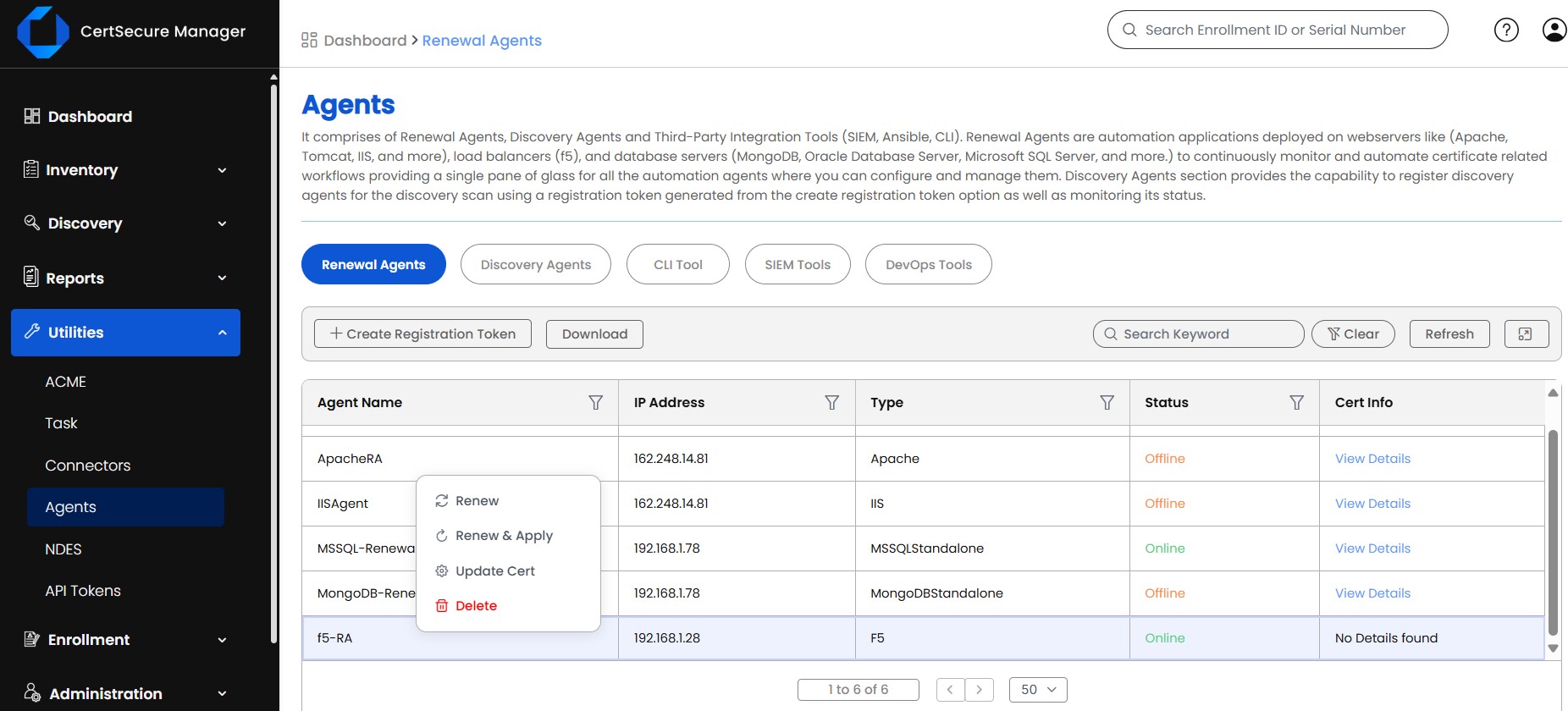
- Log in to CertSecure Manager, go to “Utilities” and then “Agents.” Confirm the status of the F5 Renewal Agent, then right-click it and select “Update Cert.”
-
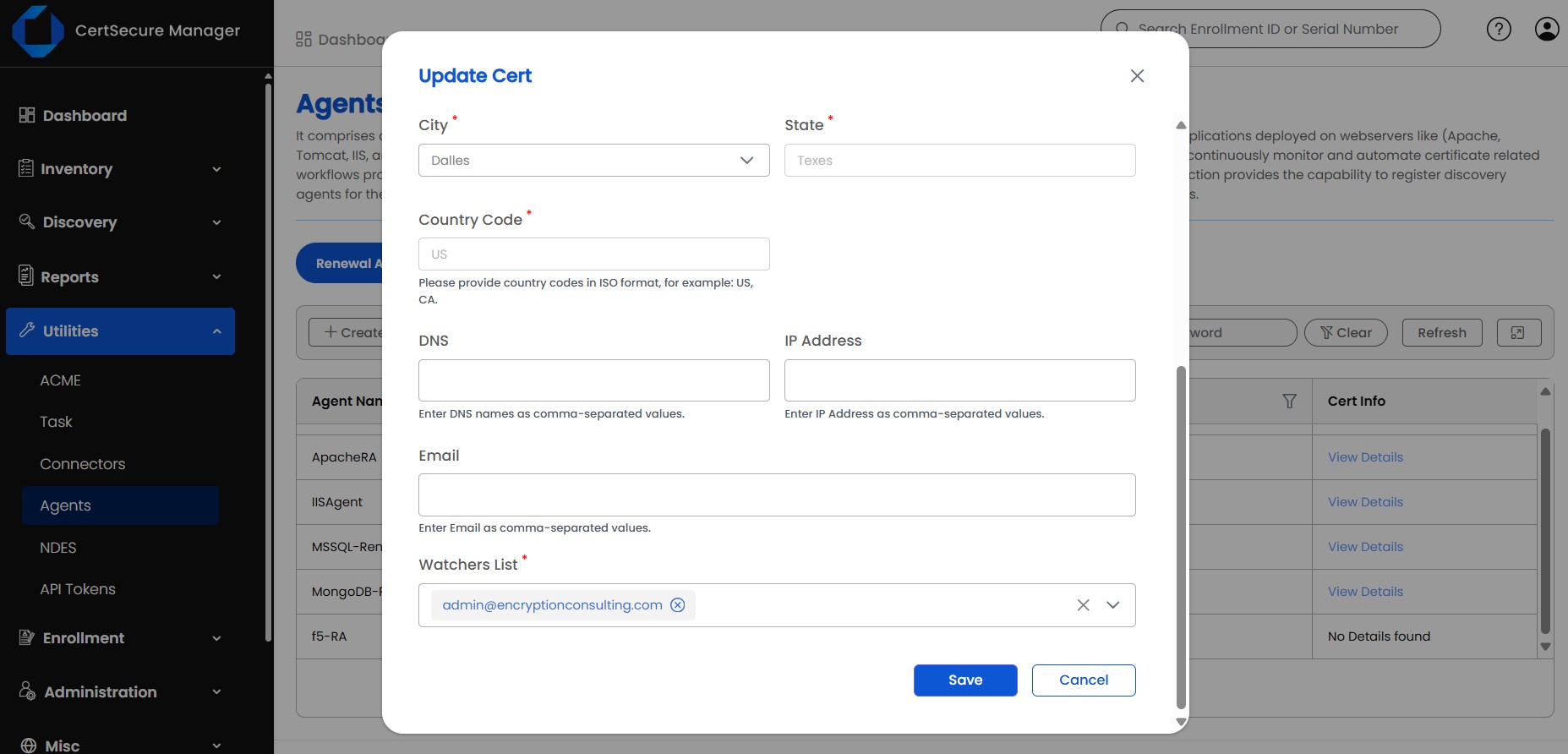
Choose the certificate authority, the certificate template, and enter the remaining required information. Click “Save” to store the configuration.
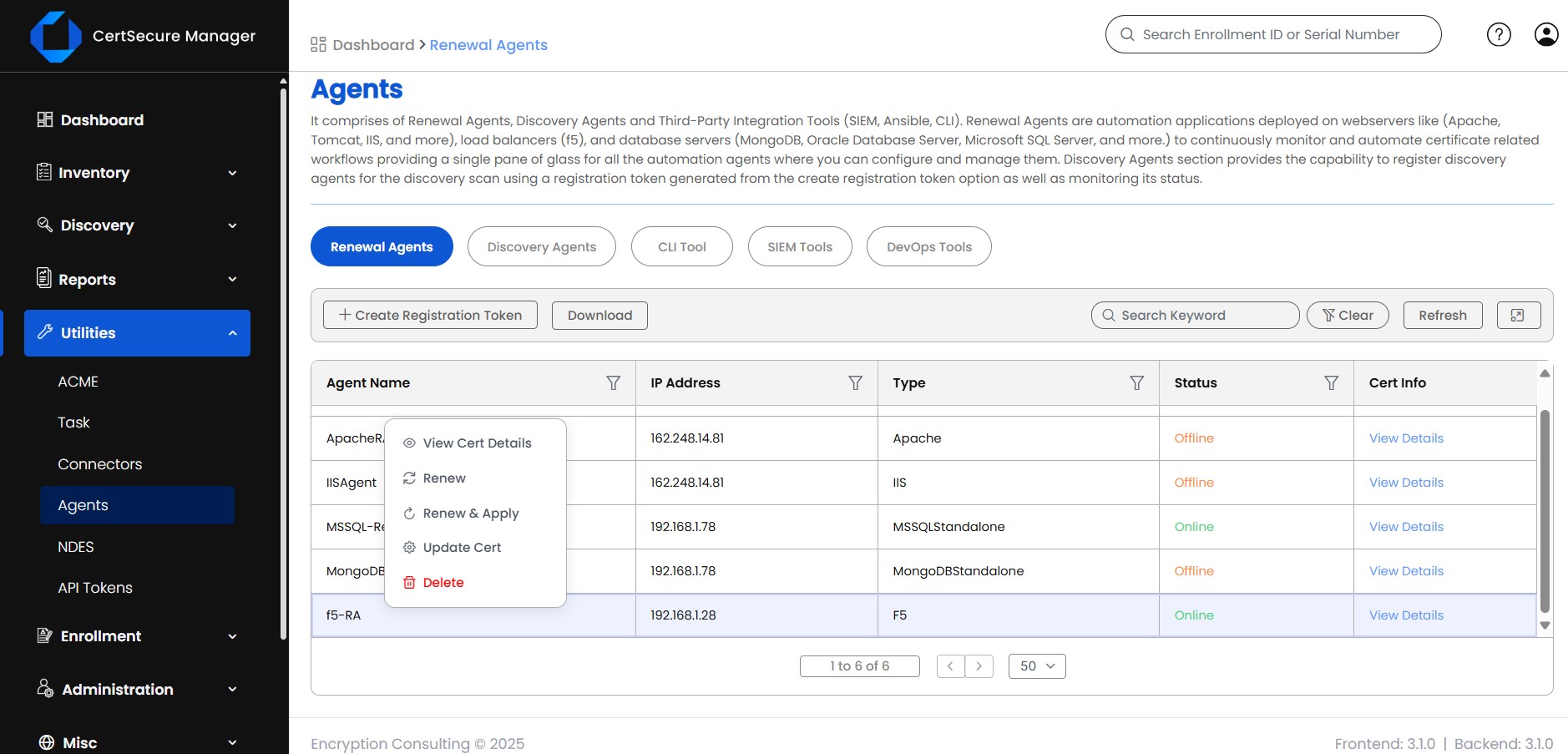
- Right-click the agent again and select “Renew and Apply,” then confirm the action to trigger the renewal. Select “Renew” instead if you only want to push the certificate to the common partition without binding it to an SSL profile yet.
-
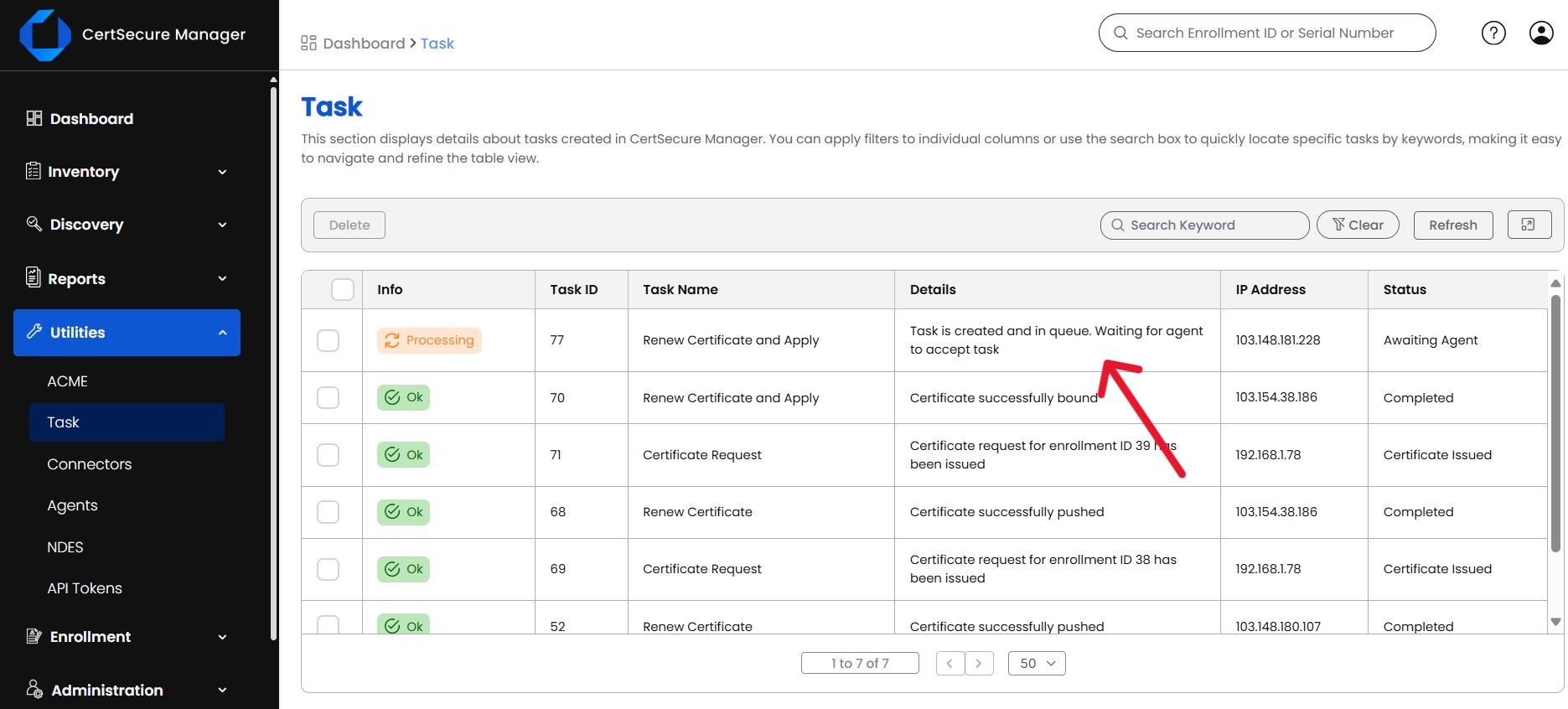
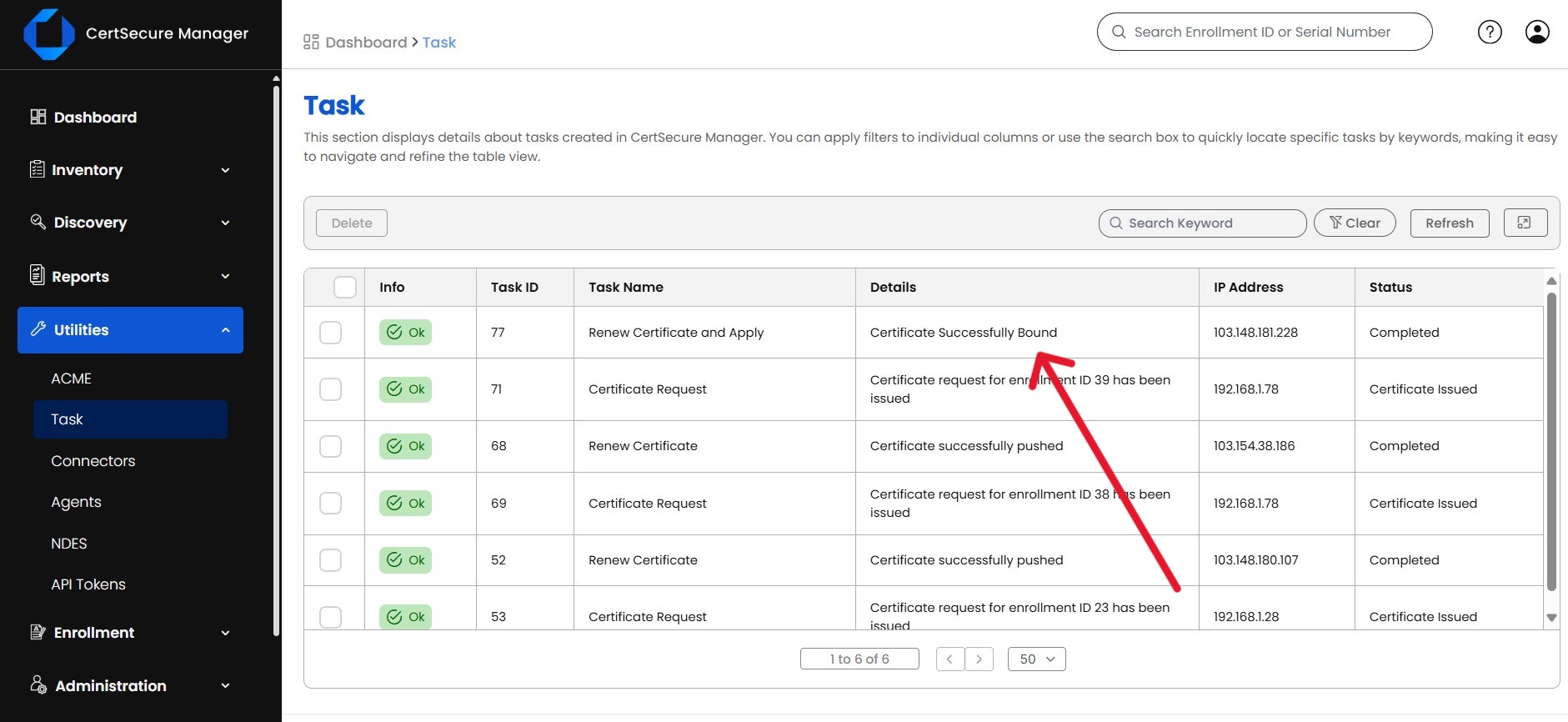
Go to “Utilities” and then “Tasks” to monitor the renewal as it runs.
-
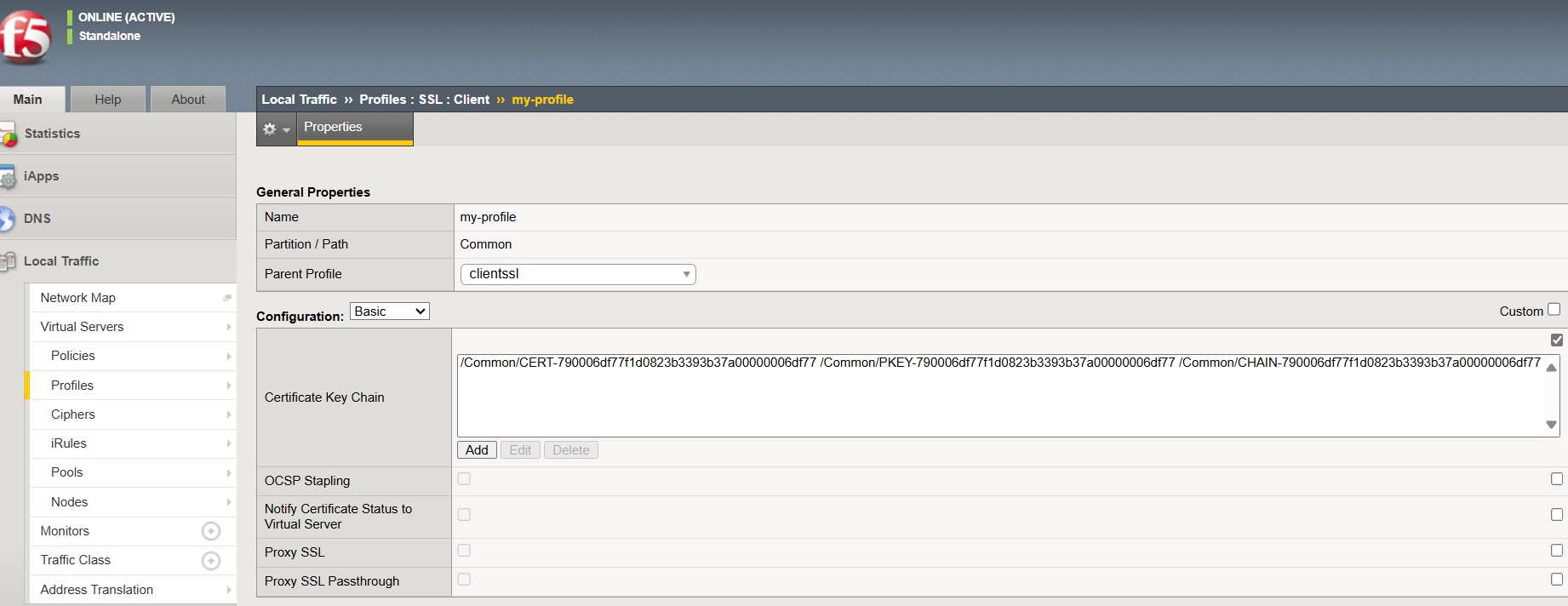
Once the renewal succeeds, open the BIG-IP web interface to confirm the certificate is bound correctly. If it fails, check the renewal agent log file, located by default at C:\CertSecure\logs\EC_F5_RenewalAgent.log.
Step 3: Verify the Renewal and Troubleshoot Failures
Verification has two parts: confirming the certificate is live on the BIG-IP virtual server, and confirming the agent logged a clean completion. Check the SSL profile on the affected virtual server in the BIG-IP UI to confirm it references the new certificate object. If a task in Utilities and Tasks shows a failure, tail the log file from the agent host to see the specific error:
Get-Content "C:\CertSecure\logs\EC_F5_RenewalAgent.log" -Tail 50 -WaitMost failures at this stage trace back to a mismatched certificate template, expired BIG-IP credentials, or a network path that blocks the agent from reaching the management interface. The common errors and rollback section below covers the most frequent cases in more detail.
Before and After: What Changes When You Automate F5 Certificate Renewal
| Task | Manual Process | Automated With CertSecure Manager |
|---|---|---|
| Certificate request | Engineer manually generates a CSR and submits it to the CA | CertSecure Manager requests from the pre-configured CA and template automatically |
| Renewal tracking | Tracked in spreadsheets or calendar reminders | Continuously monitored with built-in expiration alerts |
| BIG-IP deployment | Certificate manually imported and bound to SSL profiles through the F5 UI or CLI | Renewal agent pushes and binds the certificate through Renew and Apply |
| Audit trail | Compiled manually before each review | Logged automatically in Utilities, Tasks, and the agent log file |
| Renewal frequency at 47-day validity | Not sustainable at scale by March 2029 | Built for high frequency, unattended renewal cycles |
Encryption Consulting’s own ROI modeling for CertSecure Manager estimates roughly 25% less manual effort on certificate lifecycle work, translating to an estimated $887,080 in annual savings for organizations at typical enterprise certificate volumes. Run the numbers for your own environment with the CertSecure Manager ROI calculator.
Common Errors and Rollback Guidance
Common Errors
- Agent shows offline in Utilities and Agents: usually caused by a blocked port 22 or a stopped Windows service on the agent host.
- Renewal fails at the CA step: the selected certificate template does not match what is configured in the CA, or an approval workflow is pending.
- Certificate renews but does not bind: no SSL profile was selected before clicking Renew and Apply, so the certificate sits in the common partition instead.
- Task stuck in Utilities and Tasks: BIG-IP admin credentials expired or were rotated after the agent was configured.
Rollback Steps
- If a renewed certificate causes issues on a virtual server, reassign the SSL profile back to the prior certificate object in BIG-IP; F5 keeps the previous certificate available until it is explicitly deleted.
- Confirm the rollback in the BIG-IP UI and re-check dependent virtual servers for TLS handshake errors.
- Open a ticket referencing the CertSecure Manager task ID so the renewal can be re-attempted once the underlying cause, whether template, credentials, or connectivity, is fixed.
- Do not delete the failed renewal task until the rollback is confirmed stable, since it preserves the log trail needed for the audit record.
Success Metrics to Track After Implementation
- Renewal success rate: percentage of scheduled renewals completed without manual intervention, targeting close to 100%.
- Mean time to renew: elapsed time from renewal trigger to confirmed BIG-IP binding.
- Certificate related incidents: outage or expiration related tickets per quarter, tracked before and after automation.
- Manual ticket volume: certificate related help desk tickets, which should trend down as agent coverage expands.
- Audit preparation time: hours spent assembling certificate evidence for compliance reviews.
Who Owns What: Action Matrix for PKI, Security, Platform, and Compliance Teams
| Team | Primary Responsibility | Key Action |
|---|---|---|
| PKI team | Owns CA, template, and certificate lifecycle policy | Configure the CA and certificate template in CertSecure Manager before rollout |
| Security team | Owns credential scope and risk acceptance | Issue least privilege BIG-IP credentials and review renewal agent access |
| Platform and DevOps team | Owns the Windows host and F5 infrastructure | Provision the agent host, open port 22, and monitor BIG-IP after renewal |
| Compliance team | Owns audit evidence and change records | Log change approvals and pull renewal task history for DORA and PCI DSS reviews |
What to Do Next
PKI Team
- Map every F5 bound certificate’s CA and template inside CertSecure Manager.
- Set internal renewal triggers well inside the current 200 day validity cap, ahead of the March 2027 drop to 100 days.
Security Team
- Audit which accounts hold the BIG-IP admin credentials used by the renewal agent, and rotate them on a defined schedule.
- Treat the agent host as a credentialed automation endpoint and include it in existing security monitoring.
Platform and DevOps Team
- Add the renewal agent host and its Windows service to infrastructure monitoring, so an offline agent triggers an alert instead of a missed renewal.
- Extend the same automation pattern to NGINX, Apache, and IIS hosts already supported by CertSecure Manager’s renewal agents.
Compliance Team
- Pull the Utilities and Tasks history quarterly as evidence for certificate governance reviews.
- Track progress against the March 2027 100 day validity deadline as a standing agenda item rather than a one time project.
Multi-Cloud and Hybrid PKI Considerations
In hybrid or multi cloud environments, F5 BIG-IP instances often sit in front of workloads spanning on premises data centers, cloud load balancers, and container platforms. A point solution that only automates renewal for one environment recreates the same manual gap the F5 Renewal Agent is meant to close. CertSecure Manager runs renewal agents for F5, NGINX, Apache, and IIS from the same console, so a hybrid estate is renewed and audited from a single system of record instead of several disconnected tools.
Certificate automation is only as complete as the inventory behind it. An F5 instance that CertSecure Manager does not yet know about cannot be automated, which is why organizations running PKI across multiple clouds should pair renewal automation with ongoing certificate discovery rather than treating discovery as a one time project. Encryption Consulting covers this pairing in more depth in our guide on how a CBOM turns inventory into intelligence, and organizations further along in planning for shorter validity windows can start with our 47-day TLS certificate readiness guidance.
How Can Encryption Consulting Help?
Encryption Consulting extends the same F5 renewal agent approach to NGINX, Apache, and IIS environments through CertSecure Manager, so certificate automation is not limited to a single platform. That matters more with every step down the CA/B Forum’s validity schedule: automation stops being a convenience at 200 days and becomes essential by the time certificates renew every 47 days in 2029. CertSecure Manager’s renewal agents keep organizations compliant and free of the downtime that comes from expired certificates through each stage of that shift.
Beyond certificate automation, Encryption Consulting provides PKI-as-a-Service (PKIaaS) and expert PKI consulting to build, manage, and optimize secure, scalable PKI environments across on premises, hybrid, or cloud deployments. For teams also planning a post quantum migration alongside their certificate lifecycle work, our PQC Center of Excellence and PQC readiness services help sequence both transitions together instead of duplicating effort across two separate programs, building the same crypto agility that certificate automation already depends on.
Conclusion
Certificate lifespans are only going to keep shrinking, and manual F5 certificate management was already strained before the CA/B Forum’s schedule brought the maximum validity down to 200 days. Deploying the F5 Renewal Agent through CertSecure Manager turns issuance, renewal, and deployment into a repeatable workflow instead of a recurring fire drill, which cuts the risk of the human error and missed deadlines behind most certificate related outages. Organizations that automate now, while there is still buffer before the 100-day and 47-day reductions land, will reach 2029 with a process that already works rather than one built under deadline pressure.
Frequently Asked Questions
What is the main takeaway from How to Automate F5 Certificate Management with CertSecure Manager?
The main takeaway is that F5 BIG-IP certificate renewal can run without manual intervention once the CertSecure Manager F5 Renewal Agent is installed and configured. The agent requests, renews, and deploys certificates directly to BIG-IP partitions, which removes the manual reissuance steps that cause missed renewals and unplanned outages as certificate lifespans keep shrinking under the CA/B Forum schedule.
Why does this matter for enterprise certificate lifecycle management?
It matters because the CA/B Forum’s phased schedule has already cut maximum TLS certificate validity to 200 days, with further reductions to 100 days in March 2027 and 47 days in March 2029. Enterprises running dozens or hundreds of F5 hosted certificates cannot sustain that renewal frequency manually, so automation becomes a requirement for continuous, compliant certificate lifecycle management rather than an optional efficiency gain.
What teams are responsible for acting on this guidance?
PKI teams own the certificate authority, template, and lifecycle policy configuration. Security teams manage the BIG-IP credentials the renewal agent uses. Platform and DevOps teams provision and monitor the Windows host running the agent along with the F5 infrastructure itself. Compliance teams use the renewal task history as audit evidence for frameworks such as DORA and PCI DSS. All four typically need to coordinate before rollout.
What risks increase if this topic is handled manually?
Manual F5 certificate management increases the risk of missed renewals, service outages, and inconsistent audit trails. DigiCert’s July 2025 Trust Pulse Survey found that 45% of enterprises experienced certificate related downtime in the past year, and 37.5% traced that downtime specifically to expired certificates, one of the most preventable causes of outages in enterprise environments.
How does automation reduce certificate outage risk?
Automation reduces outage risk by removing the human steps where renewals are most often missed: tracking expiration dates, generating CSRs, and manually binding certificates to SSL profiles. The F5 Renewal Agent monitors certificates continuously and pushes renewed certificates to BIG-IP through a defined workflow, so a certificate approaching its validity limit triggers an automated renewal instead of depending on someone remembering a deadline.
What metrics should teams track after implementation?
Track renewal success rate, mean time to renew from trigger to confirmed BIG-IP binding, the count of certificate related incidents per quarter, and manual ticket volume tied to certificate work. A drop in manual tickets and incidents alongside a renewal success rate near 100% indicates the automation is covering the F5 estate as intended rather than running alongside unmanaged manual processes.
How does this connect to 47-day TLS certificate readiness?
The CA/B Forum’s ballot, endorsed by Sectigo and passed on April 11, 2025, phases maximum TLS certificate validity down to 200 days as of March 2026, 100 days by March 2027, and 47 days by March 2029. F5 certificate automation is a direct prerequisite for 47-day readiness, since manual renewal cycles that were manageable at 200 or 100 days become operationally impossible at a 47-day cadence.
How should this be handled in multi-cloud or hybrid PKI environments?
In hybrid or multi cloud environments, F5 instances often sit alongside NGINX, Apache, and IIS workloads across on premises and cloud infrastructure. CertSecure Manager runs renewal agents for all of these from one console, so certificate automation is not siloed by platform. Pairing that automation with a current cryptographic inventory ensures every F5 instance across the hybrid estate is actually known and covered.
What prerequisites are needed before implementation?
Before implementation, confirm a Windows Server 2019, Windows Server 2022, or Windows 11 host is available to run the renewal agent with port 22 open to the F5 BIG-IP management interface, that CertSecure Manager already has the correct CA and certificate template configured, and that scoped BIG-IP admin credentials and change approval are in place for production virtual servers.
What screenshots or configuration examples should be included?
Useful screenshots cover the Utilities and Agents view for confirming agent status, the certificate and template selection screen, the Renew and Apply confirmation step, and the Utilities and Tasks view for monitoring progress. A configuration example worth including is the renewal agent log path, C:\CertSecure\logs\EC_F5_RenewalAgent.log, which is the first place to check when a renewal task fails.
- Key Takeaways
- Prerequisites Before You Automate F5 Certificate Renewal
- How to Automate F5 Certificate Management With CertSecure Manager
- Before and After: What Changes When You Automate F5 Certificate Renewal
- Common Errors and Rollback Guidance
- Success Metrics to Track After Implementation
- Who Owns What: Action Matrix for PKI, Security, Platform, and Compliance Teams
- What to Do Next
- Multi-Cloud and Hybrid PKI Considerations
- How Can Encryption Consulting Help?
- Conclusion
- Frequently Asked Questions
