

- Executive Summary
- Key Takeaways
- Quick Checklist: Before You Start
- Why Manual Certificate Tracking Fails at Scale
- What Is CertSecure Manager?
- Why Use ServiceNow? Unveiling the Significance of Integration
- How the ServiceNow Integration Resolves Each Challenge
- In-Depth Architecture of the Integration
- Step-by-Step: Setting Up the CertSecure Manager and ServiceNow Integration
- Before and After: Operational Workflow Comparison
- Rollback Guidance and Common Errors
- Success Metrics to Track After Implementation
- How This Connects to 47-Day TLS Certificate Readiness
- Handling This in Multi-Cloud or Hybrid PKI Environments
- Owner and Action Matrix by Team
- What to Do Next
- Conclusion
- Frequently Asked Questions
Quick answer: CertSecure Manager’s ServiceNow integration automatically converts certificate expiration events into RBAC-routed ServiceNow incident tickets at 90, 60, 30, and 7 days before expiry, plus at expiration, with automated fallback escalation, so certificate renewals get tracked, owned, and audited instead of relying on someone noticing an email alert.
A single expired certificate can take down a customer-facing application in seconds, and most security teams find out from an outage alert, not a dashboard. As certificate volumes climb into the thousands per organization, spreadsheet tracking and manual renewal reminders stop scaling long before the next compliance audit does.
CertSecure Manager’s ServiceNow integration connects certificate lifecycle events directly to ServiceNow’s incident and ticketing workflows. When a certificate is approaching expiration, at 90, 60, 30, or 7 days, or has already expired, the integration automatically opens an incident, assigns it to the correct owner group through role-based access control, and escalates through a fallback chain if nobody responds. The result: fewer missed renewals, a documented resolution trail for auditors, and no more certificate outages traced back to “nobody saw the email.”
This guide covers why manual certificate tracking fails at scale, how the ServiceNow integration is architected, the step-by-step setup workflow, the metrics to track after rollout, and how this fits into your broader 47-day TLS certificate readiness plan.
Jump to: Executive Summary | Key Takeaways | Quick Checklist | Step-by-Step Setup | Owner and Action Matrix | Frequently Asked Questions
Executive Summary
Manually tracking certificate expirations does not scale once an enterprise’s inventory reaches the thousands, and it scales even worse as the CA/Browser Forum’s schedule compresses maximum public TLS certificate validity toward 47-day TLS certificates by March 2029. CertSecure Manager’s ServiceNow integration closes that gap by converting certificate lifecycle events into RBAC-routed, owned ServiceNow incident tickets with automated fallback escalation, so renewals get tracked and audited instead of depending on someone noticing an email. This guide covers the setup workflow, the architecture behind it, an owner and action matrix for PKI, security, platform, and compliance teams, and the metrics to track once it is live, all as part of a broader certificate discovery and crypto agility strategy.
Key Takeaways
- CertSecure Manager’s ServiceNow integration turns certificate expiration events into RBAC-routed incident tickets at 90, 60, 30, and 7 days before expiry, plus at expiration.
- A built-in fallback escalation chain reassigns unresolved tickets to a named group owner, closing the gap between an alert being sent and a certificate actually getting renewed.
- Per DigiCert’s July 2025 Trust Pulse Survey, 45% of organizations reported certificate-related downtime in the past year, with 37.5% tied specifically to expired certificates.
- PKI, security, platform/ITSM, and compliance teams each own a distinct part of the workflow, from RBAC structure to audit evidence.
- As the CA/B Forum’s schedule compresses maximum TLS certificate validity to 200 days in 2026, 100 days in 2027, and 47 days in 2029, ticket-based automation becomes necessary rather than optional.
Quick Checklist: Before You Start
- CertSecure Manager instance deployed with admin access to connector configuration
- ServiceNow instance with API access and a service account with incident-creation permissions
- Defined RBAC groups mapped to certificate owners (app teams, PKI team, platform team)
- Agreed alert intervals (commonly 90/60/30/7 days pre-expiry, plus post-expiry)
- A documented fallback/escalation owner for unresolved tickets
- Network connectivity between CertSecure Manager and the ServiceNow instance (firewall rules, API endpoint allow-listed)
Prerequisite-to-action table:
| Prerequisite | Owner | Action Before Integration |
|---|---|---|
| CertSecure Manager deployed and connectors configured to all CAs | PKI team | Confirm HA architecture is live and certificate inventory is populated |
| ServiceNow API access | Platform / ITSM team | Provision a service account and API credentials scoped to incident creation |
| RBAC group mapping | Security / PKI team | Map certificate owners to ServiceNow assignment groups |
| Alert interval policy | Compliance team | Agree and document the 90/60/30/7-day and post-expiry alert schedule |
| Escalation/fallback owner | PKI team lead | Name a group owner who receives unresolved tickets after the fallback window |
Why Manual Certificate Tracking Fails at Scale
The proliferation of digital certificates within enterprises is a direct consequence of how complex modern IT environments have become. Servers, computing devices, APIs, and user identities all need certificates, and the number issued across a typical enterprise now runs into the thousands. According to DigiCert’s Trust Pulse Survey (July 2, 2025), 45% of organizations experienced service downtime due to certificate-related incidents in the past year, and 37.5% specifically linked outages to expired certificates. That is one of the most preventable causes of downtime in enterprise IT, and it keeps happening because most teams are still tracking certificates the same way they did a decade ago.
Being a certificate management solutions provider, we see three recurring failure patterns when organizations try to manage this manually.
Challenge 1: Tracking the Ever-Growing Certificate Portfolio
Digital certificates are now issued for everything from developer tooling to customer-facing endpoints, and issuance volume has outpaced what any spreadsheet or manual register can reliably track. Beyond issuance, someone still has to keep every certificate valid and trustworthy, across every CA, every environment, and every renewal cycle. Left untracked, this complexity turns into expirations and outages.
Challenge 2: Certificate Expiry Foresight Gap
Most certificate management setups have no real-time, forward-looking view of what’s about to expire. Without a clear, automated indicator of upcoming expirations, teams fall back on manual tracking and spreadsheets, which introduces human error at exactly the scale where human error is least tolerable. The absence of foresight, not the absence of effort, is what causes outages.
Challenge 3: Alerting System Inefficiency and Lack of Issue Lifecycle Tracking
Even where expiration alerts exist, they’re often limited to a notification with no accompanying ticket, owner, or lifecycle tracking. A certificate expires, an alert fires, and then there’s no mechanism that tracks whether anyone actually resolved it. Worse, there’s typically no fallback path when the first responder doesn’t act. That gap is exactly what CertSecure Manager’s ServiceNow integration was built to close.
What Is CertSecure Manager?
CertSecure Manager is Encryption Consulting’s certificate lifecycle management (CLM) platform, purpose-built to solve the core challenge of managing PKI environments at scale. Its High-Availability (HA) architecture lets connector clients integrate every public and private CA into a single pane of glass, so no CA, whether in a multi-cloud, hybrid, or public-private setup, is left out of the inventory.
CertSecure Manager also supports Renewal Agents that integrate directly with servers like IIS and Tomcat and load balancers like F5, keeping certificates active and auto-renewed before they expire. Its certificate discovery capability finds every certificate on a web server regardless of which partition or path it’s installed in, and organizations can integrate their own tooling through ACME or REST APIs to simplify certificate issuance for internal applications.
Why Use ServiceNow? Unveiling the Significance of Integration
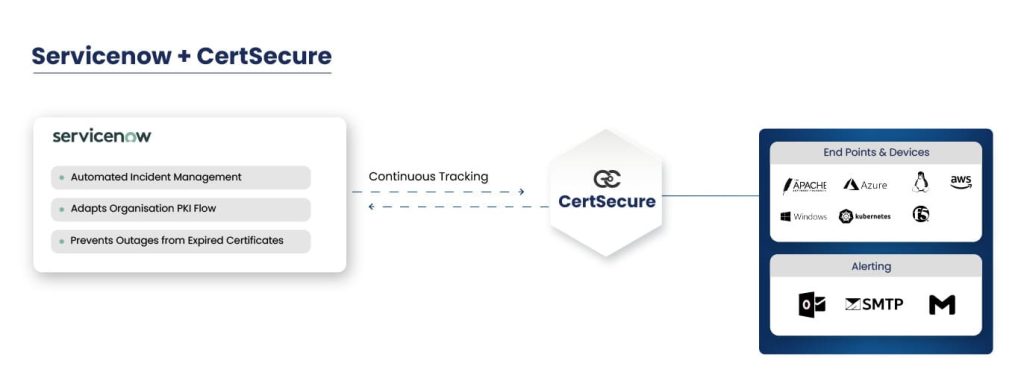
The ServiceNow integration helps a connected organization configure its ServiceNow instance to work with CertSecure Manager directly. It’s built on role-based access control (RBAC) so responsibility for certificate administration maps precisely to the right people. RBAC simplifies role assignment and user grouping, letting the system categorize users into layers based on permissions and access level, which keeps certificate management organized and auditable.
The integration delivers four concrete benefits:
- Automates certificate tracking with real-time updates and minimal manual intervention
- Generates automated alerts and tickets well in advance (7, 30, 60, 90 days) and immediately at expiration
- Runs a fallback escalation algorithm when resolution isn’t received in time
- Prevents human error and service outages tied to certificate expiry
ServiceNow also solves the persistent problem of tracking certificates at any given moment. When a certificate expires, a ticket is generated and assigned to the relevant group, then escalated to the issuer for resolution, which keeps the entire certificate renewal workflow inside a single, auditable system.
How the ServiceNow Integration Resolves Each Challenge
Tracking the Ever-Growing Portfolio
ServiceNow automates and streamlines the certificate lifecycle on top of CertSecure Manager’s centralized certificate database. It acts as a dynamic orchestrator, automating routine tasks like tracking validity and driving timely renewals. That precision-driven automation cuts manual intervention, which directly reduces the risk of oversight.
Closing the Certificate Expiry Foresight Gap
The integration closes the foresight gap with automated tracking, alerting, and fallback mechanisms for every certificate. RBAC ensures responsibilities and roles are assigned precisely to the right grouped users, and ServiceNow’s automation sends alerts to designated groups, and in turn designated users, well before a certificate is due to expire.
Fixing Alerting Inefficiency and Issue Lifecycle Tracking
ServiceNow improves alerting by creating an incident for every expiration issue. The integration generates tickets automatically, well in advance at 7, 30, 60, and 90-day intervals, and immediately at expiration, so every event is logged and tracked. A built-in fallback algorithm reassigns the ticket if a response to the resolution isn’t received in time, keeping the process reliable instead of dependent on one person noticing an email.
In-Depth Architecture of the Integration
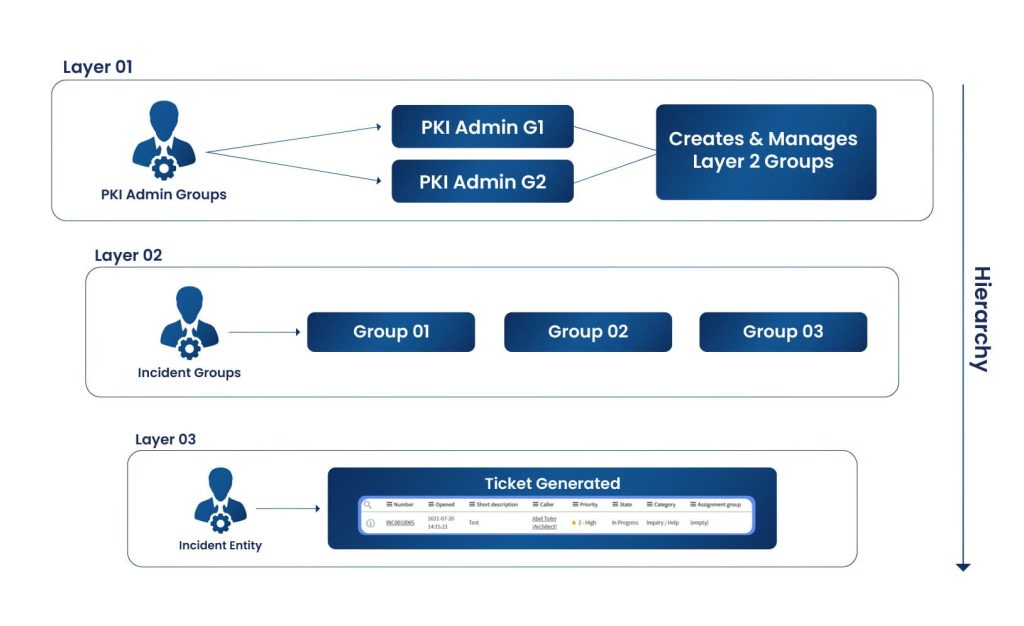
The integration’s architecture is organized into three layers: the Admin layer, the incident group layer, and the incident ticket entity. The Admin layer sits at the top and oversees all administrative groups, managing the second layer beneath it. Access control moves from broad at the Admin layer to specific at the incident ticket entity.
The Admin layer runs overall group administration. The incident group layer handles group-specific activity, the teams actually responsible for resolving certificate-related incidents. The incident ticket entity holds the precise details tied to a given certificate expiration, giving the whole process a structured, organized path to resolution.
This structure is designed to align with workflows your organization likely already has. Existing administrative policies map cleanly onto the layers, so the integration reinforces your existing process rather than replacing it.
Here’s how ticket assignment actually works for an expiring certificate: when a ticket is generated, it’s assigned to the issuing group responsible for that certificate. That incident group owns the ticket and the renewal. Tickets are generated well in advance, at 7, 30, 60, and 90 days before expiry, and again promptly after expiration if it wasn’t resolved in time.
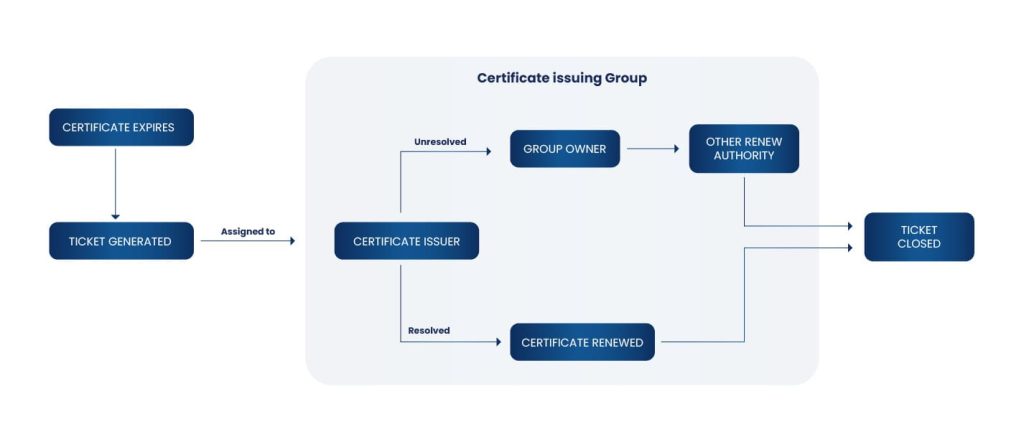
The ticket lifecycle policy is straightforward: it’s first assigned to the certificate issuer or designated entity. Once the certificate is renewed and the issue resolved, the ticket closes. If it stays unresolved past a defined window, it’s automatically reassigned to the group owner, who then assigns it to whoever can actually close it out. That structured, responsive workflow is what keeps certificate renewal incidents from silently expiring alongside the certificate itself.
Step-by-Step: Setting Up the CertSecure Manager and ServiceNow Integration
The setup below assumes CertSecure Manager is already deployed and your certificate inventory is populated. Screenshots referenced below should reflect your current CertSecure Manager admin console and ServiceNow instance versions at the time of configuration.
- Provision the ServiceNow service account: In ServiceNow, create a dedicated integration user with API access scoped to incident creation and assignment group read/write. Avoid reusing a personal admin account; this account is the one CertSecure Manager will authenticate as. Screenshot: ServiceNow user creation screen with the “Web Service Access Only” role assigned.
- Map RBAC groups: In CertSecure Manager’s admin console, define the Admin layer, then create incident groups that mirror your existing certificate ownership structure (application teams, PKI team, platform team). Screenshot: CertSecure Manager RBAC configuration panel showing group hierarchy.
- Configure the ServiceNow connector: Enter the ServiceNow instance URL, the service account credentials, and the target table (typically the incident table) inside CertSecure Manager’s integrations settings. Screenshot: CertSecure Manager integration settings page with ServiceNow fields populated.
- Set alert intervals: Define the pre-expiry alert schedule, commonly 90, 60, 30, and 7 days, plus a post-expiry alert. Each interval should map to a ticket priority level in ServiceNow. Screenshot: alert interval configuration screen.
- Configure the fallback/escalation chain: Set the time window after which an unresolved ticket reassigns to the group owner, and name that owner explicitly. Screenshot: escalation rule builder showing the reassignment window and target owner.
- Run a test certificate through the pipeline: Use a certificate with a near-term expiration date in a non-production environment to confirm a ticket is created, assigned, and escalated correctly end-to-end.
- Validate ticket data against the certificate record: Confirm the ticket includes the certificate’s CN/SAN, issuing CA, expiration date, and owning application, so responders don’t have to look it up separately.
- Go live and monitor the first full alert cycle: Watch the first 90-day and 30-day alert batch closely to confirm assignment groups and escalation timing behave as configured before relying on it fully.
Sample configuration reference (values will vary by ServiceNow instance):
Integration endpoint: https://<instance>.service-now.com/api/now/table/incident
Auth type: OAuth 2.0 (service account)
Alert intervals (days before expiry): 90, 60, 30, 7
Post-expiry alert: immediate
Fallback escalation window: 48 hours
Escalation target: PKI team lead (group owner)
Before and After: Operational Workflow Comparison
| Step | Before Integration (Manual) | After Integration (Automated) |
|---|---|---|
| Expiry tracking | Spreadsheet or calendar reminders, checked periodically | Continuous, automated monitoring inside CertSecure Manager |
| Alerting | Email to a distribution list, no ownership guarantee | Ticket auto-created and assigned to the correct owner group via RBAC |
| Escalation | None; relies on someone noticing the email | Automated fallback reassignment after a defined window |
| Audit trail | Scattered across email threads and spreadsheets | Single ticket lifecycle record inside ServiceNow |
| Resolution visibility | Unknown until an outage occurs | Tracked from ticket creation to closure |
Rollback Guidance and Common Errors
If the integration needs to be rolled back, disable the ServiceNow connector inside CertSecure Manager’s integration settings first; this stops new tickets from generating without deleting existing ones. Keep the RBAC group mappings in place so re-enabling the integration later doesn’t require reconfiguring ownership from scratch. Revoke the ServiceNow service account’s API token last, after confirming no in-flight tickets depend on it for updates.
Common errors during setup:
- Tickets created but unassigned: usually means RBAC group mapping wasn’t completed before the connector was enabled.
- No tickets generated at all: check that the service account’s API token hasn’t expired and that the ServiceNow instance URL is correct.
- Duplicate tickets for the same certificate: typically caused by overlapping alert-interval rules; confirm each interval maps to a distinct ticket state.
- Escalation never triggers: confirm the fallback window and escalation target are both set; a missing target silently disables escalation in some ServiceNow configurations.
Success Metrics to Track After Implementation
Track these metrics for at least one full quarter after go-live to confirm the integration is delivering the intended reduction in manual effort and outage risk:
- Number of certificate-related incident tickets created vs. resolved within SLA
- Percentage of tickets resolved before the escalation/fallback window triggers
- Reduction in manually tracked certificates (spreadsheet entries retired)
- Certificate-related outage count, quarter over quarter, compared to the pre-integration baseline
- Average time from alert to ticket resolution, by alert interval (90/60/30/7-day)
Organizations running CertSecure Manager’s full automation suite, including Renewal Agents and the ServiceNow integration together, commonly report renewal time reductions and a measurable drop in manually opened certificate tickets within the first two quarters of rollout. If you’re tracking your own numbers, log them by quarter so you can show the trend at your next compliance or audit review.
How This Connects to 47-Day TLS Certificate Readiness
The case for automated certificate tracking gets stronger every year the CA/Browser Forum’s validity reduction schedule advances. Per Sectigo’s April 11, 2025 announcement, the CA/B Forum-approved ballot phases maximum public TLS certificate validity down from 398 days to 200 days starting March 15, 2026, to 100 days starting March 15, 2027, and to 47 days starting March 15, 2029. Each step cuts the renewal window and multiplies how often every certificate in your inventory needs attention.
A manual or semi-automated tracking process that was merely inconvenient at 398-day validity becomes untenable at 47 days, when a mid-size enterprise could be renewing certificates on a near-continuous basis. The ServiceNow integration’s ticket-based lifecycle tracking, alert intervals, and fallback escalation are exactly the automation layer that 47-day certificate readiness requires: it turns “someone should renew this soon” into a tracked, owned, auditable ticket every time.
Handling This in Multi-Cloud or Hybrid PKI Environments
In multi-cloud or hybrid PKI environments, the same certificate inventory challenge multiplies across cloud provider CAs, on-premises CAs, and third-party public CAs. CertSecure Manager’s HA architecture is built to integrate all of them into one inventory regardless of where a given CA lives, so the ServiceNow integration doesn’t need a separate configuration per cloud or per CA type. Define RBAC groups by application or team ownership, not by which CA issued the certificate, so a ticket routes to the right owner whether the certificate came from an internal Microsoft CA, a public CA, or a cloud-native CA.
Teams running hybrid environments should also connect this integration to their broader CBOM Secure discovery process. A cryptographic bill of materials gives you the full certificate and cryptographic asset inventory across cloud and on-prem estates; the ServiceNow integration then turns the lifecycle events from that inventory into owned, tracked tickets. Together they close both halves of the problem: knowing what exists, and making sure someone acts on it before it expires.
Owner and Action Matrix by Team
| Team | Responsibility | Action After Rollout |
|---|---|---|
| PKI team | Owns CA integrations, RBAC group structure, and escalation policy | Review alert intervals and fallback timing quarterly |
| Security team | Owns overall certificate risk posture and outage prevention | Track outage and incident-resolution metrics against baseline |
| Platform / ITSM team | Owns the ServiceNow instance and API integration health | Monitor connector uptime and service account credential rotation |
| Compliance team | Owns audit evidence for certificate lifecycle governance | Pull ticket history as evidence for DORA, PCI DSS, or internal audits |
What to Do Next
If you’re evaluating this integration, the fastest path forward looks like this:
- PKI and security teams: confirm your certificate inventory is complete before configuring alerts; an incomplete inventory produces false confidence, not fewer outages.
- Platform teams: provision the ServiceNow service account and confirm API connectivity in a non-production environment first.
- Compliance teams: define which alert intervals and escalation records need to be retained as audit evidence before go-live.
- All teams: agree on the RBAC group structure together, since misaligned ownership is the most common cause of unassigned tickets after rollout.
Conclusion
Integrating CertSecure Manager with ServiceNow turns certificate monitoring and management from a reactive, manual process into a structured, auditable one. The three-layer architecture, from Admin control down to the individual incident ticket, keeps the workflow aligned with how your organization already assigns ownership, while automated alerting and fallback escalation close the gaps that cause certificate-related outages in the first place.
As certificate validity periods compress under the CA/B Forum’s schedule toward 47 days, this kind of automation stops being a nice-to-have and becomes the only realistic way to keep a growing certificate portfolio under control. Combined with CBOM Secure’s discovery and inventory capabilities and a broader PQC readiness strategy, the ServiceNow integration gives PKI, security, platform, and compliance teams a single, shared source of truth for every certificate lifecycle event.
CertSecure Manager has a comprehensive suite of lifecycle management features, discovery, inventory, issuance, deployment, renewal, revocation, and reporting, backed by intelligent alerting, automation, and automatic server deployment. Explore the PQC Center of Excellence to see how certificate automation fits into your broader crypto-agility roadmap.
Frequently Asked Questions
What Is the Main Takeaway from Enhancing Digital Certificate Management with CertSecure’s Service Now Integration?
CertSecure Manager’s ServiceNow integration automatically turns certificate expiration events into owned, tracked incident tickets using RBAC-based assignment and fallback escalation, closing the gap between an alert being sent and someone actually renewing the certificate.
Why Does This Matter for Enterprise Certificate Lifecycle Management?
Enterprises now manage thousands of certificates across multiple CAs and cloud environments. Without automated, ticket-based tracking, expirations get missed until they cause an outage, and there’s no audit trail showing who was responsible or when the issue was resolved.
What Teams Are Responsible for Acting on This Guidance?
PKI teams own the RBAC structure and CA integrations, security teams own outage-prevention metrics, platform/ITSM teams own the ServiceNow connector and API health, and compliance teams use the resulting ticket history as audit evidence.
What Risks Increase If This Topic Is Handled Manually?
Manual tracking increases the risk of missed renewals, undocumented resolution paths, and outages; per DigiCert’s July 2025 Trust Pulse Survey, 45% of organizations reported certificate-related downtime in the past year, with 37.5% of that downtime tied specifically to expired certificates.
How Does Automation Reduce Certificate Outage Risk?
Automation replaces manual spreadsheet tracking with continuous monitoring, automatically generates tickets at defined intervals (7, 30, 60, 90 days and at expiry), assigns them to the correct owner via RBAC, and escalates automatically if no one responds in time.
What Metrics Should Teams Track After Implementation?
Track ticket volume vs. SLA resolution rate, percentage of tickets resolved before escalation triggers, reduction in manually tracked certificates, quarter-over-quarter outage count, and average time from alert to resolution by alert interval.
How Does This Connect to 47-day TLS Certificate Readiness?
The CA/B Forum’s approved schedule cuts maximum public TLS certificate validity from 398 days to 200 days in March 2026, 100 days in March 2027, and 47 days by March 2029. Ticket-based automation is what makes tracking renewals at that frequency operationally realistic.
How Should This Be Handled in Multi-Cloud or Hybrid PKI Environments?
Define RBAC groups by application or team ownership rather than by issuing CA, since CertSecure Manager’s HA architecture already unifies public, private, cloud, and on-premises CAs into one inventory. Pairing this with CBOM Secure’s discovery capability extends the same tracking across the full hybrid estate.
What Prerequisites Are Needed Before Implementation?
You need a deployed CertSecure Manager instance with a populated certificate inventory, a ServiceNow service account with incident-creation API access, defined RBAC groups mapped to certificate owners, an agreed alert-interval policy, and a named escalation/fallback owner.
What Screenshots or Configuration Examples Should Be Included?
Document the ServiceNow service account creation screen, the CertSecure Manager RBAC configuration panel, the integration settings page with ServiceNow fields populated, the alert-interval configuration screen, and the escalation rule builder, captured from your current CertSecure Manager and ServiceNow versions at setup time.
- Executive Summary
- Key Takeaways
- Quick Checklist: Before You Start
- Why Manual Certificate Tracking Fails at Scale
- What Is CertSecure Manager?
- Why Use ServiceNow? Unveiling the Significance of Integration
- How the ServiceNow Integration Resolves Each Challenge
- In-Depth Architecture of the Integration
- Step-by-Step: Setting Up the CertSecure Manager and ServiceNow Integration
- Before and After: Operational Workflow Comparison
- Rollback Guidance and Common Errors
- Success Metrics to Track After Implementation
- How This Connects to 47-Day TLS Certificate Readiness
- Handling This in Multi-Cloud or Hybrid PKI Environments
- Owner and Action Matrix by Team
- What to Do Next
- Conclusion
- Frequently Asked Questions
