

- Key Takeaways
- How the Intune Architecture Works
- Microsoft Intune Service
- Microsoft Entra ID
- Device Enrollment and Windows Autopilot
- Mobile Device Management (MDM) and Mobile Application Management (MAM)
- Intune Suite and Microsoft Cloud PKI
- Reporting and Analytics
- Security Integrations: Defender for Endpoint, MTD, and NAC
- Microsoft Tunnel
- Microsoft Configuration Manager and Co-management
- Applications and App Stores
- Windows Updates
- How Encryption Consulting Helps
- Frequently Asked Questions
- Build the PKI Your Intune Deployment Depends On
Microsoft Intune architecture is the set of cloud services, identity components, and integration points that work together to manage and secure an organization’s devices and applications. The Intune service, Microsoft Entra ID, enrollment services, and connectors to security, update, and certificate services form a single cloud-based endpoint management platform.
Microsoft Intune architecture consists of the cloud-hosted Intune service, Microsoft Entra ID for identity and Conditional Access, enrollment services such as Windows Autopilot, two management channels (MDM for devices and MAM for applications), and integrations with Microsoft Defender for Endpoint, Configuration Manager, Windows Autopatch, and Microsoft Graph. Administrators control every component from the Microsoft Intune admin center.
Key Takeaways
- Microsoft Intune runs entirely in Microsoft’s cloud. There are no on-premises Intune servers, and every admin center action is backed by a Microsoft Graph API call.
- Microsoft Entra ID provides authentication, group targeting, and Conditional Access. Intune reports device compliance to Entra ID, which then allows or blocks access to corporate resources.
- Intune manages Windows 10 and 11, macOS, iOS/iPadOS, Android, Linux (Ubuntu Desktop 24.04 and 26.04 LTS), tvOS, visionOS, and ChromeOS devices from one console.
- The Intune Suite adds Remote Help, Endpoint Privilege Management, Advanced Analytics, Enterprise App Management, and Microsoft Cloud PKI. Since July 1, 2026, Microsoft 365 E5 includes the full Suite and Microsoft 365 E3 includes a subset.
- Certificate-based features such as Wi-Fi, VPN, and Windows Hello for Business depend on a PKI that Intune reaches through SCEP, PKCS, or Microsoft Cloud PKI.
How the Intune Architecture Works
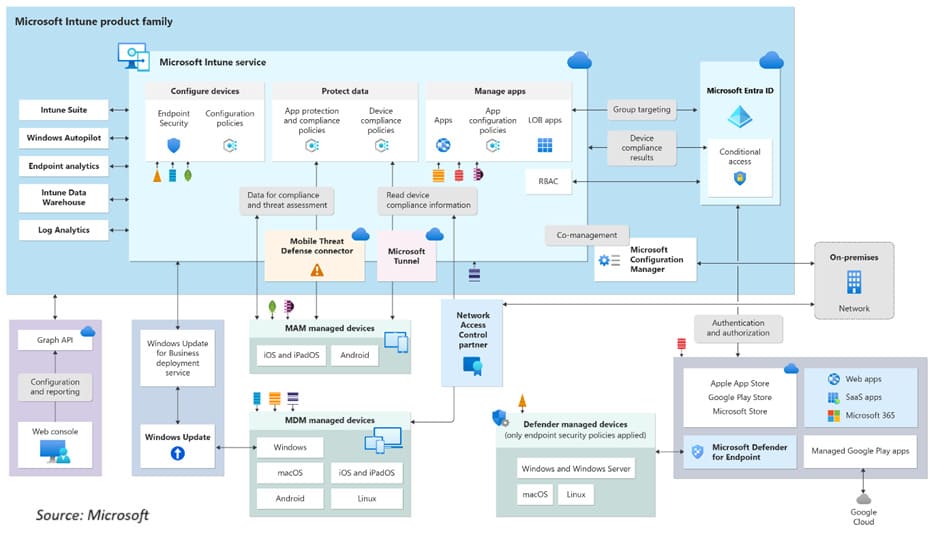
Microsoft Intune is a cloud-only service: policy evaluation, reporting, and app deployment all run on Microsoft’s infrastructure, and managed devices check in over the internet. Administrators work in the Microsoft Intune admin center at intune.microsoft.com, and every action in that console executes as a Microsoft Graph API call, so anything an administrator can click can also be automated through code. According to Microsoft Learn (May 2026), Intune supports Windows, macOS, iOS/iPadOS, Android, Linux, tvOS, and visionOS, and it manages ChromeOS devices through a connector to the Google Admin console.
The architecture is built around three elements: the identities that sign in (Microsoft Entra ID), the devices they sign in from (managed through MDM), and the apps they work in (managed through MAM). Every other component either feeds signals into that loop or acts on its output. In Intune’s architecture, identity is the control plane: every management decision starts and ends with Microsoft Entra ID.
Microsoft Intune Service
The Intune service is the policy engine at the center of the architecture. It handles three jobs: device configuration (defining settings and restrictions per platform), data protection (controlling how corporate data is accessed, shared, and removed), and app management (deploying applications and their configurations). On Windows, the settings catalog exposes thousands of configuration service provider (CSP) settings natively, so most policies no longer require custom OMA-URI entries.
Microsoft Entra ID
Microsoft Entra ID, renamed from Azure Active Directory in 2023, is the identity layer of the architecture. When a device enrolls in Intune, it registers in Entra ID, and Intune reports the device’s compliance state back to Entra ID. Conditional Access policies then use that signal: if a policy requires the device to be marked as compliant, a noncompliant device is blocked from email, Microsoft 365, and other connected resources. Intune also relies on Entra security groups to target every policy, profile, and app assignment.
Device Enrollment and Windows Autopilot
Windows Autopilot provisions new Windows devices into a business-ready state without imaging, and it now exists in two versions. Classic Autopilot registers a device by its hardware hash before deployment and supports user-driven, self-deploying, and pre-provisioned modes, Microsoft Entra hybrid join, and HoloLens 2. Windows Autopilot device preparation, generally available since June 2024, removes the hardware hash requirement: the user signs in with Entra ID credentials during the out-of-box experience, and Intune delivers policies and apps at enrollment time. Device preparation supports Microsoft Entra join only. Apple devices enroll through Apple Business Manager with Automated Device Enrollment, and Android devices enroll through Android Enterprise.
Mobile Device Management (MDM) and Mobile Application Management (MAM)
Intune manages endpoints through two channels: MDM controls the whole device, while MAM protects corporate data inside specific apps without enrolling the device. The two channels can run together on the same device.
| Attribute | MDM | MAM |
|---|---|---|
| Scope | The full device: settings, security baselines, apps, updates | Corporate apps and the data inside them |
| Enrollment | Device enrolls in Intune | No device enrollment required |
| Typical use | Corporate-owned hardware | BYOD and contractor devices |
| Key controls | Compliance policies, configuration profiles, remote actions | App protection policies, app configuration |
| Data removal | Full or selective wipe of the device | Selective wipe of corporate app data only |
Intune Suite and Microsoft Cloud PKI
The Microsoft Intune Suite is the advanced capability tier that sits on top of the base service (Intune Plan 1). It includes Remote Help for secure help desk sessions, Endpoint Privilege Management for elevating approved tasks without granting standing local admin rights, Advanced Analytics, Enterprise App Management with a catalog of more than 1,000 prepackaged applications, Microsoft Cloud PKI, Microsoft Tunnel for MAM, firmware-over-the-air updates for supported Zebra Android devices, and specialty device management for AR/VR headsets and meeting room devices.
Since July 1, 2026, Microsoft includes the full Suite in Microsoft 365 E5 and adds Remote Help, Advanced Analytics, and the Intune Plan 2 capabilities to Microsoft 365 E3, with rollout to eligible tenants completing by August 1, 2026.
Microsoft Cloud PKI deserves specific attention. It is a managed certificate authority service that issues, renews, and revokes certificates for Intune-managed devices without on-premises CA infrastructure. Organizations that keep an on-premises Microsoft CA connect it to Intune through the Certificate Connector, which delivers certificates via SCEP or PKCS profiles. Either way, certificates remain the foundation for Wi-Fi and VPN authentication and for passwordless sign-in with Windows Hello for Business.
Reporting and Analytics
Three components handle reporting. Endpoint Analytics scores startup performance, application reliability, and work-from-anywhere readiness, so IT can fix device problems before users open help desk tickets. The Intune Data Warehouse exposes historical Intune data through an OData API for tools such as Power BI; Microsoft is re-architecting it in mid-2026, a change that resets stored history to about 30 days and retires the Power BI beta connector in favor of the OData feed. Log Analytics integration routes Intune audit and operational logs to an Azure Monitor Log Analytics workspace for long-term retention and custom queries.
Security Integrations: Defender for Endpoint, MTD, and NAC
Intune feeds risk signals from security tools into its compliance and Conditional Access decisions. Microsoft Defender for Endpoint acts as the native Mobile Threat Defense (MTD) partner: it reports a machine risk score that compliance policies evaluate, and Intune can deploy and manage Defender’s security settings on managed and unmanaged devices. Third-party MTD vendors connect through the Mobile Threat Defense connector and feed threat data into the same compliance evaluation. Network Access Control (NAC) partner solutions check a device’s enrollment and compliance status with Intune before allowing it onto the network, and they redirect unenrolled or noncompliant devices to remediation.
Microsoft Tunnel
Microsoft Tunnel is Intune’s VPN gateway. It runs in a Linux-based container, hosted on premises or in the cloud, and gives iOS/iPadOS and Android Enterprise devices access to on-premises resources using modern authentication and Conditional Access. A noncompliant device is blocked from both the VPN server and the internal network. Microsoft Tunnel for MAM, one of the Intune Plan 2 capabilities, extends the same per-app VPN to iOS and Android devices that are not enrolled in Intune.
Microsoft Configuration Manager and Co-management
Microsoft Configuration Manager remains Microsoft’s on-premises management platform for Windows, and co-management attaches it to Intune. A Windows 10 or later device can be managed by both tools at once, with individual workloads such as compliance policies, update policies, and app deployment shifted to Intune one at a time. This lets an organization move to cloud management at its own pace while keeping its Configuration Manager investment in place.
Applications and App Stores
Intune deploys and manages applications on every supported platform: Win32 and MSIX packages and Microsoft Store apps on Windows, PKG and DMG installers on macOS, and store or line-of-business apps on iOS/iPadOS and Android. Users authenticate to those apps with their Entra ID identity, and app configuration and protection policies follow the app rather than the device. Enterprise App Management, part of the Intune Suite, adds a curated catalog of prepackaged third-party applications with managed updates.
Windows Updates
Intune manages Windows updates through Windows Update client policies and the Windows Autopatch service. Microsoft renamed Windows Update for Business to Windows Update client policies in April 2025 and folded its deployment service into Windows Autopatch, which automates updates for Windows, Microsoft 365 Apps for enterprise, Microsoft Edge, and Microsoft Teams. Since June 2026, Intune is the required management path for these update policies. Hotpatch updates, enabled by default starting with the May 2026 security update, install security fixes on eligible Windows 11 24H2 x64 devices without a restart in eight months of the year.
How Encryption Consulting Helps
Encryption Consulting’s PKI Services design and operate the certificate infrastructure that Intune’s certificate-based features depend on, including Microsoft PKI integration with Intune for SCEP and PKCS certificate deployment and Windows Hello for Business implementation for passwordless sign-in. Organizations that prefer managed PKI over running their own CA can use PKI-as-a-Service, and CertSecure Manager automates certificate discovery, renewal, and revocation across the estate. Backed by ISO/IEC 27001:2022 and SOC 2 certified practices.
Frequently Asked Questions
What are the main components of Microsoft Intune architecture?
The main components are the cloud-hosted Intune service, Microsoft Entra ID for identity and Conditional Access, enrollment services such as Windows Autopilot and Apple Business Manager, the MDM and MAM management channels, the Intune Suite capabilities, and integrations with Microsoft Defender for Endpoint, Configuration Manager, Windows Autopatch, Microsoft Tunnel, and the Microsoft Graph API. Administrators control all of them from the Microsoft Intune admin center.
Does Microsoft Intune require on-premises infrastructure?
No. Intune runs entirely in Microsoft’s cloud. Optional on-premises components exist for specific scenarios: the Certificate Connector for Microsoft Intune delivers SCEP and PKCS certificates from an on-premises certificate authority, the Intune Connector for Active Directory supports Microsoft Entra hybrid join during Autopilot, and the Microsoft Tunnel gateway runs on a Linux server that the organization hosts.
What is the difference between MDM and MAM in Microsoft Intune?
Mobile Device Management (MDM) enrolls and manages the whole device, including settings, compliance, updates, and remote wipe, and fits corporate-owned hardware. Mobile Application Management (MAM) protects corporate data inside specific apps without enrolling the device, which fits BYOD scenarios. MAM supports selective wipe, so work data can be removed while personal content stays untouched. The two channels can run together on the same device.
What is included in the Microsoft Intune Suite?
The Intune Suite includes Remote Help, Endpoint Privilege Management, Advanced Analytics, Enterprise App Management, Microsoft Cloud PKI, Microsoft Tunnel for MAM, firmware-over-the-air updates for supported Zebra Android devices, and specialty device management. Since July 1, 2026, Microsoft 365 E5 includes the full Suite, and Microsoft 365 E3 includes Remote Help, Advanced Analytics, and the Intune Plan 2 capabilities.
How does Microsoft Intune issue certificates to devices?
Intune delivers certificates through certificate profiles. SCEP and PKCS profiles issue certificates from an on-premises certificate authority through the Certificate Connector for Microsoft Intune, while Microsoft Cloud PKI issues them from a managed cloud certificate authority. Devices then use these certificates for Wi-Fi and VPN authentication and for passwordless sign-in with Windows Hello for Business.
Build the PKI Your Intune Deployment Depends On
Intune can deliver certificates to every device you manage, but it cannot design the CA hierarchy behind them. Explore PKI Services or read the sibling article on the key features of Microsoft Intune to see how these components appear in day-to-day administration.
- Key Takeaways
- How the Intune Architecture Works
- Microsoft Intune Service
- Microsoft Entra ID
- Device Enrollment and Windows Autopilot
- Mobile Device Management (MDM) and Mobile Application Management (MAM)
- Intune Suite and Microsoft Cloud PKI
- Reporting and Analytics
- Security Integrations: Defender for Endpoint, MTD, and NAC
- Microsoft Tunnel
- Microsoft Configuration Manager and Co-management
- Applications and App Stores
- Windows Updates
- How Encryption Consulting Helps
- Frequently Asked Questions
- Build the PKI Your Intune Deployment Depends On