- What Is Google Cloud Key Management Service?
- How Do Cloud KMS's Key Sources Compare (Native vs. External Control)?
- What Are Keys, Keyrings, and Key Versions in Cloud KMS?
- What Are Cloud KMS's Core Components (Project, Location, Key Metadata)?
- What Is Google's Internal Key Hierarchy?
- How Do Cloud KMS Protection Levels and CMEK Work?
- How Should IAM Roles Be Structured for Cloud KMS?
- How Does Key Rotation Work in Cloud KMS?
- What Should You Log for Cloud KMS?
- What Are the Limitations of Cloud KMS?
- Decision Checklist: Configuring Cloud KMS
- What Would Encryption Consulting Recommend?
- Frequently Asked Questions
Google Cloud Key Management Service (Cloud KMS) is Google Cloud’s service for creating, storing, and controlling the cryptographic keys that protect data at rest. It matters because misconfiguring key protection levels, keyrings, or IAM here directly determines whether a compliance audit passes. Recommended action: use separate projects for key administration and data, choose the protection level (software, HSM, or external) based on an actual requirement, and enable automatic rotation from day one.
Key Takeaways
- Cloud KMS keys can come from four sources: Cloud KMS’s own software-backed keys, Cloud HSM (hardware-backed), BYOK (imported key material), or Cloud EKM (external key managers like Thales or Fortanix).
- Keys are organized into keyrings scoped to a project and a location; IAM permissions are usually granted at the keyring level so an entire group of keys inherits the same access policy.
- Cloud HSM’s hardware protection level is FIPS 140-2 Level 3 validated; the software protection level uses FIPS 140-3 Level 1-validated cryptographic primitives – two different claims worth not conflating.
- Automatic key rotation creates new key versions on schedule but never re-encrypts existing data or deletes old versions; that lifecycle work is the customer’s responsibility.
- Customer-managed encryption keys (CMEK) let services like Cloud Storage, BigQuery, and Compute Engine use a Cloud KMS key you control instead of Google’s default key.
Published: October 2020. Updated: August 2026. Reviewed by Encryption Consulting’s Cloud Key Management Team.
This post is a technical deep dive into Cloud KMS’s internals. For the broader picture of how KMS fits alongside Cloud HSM and PKI on GCP, see Google Cloud Platform’s Data Encryption Tools – KMS, HSMs, and PKIs. For how Cloud KMS compares to AWS KMS and Azure Key Vault, see AWS KMS Vs Azure Key Vault Vs GCP KMS.
What Is Google Cloud Key Management Service?
When data is stored in Google Cloud, it is automatically encrypted at rest by default. Cloud Key Management Service (Cloud KMS) is the layer that gives an organization direct control over the cryptographic keys behind that default encryption, rather than leaving key management entirely to Google.
How Do Cloud KMS’s Key Sources Compare (Native vs. External Control)?
Cloud KMS lets you manage cryptographic keys in a central cloud service, and the key material itself must come from one of four sources:
| Key source | Custody model | Best fit |
|---|---|---|
| Cloud KMS software-backed key (native) | Encrypt with a symmetric or asymmetric key generated and used inside Google’s software cryptographic module. | Default choice for most workloads. |
| Cloud HSM (native, hardware) | Symmetric and asymmetric keys generated and used only in FIPS 140-2 Level 3 validated Hardware Security Modules. | Workloads with an explicit hardware-custody requirement. |
| BYOK (Bring Your Own Key) | Import key material generated outside GCP; Cloud KMS then manages its lifecycle. | Organizations needing provenance over their own key generation process. |
| Cloud EKM (external/HYOK-equivalent) | Cloud KMS references a key held by an external key manager such as Thales or Fortanix; Google never holds usable key material. | Regulated data where a contract requires the cloud provider never possess the key. |
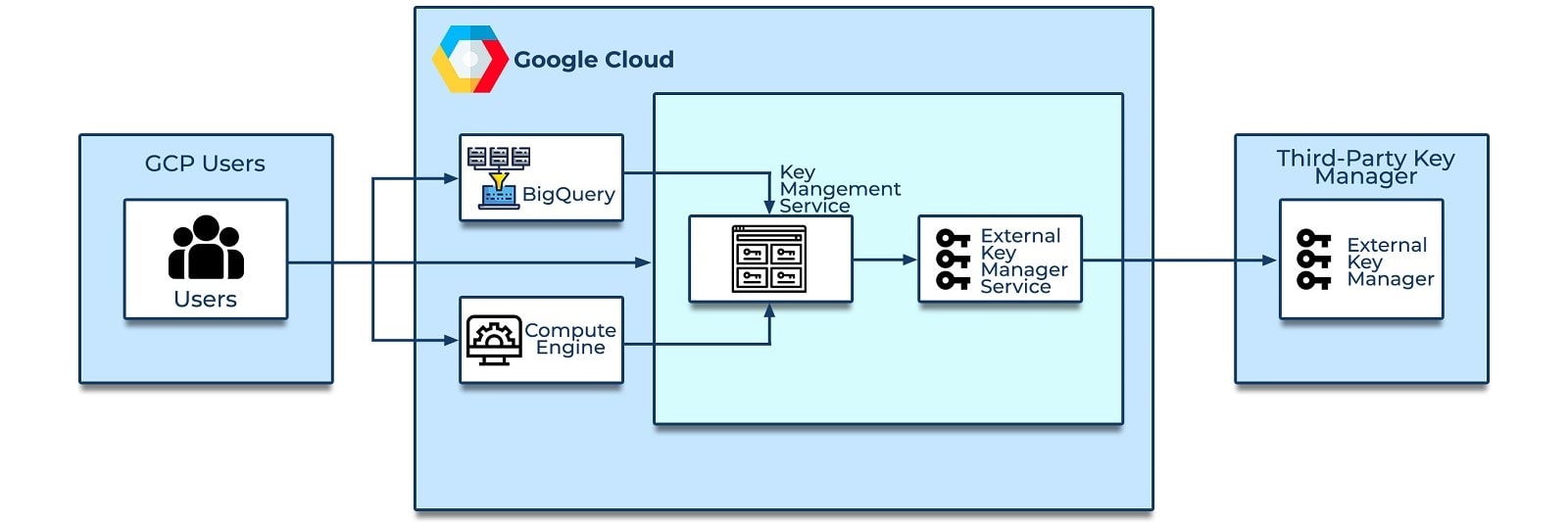
Figure: Cloud EKM providing a bridge between Cloud KMS and an external key manager.
What Are Keys, Keyrings, and Key Versions in Cloud KMS?
A key in Cloud KMS is a named object representing a cryptographic key; it is a pointer, and the actual key material can change as the key is rotated or new versions are created. Cloud KMS supports both symmetric keys (used for symmetric encryption, such as AES-256 in GCM mode) and asymmetric keys (used for asymmetric encryption or digital signatures).
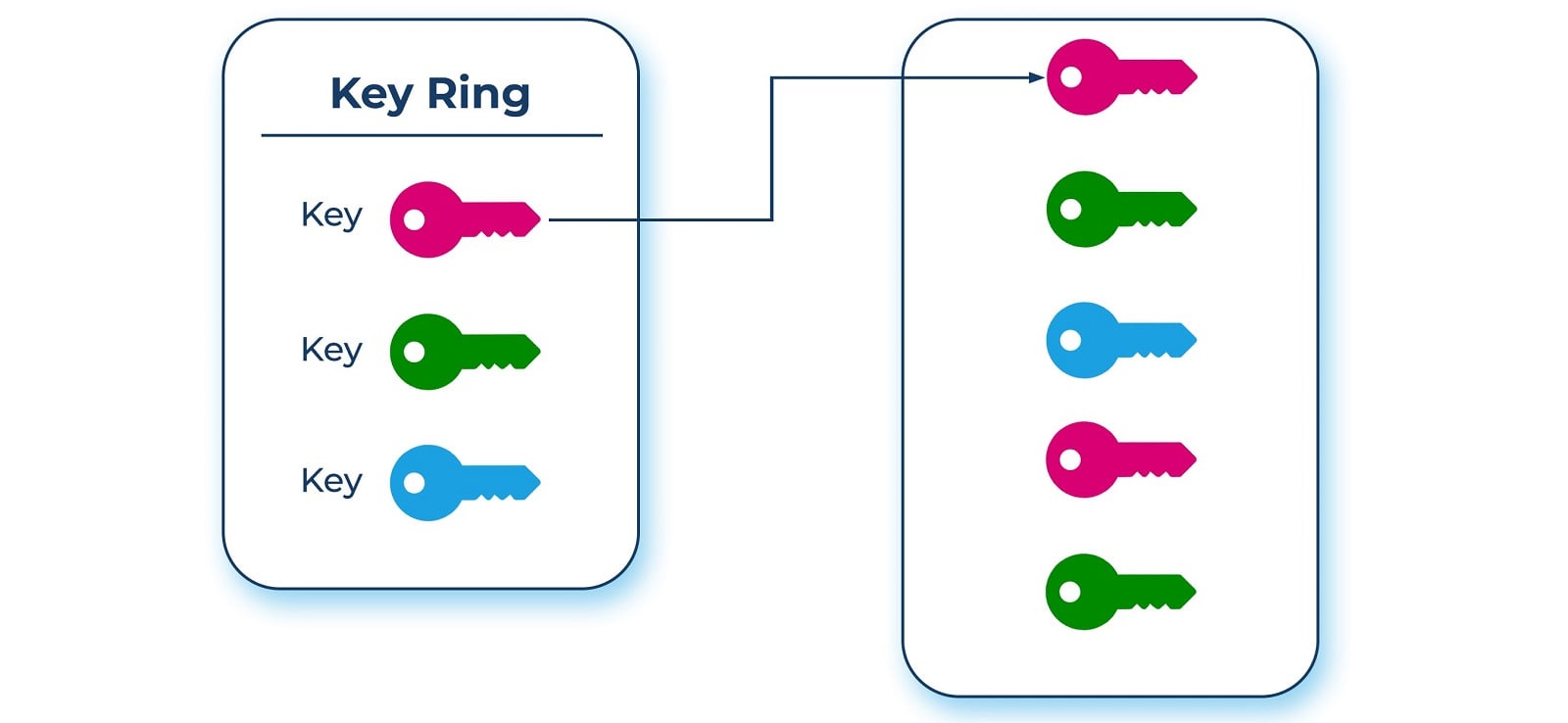
Keys are grouped into a keyring to organize them; a keyring belongs to a specific Google Cloud project and resides in a particular location, and keys inherit IAM policies from the keyring that contains them. Grouping related keys into one keyring lets you grant, revoke, or modify permissions across the group at once rather than acting on each key individually, though managing permissions directly on individual keys is also possible when grouping does not fit your use case.
What Are Cloud KMS’s Core Components (Project, Location, Key Metadata)?
- Project: Cloud KMS resources belong to a Google Cloud project like any other resource. Hosting data in a project separate from the one holding your Cloud KMS keys supports the best practice of separating key administrators from data administrators.
- Location: Within a project, Cloud KMS resources are created in one specific location, which determines data residency for the key material itself.
- Key metadata: resource names and properties (IAM policies, key type, key size, key state) that can be managed and audited independently of the key material itself.
What Is Google’s Internal Key Hierarchy?
Cloud KMS leverages Google’s own internal key management service: Cloud KMS-encrypted keys are wrapped by Google’s internal KMS, sharing the same root of trust. The hierarchy has four layers:
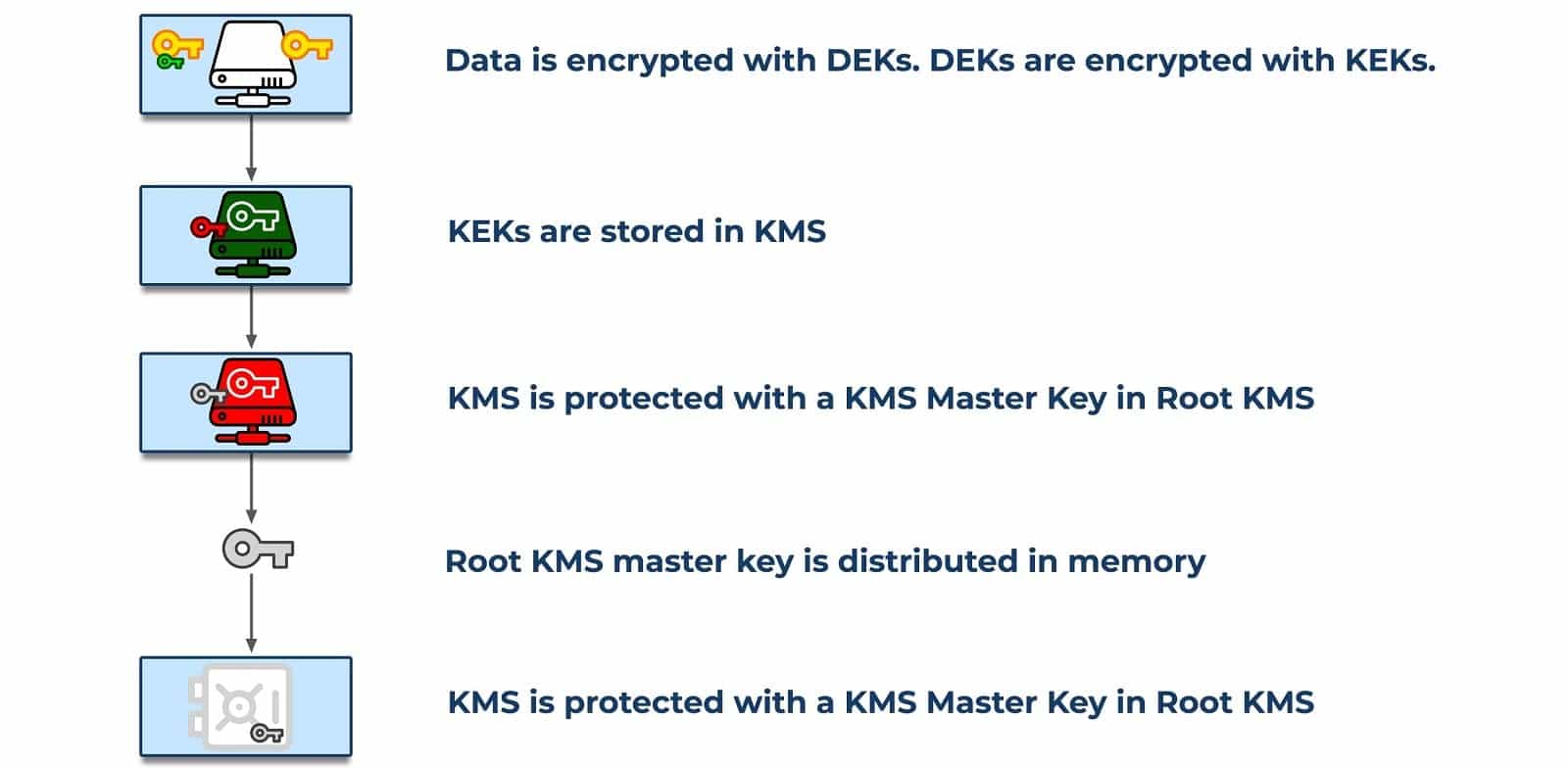
- Data encryption key (DEK): the key that directly encrypts customer data.
- Key encryption key (KEK): encrypts (wraps) a DEK. Every Cloud KMS platform option (software, hardware, external) lets you control the KEK specifically.
- KMS Master Key: encrypts the KEKs, distributed in memory and backed up on hardware devices; this key is what ultimately protects your keys.
- Root KMS: Google’s own internal key management service, the root of trust for the entire hierarchy.
How Do Cloud KMS Protection Levels and CMEK Work?
The Cloud KMS platform provides two protection-level backends (Cloud EKM is a third, handled separately above), chosen per key at creation time to determine which backend performs all future cryptographic operations on that key:
- Software protection level: keys are unwrapped by a software security module (BoringCrypto) to perform cryptographic operations, and are FIPS 140-3 Level 1-validated at the primitive level.
- HSM protection level: keys can only be unwrapped by dedicated Hardware Security Modules, currently FIPS 140-2 Level 3 validated.
Administrators reach Cloud KMS through the Google Cloud Console, the gcloud CLI, or applications implementing the REST or gRPC APIs directly. Applications that need customer-managed encryption keys (CMEK) use Cloud KMS through several supported services, including Cloud Storage, BigQuery, and Compute Engine; CMEK lets you manage the actual encryption keys these services use rather than relying solely on Google-managed defaults.
How Should IAM Roles Be Structured for Cloud KMS?
- Grant keyring-level IAM roles for teams that manage a whole category of keys, and key-level roles only when a single key genuinely needs a narrower policy.
- Separate
cloudkms.admin(lifecycle management: create, rotate, destroy) fromcloudkms.cryptoKeyEncrypterDecrypter(actual use for encrypt/decrypt), since almost no identity needs both. - Keep the project holding Cloud KMS keyrings separate from the project holding the data those keys protect.
- Audit IAM bindings on keyrings quarterly at minimum, since a keyring-level grant applies to every key it contains.
How Does Key Rotation Work in Cloud KMS?
Cloud KMS supports automatic rotation on a schedule you define. Rotation creates a new active key version for future encrypt operations, but it does not re-encrypt data already protected by a previous version and does not delete that previous version automatically. A complete rotation plan needs a separate re-encryption step for existing data and an explicit schedule for destroying retired key versions once nothing depends on them.
What Should You Log for Cloud KMS?
- Every cryptographic operation (encrypt, decrypt, sign, verify) via Cloud Audit Logs, including caller identity and the specific key version used.
- Key and keyring lifecycle events: creation, rotation, IAM binding changes, scheduled destruction.
- CMEK configuration changes on the consuming services (Cloud Storage, BigQuery, Compute Engine) that reference a Cloud KMS key.
What Are the Limitations of Cloud KMS?
- Cloud HSM’s hardware protection level is FIPS 140-2 Level 3, not yet the FIPS 140-3 Level 3 that AWS and Azure’s equivalent hardware tiers have reached.
- Rotation is not re-encryption; the two have to be planned as separate operational steps.
- Cloud EKM introduces an external dependency and added latency on every operation against a key it backs.
- Keyring-level IAM grants apply to every key inside, which can over-grant access if a keyring accumulates keys with genuinely different sensitivity levels.
Decision Checklist: Configuring Cloud KMS
- Choose software, HSM, BYOK, or Cloud EKM based on an actual documented requirement, not by default.
- Put Cloud KMS keyrings in a project separate from the data project.
- Split IAM roles between key administration and key use.
- Enable automatic rotation and separately document the re-encryption process for existing data.
- Enable CMEK on every supported service handling regulated data, rather than relying on Google-managed default keys.
What Would Encryption Consulting Recommend?
The Cloud KMS deployments we see run into trouble almost always have one thing in common: keyrings that mix key administrators and data administrators in the same IAM bindings. Encryption Consulting’s Cloud Key Management services design the project separation, keyring structure, and rotation runbook for Cloud KMS, and our HSM-as-a-Service offering extends that to hardware-backed custody when Cloud HSM’s current FIPS 140-2 Level 3 posture isn’t sufficient for your compliance mandate.
Frequently Asked Questions
What is the difference between a keyring and a key in Cloud KMS?
A keyring is a container scoped to a project and location that groups related keys together for shared IAM policy management. A key is the individual cryptographic object within that keyring, which can have multiple versions over its lifetime.
What FIPS level does Cloud KMS meet?
It depends on the protection level. Software-protection-level keys use FIPS 140-3 Level 1-validated cryptographic primitives; HSM-protection-level keys are FIPS 140-2 Level 3 validated.
What is CMEK and which GCP services support it?
Customer-managed encryption keys (CMEK) let a Google Cloud service use a Cloud KMS key you control instead of a Google-managed default key. Supported services include Cloud Storage, BigQuery, and Compute Engine, among others.
Can I use an external key manager like Thales with Cloud KMS?
Yes, through Cloud External Key Manager (Cloud EKM), which lets Cloud KMS reference a key physically held by an external key manager, so Google itself never holds usable key material.
Does key rotation in Cloud KMS re-encrypt existing data?
No. Rotation only creates a new active key version for future use; data already encrypted under a previous version requires a separate, explicit re-encryption step.
Need help structuring Cloud KMS keyrings and IAM the right way from the start? Talk to Encryption Consulting’s Cloud Key Management team.
References
- What Is Google Cloud Key Management Service?
- How Do Cloud KMS's Key Sources Compare (Native vs. External Control)?
- What Are Keys, Keyrings, and Key Versions in Cloud KMS?
- What Are Cloud KMS's Core Components (Project, Location, Key Metadata)?
- What Is Google's Internal Key Hierarchy?
- How Do Cloud KMS Protection Levels and CMEK Work?
- How Should IAM Roles Be Structured for Cloud KMS?
- How Does Key Rotation Work in Cloud KMS?
- What Should You Log for Cloud KMS?
- What Are the Limitations of Cloud KMS?
- Decision Checklist: Configuring Cloud KMS
- What Would Encryption Consulting Recommend?
- Frequently Asked Questions