- Quick Answer: What Are the Two Paths and Which Applies to You?
- Planning: What to Document Before You Start
- Upgrading DSMs: Real-World Challenges
- Migration to CipherTrust Manager
- Benefits of Migrating to CipherTrust Manager
- DSM Upgrade vs CTM Migration: Decision Table
- Pre-Migration Checklist
- Conclusion
- Frequently Asked Questions
Upgrading Vormetric Data Security Manager (DSM), the Thales key and policy management appliance for Vormetric Transparent Encryption (VTE) environments, can seem relatively straightforward, but if something goes wrong, the data protected by DSM-managed encryption can be lost or become inaccessible. Thales announced that Vormetric DSM reached end of life in June 2024, making migration to CipherTrust Manager (CTM) an urgent business-critical decision for all remaining DSM users. This article does not provide the step-by-step upgrade commands, but rather covers what organizations need to be careful about: the technical and non-technical points that the official upgrade guide does not emphasize, and the real-world challenges that production DSM upgrades and CTM migrations present. The recommended action: document your complete agent inventory and compatibility matrix before touching anything, bring your DSM to 6.4.5 or 6.4.6 before attempting CTM migration, and run exhaustive pilot testing in a non-production environment before any production cutover. For the key management context, see CipherTrust Manager and What Is Key Management.
Quick Answer: What Are the Two Paths and Which Applies to You?
There are two distinct operational paths: upgrading an existing DSM instance to a newer DSM version, and migrating from DSM entirely to CipherTrust Manager. The two paths are sequential, not alternative, for most organizations: if your DSM is not already on version 6.4.5 or 6.4.6, you must upgrade DSM first before the migration tooling can move your data to CTM. Both paths carry data loss and downtime risk if executed without thorough planning, a compatibility matrix, and pilot testing. CTM is a different product from DSM, not just an upgraded version, so the migration also requires new runbooks, new standard operating procedures, new architecture documentation, and retraining for operations teams.
Planning: What to Document Before You Start
Everything starts with good planning, and the DSM upgrade is no different. A full scan of the current environment is vital to assess any future roadblocks or challenges you might face.
-
Document all agents, agent versions, and guardpoints. When you upgrade the DSM, you can check the list of all agents and confirm whether all guardpoints are up and healthy. If something does not match as expected, you may need to troubleshoot before proceeding. Agent versions can also highlight whether you have agents that are incompatible with the DSM version you want to upgrade to. A compatibility matrix will help you determine which agents are compatible and which need to be upgraded. You can also develop an upgrade path from this inventory. Thales defines a mandatory upgrade path that must be followed: for example, if upgrading from DSM 5.3 to 6.2, you cannot jump directly to 6.2 without passing through the intermediate version 6.0.0.
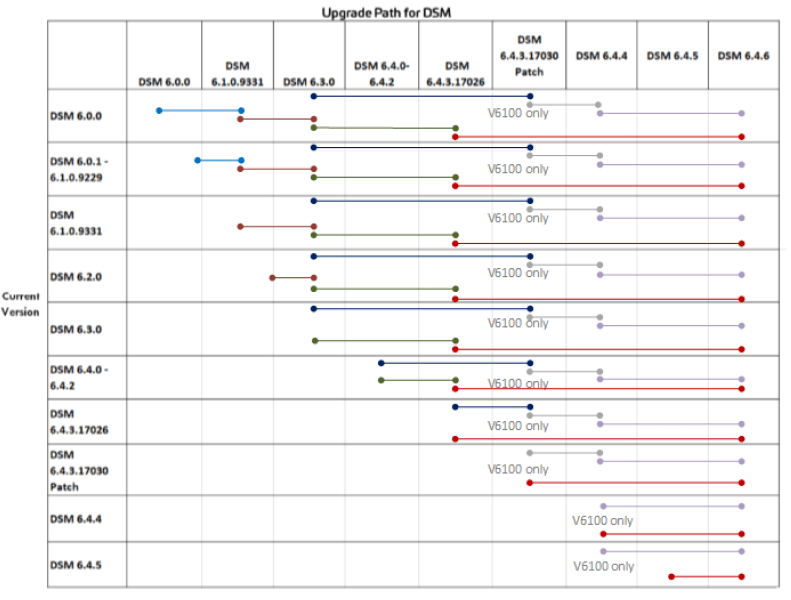
- Plan the production cutover. Many organizations looking to upgrade should already have a production DSM working in their environment. They typically prefer not to upgrade the existing production DSM in place; instead they bring up another DSM at the target version, conduct pilot testing, and switch to the new DSM as the production instance only after testing is complete. Organizations should plan the cutover timing, communication, and rollback procedures before starting any upgrade work.
Thorough planning ensures the following steps are smooth and that DSM can be upgraded to the desired version without unexpected data or service disruption.
Upgrading DSMs: Real-World Challenges
Planning can smooth the upgrade process, but upgrading a production DSM frequently exposes challenges that were not visible during planning. Challenges encountered in real production upgrades include:
- Cutting over from the old DSM to the new DSM without disrupting agent registration, which requires careful orchestration of the agent re-registration sequence
- Upgrading DSM to a version where all existing agents remain compatible, particularly when the environment includes a mix of agent versions from different eras
- Configuring high-availability (HA) clusters with DSMs on different subnets, which introduces networking and cluster synchronization complexities not covered in basic upgrade documentation
- Upgrade duration planning: DSM upgrades can take significant time depending on environment size, and without proper cutover planning, production systems can face unplanned downtime; with adequate planning, DSM cutover can be seamless with no downtime
Organizations should prepare exhaustively for upgrading DSMs, because an error in the upgrade process can render encrypted data permanently inaccessible.
Migration to CipherTrust Manager
Thales announced that Vormetric DSM reached end of life in June 2024. As a result, organizations are migrating their DSMs to CipherTrust Manager. Migrating from DSM to CTM brings a different category of challenge: CTM is a different product, not just an upgraded DSM, and the migration requires building new operational procedures from scratch alongside the technical migration of keys, policies, and configurations.
Common concerns organizations have when planning a CTM migration include:
- Policies, keys, user sets, and process sets migration: which objects carry over and which must be rebuilt
- Migration of hosts and agent re-registration to CTM
- High Availability configuration in the CTM architecture, which differs from DSM HA
- Downtime and system disruption during the migration window
- Data loss risk from incorrect key migration or guardpoint configuration errors
If organizations are already on DSM 6.4.5 or 6.4.6, they can migrate to CipherTrust Manager and restore the following objects:
- Agent Keys, including versioned keys and KMIP-accessible agent keys
- Vault Keys
- Bring Your Own Keys (BYOK) objects
- Domains
- CipherTrust Transparent Encryption (CTE) configuration
Objects That Are NOT Restored During Migration
- Most Key Management Interoperability Protocol (KMIP) keys, except KMIP-accessible agent keys
- Keys associated with CipherTrust Cloud Key Manager (CCKM), including key material as a service (KMaaS) keys
- DSM hostname and host configuration
The non-migration of standard KMIP keys and CCKM keys is one of the most commonly underestimated gaps. Organizations with KMIP-based integrations must plan for how those integrations will be re-established in CTM before starting migration. When customers migrate, exhaustive pilot testing is essential to ensure the migration proceeds without data loss. Customers should also conduct a cleanup session of the DSM before migration, removing all decommissioned servers and inactive users, so that only valid, current configurations are carried into CTM. If migrating from DSM to CTM, agents running VTE agents below version 7.0 must be upgraded to CipherTrust Transparent Encryption (CTE) before migration can proceed.
Benefits of Migrating to CipherTrust Manager
- Improved browser-based UI that replaces the DSM’s older interface
- No hypervisor limitation: CTM supports deployment across physical and virtual environments without the hypervisor constraints of DSM
- Fully featured remote CLI interface for operational management
- Embedded CipherTrust Cloud Key Manager (CCKM) for unified cloud key management across AWS, Azure, GCP, and other cloud providers
- Better key management capabilities with KMIP key material: integrates policy, logging, and management into a simplified and richer KMIP experience
- Supports CTE agents (renamed from VTE agents) from version 7.0, providing a clear forward path for encrypted host management
- New REST API for automation, enabling integration with DevOps toolchains and security orchestration platforms
Beyond these platform-wide improvements, CTM also provides specialized capabilities worth considering:
- Password and PED Authentication: Similar to S-series Luna HSM, Thales provides the choice of password and Pin Entry Device (PED) as authentication mechanisms for CTM. PED authentication provides improved security but is only available for k570 physical appliances.
- Multi-cloud and hybrid deployment: CTM supports deployment across multi-cloud environments including AWS, Azure, GCP, VMware, HyperV, and Oracle VM. Organizations can also form hybrid clusters combining physical and virtual appliances for high-availability environments, providing deployment flexibility that DSM did not support.
DSM Upgrade vs CTM Migration: Decision Table
| Scenario | Recommended Action | Key Prerequisite | Primary Risk |
|---|---|---|---|
| DSM below 6.4.5 and no CTM migration planned yet | Upgrade DSM to 6.4.5 or 6.4.6 using mandatory Thales upgrade path | Complete agent and guardpoint inventory; compatibility matrix | Agent incompatibility; guardpoint disruption during upgrade |
| DSM at 6.4.5 or 6.4.6 and planning CTM migration | Run exhaustive CTM pilot in non-production before production migration | Upgrade all VTE agents below 7.0 to CTE; pre-migration DSM cleanup | Non-migrating KMIP keys leaving integrations broken post-migration |
| DSM with significant KMIP integrations | Map all KMIP integrations before migration; plan re-establishment in CTM | Identify all KMIP keys that will not migrate and plan re-enrollment | KMIP-dependent applications losing key access after migration |
| DSM in HA configuration on different subnets | Engage Encryption Consulting for architecture-specific migration planning | Document all HA network configuration details; plan subnet routing | HA cluster misconfiguration causing split-brain or synchronization failure |
| DSM already past end-of-life with no migration plan | Begin migration planning immediately; prioritize based on data criticality | Thales support and documentation access; upgrade path verification | Unsupported DSM version creating compliance and security exposure |
Pre-Migration Checklist
- Document all DSM agents, agent versions, and guardpoints; create a complete agent inventory before any upgrade or migration activity begins
- Develop a compatibility matrix confirming which agents are compatible with the target DSM version or CTM
- Verify the mandatory DSM upgrade path and identify all intermediate versions required to reach the target version
- Confirm DSM version is 6.4.5 or 6.4.6 before beginning CTM migration; upgrade DSM first if it is on an earlier version
- Upgrade all VTE agents below version 7.0 to CipherTrust Transparent Encryption (CTE) agents before CTM migration
- Conduct a DSM cleanup session: remove all decommissioned servers, inactive users, stale policies, and unused objects before migration
- Identify all KMIP keys and CCKM keys in DSM that will not migrate to CTM; plan for re-establishment of those integrations in CTM
- Stand up a non-production CTM instance and run exhaustive pilot migration before touching the production DSM
- Validate all guardpoints and key accessibility in the CTM pilot environment before scheduling production migration
- Plan production cutover timing with defined maintenance windows and notify all business stakeholders of expected service impact
- Document all new CTM runbooks, standard operating procedures, and architecture documentation before production go-live
- Plan CTM HA configuration for production; test HA failover in the non-production environment before production deployment
Conclusion
Upgrading DSM can be challenging and requires thorough planning and troubleshooting. Migrating to CTM is a different level of complexity because CTM is a different product, not simply an upgraded DSM. Organizations that migrate must develop new runbooks, standard operating procedures, and architecture documents alongside the technical migration of keys and configurations. With DSM having reached end of life in June 2024, organizations still on DSM face increasing risk from an unsupported platform and should prioritize migration planning immediately. Encryption Consulting can help customers plan, upgrade, and migrate their existing DSMs. As a certified partner with Thales and an organization that has supported Vormetric customers with implementations and upgrades for years, Encryption Consulting can help plan a full-fledged migration to CipherTrust Manager and provide gap assessments and pre-planning to ensure customers do not face data loss, downtime, or production issues. Contact us for more information at [email protected].
Sources:
- CipherTrust Platform Documentation Portal: DSM Migration (thalesdocs.com)
- CipherTrust Platform Documentation Portal: CTE-DSM Migration (thalesdocs.com)
Frequently Asked Questions
What is Vormetric Data Security Manager (DSM) and what is CipherTrust Manager (CTM)?
Vormetric Data Security Manager (DSM) is the Thales key and policy management appliance that manages encryption keys, policies, user sets, process sets, and guardpoints for VTE agents on protected hosts. CipherTrust Manager (CTM) is Thales’s next-generation data security management platform that replaces DSM, with a modern browser-based UI, no hypervisor limitations, embedded CCKM for cloud key management, improved KMIP capabilities, CTE agent support from version 7.0, and a REST API for automation. Thales announced DSM reached end of life in June 2024.
What objects migrate from DSM to CipherTrust Manager and what does not migrate?
Objects that migrate from DSM 6.4.5 or 6.4.6 to CTM include: Agent Keys (including versioned keys and KMIP-accessible agent keys), Vault Keys, BYOK objects, Domains, and CTE configuration. Objects that do not migrate include: most KMIP keys except KMIP-accessible agent keys, CCKM and KMaaS keys, and DSM hostname and host configuration. The non-migration of standard KMIP keys is one of the most commonly underestimated gaps in migration planning.
What version of DSM must an organization be on before migrating to CipherTrust Manager?
Organizations must be on DSM version 6.4.5 or 6.4.6 before migrating to CTM. If on an earlier version, the organization must upgrade DSM through the mandatory Thales upgrade path to 6.4.5 or 6.4.6 first. Additionally, all VTE agents below version 7.0 must be upgraded to CTE agents before CTM migration can proceed.
What are the biggest risks in a DSM upgrade or CTM migration?
The biggest risks are: data loss from guardpoint or key migration errors rendering encrypted data permanently inaccessible; production downtime from poorly planned cutover timing; agent incompatibility with the target DSM or CTM version; and configuration gaps in KMIP integrations that break dependent applications after migration. These risks are mitigated by complete pre-upgrade inventory, compatibility matrix development, parallel staging for upgrade testing, pre-migration DSM cleanup, and exhaustive pilot testing before any production cutover.
Can a DSM upgrade or CTM migration be performed with no downtime?
A DSM cutover can be executed with no production downtime using a parallel upgrade approach where a new DSM at the target version is brought up and agents are cut over without interruption. A migration from DSM to CTM involves a different product and architecture and typically requires planned maintenance windows for specific migration operations. The extent of downtime depends on environment complexity, agent count, and whether the migration can be staged.
- Quick Answer: What Are the Two Paths and Which Applies to You?
- Planning: What to Document Before You Start
- Upgrading DSMs: Real-World Challenges
- Migration to CipherTrust Manager
- Benefits of Migrating to CipherTrust Manager
- DSM Upgrade vs CTM Migration: Decision Table
- Pre-Migration Checklist
- Conclusion
- Frequently Asked Questions