
- Executive Summary
- Prerequisites for Centralizing Let's Encrypt with CertSecure Manager
- What Is the "Certbot" Silo Problem?
- Centralized ACME Orchestration Is the Solution You Need!
- CertSecure Manager's Automation Workflow for Let's Encrypt
- CertSecure Manager's Dashboard Metrics Give Governance Insights at a Glance
- Why This Matters for the Enterprise
- What to Do Next
- How Encryption Consulting Can Help
- Conclusion
- Frequently Asked Questions
Over the past several years, in nearly every enterprise PKI assessment we’ve conducted, a familiar pattern continues to appear. The security team has a tight grip on their paid, high-assurance certificates from authorities like DigiCert or GlobalSign. They have inventories, expiration alerts, and budget approvals.
Quick answer: CertSecure Manager v3.2 adds native Let’s Encrypt integration, so every ACME certificate is requested, validated, and deployed to F5, IIS, Apache, Nginx, and Tomcat through the same centralized platform used for paid CAs, replacing scattered Certbot cron jobs with one governed, monitored workflow.
But when we run a discovery scan on their development environments, cloud load balancers, and lower-tier web servers, we find a massive blind spot in the widespread, unmanaged use of free Let’s Encrypt Certificates.
Let’s Encrypt has revolutionized the internet by making SSL/TLS free and accessible via the ACME protocol. However, in the enterprise, it often creates “Shadow PKI.” Developers spin up certbot on individual servers, set up cron jobs, and forget about them. There is no central visibility. If a cron job fails, the certificate expires, the service goes down, and the SecOps team has no idea why, or even that the certificate existed in the first place.
With the release of CertSecure Manager v3.2, we are changing that dynamic. We are bringing the “Wild West” of Let’s Encrypt under the same governance umbrella as your premium OV/EV certificates.
Here is how we are doing it, and why this integration is a game-changer for your operational sanity.
Executive Summary
Manual certificate handling remains a widespread source of downtime industry-wide. DigiCert’s Trust Pulse Survey (July 2, 2025) found that 45% of organizations experienced certificate-related downtime in the past year, and 37.5% traced an outage directly to an expired certificate (source). A Let’s Encrypt certificate renewed by an unmonitored Certbot cron job is exactly the kind of certificate that produces this pattern, since nobody finds out it failed until the service is already down.
As an illustrative estimate: an enterprise with 500 Let’s Encrypt certificates spread across dev servers, F5 load balancers, and web tiers, each needing a manual check or renewal roughly every 60 to 90 days, represents dozens of unplanned engineering hours every quarter recovering from missed cron jobs and failed DNS challenges. That workload only grows as the CA/B Forum’s Sectigo-backed ballot phases maximum public TLS validity down to 47-day TLS certificates by March 2029 (200 days from March 2026, 100 days from March 2027, per the April 14, 2025 ballot), since every certificate in that inventory will need to be renewed far more often than it does today.
Quick Checklist
- Confirm admin access to Administration > Certificate Authorities in CertSecure Manager.
- Gather API credentials from your DNS provider (Cloudflare, Route 53, Linode, or similar) for DNS-01 validation.
- Install the Renewal Agent on at least one F5, IIS, Apache, Nginx, or Tomcat target before wider rollout.
- Export the list of existing Certbot-managed domains and their renewal schedules before onboarding.
- Classify domains into Tier 1, 2, or 3 before adding Let’s Encrypt as a certificate authority.
Owner and Action Matrix
Centralizing Let’s Encrypt touches more than the team that installed Certbot in the first place. The table below maps the primary responsibility and the first concrete action for each team.
| Team | Primary Responsibility | First Action |
|---|---|---|
| PKI / Certificate team | Owns the ACME account, CA integration, and tiered certificate policy | Define which domains qualify for Tier 3 Let’s Encrypt versus a paid CA |
| Security team | Owns visibility into previously unmanaged Certbot certificates | Run a discovery scan to confirm no Shadow PKI certificates remain outside CertSecure Manager |
| Platform / DevOps team | Owns Renewal Agent installation on F5, IIS, Apache, Nginx, and Tomcat | Install and test the Renewal Agent on one non-production endpoint before rollout |
| Compliance / vendor risk | Owns audit evidence for free-certificate governance | Require onboarding and renewal logs as standing audit artifacts for Tier 3 certificates |
Prerequisites for Centralizing Let’s Encrypt with CertSecure Manager
Before adding Let’s Encrypt as a certificate authority in CertSecure Manager, confirm the following are in place. Skipping any of these is the most common reason a first onboarding attempt stalls.
| Prerequisite | Why It’s Needed | Action |
|---|---|---|
| Admin access to CertSecure Manager | Required to add Let’s Encrypt as a CA and onboard domains | Confirm your account has the Certificate Authorities permission before starting |
| DNS provider API credentials | Enables automated DNS-01 challenge validation | Generate a scoped API token from Cloudflare, Route 53, or your DNS provider |
| Renewal Agent on target endpoints | Required to push and bind renewed certificates | Install the F5, IIS, Apache, Nginx, or Tomcat Renewal Agent before onboarding the domain |
| Existing Certbot inventory | Prevents duplicate or orphaned certificates during migration | Export the list of Certbot-managed domains and cron schedules before cutover |
What Is the “Certbot” Silo Problem?
The standard way to use Let’s Encrypt is to install an ACME client (like Certbot) directly on the endpoint.
- The Issue: This creates thousands of isolated operational islands. Each server manages its own renewal logic. There is no centralized reporting to indicate whether a validation failed or a cron job was deleted during a patch cycle.
- The Risk: When you manage thousands of 90-day certificates, and the industry is moving toward 47-day TLS certificates, “set it and forget it” eventually becomes “it broke, and we don’t know why.”
Centralized ACME Orchestration Is the Solution You Need!
CertSecure Manager v3.2 introduces native Let’s Encrypt Integration. Instead of every server talking to Let’s Encrypt independently, CertSecure Manager acts as the centralized ACME command center.
It handles account binding, challenge validation (e.g., DNS-01) with your domain providers (e.g., Cloudflare, Amazon Route 53, Linode, and others), and certificate retrieval. Then, it uses our established Renewal Agents to push those certificates to the target infrastructure.
This gives you a Unified Dashboard. You can now see a free Let’s Encrypt certificate used on a dev server right next to the high-value DigiCert certificate used on your corporate websites.
CertSecure Manager’s Automation Workflow for Let’s Encrypt
Let’s look at how this works in practice, specifically for complex endpoints like F5 Load Balancers and IIS Web Servers, which are notoriously difficult to automate with standard Certbot scripts.
-
One-Click Integration Setup
In v3.2, adding Let’s Encrypt is no longer a script-heavy process.
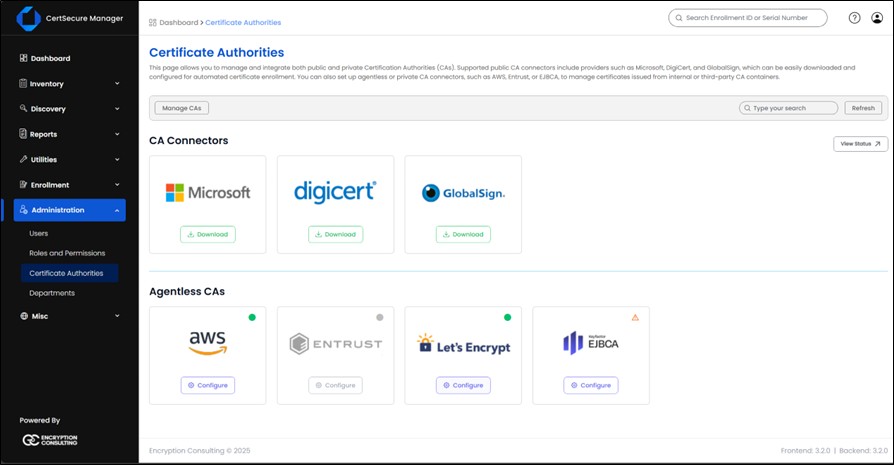
- Navigate to Administration > Certificate Authorities.
- Click on Let’s Encrypt from the available list.
- Onboard the required ACME URL. For Let’s Encrypt, type in https://acme-v02.api.letsencrypt.org/directory
- Click on Let’s Encrypt from the available list.
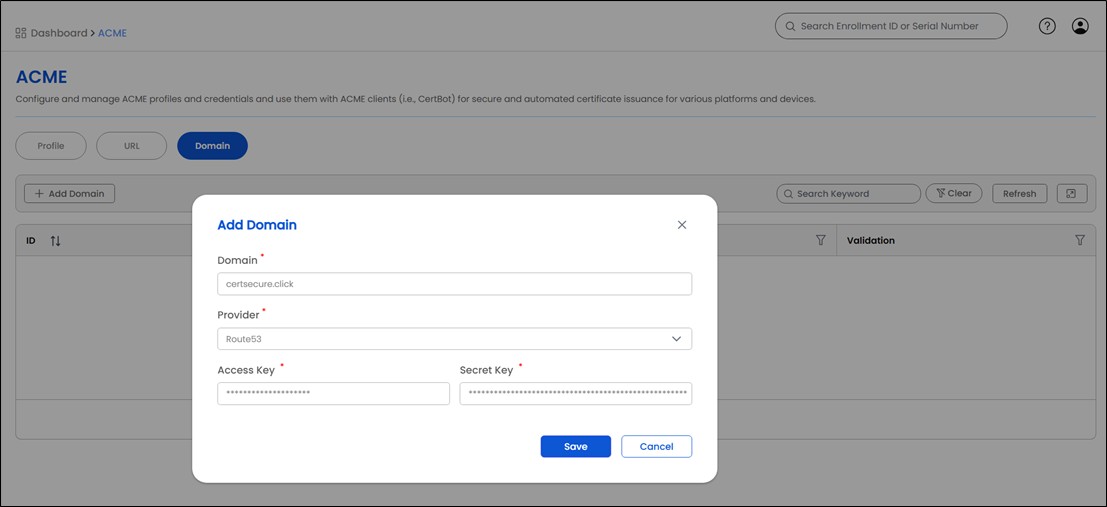
- Onboard your domains in the next “Domain” tab.
- CertSecure automatically initiates the domain validation process with your provider. Depending on the vendor, auto-validation can take 1-3 minutes.
- Once validation is completed, the domain will be available for certificate requests.



-
Certificate Automation with CertSecure Renewal Agents
This is where the heavy-lifting happens. We don’t just get the certificate; we apply and bind it to your target appliances.
-
F5 BIG-IP Load Balancers: Many organizations use Let’s Encrypt digital certificates on their F5 devices, but manually getting a certificate, importing it to the F5 device, and then updating the corresponding F5 SSL profile is already tedious and becomes unmanageable with shorter certificate lifecycles.
- The Workflow: CertSecure Manager requests the cert from Let’s Encrypt. Once issued, our F5 Renewal Agent pushes the new cert and key to the specific F5 partition and updates the onboarded SSL Profile.
- The Result: You get free, automated SSL on your load balancer without having to install and bind it every time manually.
- Web Servers (IIS/Apache/Nginx/Tomcat): CertSecure Manager also provides seamless certificate automation for your web servers. Once a Let’s Encrypt certificate is issued, our agent handles the entire deployment, delivering the new certificate, updating the server’s SSL configuration, and ensuring it’s activated, with no manual steps required. This gives you fully automated, consistently renewed TLS across your entire web server environment.
We have recently recorded a detailed walkthrough of this F5 setup. You can see exactly how the certificate renewal and binding work in the video below:
-
F5 BIG-IP Load Balancers: Many organizations use Let’s Encrypt digital certificates on their F5 devices, but manually getting a certificate, importing it to the F5 device, and then updating the corresponding F5 SSL profile is already tedious and becomes unmanageable with shorter certificate lifecycles.
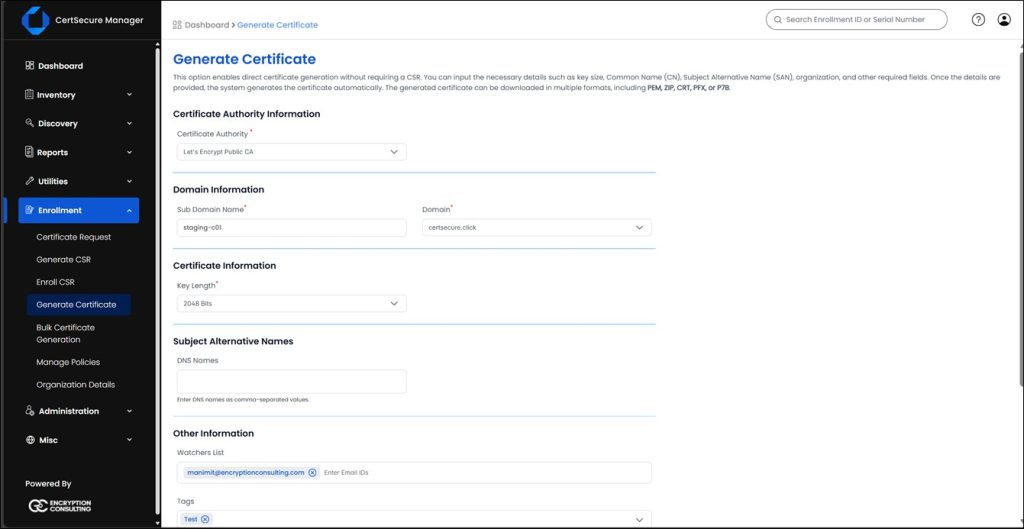
CertSecure Manager also allows you to request a Let’s Encrypt certificate manually from the CLM Platform from the Enrollment > Generate Certificate tool. You can always view, download, and use these certificates for any manual requirements in your organization.
Before and After: Certbot vs. CertSecure Manager-Orchestrated ACME
| Step | Manual Certbot | With CertSecure Manager v3.2 |
|---|---|---|
| Account setup | Each server registers its own ACME account with no shared record | One centralized ACME account manages every domain from a single dashboard |
| Domain validation | Each server runs its own DNS-01 or HTTP-01 challenge script | CertSecure Manager triggers and confirms validation directly with the DNS provider |
| Certificate deployment | An admin manually imports the certificate to F5 or the web server and updates the SSL profile | The Renewal Agent pushes and binds the certificate to the target F5 partition or web server automatically |
| Renewal monitoring | A cron job runs unattended until it silently fails | CertSecure Manager tracks every certificate’s status and alerts before expiration |
Common Errors and Rollback Guidance
The most frequent first-run issue is a DNS challenge that fails validation because of propagation delay; waiting a few minutes and retrying usually resolves it. The second most common issue is a certificate that renews successfully but never gets bound, typically because the F5 partition or SSL profile referenced during onboarding no longer matches the target device.
If a renewal or binding fails, CertSecure Manager and its Renewal Agents keep the previous certificate active until the new one is confirmed, so a failed attempt does not take down the existing TLS listener. Roll back by re-running the onboarding step once the DNS or F5 connectivity issue is resolved, rather than manually reverting to a Certbot-managed certificate on that endpoint.
CertSecure Manager’s Dashboard Metrics Give Governance Insights at a Glance
The v3.2 update integrates Let’s Encrypt Public Certificate issuance data directly into CertSecure Manager’s centralized reporting engine. Since these certificates cycle every 60-90 days, relying on scattered emails, Excel files, or cron logs is insufficient and inefficient at scale.
CertSecure Manager provides certificate insights and alerts:
- Unified KPI Dashboard: View your Let’s Encrypt inventory alongside your paid certificates. The dashboard features 12 distinct KPIs, highlighting critical metrics like Active, Expired, Pending, and High-Risk certificates in a single view. This ensures that no “free” certificate becomes a costly, unmonitored point of failure.
- Expiration Alerts: Instead of relying on a developer’s personal email to catch renewal failures, CertSecure integrates directly with ITSM tools like ServiceNow, Microsoft Teams, and your organization’s SMTP. You receive automated notifications 7, 30, or 60 days before a Let’s Encrypt certificate expires, ensuring your team is alerted to potential failures well before impact.
Success Metrics to Track After Implementation
Track these metrics quarterly to confirm the migration away from unmanaged Certbot is actually reducing risk:
- Percentage of Let’s Encrypt certificates onboarded into CertSecure Manager versus still self-managed by Certbot.
- Number of expiration alerts fired versus missed renewals per quarter.
- Average time from certificate issuance to F5 or web server deployment.
- Reduction in manual certificate-related tickets per quarter, compared against the prior quarter’s baseline.
Why This Matters for the Enterprise
This integration allows you to adopt a Tiered Certificate Strategy without fragmenting your management tools:
- Tier 1 (Public Trust/High Value): Use Paid CAs (DigiCert/Entrust) managed by CertSecure.
- Tier 2 (Internal Trust): Use Microsoft CA / AWS Private CA managed by CertSecure.
- Tier 3 (Public Trust/Low Value): Use Let’s Encrypt managed by CertSecure.
You get the cost benefits of Let’s Encrypt with the same certificate automation and governance rigor of an enterprise CLM Solution.
What to Do Next
Bringing Let’s Encrypt under governance does not require migrating every certificate at once. Each team has a specific, near-term action.
- PKI and certificate teams: define the Tier 1, 2, and 3 classification before adding Let’s Encrypt as a CA in CertSecure Manager.
- Security teams: run a discovery scan across dev environments and load balancers to confirm no Shadow PKI certificates remain outside CertSecure Manager.
- Platform and DevOps teams: install and test the Renewal Agent on one non-production F5 or web server endpoint before rolling out to production.
- Compliance and vendor risk teams: require onboarding and renewal logs as standing evidence for free-certificate governance audits.
How Encryption Consulting Can Help
Addressing “Shadow PKI” is less about software and more about having the right strategy. CertSecure Manager provides the technical controls, and Encryption Consulting ensures they’re implemented effectively across your enterprise.
- Establish a Trust Strategy: We help classify assets, starting with certificate discovery across your environment, and define where Let’s Encrypt fits versus where higher-assurance CAs are needed, turning informal usage into a clear Tiered Certificate Policy.
- Ensure Smooth Implementation: Our engineers deploy CertSecure Manager, configure ACME integrations, and optimize renewal workflows to maintain uptime during the transition.
- Align Security and DevOps: We integrate CertSecure APIs into existing CI/CD pipelines (Jenkins, Ansible, Terraform) to preserve delivery speed while strengthening governance.
- Provide Managed PKI: Our PKIaaS team can operate your certificate lifecycle infrastructure with 24/7 monitoring and expert support.
- Prepare for Crypto Agility: As certificate lifetimes shorten and post-quantum migration approaches, we help you build crypto agility into your Let’s Encrypt and enterprise CA strategy alike, assess PQC readiness, and extend your certificate inventory into a full CBOM once you are ready to move beyond certificates to a complete cryptographic asset inventory.
If your organization needs better visibility and governance over certificate usage, it’s time to centralize. Contact us for a demo and start building a resilient, automated PKI foundation.
Conclusion
By centralizing Let’s Encrypt management with CertSecure Manager v3.2, your enterprise can eliminate blind spots and operational chaos caused by unmanaged certificates. The combination of automated ACME workflows, renewal agents, and a unified dashboard ensures that every certificate, whether free or paid, is tracked, renewed, and deployed correctly. This not only reduces the risk of unexpected outages but also strengthens overall PKI governance, giving security and DevOps teams confidence that their SSL/TLS infrastructure is reliable, compliant, and easy to manage at scale.
Frequently Asked Questions
What is the main takeaway from How CertSecure Manager v3.2 Brings Enterprise Control to Your Let’s Encrypt Certificates?
CertSecure Manager v3.2 adds native Let’s Encrypt integration so every ACME certificate is requested, validated, and deployed through the same centralized platform used for paid CAs, replacing scattered per-server Certbot cron jobs with one governed, monitored workflow.
Why does this matter for enterprise certificate lifecycle management?
CLM programs typically govern paid, high-assurance certificates closely but leave free Let’s Encrypt certificates on dev servers and load balancers unmanaged, and that gap, often called Shadow PKI, is where outages and audit findings tend to originate.
What teams are responsible for acting on this guidance?
The PKI or certificate team owns the ACME account and tiered certificate policy, the security team owns discovery of previously unmanaged Certbot certificates, the platform or DevOps team owns Renewal Agent installation on F5 and web servers, and the compliance team owns audit evidence for free-certificate governance.
What risks increase if this topic is handled manually?
Manual Certbot deployments create isolated operational islands with no centralized reporting, so a failed DNS challenge or a cron job deleted during a patch cycle goes unnoticed until the certificate expires and the service goes down.
How does automation reduce certificate outage risk?
CertSecure Manager centralizes account binding, DNS-01 challenge validation, and certificate retrieval, then uses Renewal Agents to push and bind certificates to F5, IIS, Apache, Nginx, and Tomcat automatically, removing the manual steps where cron jobs and SSL profile updates typically fail.
What metrics should teams track after implementation?
Useful metrics include the percentage of Let’s Encrypt certificates onboarded into CertSecure Manager versus still self-managed by Certbot, the number of expiration alerts fired versus missed renewals per quarter, average time from issuance to deployment, and the reduction in manual certificate-related tickets per quarter.
How does this connect to 47-day TLS certificate readiness?
As maximum public TLS validity phases down toward 47-day TLS certificates, every Let’s Encrypt certificate in an enterprise’s inventory will need to be renewed far more often, a frequency that makes an unmonitored, per-server Certbot cron job an operationally unworkable way to manage renewals.
How should this be handled in multi-cloud or hybrid PKI environments?
In multi-cloud or hybrid environments, CertSecure Manager needs DNS provider API credentials configured for each domain’s actual DNS host, whether that is Cloudflare, Route 53, or an on-premises DNS server, since a domain validated against the wrong provider will fail its ACME challenge.
What prerequisites are needed before implementation?
Before onboarding, confirm admin access to Administration > Certificate Authorities in CertSecure Manager, DNS provider API credentials for DNS-01 validation, the Renewal Agent installed on at least one target endpoint, and an exported list of existing Certbot-managed domains so nothing is orphaned during migration.
What screenshots or configuration examples should be included?
The most useful reference points are the Administration > Certificate Authorities screen for adding Let’s Encrypt, the ACME directory URL configuration screen, the Domain tab used to onboard a domain for validation, and the dashboard view confirming validation is complete and the domain is ready for certificate requests.
- Executive Summary
- Prerequisites for Centralizing Let's Encrypt with CertSecure Manager
- What Is the "Certbot" Silo Problem?
- Centralized ACME Orchestration Is the Solution You Need!
- CertSecure Manager's Automation Workflow for Let's Encrypt
- CertSecure Manager's Dashboard Metrics Give Governance Insights at a Glance
- Why This Matters for the Enterprise
- What to Do Next
- How Encryption Consulting Can Help
- Conclusion
- Frequently Asked Questions
