

- Key Takeaways
- Executive Summary and Quick Checklist
- What Is a Java Keystore, and Why Does It Matter for Certificate Lifecycle Management?
- Why Manual Java Keystore Management Breaks Down at Scale
- Prerequisites Before Automating Java Keystore Management
- Step-by-Step: Automating JKS Management with the CertSecure CLI Agent
- Before and After: Manual vs. Automated JKS Workflow
- Prerequisite-to-Action Matrix: Who Owns What
- Rollback Guidance and Common Errors
- Success Metrics to Track After Implementation
- Handling Multi-Cloud and Hybrid PKI Environments
- How Encryption Consulting Can Help
- Conclusion
- Frequently Asked Questions
Quick answer: CertSecure Manager automates Java KeyStore (JKS) and PKCS12 certificate management through a CLI agent that requests certificates, imports them into the keystore with the correct alias and chain order, pushes CA trust chains, and triggers renewals automatically, replacing the manual keytool workflow that breaks down as certificate lifespans shrink toward 47 days.
Nearly half of enterprises, 45%, reported certificate-related downtime in the past year, and 37.5% traced an outage directly to an expired certificate, according to DigiCert’s July 2025 Trust Pulse Survey. For any Java application storing its certificates and private keys in a Java KeyStore (JKS) or PKCS12 file, that risk sits one missed renewal away.
The Java KeyStore is the storage format most Java applications, including Spring Boot services, Tomcat, JBoss, Kafka, and Hadoop, expect for certificates, private keys, and trust anchors. Whether you are securing HTTPS endpoints, enabling mutual TLS, or deploying signed JARs, whatever sits in that keystore file determines whether the application starts, serves traffic, and passes its next security audit.
Manually generating a CSR, waiting on CA issuance, verifying a certificate chain, and re-running keytool import commands across dozens of applications was manageable when certificates lasted one to two years. It is not manageable at 90 days, and it will not survive 47-day TLS certificates. CertSecure Manager‘s CLI agent automates that entire workflow end to end, from certificate request to keystore import to renewal, within a Certificate Lifecycle Management (CLM) program that treats JKS as one of many certificate endpoints it needs to control.
Key Takeaways
- Java applications store TLS certificates and private keys in a Java KeyStore (.jks) or the more modern PKCS12 (.p12) format, both historically managed with the JDK’s keytool utility.
- 45% of enterprises reported certificate-related downtime in the past year, and 37.5% traced an outage to an expired certificate (DigiCert Trust Pulse Survey, July 2025).
- Public TLS certificate validity is shrinking on a fixed CA/Browser Forum schedule: 200 days by March 2026, 100 days by March 2027, and 47 days by March 2029 (Sectigo / CA/B Forum, April 2025).
- CertSecure Manager’s CLI agent requests certificates, imports them into JKS or PKCS12 with the correct alias and chain order, pushes CA trust chains, and automates renewal without manual keytool commands.
- Automating this workflow reduces the manual effort tied to certificate-related outages and produces the audit trail regulators increasingly expect under frameworks like DORA and PCI DSS.
Executive Summary and Quick Checklist
For security, PKI, platform, and compliance leaders: Java KeyStore management is a recurring, high-risk manual process spread across CSR generation, CA submission, chain verification, keytool import, service restarts, and audit logging. As certificate lifespans compress toward 47 days, repeating that process every few weeks at enterprise scale is not sustainable without automation. CertSecure Manager’s CLI agent closes that gap by handling certificate issuance, JKS or PKCS12 import, CA trust chain deployment, and renewal from a single, auditable workflow.
- Inventory every application storing certificates in a .jks or .p12 file, and record its keystore path and alias naming convention.
- Confirm CertSecure Manager connectivity and an authentication token before rolling out the CLI agent.
- Back up every keystore before the first automated import.
- Assign an owner for JKS automation within each of the PKI, security, platform, and compliance teams.
- Set a target renewal cadence that matches the current CA/Browser Forum schedule, not the legacy one to two year cycle.
- Define rollback steps and common error responses before the first production rollout, not after an incident.
What Is a Java Keystore, and Why Does It Matter for Certificate Lifecycle Management?
A Java Keystore is a secure, file-based repository that Java applications use to store private keys, their certificate chains, and trusted CA certificates, most commonly accessed through the JDK’s keytool utility.
- Private keys and their corresponding certificate chains
- Trusted public certificates from CAs
Most Java applications, including Spring Boot apps, Tomcat, JBoss, Kafka, Hadoop, and microservices, expect certificates and keys to be stored in a Java KeyStore or PKCS12 format. A Certificate Lifecycle Management program needs to interface with that keystore to push issued certificates, automate renewals ahead of expiration, distribute updated keys and certificates securely, and support compliance with current validity standards.
JKS vs. PKCS12: Which Format Should You Use?
JKS was Java’s original keystore format; PKCS12 is the cross-platform, standards-based format that has been the JDK default since Java 9. For official command syntax, refer to Oracle’s keytool documentation.
| Aspect | JKS | PKCS12 |
|---|---|---|
| Origin | Java-proprietary format | Cross-platform standard (RFC 7292) |
| Encryption strength | Weaker, proprietary key protection | Stronger, standards-based encryption |
| Interoperability | Java tooling only | Works with OpenSSL, browsers, and other PKI tooling |
| Default in current JDK | Legacy, still supported | Default since JDK 9 |
| Recommendation | Migrate away where possible | Preferred format for new deployments |
Why Manual Java Keystore Management Breaks Down at Scale
Manual JKS management breaks down at scale because each certificate update requires several tightly coupled steps, repeated across every application and environment, now every few weeks instead of every few years.
The Hidden Steps Behind Every Manual Certificate Update
-
Generate the CSR (Certificate Signing Request):
- Use keytool or openssl to create a private key and CSR.
- Store the private key in an HSM device where required.
-
Submit the CSR and await issuance:
- Submit the CSR to your private or public CA.
- Wait for the CA to validate the CSR and issue the certificate.
-
Receive and verify the certificate chain:
- Download the issued certificate, intermediate certificates, and root certificate.
- Confirm the chain is in proper order, leaf, then intermediate, then root, under the Certification Path tab in the certificate properties.
-
Import into the keystore:
- Use
keytool -importcertor an equivalent command. - Import the certificate with its full chain in the correct order.
- Maintain correct alias mapping to the existing private key.
- Confirm compatibility with the application’s keystore format (.jks or .p12).
- Use
-
Restart or reload the service:
- Services bound to an HTTPS connector (Tomcat, Apache) often need a restart to bind the new certificate.
- In clustered environments, this update must be coordinated across every node.
-
Audit and log the change:
- Record when the certificate was updated, who performed the update, and which systems were affected.
- Tracking this in a spreadsheet does not scale past a handful of applications.
The 47-Day Certificate Deadline Raises the Stakes
Public TLS certificates are moving off the old one to two year renewal cycle on a fixed, industry-wide schedule. The CA/Browser Forum ballot endorsed by Sectigo (April 14, 2025) phases maximum public TLS certificate validity down from the current 398 days to 47 days:
| Effective Date | Maximum TLS Certificate Validity | DCV Reuse Period |
|---|---|---|
| March 15, 2026 | 200 days | 200 days |
| March 15, 2027 | 100 days | 100 days |
| March 15, 2029 | 47 days | 10 days |
Combine that schedule with the downtime data above and the exposure is concrete: nearly half of enterprises already experience certificate-related downtime at today’s longer validity periods, and more than a third of those incidents come from a certificate that was simply allowed to expire. A JKS renewal process built around annual reminders will not hold up on a 47-day cadence.
Prerequisites Before Automating Java Keystore Management
Confirm the following before running the CertSecure CLI agent against a production keystore:
- An active CertSecure Manager account with an API or CLI authentication token
- Read and write OS-level permissions on every .jks or .p12 file the CLI will touch
- The current keystore password for each keystore in scope
- A documented alias naming convention so automated imports do not collide with existing entries
- Network access from the host running the CLI to both the CertSecure Manager backend and the issuing CA
- A recent backup of each keystore, taken before the first automated run
- An RBAC role assignment in CertSecure Manager that matches the operator’s responsibilities
Step-by-Step: Automating JKS Management with the CertSecure CLI Agent
Once the prerequisites above are in place, the CLI agent handles certificate request, keystore import, and trust chain deployment in eight steps.
Step 1: Configure the CLI Agent
Launch the configuration executable to connect the CLI to your CertSecure Manager instance:
./configure_certsecure.exeConfirm the OS account running this executable has read and write permissions to the target keystore. When prompted, paste the authentication token retrieved from your CertSecure Manager portal.
Step 2: Connect to CertSecure Manager
Once the token is verified, the CLI is connected to CertSecure Manager, and it inherits the operator’s assigned role-based access control (RBAC) policy, audit logging, and certificate issuance workflow exactly as configured in the central portal.
Step 3: Launch the CLI and Choose an Operation
./certsecure_cli.exeThe CLI presents a menu to request new certificates, view the status of submitted requests, download issued certificates, or manage a Java KeyStore.
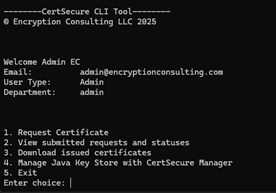
Step 4: Request and Download a Certificate
From the terminal, with no browser or portal login required, provide the Common Name (CN), Subject Alternative Names (SANs), key type, and algorithm. Once the request is approved, the signed certificate and its full chain download automatically in one of five supported formats: .txt, .zip, .p7b, .pfx, or .cer.
Step 5: Import Certificates into the Keystore
Selecting “Manage Java Key Store” opens options to check the JKS configuration, integrate the keystore with CertSecure Manager, push a .pfx certificate into the JKS, push CA certificates from a .p7b file, and print current keystore contents for verification.
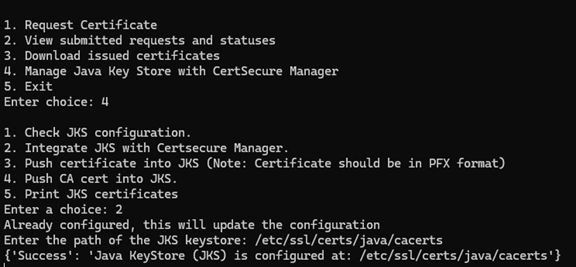
The CLI maps the certificate to the specified alias, preserves existing entries, and maintains the keystore’s existing password protection automatically, with no direct keytool commands required.
Step 6: Push CA Certificates into the Truststore
When pushing a CA certificate, point the CLI at the directory containing the .p7b file. It extracts and maps the domain, intermediate, and root certificates automatically. If any of those aliases already exist in the keystore, the CLI prompts for deletion before re-importing, avoiding duplicate or conflicting entries.

If the target is a legacy .jks file such as cacerts, the CLI displays a migration warning recommending a move to PKCS12.
Step 7: Verify the Trust Chain
After import, the CLI confirms each certificate individually, domain, intermediate, and root, with a success message. The “print keystore contents” option lets you confirm alias, expiration, and chain order before putting the keystore back into service.
Step 8: Automate Certificate Rotation
Once configured, the CLI can be scripted with flags for CI/CD environments so renewal, reissuance notification, and re-import into the keystore run on a schedule instead of a manual trigger. That scripted step is what makes a 47-day renewal cadence realistic across more than a handful of applications.
Before and After: Manual vs. Automated JKS Workflow
| Workflow Step | Manual (keytool) | Automated (CertSecure Manager CLI) |
|---|---|---|
| CSR generation | Run keytool or openssl per application, per environment | Generated on demand from the CLI menu |
| Certificate issuance | Submit to CA, wait, download manually | Requested and downloaded through the CLI under existing policy |
| Chain verification | Manually confirm leaf, intermediate, root order | Extracted and mapped automatically from the .p7b file |
| Keystore import | keytool -importcert per alias, per keystore | Single CLI operation with automatic alias mapping |
| Trust store updates | Manual re-import for every CA change | Pushed in bulk with automatic alias conflict handling |
| Service restart or reload | Manual, coordinated separately across nodes | Unchanged; still requires application-level reload unless scripted separately |
| Renewal cadence | Set manually to legacy one to two year expectations | Scriptable to match the current CA/Browser Forum schedule |
| Audit trail | Spreadsheet or ticket-based | Centralized, RBAC-enforced logging in CertSecure Manager |
Prerequisite-to-Action Matrix: Who Owns What
| Team | Before Rollout | Ongoing Action |
|---|---|---|
| PKI team | Confirm CA connectors and issuance policies in CertSecure Manager | Approve certificate templates and monitor issuance volume |
| Security team | Validate RBAC roles and token scope for the CLI agent | Review audit logs and investigate alias or chain anomalies |
| Platform / DevOps team | Inventory keystore paths and back up existing .jks/.p12 files | Run the CLI configuration, execute imports, script rotation into CI/CD |
| Compliance team | Confirm audit log retention meets regulatory requirements | Pull certificate registers for DORA, PCI DSS, or internal audit evidence |
Rollback Guidance and Common Errors
Plan for rollback before the first production run, not after an incident.
How to Roll Back a Failed Certificate Import
Restore the keystore backup taken before the CLI run; the CLI does not overwrite the original file until an import commits. If a partial import has already replaced an alias, use the CLI’s print-contents option to confirm which entries changed, remove only the affected alias, and re-import the previous certificate and chain from your backup before restarting the affected service.
Common Errors and How to Resolve Them
| Error | Likely Cause | Resolution |
|---|---|---|
| Alias already exists | A previous certificate is already mapped to that alias | Confirm the deletion prompt before re-import, or choose a distinct alias |
| Certificate chain out of order | The .p7b bundle lists intermediates before the leaf | Re-export the chain from the CA in leaf, intermediate, root order |
| Keystore password mismatch | The password stored in the CLI configuration is stale | Re-run the configuration executable to update the stored password |
| Permission denied on keystore file | The OS account running the CLI lacks write access | Grant read and write permission to the account before re-running the import |
| Legacy .jks warning | The target keystore is in the older JKS format | Migrate to PKCS12 using the CLI’s guidance, or proceed if legacy support is required |
Success Metrics to Track After Implementation
Encryption Consulting’s CertSecure Manager ROI model estimates up to 25% less manual operational effort and an average of $887,080 saved from automating certificate lifecycle management, though actual savings scale with certificate volume and environment complexity. Track these numbers against your own baseline before and after rollout:
- Average renewal cycle time, from certificate request to keystore import
- Total number of certificates under active JKS or PKCS12 management
- Manual support tickets tied to certificate expiration or import errors, per quarter
- Certificate-related downtime incidents, before and after automation
- Time required to assemble a certificate audit trail for a compliance review
Handling Multi-Cloud and Hybrid PKI Environments
Hybrid and multi-cloud environments add a discovery problem on top of the automation problem: certificates live in cloud load balancer stores, container secrets, and on-premises keystores at the same time, often issued by different CAs. CertSecure Manager’s CLI agent handles the JKS and PKCS12 side of that estate, but it works best paired with continuous certificate discovery so no keystore, cloud-native or on-premises, sits outside the automated workflow.
That same discovery layer feeds crypto agility planning, since knowing every certificate’s algorithm and key size today is also the starting point for a post-quantum migration. Encryption Consulting’s PQC Center of Excellence and PQC readiness assessment both build on the same underlying CBOM, so the inventory work done for JKS automation does not need to be repeated later. For a closer look at turning that inventory into a working program, see how a cryptographic bill of materials turns inventory into intelligence.
How Encryption Consulting Can Help
Managing certificates within Java environments has long been a time-consuming, high-stakes responsibility. From generating CSRs and importing signed certificates to maintaining keystore integrity and trust chains, each step introduces operational overhead and room for error. That is where CertSecure Manager‘s CLI integration steps in: it does not just simplify individual certificate automation tasks, it standardizes and automates them across every JKS and PKCS12 keystore in your environment.
Whether you are a platform engineer integrating certificates into a CI/CD workflow, a security administrator enforcing trust across hundreds of services, or a compliance lead who needs an audit-ready certificate register, Encryption Consulting’s ISO/IEC 27001:2022 and SOC 2-aligned CertSecure Manager platform, backed by our PKI advisory services, gives you the tooling and expertise to get there.
Conclusion
The industry’s shift toward short-lived certificates is not a future concern; the schedule is already set, and 47-day validity arrives by March 2029 with two intermediate steps before it. A JKS renewal process that depends on manual keytool commands and human memory was already fragile at one to two year cycles. It cannot survive a renewal cadence measured in weeks. Automating that workflow now, while the timeline still allows for a careful pilot and rollback plan, is the difference between a controlled migration and a scramble.
Frequently Asked Questions
What is the main takeaway from Automating Java KeyStore Management with CertSecure Manager?
Manually managing Java KeyStores does not scale once certificate validity drops toward 47 days. CertSecure Manager’s CLI agent automates certificate request, keystore import, CA trust chain deployment, and renewal in one auditable workflow, replacing repeated keytool commands across every application and environment.
Why does this matter for enterprise certificate lifecycle management?
Java applications sit inside a broader Certificate Lifecycle Management program, and JKS is one endpoint among many that needs consistent policy, renewal, and audit treatment. Leaving JKS management manual while other endpoints are automated creates a gap where expired certificates and untracked chains slip through.
What teams are responsible for acting on this guidance?
PKI teams own CA connectors and issuance policy, security teams own RBAC scope and audit review, platform or DevOps teams run the CLI and script rotation, and compliance teams pull the resulting audit trail for regulatory evidence. All four need a defined role before rollout.
What risks increase if this topic is handled manually?
Manual JKS management raises the odds of an expired-certificate outage, since 37.5% of certificate-related outages already trace to expired certificates. It also increases the chance of a misordered trust chain, a misapplied alias, and a missing audit trail during a compliance review.
How does automation reduce certificate outage risk?
Automation removes the manual steps most likely to fail under time pressure: CSR generation, chain verification, and keytool import. CertSecure Manager’s CLI agent maps aliases automatically, preserves existing keystore entries, and can be scripted to renew certificates before they expire instead of after.
What metrics should teams track after implementation?
Track average renewal cycle time, the total number of certificates under active JKS or PKCS12 management, manual support tickets tied to certificate issues per quarter, certificate-related downtime incidents before and after rollout, and the time needed to assemble an audit trail for a compliance review.
How does this connect to 47-day TLS certificate readiness?
The CA/Browser Forum’s approved schedule cuts maximum public TLS certificate validity to 200 days by March 2026, 100 days by March 2027, and 47 days by March 2029. A JKS renewed manually every one to two years cannot keep pace with a 47-day cycle without automation.
How should this be handled in multi-cloud or hybrid PKI environments?
Hybrid and multi-cloud estates need certificate discovery alongside JKS automation, since certificates also live in cloud load balancers and container secrets outside any single keystore. Pairing CertSecure Manager’s CLI agent with continuous discovery keeps every keystore, cloud-native or on-premises, inside the same automated policy.
What prerequisites are needed before implementation?
Teams need an active CertSecure Manager account with an authentication token, read and write permission on every target keystore file, current keystore passwords, a documented alias naming convention, network access to the CertSecure Manager backend and issuing CA, and a backup of each keystore.
What screenshots or configuration examples should be included?
Documentation should include the CLI’s main menu, the Java KeyStore management submenu, and the CA certificate import prompt, since these show exactly where operators choose an operation, select a keystore action, and confirm an alias mapping. Configuration commands such as ./configure_certsecure.exe should accompany each step.
- Key Takeaways
- Executive Summary and Quick Checklist
- What Is a Java Keystore, and Why Does It Matter for Certificate Lifecycle Management?
- Why Manual Java Keystore Management Breaks Down at Scale
- Prerequisites Before Automating Java Keystore Management
- Step-by-Step: Automating JKS Management with the CertSecure CLI Agent
- Step 1: Configure the CLI Agent
- Step 2: Connect to CertSecure Manager
- Step 3: Launch the CLI and Choose an Operation
- Step 4: Request and Download a Certificate
- Step 5: Import Certificates into the Keystore
- Step 6: Push CA Certificates into the Truststore
- Step 7: Verify the Trust Chain
- Step 8: Automate Certificate Rotation
- Before and After: Manual vs. Automated JKS Workflow
- Prerequisite-to-Action Matrix: Who Owns What
- Rollback Guidance and Common Errors
- Success Metrics to Track After Implementation
- Handling Multi-Cloud and Hybrid PKI Environments
- How Encryption Consulting Can Help
- Conclusion
- Frequently Asked Questions
