

- Key Takeaways
- Who This Guide Is For
- Definitions of Root and Issuing CAs
- What Is CA Certificate Renewal?
- Best Practices for Renewal of Root and Issuing CA Certificates
- What Is Certificate Revocation?
- Operational and Governance Best Practices
- CA Renewal in Multi-Cloud and Hybrid PKI Environments
- How Can Encryption Consulting Help?
- Conclusion
- Frequently Asked Questions
Quick answer: Renew Root CA certificates every 10 to 15 years and Issuing CA certificates every 3 to 5 years, always generating a fresh key pair rather than reusing the old one. Before the old certificate expires, publish an updated CRL, point the new certificate’s CDP and AIA extensions to reachable URLs, distribute the new CA certificate to relying parties, and re-issue or re-chain dependent end-entity certificates. Test the full sequence in staging first, and automate it with a certificate lifecycle management platform to remove the manual steps that most often cause outages.
Certificate outages are common, and they are expensive. In DigiCert’s July 2025 Trust Pulse Survey, 45% of organizations reported certificate-related downtime in the past year, and 37.5% traced an outage specifically to an expired certificate (DigiCert, July 2025). A lapsed Root or Issuing CA certificate is one of the most damaging versions of that failure, because every certificate the CA has ever issued stops validating the moment the CA certificate itself is no longer trusted.
In a Public Key Infrastructure (PKI) environment, Certificate Authorities (CAs) are the components that anchor the security and integrity of digital communications. Renewing Root and Issuing CAs on schedule, with the right cryptographic parameters and a tested rollback plan, is what keeps that trust chain continuous instead of becoming a scramble against an expiration date.
This guide covers CA lifetime planning, Certificate Revocation List (CRL) publication timelines, a step-by-step renewal workflow, prerequisites, an owner-to-action matrix for the teams involved, rollback guidance, common errors, and the metrics worth tracking once a renewal is complete.
Key Takeaways
- Root CA certificates typically carry a 10 to 15 year validity window; Issuing CA certificates typically carry 3 to 5 years. Both are renewed with a freshly generated key pair, never a reused one.
- CA/Browser Forum Ballot SC-081v3 does not govern private/internal CA certificates directly, but it is compressing public TLS certificate validity to 200 days by March 15, 2026, 100 days by March 15, 2027, and 47 days by March 15, 2029 (Sectigo, April 2025), which raises the bar for how automated the surrounding CA operations need to be.
- DigiCert’s July 2025 Trust Pulse Survey found that 45% of organizations experienced certificate-related downtime in the past year, and 37.5% linked an outage directly to an expired certificate.
- A complete CA renewal sequence has five checkpoints: generate the new key pair and certificate, update the CDP and AIA extensions, publish new CRLs, distribute the new CA certificate to relying parties, and re-issue or re-chain end-entity certificates.
- CA renewal works best as a governed, auditable workflow with named owners across PKI, security, platform, and compliance teams, not a one-off task handled by a single administrator.
Who This Guide Is For
This guide is written for the teams that plan, execute, and sign off on CA renewals: PKI engineers who run the technical sequence, security teams who approve cryptographic parameters, platform teams who distribute trust and monitor the rollout, and compliance teams who need an auditable record. Use the sections below to confirm you have what you need before starting, then use the action matrix to see who owns which step.
Prerequisites Before You Begin
Confirm each of the following before starting a CA renewal in production:
- An up-to-date PKI hierarchy diagram showing where the CA sits and what it issues.
- HSM or key ceremony access and the credentials or quorum needed to generate a new key pair.
- CA lifetime, key length, and CRL publication policy documented in the Certificate Policy / Certification Practice Statement (CP/CPS).
- A staging environment that mirrors the production CA configuration, including CDP and AIA endpoints.
- An inventory of relying parties and applications that reference the outgoing CA certificate.
- An approved change window and a rollback plan that has been reviewed, not just written down.
- ITSM or ticketing integration in place if the renewal needs to be tracked and audited (for example, through CertSecure Manager connected to ServiceNow).
- Named approvers from security and compliance who sign off before the new CA certificate goes live.
Owner and Action Matrix
The table below maps each team to its primary responsibility and the specific actions it owns during a CA renewal.
| Team | Primary Responsibility | Key Actions |
| PKI Team | Own the technical renewal sequence | Generate the new key pair, issue the new CA certificate, update CDP/AIA, publish the CRL and Delta CRL |
| Security Team | Approve cryptographic parameters and validate risk | Review algorithm and key length choice, approve the HSM key ceremony, sign off on the revocation policy |
| Platform Team | Distribute trust and monitor rollout | Push the new CA certificate to trust stores and load balancers, monitor CRL and OCSP availability |
| Compliance Team | Confirm regulatory alignment and evidence | Validate against the CP/CPS, NIST SP 800-57, and FIPS 140-2/140-3; retain the renewal audit trail |
Definitions of Root and Issuing CAs
Before diving into the renewal process, here is a quick look at the roles of Root and Issuing CAs:
- Root CA: The Root CA is the topmost CA in the PKI hierarchy. It issues certificates to Issuing CAs (also called subordinate CAs). The Root CA’s certificate is self-signed, meaning it signs its own certificate. A Root CA is typically kept offline and non-domain joined to minimize the risk of compromise.
- Issuing CA: Issuing CAs are subordinate to the Root CA and issue end-entity certificates (for example, SSL/TLS certificates, email certificates, and web server certificates). Issuing CAs stay online to handle certificate issuance for end entities such as users, systems, devices, and applications.
Before going further into the renewal strategy itself, it helps to understand three related concepts: the Certificate Revocation List (CRL), the CRL Distribution Point (CDP), and Authority Information Access (AIA). Each is covered in its own section below.
What Is CA Certificate Renewal?
CA certificate renewal means generating a new Certificate Authority (CA) certificate before the existing one expires, so the transition to the new certificate is seamless and trust continues uninterrupted. Best practice is to generate a new key pair for the renewed certificate rather than reusing the outgoing one, since a fresh key pair limits how long any single key stays exposed and gives you a natural point to move to stronger algorithms or longer key lengths.
Best Practices for Renewal of Root and Issuing CA Certificates
CA Lifetimes
When you design a PKI hierarchy, defining the CA lifetime is one of the first decisions to get right. The lifetime determines how long a CA can issue certificates before it needs to be renewed. A few best practices for setting CA lifetimes:
- Root CA validity: Root CAs typically carry longer lifetimes than Issuing CAs. A common practice is a Root CA lifetime of 10 to 15 years. The longer lifetime is workable because the Root CA stays offline, reducing exposure. A very long lifetime, though, can make it harder to respond quickly to cryptographic advances, such as a move to a new algorithm.
- Issuing CA validity: Issuing CAs should carry shorter lifetimes, typically 3 to 5 years, because they stay online and carry more risk. Shorter lifetimes also allow more frequent updates to cryptographic algorithms and key sizes, keeping the PKI aligned with current security expectations.
Use strong cryptographic algorithms for renewed Root and Issuing CA certificates, such as RSA 4096 or the Post-Quantum Cryptographic (PQC) algorithms recommended by NIST. Validate the choice against industry standards, including NIST SP 800-57 and FIPS 140-2/140-3.
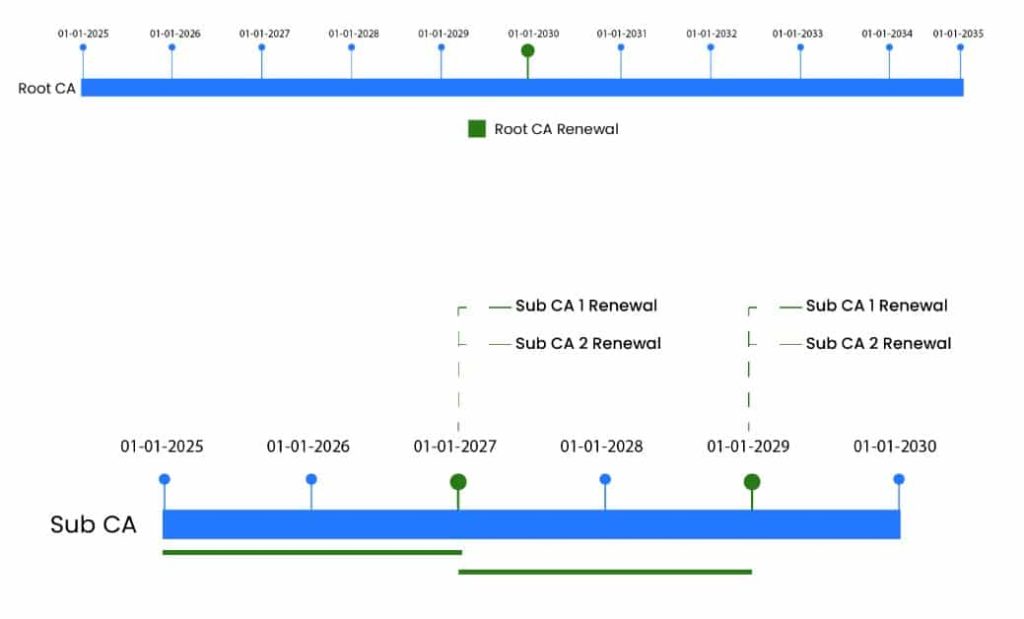
The table below shows an example of key lengths, lifetimes, and renewal strategies for CA certificates in a two-tier PKI hierarchy.
| CA Name | Algorithms/Key Length | Certificate Validity | Renewal Strategy |
| Root CA | SHA256, RSA/4096 bit | 10 years | Renew after 5 years to keep issuing certificates to the Issuing CAs. |
| Issuing CA 1 | SHA256, RSA/4096 bit | 5 years | Renew after 2 years to keep issuing end-entity certificates. |
| Issuing CA 2 | SHA256, RSA/4096 bit | 5 years | Renew after 2 years to keep issuing end-entity certificates. |
Step-by-Step CA Renewal Workflow
The sequence below is the core, repeatable workflow behind every CA renewal, whether it runs manually or through a certificate lifecycle management (CLM) platform. Each step names the action and the checkpoint that confirms it succeeded before moving to the next one.
- Confirm scope and prerequisites: Identify the CA nearing expiry, its position in the hierarchy, and everything it issues. Work through the prerequisites checklist above before touching production.
- Generate the new key pair: Generate a new key pair for the renewed CA certificate inside the HSM or key ceremony environment. Do not reuse the outgoing key pair.
- Issue the new CA certificate: For a Root CA, self-sign the new certificate. For an Issuing CA, submit the certificate request to the parent Root CA and have it issue the new subordinate certificate.
- Update the CDP and AIA extensions: Point the new certificate’s CRL Distribution Point and Authority Information Access extensions to correct, currently reachable URLs before publishing anything.
- Publish the new CRL and Delta CRL: Publish a base CRL, and a Delta CRL where one is used, signed by the new CA certificate. Confirm the publication interval and overlap period match policy (see the CRL section below).
- Distribute the new CA certificate to relying parties: Push the new CA certificate to trust stores, HSMs, load balancers, and any application-level trust anchors before end-entity certificates start chaining to it.
- Re-issue or re-chain end-entity certificates: Re-issue certificates that chain to the outgoing CA, or re-chain them to the new CA certificate if cross-signing is supported.
- Validate and monitor: Confirm chain validation succeeds from representative clients, monitor CRL and OCSP responder uptime, and keep the outgoing CA certificate valid and published until every dependent certificate has migrated.
A quick way to check the key fields on a certificate or CRL before and after renewal, using OpenSSL:
openssl x509 -in new-issuing-ca.pem -noout -dates -subject -issuer
openssl crl -in ca.crl -noout -lastupdate -nextupdate
The first command confirms the new certificate’s validity window and issuer chain; the second confirms the CRL’s publication and next-update timestamps line up with the policy set in your CP/CPS.
The table below compares a manual renewal process to one run through an automated CLM platform, across the same checkpoints.
| Checkpoint | Before: Manual Process | After: Automated CLM |
| Renewal trigger | Calendar reminder or spreadsheet tracking, prone to being missed | Automated alert tied to the CA’s actual expiry date |
| Key generation | Manual HSM commands run by an individual administrator | Scripted key ceremony with role-based approval built in |
| CRL publication | Manually triggered, easy to miss the overlap window | Scheduled publication with monitoring and alerting on failure |
| Trust distribution | Manually pushed to each trust store and load balancer | Centrally distributed and tracked across all relying parties |
| Audit trail | Assembled after the fact from tickets and emails | Generated automatically as the workflow executes |
Screenshots to capture for internal runbooks: the CA properties dialog showing validity dates before and after renewal, the CDP/AIA extension fields in the new certificate, the CRL publication confirmation screen, and the trust distribution status view in your CLM platform. Each screenshot should carry descriptive alt text, for example “CertSecure Manager CA renewal confirmation showing updated validity dates,” rather than a generic filename.
What Is Certificate Revocation?
Every certificate has a defined validity period, after which it is no longer considered valid. In some cases, an organization needs to invalidate (revoke) a certificate before that validity period ends. This usually happens because a key was lost or compromised, the relationship with the certificate subject ended, or the certificate was superseded by a new one before its expiration date.
Certificate Revocation Lists (CRLs)
CRLs are files signed by a CA that list the serial numbers of revoked certificates. Clients download CRLs to check certificate validity. The Microsoft Crypto API caches retrieved CRLs until the next scheduled update, so clients may not pick up an out-of-band CRL update published before that scheduled time.
For that situation, Delta CRLs are recommended. A Delta CRL is issued between publications of the full (base) CRL and contains only the certificates revoked since the last publication. A client can combine the base CRL with the latest Delta CRL to determine revocation status, reducing the load on network infrastructure.
CRL Publication Timeline and Interval
CRLs inform relying parties about certificates revoked before their expiration date, so managing CRL publication properly is central to PKI security.
The CRL publication interval should be set based on certificate trust requirements and the impact on network infrastructure. A more frequent publication schedule allows faster revocation response, useful for authentication certificates, but it also increases network traffic and administrative overhead, which affects uptime and recovery windows.
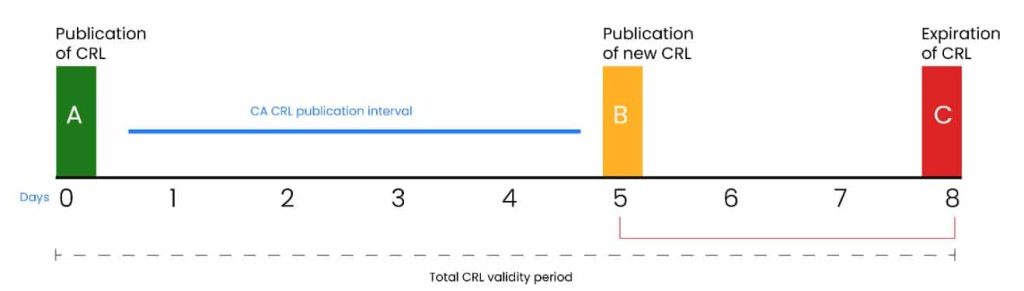
Alongside the publication interval, the overlap period also shapes a CRL’s validity window. The overlap period is the time between the next scheduled publication and the actual expiration of the current CRL. Total CRL validity equals the publication interval plus the overlap period, and the same logic applies to Delta CRLs. For example, a 5-day publication interval with a 3-day overlap gives a total validity period of 8 days.
| CA Name | Certificates Issued By CA | CRL Publication Interval | CRL Overlap Period |
| Root CA | Issuing CA certificates | 1 Year | 1 month |
| Issuing CA1 | Issuing machine certificates | 5 days | 3 days |
| Issuing CA2 | Issuing user certificates | 5 days | 3 days |
CRL Distribution Point
Certificate revocation information needs to be reachable by any client that relies on the certificate for trust, and it should be available whenever a certificate’s status needs to be checked. To meet that requirement, organizations usually define multiple Certificate Distribution Points (CDPs) to distribute CRLs, using both internal and external (internet) URLs and, often, different access protocols such as HTTP and LDAP.
AIA Extension
The Authority Information Access (AIA) extension points to a CA’s most recently published certificate. It helps client computers find CA certificates dynamically while building a certificate chain. Windows PKI implementations use this extension to help build trust chains during validation. The main advantage is that only the Root CA needs to be explicitly trusted; every subordinate CA certificate is retrieved from the AIA locator to build the rest of the chain.
Operational and Governance Best Practices
Documentation and Communication
Clear documentation and communication keep a CA renewal from becoming a fire drill. Document the entire renewal process, including key generation, certificate issuance, CRL publication, and end-entity re-issuance, with detailed, step-by-step instructions. Share the renewal plan with every stakeholder involved, including IT teams, security teams, and relying parties, so everyone understands the timeline and any potential impact on services. Before running the process in production, test it in a staging environment to catch issues early and confirm it runs smoothly when it counts.
Monitoring and Auditing
Monitor CRL publication continuously to confirm CRLs go out on time and that clients can reach them. Investigate and resolve any delay or failure in CRL publication promptly.
Regular audits confirm that the PKI stays compliant with security policies and industry standards. Audits should cover key management, certificate issuance, CRL publication, and other PKI operations.
Log every activity related to the CA, including issuance, revocation, and renewal, and review those logs regularly to catch suspicious activity or potential security incidents early.
Rollback and Contingency Planning
A renewal that fails validation partway through should not turn into an outage. Build these safeguards into the plan before cutover:
- Keep the outgoing CA certificate valid and published in parallel with the new one during an overlap window, rather than retiring it the moment the new certificate is issued.
- Only revert CDP or AIA pointers to the old values if the new CRL infrastructure is confirmed broken, not on the first sign of a client-side error.
- Never revoke the outgoing CA certificate while any dependent end-entity certificate still chains to it.
- Roll back key ceremony changes only through the same documented HSM procedure used to make them, never through an ad hoc workaround.
- Log every rollback action with the same rigor as the original renewal, so the audit trail reflects what actually happened.
Common Errors and How to Avoid Them
| Error | Why It Happens | How to Avoid It |
| CDP or AIA points to an old URL | Copied from a previous certificate template without review | Validate every extension value before publishing the new certificate |
| CRL overlap period too short | Publication delayed by an unrelated change window | Size the overlap period to cover at least one full change-management cycle |
| Reused key pair | Time pressure leads to skipping the key ceremony | Make the key ceremony checklist a hard gate, not an optional step |
| Missing cross-signing for legacy clients | Assuming every client trusts the new Root CA immediately | Cross-sign, or maintain dual trust, until migration is confirmed complete |
| Rollback plan never tested | Renewal treated as a one-way process | Rehearse the rollback in staging before the production cutover |
Success Metrics to Track
After a renewal, track these metrics quarter over quarter to confirm the process is actually improving rather than just repeating:
- Certificate-related downtime incidents, with a target of zero.
- Percentage of dependent end-entity certificates successfully migrated to the new chain within the approved change window.
- CRL and OCSP responder availability during and after the renewal.
- Number of manual tickets opened for certificate-related issues.
- Mean time to complete a CA renewal, from kickoff to full trust distribution.
Teams that move from manual renewal to a managed platform such as CertSecure Manager typically see these numbers improve immediately, since the platform tracks renewal time, the number of certificates under management, and ticket volume automatically rather than relying on someone to reconstruct them after the fact.
CA Renewal in Multi-Cloud and Hybrid PKI Environments
CA renewal gets harder once the hierarchy spans more than one environment. A few things to plan for in multi-cloud or hybrid PKI setups:
- Different private CA services behave differently. AWS Private CA, Azure Key Vault-backed CAs, and Google Cloud Certificate Authority Service each handle renewal, key storage, and CDP/AIA configuration in their own way. A renewal runbook written for one will not transfer cleanly to another without adjustment.
- Keep CDP and AIA endpoints in sync across regions. If the same CA issues certificates consumed by workloads in multiple regions or clouds, confirm the CRL and AIA URLs are reachable from every one of them, not just the primary region.
- Centralize discovery before you centralize renewal. In a hybrid estate, the same key or certificate can show up in a cloud vault, an on-premises HSM, and application source code at once. A platform such as CBOM Secure gives you a single, continuously updated inventory of what exists and where, which is a prerequisite for renewing anything with confidence. See how a Cryptography Bill of Materials turns inventory into intelligence for more on that process.
- Plan for hybrid and post-quantum certificates now, not at the next renewal. As PQC algorithms move into production PKI, some CAs in a hybrid estate may issue classical certificates while others begin issuing hybrid or PQC-ready ones. Crypto-agility, the ability to swap algorithms without re-architecting the PKI, is what keeps that transition from becoming its own outage. A PQC readiness assessment benchmarks where your PKI stands today.
How Can Encryption Consulting Help?
Encryption Consulting LLC (EC) helps automate the certificate lifecycle management process by deploying CertSecure Manager, a certificate lifecycle management platform that tracks CA and end-entity certificates, automates renewal workflows, and integrates with ITSM tools like ServiceNow for alerts and approvals. For the discovery work that has to happen before any renewal program scales, CBOM Secure builds and maintains a continuous inventory of every key, certificate, and algorithm across cloud, on-premises, and application environments. And for organizations planning the move to quantum-resistant algorithms alongside their normal renewal cadence, the PQC Center of Excellence offers a free hub and sandbox for testing PQC-ready certificates before they touch production.
Conclusion
Renewing Root and Issuing CAs is one of the highest-stakes recurring tasks in PKI management, because a mistake does not affect one certificate, it affects everything the CA has ever issued. Following the practices in this guide, clear CA lifetimes, tested CRL and CDP configuration, a documented and rehearsed rollback plan, and named owners across PKI, security, platform, and compliance teams, keeps that process predictable instead of reactive. Planning and automation matter more every year, since certificate volumes keep growing and public TLS validity keeps shrinking under the CA/Browser Forum’s 47-day schedule. Staying current on cryptographic guidance and monitoring the PKI continuously is what keeps digital trust intact through every renewal cycle.
Frequently Asked Questions
What is the main takeaway from this guide to CA certificate renewal best practices?
Renew Root CA certificates every 10 to 15 years and Issuing CA certificates every 3 to 5 years, always with a freshly generated key pair. Update CDP and AIA extensions, publish new CRLs, distribute the new CA certificate to relying parties, and re-issue or re-chain dependent certificates before the old CA certificate expires, and test the whole sequence in staging first.
Why does this matter for enterprise certificate lifecycle management?
A CA certificate sits at the top of a trust chain, so a missed or mishandled renewal invalidates every certificate the CA has issued at once, not just one endpoint. DigiCert’s July 2025 Trust Pulse Survey found 45% of organizations had certificate-related downtime in the past year, and CA-level failures tend to be the most disruptive version of that risk.
What teams are responsible for acting on this guidance?
PKI teams own the technical renewal sequence, security teams approve cryptographic parameters and the key ceremony, platform teams distribute trust and monitor the rollout, and compliance teams confirm the process satisfies CP/CPS, NIST, and FIPS requirements and retain the audit trail.
What risks increase if this topic is handled manually?
Manual renewal raises the odds of a missed expiration date, a reused key pair, an incorrect CDP or AIA value, or a CRL publication gap, any of which can produce an outage or an audit finding. It also tends to leave a thinner, harder-to-reconstruct audit trail than an automated workflow.
How does automation reduce certificate outage risk?
Automation ties renewal to the CA’s actual expiration date instead of a calendar reminder, runs the key ceremony and CRL publication on a fixed schedule with built-in monitoring, and generates the audit trail as the workflow executes rather than after the fact, removing most of the manual steps that cause missed renewals.
What metrics should teams track after implementation?
Track certificate-related downtime incidents, the percentage of dependent certificates migrated within the change window, CRL and OCSP responder availability, the number of manual tickets tied to certificate issues, and the mean time to complete a renewal from kickoff to full trust distribution.
How does this connect to 47-day TLS certificate readiness?
CA/Browser Forum Ballot SC-081v3 phases the maximum public TLS certificate validity down to 200 days by March 15, 2026, 100 days by March 15, 2027, and 47 days by March 15, 2029. That schedule applies to public end-entity TLS certificates rather than private CA certificates directly, but it pushes every organization toward the same automated, well-governed renewal discipline this guide describes. See EC’s 47-day certificate validity explainer for the full schedule.
How should this be handled in multi-cloud or hybrid PKI environments?
Confirm CDP and AIA endpoints are reachable from every region and cloud involved, account for the fact that different private CA services (AWS Private CA, Azure Key Vault, Google Cloud CAS) each handle renewal differently, and centralize cryptographic discovery, for example with CBOM Secure, before centralizing the renewal process itself.
What prerequisites are needed before implementation?
An up-to-date PKI hierarchy diagram, HSM or key ceremony access, CA lifetime and CRL policy documented in the CP/CPS, a staging environment that mirrors production, an inventory of relying parties, an approved change window with a reviewed rollback plan, and named approvers from security and compliance.
What screenshots or configuration examples should be included in a renewal runbook?
Capture the CA properties dialog showing validity dates before and after renewal, the CDP and AIA extension fields on the new certificate, the CRL publication confirmation, and the trust distribution status view in your CLM platform, each with descriptive alt text rather than a generic filename.
- Key Takeaways
- Who This Guide Is For
- Definitions of Root and Issuing CAs
- What Is CA Certificate Renewal?
- Best Practices for Renewal of Root and Issuing CA Certificates
- What Is Certificate Revocation?
- Operational and Governance Best Practices
- CA Renewal in Multi-Cloud and Hybrid PKI Environments
- How Can Encryption Consulting Help?
- Conclusion
- Frequently Asked Questions
