- What Is SSH and Why Does It Matter?
- How Does the SSH Protocol Work?
- SSH Authentication Methods Compared: Password vs. Key-Based vs. Certificate-Based
- SSH vs. Telnet vs. RDP: How Do They Differ?
- How Do You Set Up SSH Securely?
- What Does Good SSH Key Hygiene Require?
- What Is SSH Used For?
- What Security Risks Should You Know About?
- Limitations
- What Would Encryption Consulting Recommend?
- FAQ
- Conclusion
Quick answer: SSH (Secure Shell) is a cryptographic protocol that encrypts remote administration, file transfer, and automation traffic between two systems. It replaced cleartext protocols like Telnet, authenticates users with passwords, public keys, or certificates, and runs on three layers, transport, authentication, and connection, defined in RFC 4251 through RFC 4254.
Key takeaways:
- SSH is built from three layered protocols defined by RFC 4251: the transport layer (encryption and server verification), the user authentication layer (client identity), and the connection layer (multiplexed channels for shells, file transfer, and forwarding).
- Key-based and certificate-based authentication remove the credential-theft risk that comes with passwords, and OpenSSH lets you stack methods (for example, a key plus a one-time code) using the AuthenticationMethods directive.
- SSH keys do not expire on their own. Without a rotation and ownership policy, they accumulate into unmanaged, hard-to-audit access, which is why even a fundamentals-level SSH deployment needs basic key hygiene from day one.
- SSH is not RDP or Telnet. It is a command-line, cryptographically secured protocol built for servers, network devices, and automation, not a full graphical remote desktop.
- For teams ready to move past manual key hygiene into automated, enterprise-scale SSH key lifecycle management, Encryption Consulting’s SSH Secure and our companion pillar guide cover that ground in depth.
Published: January 2025. Updated: August 2026. Reviewed by Encryption Consulting’s SSH Secure engineering team.
What Is SSH and Why Does It Matter?
SSH, or Secure Shell, is a cryptographic network protocol that lets one computer log into, run commands on, or transfer files to another computer over an untrusted network without exposing credentials or the data itself in the clear. It is the default way administrators, developers, and automated systems reach Linux, Unix, network, and cloud infrastructure, and it underpins tools ranging from a single ssh user@host command to entire CI/CD deployment pipelines.
SSH exists because its predecessors did not protect what mattered. Telnet, rlogin, and rsh sent usernames, passwords, and every keystroke as plaintext over the network. Anyone positioned between the client and server, on a shared network segment, a compromised router, or a rogue access point, could read that traffic or inject their own commands. In 1995, Tatu Ylönen, then a researcher at the Helsinki University of Technology, wrote the first version of SSH after his own university network suffered a password-sniffing attack. He released it as free software, and within its first year it had tens of thousands of users worldwide. The IETF later standardized a substantially redesigned version, SSH-2, in RFC 4251 through RFC 4254 (published in 2006), correcting cryptographic weaknesses in the original SSH-1 protocol. SSH-1 is now considered obsolete and disabled by default in current OpenSSH releases.
For a shorter, glossary-style definition, see the Education Center’s what is SSH entry. This guide goes further: it covers how the protocol actually negotiates a secure session, how the three authentication methods compare in practice, how SSH differs from Telnet and RDP, and what a defensible, enterprise-grade SSH key hygiene program looks like at the fundamentals level. If you already run SSH at scale and need the deeper operational playbook, ownership models, rotation policy design, and audit evidence, our Comprehensive SSH Key Lifecycle Management guide is the companion resource for that work.
How Does the SSH Protocol Work?
SSH connections are built from three layered protocols, defined in RFC 4251 through RFC 4254, that separate encryption, identity verification, and traffic multiplexing so each concern can evolve independently.
- The transport layer (RFC 4253) establishes the encrypted pipe. The client and server negotiate algorithms, perform a Diffie-Hellman or Elliptic-Curve Diffie-Hellman key exchange to derive a shared session key, and the client verifies the server’s identity against its host key. This layer alone provides confidentiality, integrity (via message authentication codes), and server authentication, before any user credentials are exchanged.
- The user authentication protocol (RFC 4252) runs on top of that encrypted channel and proves who the client is. It supports several methods, most commonly public key and password, negotiated between client and server, and it can require more than one method in sequence.
- The connection protocol (RFC 4254) multiplexes the single encrypted tunnel into multiple logical channels, so one SSH session can carry an interactive shell, a file transfer, and one or more forwarded ports simultaneously, each isolated from the others.
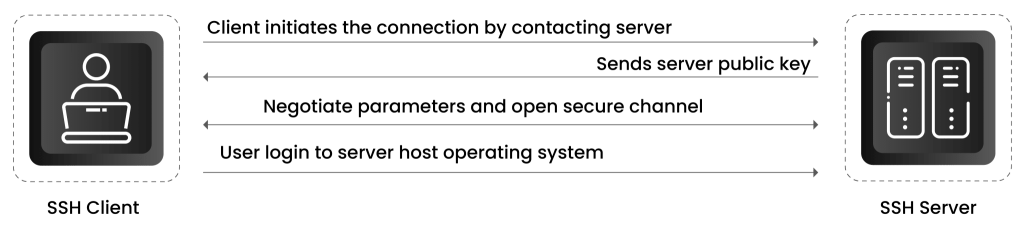
In practice, a single connection walks through five steps:
-
Connection initiation.
The client opens a TCP connection to the server, by default on port 22. The server responds with its host key and a list of supported algorithms.
-
Server verification.
The client checks the server’s host key against its local
known_hostsfile. A match means the connection is trusted; a mismatch triggers a warning, since it can indicate a man-in-the-middle attempt or simply a reinstalled server. -
Key exchange.
Client and server run a Diffie-Hellman or Elliptic-Curve Diffie-Hellman exchange to agree on a shared secret without ever transmitting it, then derive the symmetric session key used to encrypt everything that follows.
-
Client authentication.
The client proves its identity, most commonly with a private key, sometimes with a password, occasionally with both in sequence when the server requires multi-factor authentication.
-
Secure session and data integrity.
Once authenticated, every byte exchanged is encrypted and covered by a message authentication code, so tampering with data in transit is detectable. When the session ends, the session key is discarded and never reused.
SSH Authentication Methods Compared: Password vs. Key-Based vs. Certificate-Based
SSH supports three practical ways to prove identity, and they differ sharply in what they protect against and how well they scale.
Password authentication is the simplest to set up and the weakest to operate. The server compares a submitted password against a stored (hashed) value. It is vulnerable to brute-force guessing, credential stuffing from other breaches, and phishing, and it gives an attacker who obtains the password the same access as the legitimate user, with no cryptographic proof of possession required.
Public key authentication replaces the shared secret with an asymmetric key pair. The private key stays on the client (ideally passphrase-protected or held in an HSM); the public key is placed in the server’s authorized_keys file and is not secret. The server proves possession by challenging the client to sign data with the private key, which it verifies against the stored public key. An attacker who only has network access, or even the password database, cannot forge this. The tradeoff is operational: every server needs the right public key deployed, and because SSH keys carry no built-in expiration, an organization that hands them out without a lifecycle policy accumulates stale, unaccounted-for access over time.
Certificate-based authentication addresses that scaling problem. Instead of trusting individual public keys, the server trusts a certificate authority. A short-lived SSH certificate, signed by that CA and bound to a specific user or host, is presented at connection time and validated against the CA’s trust anchor rather than looked up in a static authorized_keys file. Because certificates expire on their own (often in hours, not years), there is no orphaned-key cleanup problem: access simply lapses. This is the model most enterprise SSH governance platforms, including SSH Secure, use to replace long-lived static keys at scale.
| Authentication method | How it proves identity | Main weakness | Revocation | Best fit |
|---|---|---|---|---|
| Password | Shared secret compared against a stored hash | Guessable, phishable, reusable if leaked | Manual reset per account | Should not be the primary method for production access |
| Public key | Cryptographic proof of holding the matching private key | No built-in expiration; keys can sprawl if unmanaged | Manual removal from every authorized_keys file | Individual users and small, well-tracked fleets |
| Certificate | A CA-signed, time-bound certificate validated against a trust anchor | Requires a certificate authority and issuance workflow | Automatic, on expiration | Enterprise fleets, automation, and short-lived access |
OpenSSH also lets administrators require more than one method for the same login, using the AuthenticationMethods directive in sshd_config (for example, publickey,keyboard-interactive to require a key plus a one-time code). This is the practical way to add multi-factor authentication to SSH without changing the underlying protocol.
SSH vs. Telnet vs. RDP: How Do They Differ?
SSH, Telnet, and RDP all provide remote access to a computer, but they differ in what they encrypt, what interface they deliver, and what they were built for.
Telnet (RFC 854) is a command-line protocol from 1969 that transmits everything, including login credentials, as plaintext. It has no encryption and no server authentication. It still exists on some legacy network hardware and lab consoles, but it should never be used to reach a production system over an untrusted network. SSH was purpose-built to replace it.
RDP (Remote Desktop Protocol) is Microsoft’s protocol for delivering a full graphical Windows desktop over the network, by default on port 3389. Modern RDP does encrypt the session, but it operates at a completely different layer than SSH: it streams a graphical interface rather than a command shell, and it is Windows-centric rather than cross-platform. CISA’s advisory on routinely exploited weak security controls specifically names externally exposed RDP, especially without multi-factor authentication, among the practices attackers most commonly abuse for initial access. That risk comes from how RDP is deployed (open to the internet, weak or reused passwords, no MFA), not from a flaw unique to the protocol, but it is a real and well-documented pattern.
SSH sits between them in interface but well ahead of both in default security posture. It is encrypted from the first packet, authenticates the server as well as the client, supports strong key-based and certificate-based authentication out of the box, and is the standard for Linux, Unix, macOS, network devices, and cloud infrastructure. It does not deliver a graphical desktop; for that, an organization typically layers a GUI protocol like RDP or VNC, or tunnels one through SSH, on top.
| SSH | Telnet | RDP | |
|---|---|---|---|
| Default port | 22 | 23 | 3389 |
| Encryption | Yes, by default | None | Yes, in modern versions |
| Interface | Command line | Command line | Full graphical desktop |
| Primary platform | Cross-platform (Linux, Unix, macOS, Windows via OpenSSH) | Cross-platform, legacy | Windows-centric |
| Typical use case | Server administration, automation, file transfer | Legacy console access only | Remote desktop work sessions |
How Do You Set Up SSH Securely?
A secure SSH setup takes roughly the same seven steps whether you are hardening a single server or a fleet.
- Generate a modern key pair. Use
ssh-keygen -t ed25519, or RSA at 4096 bits if Ed25519 is not supported by a target system. Avoid DSA and RSA keys under 2048 bits; both are deprecated in current OpenSSH releases. - Protect the private key with a passphrase so a stolen key file alone is not enough to use it, and store it in an HSM or credential manager where the deployment supports one rather than as a bare file on disk.
- Deploy the public key to the server’s
authorized_keysfile through an automated, auditable process rather than manual copy-paste, so there is a record of who has access to what. - Disable password authentication in
sshd_config(PasswordAuthentication no) once key-based access is confirmed working, so brute-force and credential-stuffing attempts have nothing to target. - Disable direct root login (
PermitRootLogin no) and scope access withAllowUsersorAllowGroups, so every session is attributable to an individual account before any privilege escalation happens. - Turn off unused features, agent forwarding, X11 forwarding, and TCP port forwarding, unless a specific workflow genuinely requires them, since each one expands what a compromised session can do.
- Enable verbose logging and monitor authentication events so unusual access patterns, an unfamiliar source IP, a login at an unusual hour, an unexpected key fingerprint, get noticed rather than blending into normal traffic.
What Does Good SSH Key Hygiene Require?
Setting up SSH correctly on day one only solves half the problem. SSH keys do not expire on their own, so the moment an organization has more than a handful of them, key hygiene becomes an ongoing discipline rather than a one-time configuration task. At a fundamentals level, that discipline rests on four things.
Ownership. Every key needs a named owner, human or service account, recorded at the moment it is created. A key with no documented owner is, by definition, a key nobody can confidently revoke later.
Rotation triggers. Keys should be rotated on a defined schedule and immediately on specific events: when an employee changes roles or leaves, when a key is suspected of exposure (committed to a public repository, present on a compromised endpoint), or when the algorithm it uses is deprecated.
Access policy. Least privilege applies to SSH exactly as it does to any other credential: a key should grant access to the specific systems and commands a role requires, not blanket administrative reach across an environment.
Audit evidence. An organization should be able to answer, on demand, which keys exist, who owns them, where they are trusted, and when they were last used. Without that evidence, a compliance audit or a post-incident investigation starts from zero.
These four practices are the entry point, not the finish line. Once an environment has more than a few dozen keys spread across servers, cloud instances, and automation pipelines, manually tracking ownership, rotation, and access quickly becomes unworkable, which is exactly the operational reality our Comprehensive SSH Key Lifecycle Management guide addresses in depth, covering discovery at scale, automated rotation and revocation, trust mapping, and audit-ready reporting.
What Is SSH Used For?
SSH’s connection protocol multiplexes several distinct workloads through the same encrypted tunnel, which is why it shows up in so many parts of a modern infrastructure stack.
- Remote administration. Logging into a server to run commands, review logs, or manage services, the original and still most common use case.
- Secure file transfer. SFTP (SSH File Transfer Protocol) and SCP (Secure Copy Protocol) move files over the same authenticated, encrypted channel as an interactive session.
- Port forwarding and tunneling. SSH can carry another application’s traffic through its encrypted tunnel, letting a remote user reach an internal database or web service that is not otherwise exposed.
- Automation and CI/CD. Build systems, deployment pipelines, and configuration management tools authenticate to target servers over SSH, often using dedicated service-account keys rather than a human’s personal credentials.
- Git operations. Developers commonly use SSH keys to authenticate to Git hosting platforms, both to push and pull code and to sign commits.
- Network device management. Routers, switches, and firewalls widely support SSH as their secure command-line management interface, replacing Telnet on that hardware.
What Security Risks Should You Know About?
SSH’s cryptography is sound; the security incidents that involve it almost always trace back to how it was deployed and managed, not to a break in the protocol itself. The risks worth understanding at a fundamentals level are:
- Key sprawl. Keys generated ad hoc and never inventoried accumulate across servers, cloud instances, and pipelines until nobody can say with confidence who has access to what.
- No built-in expiration. Unlike a certificate, a bare SSH key stays valid indefinitely unless someone explicitly removes it, which is why orphaned keys from former employees or decommissioned systems are such a common finding in security reviews.
- Stolen or unprotected private keys. A private key without a passphrase, sitting on a compromised endpoint or committed to a public repository, gives an attacker the same access as the legitimate owner, with no failed-login alert to flag it.
- Weak server configuration. Password authentication left enabled alongside keys, root login permitted, or outdated ciphers still accepted all widen the attack surface even when the protocol itself is configured correctly elsewhere.
- Lateral movement through reused keys. The same private key deployed across many hosts means a single compromised endpoint can grant an attacker access to every system that trusts it.
These risks are almost entirely operational, not cryptographic, which is exactly why NIST IR 7966, the primary federal guidance on SSH, frames secure SSH as a full access management lifecycle (provisioning, monitoring, rotation, and revocation), not a one-time configuration exercise.
Limitations
SSH is not a complete access control or identity governance system on its own, and it is worth being direct about where it stops.
- SSH keys carry no native expiration, ownership record, or approval workflow. Those have to be layered on through policy and tooling, they do not come with the protocol.
- SSH secures the connection and authenticates the endpoint; it does not, by itself, enforce what a user can do once connected. Command restrictions, session recording, and least-privilege scoping require additional configuration or a dedicated access gateway.
- SSH is not a substitute for network segmentation. A flat network where every server trusts keys from every other server turns a single compromised credential into an enterprise-wide incident.
- SSH does not deliver a graphical desktop. Workflows that genuinely need one still require RDP, VNC, or a similar protocol, ideally tunneled through SSH or placed behind a gateway rather than exposed directly.
What Would Encryption Consulting Recommend?
Get the protocol fundamentals right first: key-based or certificate-based authentication as the default, password authentication disabled, root login disabled, and logging turned on before anything is exposed to a network you do not fully control. That is the baseline this guide covers, and it is achievable on a single server or a small fleet with standard OpenSSH configuration.
Where we consistently see organizations get into trouble is scale: the point where dozens of keys become thousands, spread across servers, cloud workloads, containers, and CI/CD pipelines, with no central inventory of who owns what or when a key was last used. At that point, manual tracking in a spreadsheet stops being a control and starts being a liability. Our SSH Secure platform is built for exactly that transition: it discovers every SSH key across an environment through agent-based and agentless scanning, maps each one to an owner, automates rotation and revocation against policy, and stores private keys in HSM-backed hardware so they cannot be exported. For the full operational model, ownership mapping, rotation policy design, incident response, and audit reporting, our Comprehensive SSH Key Lifecycle Management guide is the next step after this one.
FAQ
Is SSH the same thing as SSL/TLS?
No. Both are cryptographic protocols, but they solve different problems. TLS secures web traffic and other application protocols (HTTPS, for example) and typically authenticates the server through a publicly trusted certificate. SSH secures remote shell access, file transfer, and tunneling, and it typically authenticates both the server (via a host key) and the client (via a password, key, or certificate) as part of the same handshake.
Do SSH keys expire?
Not by default. A bare public or private key pair remains valid indefinitely until someone explicitly removes the public key from every server’s authorized_keys file. This is precisely why unmanaged SSH deployments accumulate orphaned access over time. SSH certificates, by contrast, can be issued with a built-in expiration, which is why certificate-based authentication scales better for large fleets.
Can I change the default SSH port from 22?
Yes, and many organizations do to cut down on automated scanning noise, but changing the port is not a security control on its own. It should be paired with key-based authentication, root login disabled, and network-level restrictions; relying on a non-standard port alone provides only minor obscurity, not real protection.
Is it ever safe to use password authentication with SSH?
For production systems reachable from an untrusted network, no, key-based or certificate-based authentication should be the default. Password authentication is acceptable only in tightly controlled, isolated scenarios (an air-gapped lab console, for instance) where the operational tradeoffs of managing keys genuinely outweigh the risk, and even then it should be paired with strong password policy and rate limiting.
What is the difference between SSH key management and SSH key lifecycle management?
Key management typically refers to the basics covered in this guide: generating, storing, and deploying keys correctly. Lifecycle management extends that across an entire organization: discovery of every existing key, ownership mapping, policy-driven rotation and revocation, and continuous audit evidence. Our Comprehensive SSH Key Lifecycle Management guide covers the lifecycle side in full.
Conclusion
SSH earned its place as the default secure remote access protocol by fixing a real, demonstrated problem: cleartext credentials and data moving across untrusted networks. Its three-layer architecture, transport, authentication, and connection, gives it the flexibility to secure everything from a single administrator’s login to an entire automation pipeline, and its authentication model gives teams a clear upgrade path from passwords to keys to certificates as their environment scales.
The protocol itself rarely fails. What fails is operational discipline: keys generated without an owner, never rotated, never revoked. Getting the fundamentals in this guide right, key-based authentication, hardened server configuration, and basic ownership and rotation practices, closes the majority of that gap. For the deeper, enterprise-scale playbook once your key count outgrows what a person can track by hand, our Comprehensive SSH Key Lifecycle Management guide picks up exactly where this one ends.
References
- RFC 4251, The Secure Shell (SSH) Protocol Architecture, IETF, 2006
- RFC 4252, The Secure Shell (SSH) Authentication Protocol, IETF, 2006
- RFC 4253, The Secure Shell (SSH) Transport Layer Protocol, IETF, 2006
- RFC 4254, The Secure Shell (SSH) Connection Protocol, IETF, 2006
- NIST IR 7966, Security of Interactive and Automated Access Management Using Secure Shell (SSH), NIST, 2015
- sshd_config(5) manual, OpenSSH
- Weak Security Controls and Practices Routinely Exploited for Initial Access, CISA AA22-137A
- What Is SSH and Why Does It Matter?
- How Does the SSH Protocol Work?
- SSH Authentication Methods Compared: Password vs. Key-Based vs. Certificate-Based
- SSH vs. Telnet vs. RDP: How Do They Differ?
- How Do You Set Up SSH Securely?
- What Does Good SSH Key Hygiene Require?
- What Is SSH Used For?
- What Security Risks Should You Know About?
- Limitations
- What Would Encryption Consulting Recommend?
- FAQ
- Conclusion