- What Does an NTE_Provider_DLL Error Actually Mean?
- What Are the Common Root Causes of a Provider DLL Failure?
- How Does This Relate to HSM and CA Deployment Topology?
- Does This Error Involve the HSM's FIPS Boundary?
- How Do You Diagnose an NTE_Provider_DLL Failure Step by Step?
- What Is the Impact on Key Ceremonies and CA Operations?
- What Are the Integration Prerequisites for a Working CSP/KSP Setup?
- What Should High Availability and Backup Look Like for the CSP/KSP?
- Failure-Mode Guidance: Error Variant, Likely Cause, and Fix
- Limitations
- What Would Encryption Consulting Recommend?
- Frequently Asked Questions
- Conclusion
An Issuing CA that will not start, an Event ID 100 entry in the Application log, and a cryptic hex code are usually the first sign that a Windows Certification Authority has lost its connection to the HSM behind it.
Quick answer: An NTE_Provider_DLL failure (commonly NTE_PROVIDER_DLL_FAIL, 0x8009001D, or the related NTE_PROV_DLL_NOT_FOUND, 0x8009001E) means Windows CryptoAPI or CNG could not load or initialize the Cryptographic Service Provider (CSP) or Key Storage Provider (KSP) DLL a CA, NDES, or other service needs to reach its HSM-backed key. Root causes fall into five buckets: the HSM client is not installed, the CSP/KSP is not registered for the account running the service, a 32-bit/64-bit mismatch, the HSM itself is unreachable, or permissions are wrong.
Key takeaways:
- NTE_PROVIDER_DLL_FAIL (0x8009001D) means the provider DLL was found but failed during initialization, usually an unreachable or locked HSM. NTE_PROV_DLL_NOT_FOUND (0x8009001E) means the DLL itself could not be located on disk or in the registry, a different failure entirely.
- These errors surface most often on ADCS Issuing CAs backed by a Thales Luna or Entrust nShield HSM, right after a client reinstall, firmware update, reboot, or HSM failover.
- The CSP/KSP itself sits outside the HSM’s FIPS 140-3 validated boundary. A provider DLL failure is a Windows integration problem, not a break in the HSM’s cryptographic validation.
certutil -csplistis the fastest way to confirm which provider is failing and how, before touching the registry or reinstalling anything.- Most fixes trace back to one of two gaps: the CSP/KSP was never registered for the SYSTEM account (the account certsvc actually runs under), or the server was never rebooted after registration.
Published: November 2022. Updated: August 2026. Reviewed by Encryption Consulting’s PKI Engineering team.
What Does an NTE_Provider_DLL Error Actually Mean?
Every NTE_* code is an HRESULT that Windows’ cryptography stack (legacy CryptoAPI or its CNG successor) returns when something in the crypto provider chain breaks. The “provider” in question is either a Cryptographic Service Provider (CSP), the older CryptoAPI model dating back to Windows NT 4.0, or a Key Storage Provider (KSP), the CNG equivalent introduced in Windows Vista that supports key isolation, SHA-2, and elliptic curve algorithms natively. Both exist so an application like ADCS, NDES, or IIS never has to know whether a private key lives in software, on a smart card, or inside a hardware security module. They just call the provider, and the provider talks to the actual key.
Two distinct codes get lumped together under the informal label “NTE_Provider_DLL failure,” and they mean different things:
- NTE_PROVIDER_DLL_FAIL, 0x8009001D (decimal -2146893795). Windows located the CSP or KSP DLL and started to load it, but initialization failed. On an HSM-backed CA this almost always means the DLL loaded but could not reach the HSM: the network path is down, the partition is locked, or the HSM client service has not started yet.
- NTE_PROV_DLL_NOT_FOUND, 0x8009001E (decimal -2146893794). Windows could not find the provider DLL at all. The registry entry for that provider either points at a path that no longer has a file in it, or the HSM client software that would have installed the DLL was never installed, or was removed.
The event that put this error family on the map for most PKI teams is Event ID 100 from Microsoft-Windows-CertificationAuthority, logged when Active Directory Certificate Services fails to start: “Could not load or verify the current CA certificate. Issuing CA Provider DLL failed to initialize correctly.” followed by the hex code.
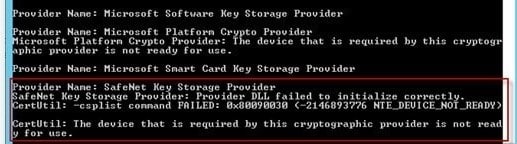
This pattern is not exclusive to Thales Luna. An nCipher/Entrust nShield-backed CA throws the same NTE_* codes with the nCipher provider name in place of the Luna one, and AWS CloudHSM, Google Cloud HSM, and IBM Cloud HSM clients can all trigger the same family of errors when their respective CSP or KSP cannot initialize. Other HSM-dependent Windows PKI services fail the same way for related reasons; our guide on an NDES duplicate endpoint error covers a different signature of the same underlying pattern, a Luna HSM Client not releasing its KSP handle before a service restart.
What Are the Common Root Causes of a Provider DLL Failure?
In practice, nearly every NTE_Provider_DLL failure traces back to one of these five causes.
- The HSM client software is missing or the wrong version. The CSP or KSP DLL ships as part of the HSM vendor’s client package (Luna Client, nShield Security World software, the CloudHSM client). If that package was never installed on the CA server, or a Windows update rolled back a driver, the provider has nothing to load.
- The CSP or KSP is not registered for the account that needs it. Registration is per-user. certsvc, NDES, and most CA-related services run as SYSTEM under the NT AUTHORITY domain, not as the administrator who installed the HSM client. A registration completed only for the interactive admin account leaves the service account unable to reach the provider, which reads to Windows as a DLL failure even though the DLL is present.
- A 32-bit and 64-bit mismatch. Windows keeps separate provider registration and DLL search paths for 32-bit and 64-bit processes (the WOW6432Node registry hive on a 64-bit OS). Installing a 32-bit HSM client on a 64-bit CA server, or vice versa, means the CSP a 64-bit certsvc process asks for is not the one that got registered.
- The HSM itself is unreachable. For NTE_PROVIDER_DLL_FAIL specifically, this is the most common cause on a server that was working fine until a reboot: the HSM client service starts, but the network HSM appliance or cloud HSM endpoint is not reachable yet, a firewall rule changed, or the partition is still locked pending Crypto Officer login.
- Wrong or stale registry and PATH configuration, or insufficient permissions. Provider registration lives under
HKEY_LOCAL_MACHINE\SOFTWARE\Microsoft\Cryptography\Defaults\Providerand, for a given CA, underHKEY_LOCAL_MACHINE\SYSTEM\CurrentControlSet\Services\CertSvc\Configuration\<CA Name>\CSP. A manual edit, a botched migration from CSP to KSP, or a service account without read access to the HSM client install directory will all produce the same symptom.
How Does This Relate to HSM and CA Deployment Topology?
A provider DLL failure almost never happens in isolation from how the CA and HSM are actually deployed. The typical enterprise topology is a two-tier hierarchy: an offline root CA (often not HSM-backed at all, since it is powered on rarely) and one or more online issuing CAs, each with its private key generated on and protected by an HSM partition. Every issuing CA server needs its own working CSP or KSP registration pointed at its own HSM partition or virtual HSM. In a multi-CA hierarchy sharing one physical HSM appliance, that registration has to be completed independently on every CA server; there is no shared or inherited configuration across CAs even when they use the same appliance.
Network topology matters just as much as CA topology. A network-attached HSM (Luna Network HSM, nShield Connect) talks to the CA server over a dedicated port (NTLS on Luna, for example), which means firewall rules, DNS or hosts-file entries, and certificate-based mutual authentication between the client and the appliance all have to be correct before the provider can initialize. A cloud HSM (AWS CloudHSM, Azure Dedicated HSM, Google Cloud HSM) adds a VPC/VNet routing and endpoint-availability dependency on top of that. If any of those layers is down, the CSP or KSP DLL loads but cannot complete initialization, which is exactly the NTE_PROVIDER_DLL_FAIL signature described above.
Does This Error Involve the HSM’s FIPS Boundary?
No, and this distinction matters for audit conversations. The FIPS 140-3 cryptographic boundary (the successor to FIPS 140-2, now the current CMVP validation standard) covers the HSM’s hardware and firmware, the module that actually generates and stores keys and performs the cryptographic operations. The CSP or KSP DLL running on the Windows CA server sits entirely outside that boundary. It is a client-side software component whose only job is to relay requests from CryptoAPI or CNG to the validated module.
That means a provider DLL failure is never itself a FIPS validation issue. The HSM’s validated boundary and the keys inside it are unaffected by a Windows-side CSP or KSP that will not load. What it does affect is whether the CA, and by extension every certificate that CA is supposed to issue, can reach that validated boundary at all. An auditor asking “does this break FIPS compliance” should hear no; an auditor asking “does this break certificate issuance” should hear yes, until the provider is fixed.
How Do You Diagnose an NTE_Provider_DLL Failure Step by Step?
Work through these steps in order rather than jumping straight to reinstalling the HSM client, which is rarely the actual fix.
- Capture the exact error. Note the full hex code and symbolic name from Event Viewer (Application log, source Microsoft-Windows-CertificationAuthority, Event ID 100) or from the CertUtil output. NTE_PROVIDER_DLL_FAIL and NTE_PROV_DLL_NOT_FOUND point at different fixes; do not treat them as interchangeable.
- Run
certutil -csplist. This enumerates every registered CSP and KSP and reports which ones are ready, which are missing, and which are failing to initialize. It is almost always the fastest way to confirm whether the DLL is present, registered, and reachable. - Confirm which provider type is in play. Check whether the CA is configured to use a legacy CSP or a CNG KSP under
HKEY_LOCAL_MACHINE\SYSTEM\CurrentControlSet\Services\CertSvc\Configuration\<CA Name>\CSP, since the registration tooling and registry path differ between the two. - Verify the HSM client software is installed and matches the server’s architecture. Confirm a 64-bit HSM client is installed on a 64-bit CA server (the overwhelming majority of production Windows Server deployments), and that the installed client version is one the HSM firmware supports.
- Test HSM connectivity independently of the CA. Use the HSM vendor’s own utility (
vtl verifyorlunacmfor Luna,nfast enquiryfor nShield) to confirm the partition or Security World is reachable and unlocked before assuming the problem is Windows-side at all. - Check the registry registration path for both the CSP and, if using KSP, the CNG provider entries. Confirm the DLL path referenced actually exists on disk and matches the installed HSM client directory.
- Confirm the registration covers the SYSTEM account, not only the interactive administrator. certsvc and NDES run as SYSTEM under NT AUTHORITY. A registration completed only for the admin account that ran the installer will not be visible to the service.
- Check HSM client logs alongside the Windows Event Log. Correlate timestamps carefully; most vendor client logs use UTC while the Windows Event Log uses local time.
- Re-register the provider and reboot. Provider registration changes, especially SYSTEM-account slot registration, frequently do not take effect for CA services until after a full restart. Skipping the reboot is the single most common reason a correct fix appears not to have worked.
- Escalate to the HSM vendor with a log bundle if the provider still will not initialize after connectivity, registration, and reboot are all confirmed clean. At that point the issue is more likely partition-level (locked, deleted, or corrupted) than a Windows registration problem.
What Is the Impact on Key Ceremonies and CA Operations?
A provider DLL failure during a key ceremony is more disruptive than the same failure on an already-running CA, because a key ceremony is a scripted, witnessed, often audited event with Crypto Officers, auditors, and sometimes a notary in the room or on the call. If the CSP or KSP cannot initialize when the CA setup wizard asks for a cryptographic provider, the ceremony script stalls at that step: the provider required to generate or protect the new CA private key on the HSM is not available to Windows, so key generation cannot proceed. Rescheduling a formal key ceremony has real cost in participant time and, for CAs operating under a documented CP/CPS, may require re-notifying witnesses or auditors of the new date.
The practical mitigation is to validate the provider entirely before the ceremony is scheduled, not during it. Run certutil -csplist and confirm the target provider is ready, confirm HSM connectivity independently with the vendor’s own tool, and confirm SYSTEM-account registration and a post-registration reboot have already happened on the exact server the ceremony will run on. Treat this as a rehearsal step in the ceremony script itself, with a named owner, rather than an assumption that installation succeeding means the provider is ready.
The same failure on an already-issuing CA has a different but still serious impact: the CA service will not start, which means no new certificates, no CRL or OCSP responses if those roles are also on the affected server, and no renewals until the provider is restored. On a CA nearing the CA/Browser Forum’s shortening TLS validity schedule (moving toward a 200-day cap, then 100 days, then 47 days by 2029), an extended outage caused by an unresolved provider failure leaves progressively less buffer before dependent certificates start expiring.
What Are the Integration Prerequisites for a Working CSP/KSP Setup?
Confirm each of these before a CA build or HSM client upgrade, rather than discovering a gap only after the CA fails to start:
- HSM client software installed and matched to the server’s OS architecture (64-bit client on a 64-bit CA server in virtually all current deployments)
- HSM partition, Security World, or cloud HSM cluster already created and reachable from the CA server over the network
- Network path open between the CA server and the HSM: firewall rules, DNS resolution, and any mutual-authentication certificates the vendor’s client requires
- CSP or KSP registered for both the interactive Administrator account and the SYSTEM account under NT AUTHORITY, since certsvc and NDES run as SYSTEM
- Time synchronization between the CA server and the HSM appliance, since clock drift can break the mutual authentication some HSM clients rely on
- Administrator privileges on the CA server to run the vendor’s registration utility (KspConfig for Luna, for example) and to complete a server reboot
- A maintenance window, since most CSP/KSP registration changes require a reboot before certsvc will recognize them
What Should High Availability and Backup Look Like for the CSP/KSP?
A single HSM partition and a single registered provider path is a single point of failure for every CA that depends on it. Most enterprise HSM vendors support high-availability groups (Luna HA groups, nShield’s load-balanced Security World across multiple modules) where the CA’s CSP or KSP is registered against a logical HA target that spans two or more physical HSMs. If one HSM in the group becomes unreachable, the provider fails over to the remaining member automatically, without the CA service itself needing to restart or re-register.
Registering for HA is not automatic just because the underlying HSMs are clustered. The CSP or KSP registration on each CA server still has to reference the HA group or virtual slot, not an individual physical partition, and that registration still has to be repeated, correctly, on every CA server, including any cold-standby or disaster-recovery CA server that is not normally running. A standby server with an untested or missing CSP/KSP registration will pass every check right up until the day it is actually needed, which is the worst possible time to discover an NTE_Provider_DLL failure.
Backup is a related but separate concern from provider registration. Backing up the HSM’s key material (cloning to a second HSM within the same security domain, or the token/smartcard-based backup schemes some vendors use) protects the keys themselves. It does not help if the restored keys sit behind a CSP or KSP that was never registered on the recovery server. A complete disaster-recovery plan for an HSM-backed CA has to validate both: the keys are recoverable, and the provider that exposes them to Windows is registered and tested on the server that will actually run the restored CA.
Failure-Mode Guidance: Error Variant, Likely Cause, and Fix
Use this table to jump from the exact error text to the most likely cause and the first fix to try, rather than working through every diagnostic step from scratch each time.
| Error / Code | Likely Cause | First Fix to Try |
|---|---|---|
| NTE_PROVIDER_DLL_FAIL (0x8009001D) | Provider DLL found but failed to initialize; HSM unreachable, partition locked, or HSM client service not started | Verify HSM connectivity with the vendor’s own tool (vtl verify, lunacm, nfast enquiry) and confirm the HSM client service is running before touching the CA |
| NTE_PROV_DLL_NOT_FOUND (0x8009001E) | Provider DLL itself is missing; HSM client not installed, or the registry path points at a file that no longer exists | Confirm the HSM client is installed and reinstall it if needed; verify the registry DLL path matches the actual install directory |
| NTE_KEYSET_NOT_DEF (0x80090019) | The CSP is not correctly set up or registered on this server | Re-register the CSP DLL with regsvr32, or reinstall the CSP if re-registration fails |
| NTE_BAD_KEYSET (0x80090016) | The key container does not exist, or the calling account has no access to it | Confirm the key exists on the HSM and check the account’s permissions on the key container |
| NTE_DEVICE_NOT_READY (0x80090030) | KSP is installed but was never registered with the HSM partition for the account running the service | Register HSM slots for the account in KspConfig (or the vendor equivalent) and reboot; see our dedicated SafeNet KSP walkthrough for the full procedure |
| Generic provider load failure, no specific NTE code | 32-bit and 64-bit mismatch between the installed HSM client and the calling process | Install the HSM client matching the server’s architecture and confirm registration exists in the correct registry hive for that architecture |
Limitations
This guide is scoped to Windows CryptoAPI/CNG provider failures on ADCS, NDES, and comparable Windows services; it does not cover the PKCS#11-only equivalents on Linux-hosted CAs, which fail differently and use separate diagnostic tooling. Exact utility names, registry paths, and log locations vary by HSM vendor (Luna, nShield, AWS CloudHSM, Azure Dedicated HSM, Google Cloud HSM); always confirm the current command syntax against that vendor’s own documentation before running it in production. Finally, a provider that still will not initialize after connectivity, registration, and reboot have all been ruled out is most likely a partition-level or hardware issue, which is outside what a Windows-side registry or registration fix can resolve and should go to the HSM vendor’s support team.
What Would Encryption Consulting Recommend?
A provider DLL failure is rarely a one-time inconvenience. It tends to resurface at the same servers, on the same HSM client version, every time there is a firmware upgrade, a client reinstall, or a new CA build, because the registration step is manual and undocumented more often than it should be. Encryption Consulting’s HSM Services team builds and validates the CSP/KSP registration, HA topology, and key ceremony runbook as part of every HSM-backed CA deployment, so registration for the SYSTEM account and the post-registration reboot are checklist items in the build plan rather than something rediscovered after a failed CA start.
For teams building or modernizing the CA hierarchy itself, our PKI Services practice designs the two-tier or multi-tier hierarchy, CP/CPS, and HSM integration together, so the provider layer is planned alongside the CA topology instead of bolted on after the first outage. And for organizations that want to remove on-premises HSM client registration and maintenance from the equation entirely, HSM-as-a-Service hosts and manages the HSM layer, including client configuration and HA, so the internal team is not the one troubleshooting an NTE_Provider_DLL failure at 2 a.m.
Frequently Asked Questions
What is the difference between NTE_PROVIDER_DLL_FAIL and NTE_PROV_DLL_NOT_FOUND?
NTE_PROVIDER_DLL_FAIL (0x8009001D) means Windows found the CSP or KSP DLL and tried to load it, but initialization failed, usually because the HSM is unreachable or locked. NTE_PROV_DLL_NOT_FOUND (0x8009001E) means Windows could not locate the DLL at all, typically because the HSM client software is not installed or the registry entry points at a path with no file in it.
What is the fastest first step to diagnose this error?
Run certutil -csplist on the affected server. It lists every registered CSP and KSP, reports whether each is ready or failing, and shows the exact error code, which tells you within seconds whether this is a missing DLL, a registration gap, or an unreachable HSM before you change anything.
Why does the fix have to include the SYSTEM account specifically?
ADCS, NDES, and most other CA-adjacent services run as the SYSTEM account under NT AUTHORITY, not as the administrator who installed the HSM client. If the CSP or KSP was only registered for the interactive admin account, the service account cannot see it, which produces the same NTE_Provider_DLL error even though registration technically happened.
Does an NTE_Provider_DLL failure mean the HSM has lost FIPS validation?
No. The CSP or KSP DLL runs on the Windows CA server, outside the HSM’s FIPS 140-3 validated cryptographic boundary. A provider DLL failure is a client-side integration problem that blocks the CA from reaching the HSM; it does not affect the HSM’s own validation status or the keys stored inside it.
Why does the server need a reboot after fixing the registration?
CSP and KSP registration changes, especially SYSTEM-account slot registration, are frequently not picked up by already-running services until the server restarts. Skipping the reboot after an otherwise correct registration fix is the most common reason administrators report the fix “did not work.”
Conclusion
An NTE_Provider_DLL failure, whether it presents as NTE_PROVIDER_DLL_FAIL (0x8009001D) or NTE_PROV_DLL_NOT_FOUND (0x8009001E), is a Windows-side CSP/KSP problem, not a break in the HSM’s FIPS 140-3 boundary. Diagnose it with certutil -csplist, confirm HSM connectivity independently of the CA, check registration for the SYSTEM account specifically, and reboot before assuming a fix has failed. Treat the registration and HA topology as part of the CA build plan, not a step to rediscover after the CA will not start.
If you need help diagnosing an HSM-backed CA or planning a resilient key ceremony, feel free to email us at [email protected].
References
- Microsoft, Use and troubleshoot CryptAcquireContext function, Microsoft Learn.
- Uwe Gradenegger, The certification authority service does not start and throws NTE_PROVIDER_DLL_FAIL.
- Thales, Microsoft Active Directory Certificate Services Integration Guide with Luna HSM.
- NIST, FIPS 140-3 Transition Effort, Computer Security Resource Center.
- Encryption Consulting, What is CSP and PKCS#11?, Education Center.
- What Does an NTE_Provider_DLL Error Actually Mean?
- What Are the Common Root Causes of a Provider DLL Failure?
- How Does This Relate to HSM and CA Deployment Topology?
- Does This Error Involve the HSM's FIPS Boundary?
- How Do You Diagnose an NTE_Provider_DLL Failure Step by Step?
- What Is the Impact on Key Ceremonies and CA Operations?
- What Are the Integration Prerequisites for a Working CSP/KSP Setup?
- What Should High Availability and Backup Look Like for the CSP/KSP?
- Failure-Mode Guidance: Error Variant, Likely Cause, and Fix
- Limitations
- What Would Encryption Consulting Recommend?
- Frequently Asked Questions
- What is the difference between NTE_PROVIDER_DLL_FAIL and NTE_PROV_DLL_NOT_FOUND?
- What is the fastest first step to diagnose this error?
- Why does the fix have to include the SYSTEM account specifically?
- Does an NTE_Provider_DLL failure mean the HSM has lost FIPS validation?
- Why does the server need a reboot after fixing the registration?
- Conclusion