- Quick Answer: How Secure Is AWS KMS?
- Key Takeaways
- What Is AWS Key Management Service (KMS)?
- AWS KMS Security Architecture: What Makes It Secure
- AWS KMS Key Types: Customer-Managed, AWS-Managed, and AWS-Owned
- Envelope Encryption: How AWS KMS Protects Data
- Data Keys and Data Key Pairs
- IAM Model: Key Policy and Identity Policy Access Control
- BYOK and HYOK: When Native KMS Is Not Enough
- CloudTrail Audit Logging: The Compliance Audit Trail
- Key Rotation in AWS KMS
- AWS KMS Cost and S3 Bucket Key Optimization
- Creating Customer-Managed KMS Keys
- AWS CloudHSM: When FIPS 140-2 Level 3 Is Required
- Custom Key Store: CloudHSM-Backed KMS Keys
- AWS KMS vs. CloudHSM: Which Should You Choose?
- Multi-Cloud Key Management Architecture
- Compliance: PCI DSS, FedRAMP, HIPAA, and DORA
- How Encryption Consulting Can Help
- Conclusion
- Frequently Asked Questions
AWS Key Management Service (AWS KMS) is the cryptographic key management backbone for over 100 AWS services and is the most widely deployed cloud KMS globally. It matters because the security of every encrypted S3 object, EBS volume, RDS database, and Lambda secret depends on how KMS keys are configured and who controls them. The recommended evaluation framework for any workload is: verify the FIPS validation level your compliance framework requires, confirm that customer-managed keys are used (not AWS-managed or AWS-owned), ensure CloudTrail Data Access logs are enabled, and decide whether the standard multi-tenant KMS model or a dedicated CloudHSM cluster is right for your threat model.
Quick Answer: How Secure Is AWS KMS?
AWS KMS is cryptographically secure for the vast majority of enterprise and regulated workloads. Key material is generated and stored in FIPS 140-2 Level 2 validated HSMs and never leaves the HSM boundary in plaintext. Keys are region-bound and cannot be exported or used outside the AWS region in which they were created. Every cryptographic operation is logged in CloudTrail with the requesting identity, key ARN, timestamp, and source IP. The primary security boundary consideration is that standard AWS KMS is a multi-tenant managed service, meaning AWS operates the underlying HSM hardware. For workloads requiring zero AWS operational access to key material, BYOK (imported key material) or HYOK (client-side encryption) should be evaluated. For workloads requiring FIPS 140-2 Level 3 dedicated single-tenant hardware, AWS CloudHSM is required.
Key Takeaways
- Standard AWS KMS uses FIPS 140-2 Level 2 validated HSMs: Key material is generated and used inside multi-tenant HSMs that are FIPS 140-2 Level 2 validated. CloudHSM provides Level 3 single-tenant hardware when required by regulation.
- AWS cannot use your customer-managed keys without an authenticated API call: Customer-managed KMS keys can only be used for cryptographic operations when an authenticated request passes both the key policy and IAM policy checks. AWS cannot initiate key use on your behalf.
- Customer-managed keys are the only type that provides a per-operation audit trail: Only customer-managed keys generate CloudTrail events for every GenerateDataKey and Decrypt call tied to a specific IAM identity. AWS-managed and AWS-owned keys do not provide this granularity.
- BYOK gives you key provenance and immediate revocation; HYOK excludes AWS entirely: BYOK (imported key material) satisfies requirements for customer-generated key material. HYOK (client-side encryption before upload) means the key never enters AWS at all. It is the strongest sovereignty model but has the highest operational complexity.
- S3 Bucket Key reduces KMS API costs by up to 99% for S3 workloads: Enabling S3 Bucket Key means S3 generates object-level DEKs locally rather than calling KMS for every object read and write, dramatically reducing KMS API call volume and cost without changing the security properties.
What Is AWS Key Management Service (KMS)?
AWS Key Management Service (AWS KMS) is a managed service that creates and controls the cryptographic keys used to protect data across AWS services and applications. AWS KMS is the key management backbone for the AWS cloud: when you enable encryption on an S3 bucket, an EBS volume, an RDS database, or a Secrets Manager secret, AWS KMS generates, stores, and protects the keys that make that encryption meaningful.
AWS KMS stores all key material inside Hardware Security Modules (HSMs) validated to FIPS 140-2 Level 2. Key material generated in AWS KMS never leaves the HSM boundary in plaintext under any operational circumstance. AWS KMS integrates natively with over 100 AWS services including Amazon S3, Amazon EBS, Amazon RDS, Amazon DynamoDB, AWS Lambda, AWS Secrets Manager, Amazon Redshift, and Amazon EFS. Keys stored in multiple Availability Zones ensure high availability. The KMS service itself provides approximately 99.999% durability for key material.
AWS KMS Security Architecture: What Makes It Secure
Understanding how secure AWS KMS is requires understanding the trust boundary it operates within and the invariants it enforces.
HSM hardware boundary: All KMS key material is generated and used inside FIPS 140-2 Level 2 validated HSMs. The HSMs are designed so that key material cannot be extracted in plaintext by any party, including AWS employees. Key operations (GenerateDataKey, Encrypt, Decrypt, Sign, Verify) are performed inside the HSM boundary and only the result is returned to the caller. No plaintext key material ever leaves the HSM.
Region isolation: Keys created in an AWS KMS region cannot be used or accessed from another region. A key created in us-east-1 cannot be used to decrypt data in eu-west-1. This regional isolation is a system-level invariant enforced at the hardware and software layer, not just a policy control.
Key policy as mandatory access control: Every customer-managed KMS key has a key policy that is the primary and mandatory access control mechanism. If the key policy does not explicitly grant a principal permission to use the key, that principal cannot use it regardless of IAM identity policy. This means even an AWS account root user cannot use a customer-managed key to perform cryptographic operations unless the key policy explicitly permits it.
What AWS can and cannot do: AWS operates the HSM hardware and manages the KMS service infrastructure. AWS cannot call your customer-managed key on your behalf to perform cryptographic operations. That requires an authenticated API request that passes both the key policy and IAM policy checks. AWS does not have visibility into the plaintext key material of customer-managed keys. However, as the operator of the underlying HSM hardware, AWS is within the trust boundary for the key material’s physical security. This is the fundamental difference between standard AWS KMS and BYOK/HYOK architectures.
AWS KMS Key Types: Customer-Managed, AWS-Managed, and AWS-Owned
AWS KMS organizes keys into three types with fundamentally different security, control, and compliance properties. AWS renamed “Customer Master Keys (CMKs)” to “KMS keys” in 2021, but the three underlying types remain the same.
Customer-managed KMS keys are created by you in your AWS account. You define the key policy, control who can use and manage the key, configure automatic rotation, and can disable or schedule the key for deletion. Every GenerateDataKey and Decrypt call generates a CloudTrail event with the key ARN, requesting IAM identity, source IP, and timestamp. This per-operation audit trail is the compliance capability that customer-managed keys provide and other key types do not. Customer-managed keys cost $1 per key per month plus $0.03 per 10,000 API calls.
AWS-managed KMS keys are created automatically by AWS services the first time you enable encryption without specifying a customer-managed key. They follow the alias pattern aws/service-name (for example, aws/s3, aws/ebs). You can view their metadata but cannot change their key policy, disable them, schedule deletion, or control rotation. AWS automatically rotates them every three years. They generate limited CloudTrail audit entries and do not provide the per-operation identity-linked audit trail that compliance frameworks require.
AWS-owned KMS keys are owned and managed entirely by AWS and shared across multiple customer accounts. They are invisible in your AWS account, generate no CloudTrail events in your account, and you have zero control over them. They are appropriate for non-sensitive data where zero management overhead is the priority but are unsuitable for any regulated workload.
Envelope Encryption: How AWS KMS Protects Data
AWS KMS uses envelope encryption to protect large amounts of data efficiently. AWS KMS does not encrypt your data directly. KMS keys can only encrypt data up to 4 KB in size directly. Instead, AWS KMS uses the envelope encryption pattern: a KMS key (the Key Encryption Key, or KEK) encrypts a Data Encryption Key (DEK), and the DEK encrypts the actual data.
Protecting the encryption key itself: The DEK is encrypted by the KMS key (CMK) so that the encrypted DEK can be safely stored alongside the encrypted data. Neither can be used without the other, and the KMS key needed to unwrap the DEK is protected inside the KMS HSMs.
Efficiency at scale: Rather than calling KMS for every individual data operation, the application calls KMS once to generate and encrypt a DEK, uses the plaintext DEK locally to encrypt potentially gigabytes of data, and then discards the plaintext DEK. Only the encrypted DEK needs to be stored with the data. This reduces KMS API calls dramatically compared to direct KMS encryption of every data record.
Algorithm strength: Envelope encryption allows combining symmetric and asymmetric algorithms. The DEK for data encryption is typically AES-256 (fast and strong for bulk data). The KEK in KMS can be an asymmetric RSA or ECC key for specific use cases, or a symmetric AES-256 key for most data encryption use cases.
Data Keys and Data Key Pairs
Data keys are the encryption keys used to actually encrypt data and other data encryption keys. AWS KMS generates data keys but does not store, manage, or track them. Data keys are used and managed outside AWS KMS by the application or AWS service.
Creating a data key: Call GenerateDataKey specifying which KMS key to use as the KEK. KMS returns two copies: a plaintext data key for immediate use and an encrypted data key (wrapped by the specified KMS key). Store the encrypted data key. The application encrypts data with the plaintext key, then deletes the plaintext key from memory.
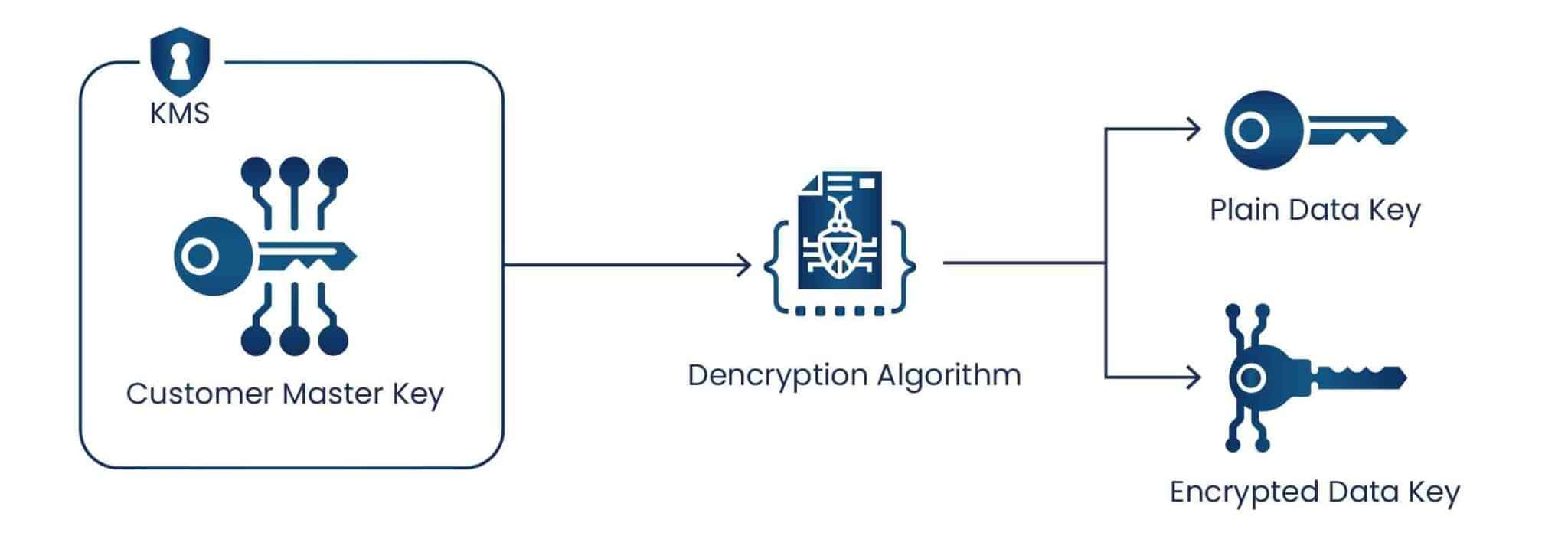
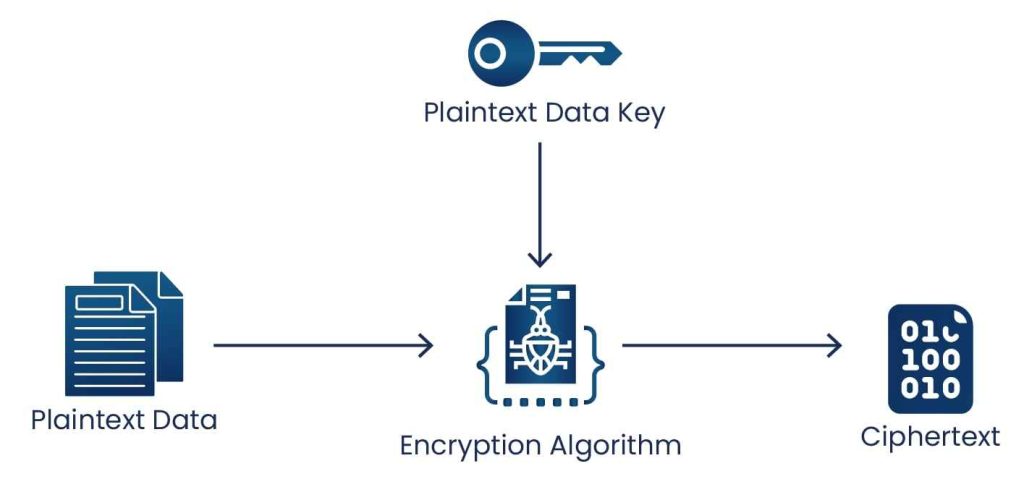
Encrypting data with a data key: Use the plaintext data key to encrypt data outside of AWS KMS, then delete the plaintext key from memory. Store the encrypted data key alongside the ciphertext.
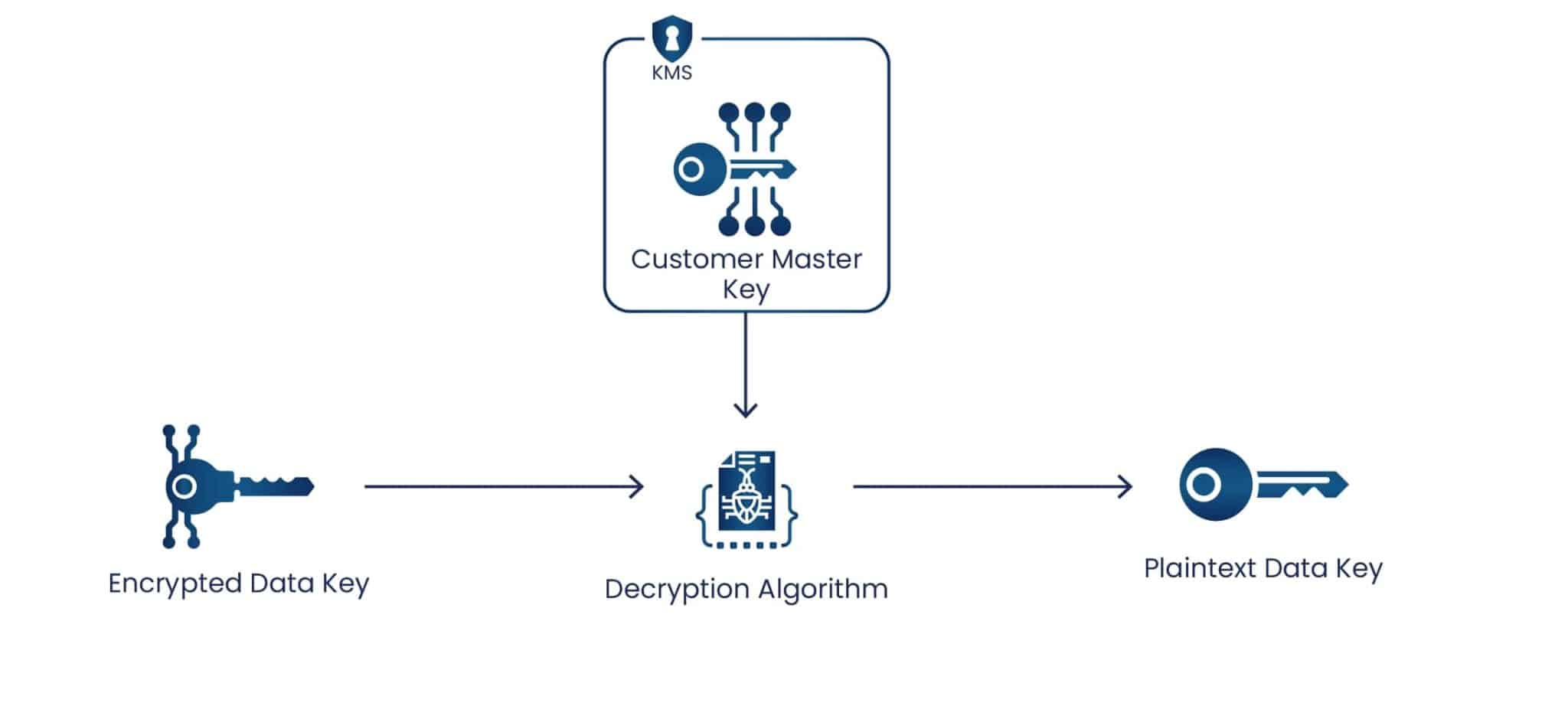
Decrypting data with a data key: Call the Decrypt operation to decrypt the encrypted data key, which returns the plaintext data key. Use the plaintext data key to decrypt the data, then remove it from memory immediately.
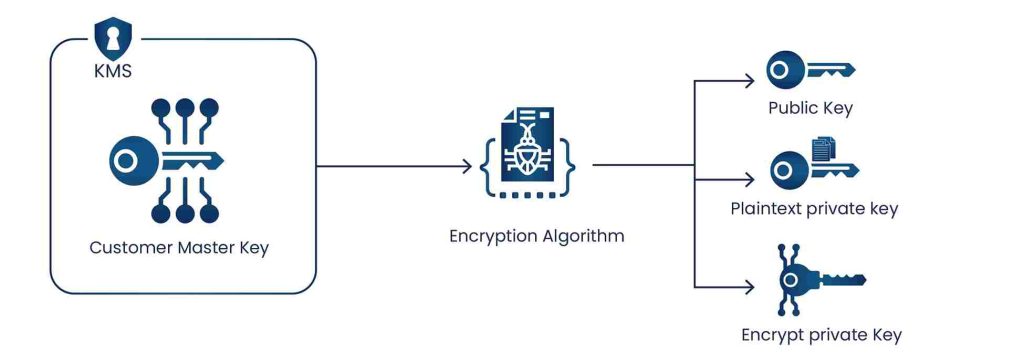
Data key pairs are asymmetric key pairs (RSA or ECC) generated by AWS KMS for client-side encryption, signing, and verification outside of AWS KMS. The private key of each data key pair is protected by a symmetric KMS key. Supported asymmetric key pair specifications include RSA 2048, 3072, and 4096 bits for encryption and decryption, and ECC_NIST_P256, ECC_NIST_P384, ECC_NIST_P521, and ECC_SECG_P256K1 for signing and verification.
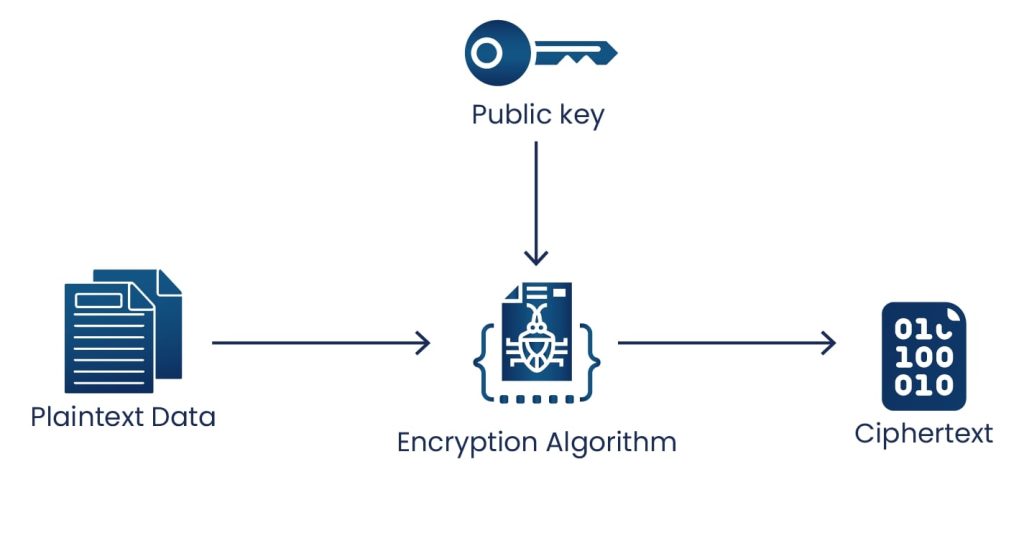
Encrypting with a data key pair: The public key encrypts data; the private key (decrypted from its encrypted form by KMS) decrypts it.
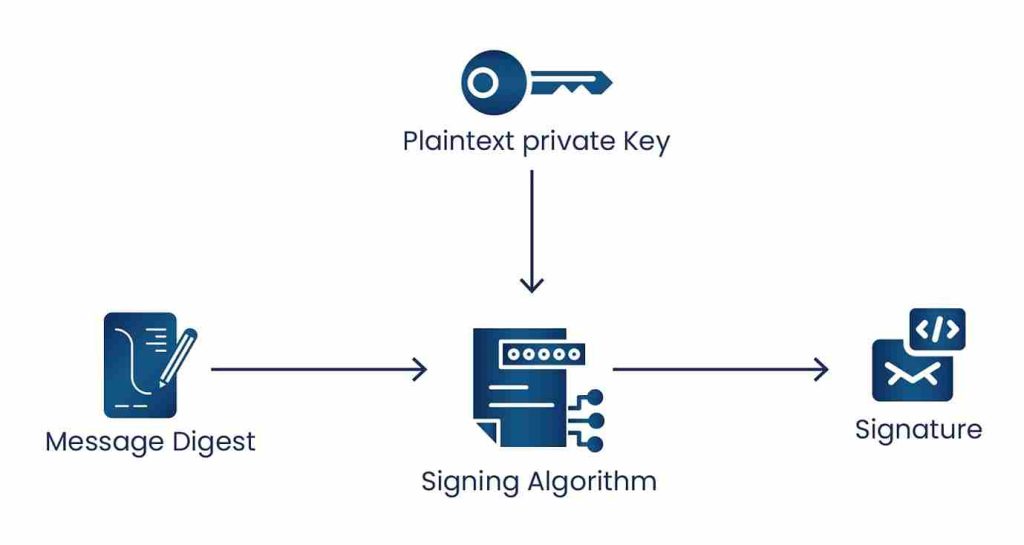
Signing and verifying with a data key pair: The plaintext private key (recovered by calling Decrypt on the encrypted private key) signs a message. Anyone with the corresponding public key can verify the signature. The plaintext private key must be removed from memory after use.
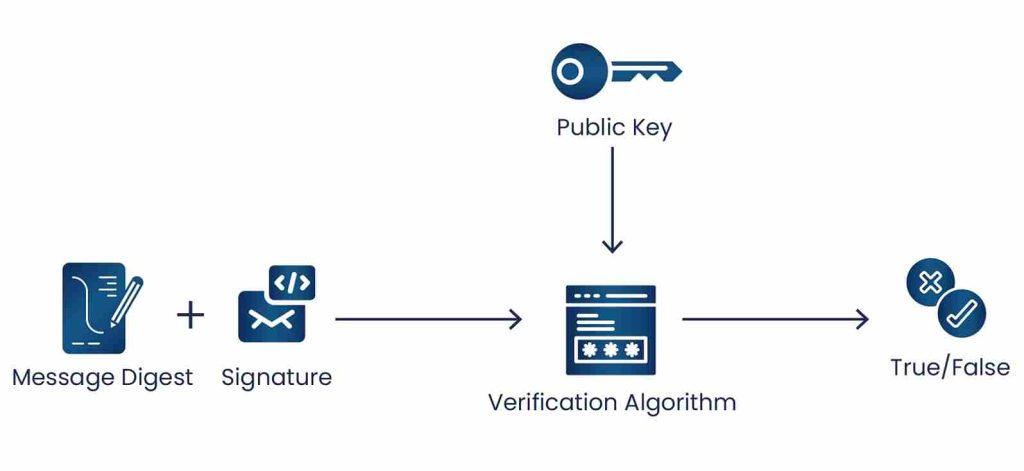
The following table summarizes AWS KMS cryptographic operations by key type and key usage:
| Operation | KMS Key Type | Key Usage |
|---|---|---|
| Decrypt | Symmetric / Asymmetric | ENCRYPT_DECRYPT |
| Encrypt | Symmetric / Asymmetric | ENCRYPT_DECRYPT |
| GenerateDataKey | Symmetric | ENCRYPT_DECRYPT |
| GenerateDataKeyWithoutPlaintext | Symmetric | ENCRYPT_DECRYPT |
| GenerateDataKeyPair | Symmetric (protects asymmetric pair) | ENCRYPT_DECRYPT |
| GenerateDataKeyPairWithoutPlaintext | Symmetric (protects asymmetric pair) | ENCRYPT_DECRYPT |
| ReEncrypt | Symmetric / Asymmetric | ENCRYPT_DECRYPT |
| Sign | Asymmetric | SIGN_VERIFY |
| Verify | Asymmetric | SIGN_VERIFY |
| GenerateMac | HMAC | GENERATE_VERIFY_MAC |
| VerifyMac | HMAC | GENERATE_VERIFY_MAC |
IAM Model: Key Policy and Identity Policy Access Control
AWS KMS access control is the most frequently misconfigured aspect of KMS deployments. Misconfiguration is also the most common actual security risk for AWS KMS: the HSM boundary protects against key extraction, but an over-permissive key policy or IAM policy can give unauthorized principals the ability to use the key for cryptographic operations.
Key policy (mandatory resource-based policy): Every customer-managed KMS key has a key policy. The key policy is the primary and mandatory access control mechanism. Unlike most AWS resource policies, the KMS key policy must exist and must explicitly grant permissions. No key policy means no access. If the key policy includes the statement granting the root account key management permissions (the default console-created key policy), then IAM identity policies in that account can also grant key management permissions to principals. Without that root delegation statement, IAM policies cannot grant access to the key regardless of their content.
IAM identity policy (secondary layer): An IAM policy attached to a user, role, or group can grant KMS permissions, but only if the key policy also permits the principal. For data-plane operations (Encrypt, Decrypt, GenerateDataKey, Sign), apply least privilege in both the key policy and the IAM identity policy: grant only the specific operation permissions, only on the specific key ARN, only to the specific service account that requires them.
Separation of key administrator from key user: The most important IAM security principle for KMS is separating the key administrator role (who can manage key policies, rotation, disable, delete) from the key user role (who can call Encrypt, Decrypt, GenerateDataKey). Application service accounts should have only the cryptographic operation permissions they need on specific keys, never key management permissions. A security operations role manages keys; application service accounts use them.
Service Control Policies (SCPs): If your AWS accounts are in an AWS Organization, SCPs provide a guardrail layer above IAM. Use SCPs to deny deletion of production KMS keys, require specific encryption standards across services, or prevent disabling of KMS-related CloudTrail logging. SCPs cannot grant permissions. They only restrict the maximum permissions available to any principal in the account.
Grants: Grants are temporary, programmatic permissions that can be created, used, and deleted without changing the key policy or IAM policy. They are useful for giving AWS services (like AWS Lambda or Amazon S3) permission to use a KMS key on your behalf for a specific operation or time window without modifying the persistent key policy. Grants are included in the access control evaluation alongside key policies and IAM policies.
BYOK and HYOK: When Native KMS Is Not Enough
The standard AWS KMS model (AWS generates and manages key material in multi-tenant HSMs) is appropriate for most regulated workloads. Two models exist for organizations that need stronger key sovereignty guarantees.
BYOK (Bring Your Own Key): You generate AES-256 key material in your own HSM or key management system, wrap it using a wrapping key downloaded from an AWS KMS Import Job, and import it into a KMS key with Origin set to EXTERNAL. AWS KMS uses your imported key material for all cryptographic operations. You retain the original key material in your own HSM. Deleting the imported copy from KMS immediately and permanently revokes AWS’s ability to use the key. BYOK gives you key provenance (you can prove the key was generated in a FIPS-validated HSM you control) and immediate independent revocation. AWS still has operational access to the key material during use, and automatic rotation is not available for imported keys.
HYOK (Hold Your Own Key): The encryption key never enters AWS at all. Your application encrypts data before uploading to any AWS service. AWS stores only ciphertext and cannot decrypt your data under any circumstance, including a legal demand directed at AWS. This is the only model that fully excludes AWS from the key trust chain. Every read and write requires a call to your external key management system, which must be highly available. Encryption Consulting’s HSM as a Service provides the external FIPS 140-2 Level 3 key management infrastructure for HYOK implementations on AWS.
| Dimension | Native KMS (AWS-generated) | BYOK (Imported key material) | HYOK (Client-side, key outside AWS) |
|---|---|---|---|
| Key generated by | AWS KMS HSM | Customer HSM (imported into KMS) | Customer (never enters AWS) |
| AWS access to key during use | Yes (multi-tenant HSM boundary) | Yes (operational access) | No |
| CloudTrail audit trail | Yes (per operation) | Yes (per operation) | No (external KMS logs only) |
| Independent revocation | Disable/delete key via API | Delete imported material (immediate) | Revoke at external KMS |
| Automatic key rotation | Yes (90 days to 7 years) | No (manual re-import required) | Fully customer-managed |
| Key provenance proof | AWS attests generation in FIPS HSM | Customer can prove own HSM generation | Fully customer-controlled |
| FIPS Level | Level 2 (standard) / Level 3 (CloudHSM) | Level 2 or 3 (depends on target store) | Depends on external KMS |
| Operational complexity | Low | Medium | High |
| Best for | Most regulated workloads | Workloads requiring customer key provenance | Classified, sovereignty-mandated, zero-trust |
CloudTrail Audit Logging: The Compliance Audit Trail
AWS KMS integration with CloudTrail is one of its strongest security features for regulated workloads. Every AWS KMS API call generates a CloudTrail event recording the key ARN, the operation, the requesting IAM identity, the source IP address, the AWS region, and the timestamp. This per-operation audit trail is what enables you to prove to a PCI DSS QSA or HIPAA auditor exactly who accessed what data and when.
CloudTrail management events (key creation, key policy changes, key rotation events, ScheduleKeyDeletion, DisableKey) are enabled by default and cannot be disabled. CloudTrail data events (GenerateDataKey and Decrypt calls per object, per operation) must be enabled separately, as they can generate high volume and cost. For regulated workloads, enabling KMS data events in CloudTrail is mandatory: this is the log that records every decrypt operation against specific data, tied to the requesting identity.
Key security alerts to configure from CloudTrail KMS events: alert immediately on ScheduleKeyDeletion and DisableKey for any production key; alert on Decrypt calls from IAM principals not in the approved role list for that key; alert on high-volume Decrypt events that may indicate data exfiltration; and alert on PutKeyPolicy changes on any production key that could expand access.
Key Rotation in AWS KMS
Automatic key rotation in AWS KMS generates new cryptographic material for a customer-managed key on a configurable schedule. The new key material becomes the primary version for all new encryption operations. Previous key versions are retained permanently so that data encrypted with them can still be decrypted. The key ARN and all aliases remain unchanged. Rotation is fully transparent to applications. You do not need to re-encrypt any existing data.
Rotation period is configurable between 90 days and 7 years. For most compliance workloads, 90 days to 1 year is the standard range. PCI DSS Requirement 3.7.4 references periodic symmetric key cryptoperiods; consult your QSA for the specific requirement in your scoped environment. Each rotation event generates a RotateKey CloudTrail event for compliance evidence. On-demand rotation (outside the automatic schedule) is available via the RotateKeyOnDemand API, useful after a suspected key compromise event.
For BYOK keys with imported material, automatic rotation is not available. You must generate new key material in your external HSM, import it as a new key version, and designate it as the primary version. You must plan this within your defined cryptoperiod to maintain compliance.
AWS KMS Cost and S3 Bucket Key Optimization
Customer-managed KMS keys cost $1 per key per month. AWS-managed and AWS-owned keys have no key storage charge. All KMS API calls cost $0.03 per 10,000 requests. For high-volume S3 workloads using customer-managed keys, the per-object KMS API call cost (one GenerateDataKey per PutObject, one Decrypt per GetObject) can accumulate significantly.
S3 Bucket Key is the solution. When S3 Bucket Key is enabled on a bucket, S3 generates a short-lived bucket-level data key from your KMS key and uses it to encrypt individual object data keys locally within S3, rather than calling KMS for every object. This reduces KMS API calls by up to 99% for S3 workloads. A workload generating 10 million S3 operations per month would normally generate 10 million KMS API calls (~$30/month in KMS fees); with Bucket Key enabled, that drops to near zero in KMS fees. S3 Bucket Key does not change the security properties of the encryption: objects are still protected by AES-256-GCM encryption under a key hierarchy that traces back to your customer-managed KMS key.
Creating Customer-Managed KMS Keys
Creating a customer-managed symmetric KMS key via the AWS Management Console:
- Sign in to the AWS Management Console and open the AWS KMS console.
- Select the AWS region from the upper-right corner.
- Choose Customer managed keys from the navigation pane.
- Choose Create key.
- In Key type, select Symmetric. In Key usage, select Encrypt and decrypt.
- Click Next.
- Create an alias for the key (a human-readable name like
prod/s3/data-lake). - Add a description. (Optional but recommended for governance)
- Click Next.
- Add tags for cost allocation and access control. (Optional)
- Click Next.
- Select IAM users and roles that can administer the key (key administrators who manage the key lifecycle but do not use it for data operations).
- If you do not want key administrators to be able to delete this key, clear the Allow key administrators to delete this key checkbox.
- Click Next.
- Select IAM users and roles that can use the key for cryptographic operations (key users, typically application service accounts).
- To allow other AWS accounts to use this key, add their account IDs in the Other AWS accounts section.
- Click Next.
- Review the key policy generated from your selections.
- Click Finish to create the key.
Creating a customer-managed asymmetric KMS key follows the same steps except: in step 5, select Asymmetric for Key type; in Key usage, select either Encrypt and decrypt or Sign and verify; and in Key spec, select the algorithm specification (RSA_2048, RSA_3072, RSA_4096, ECC_NIST_P256, ECC_NIST_P384, ECC_NIST_P521, or ECC_SECG_P256K1).
AWS CloudHSM: When FIPS 140-2 Level 3 Is Required
AWS CloudHSM is a customer-owned, single-tenant HSM service that provides FIPS 140-2 Level 3 validated hardware security modules within your own Amazon VPC. Unlike standard AWS KMS, which is multi-tenant and managed entirely by AWS, CloudHSM provisions dedicated physical HSM hardware exclusively to your organization. No other customer’s keys or cryptographic operations share the hardware with yours.
With CloudHSM, AWS manages the physical infrastructure (racking, networking, power, firmware updates) but has no access to your keys or your HSM partitions. You manage the HSM software, partitions, and key material directly through the HSM’s own management interface using hardware tokens (PED) or smart card authentication. This is the key distinction from standard KMS: with CloudHSM, AWS cannot access your key material even operationally.
CloudHSM use cases include: CA private key protection for PKI infrastructure, code signing and document signing private keys, database transparent data encryption (TDE) master keys, BYOK source for keys imported into KMS or other systems, and payment PIN encryption operations. CloudHSM is accessed through PKCS#11, JCE (Java Cryptography Extension), Microsoft CNG (Cryptography Next Generation), or OpenSSL Dynamic Engine APIs.
AWS CloudHSM pricing: approximately $1.45 per hour per HSM instance, approximately $2,100 per month for a two-instance HA cluster (recommended minimum for production).
Custom Key Store: CloudHSM-Backed KMS Keys
AWS KMS custom key stores combine the KMS API with CloudHSM Level 3 hardware. When you create a KMS key in a custom key store, KMS generates a 256-bit AES-GCM key inside your CloudHSM cluster. The key material is non-exportable and never leaves the CloudHSM HSMs in plaintext. All cryptographic operations on keys in a custom key store are performed inside your CloudHSM cluster, not in the standard KMS multi-tenant HSM infrastructure.
Custom key stores require at least two active HSMs in different Availability Zones. If the CloudHSM cluster becomes unavailable, KMS cannot perform operations on keys in that custom key store. Your application’s availability depends on your CloudHSM cluster’s availability. Custom key stores are appropriate for FedRAMP High workloads requiring FIPS 140-2 Level 3, for eIDAS qualified signature operations, or for organizations that need to use existing CloudHSM infrastructure as the KMS key backing. See our dedicated guide on AWS KMS deep dive for the full key hierarchy mechanics.
AWS KMS vs. CloudHSM: Which Should You Choose?
| Property | AWS KMS (Standard) | AWS CloudHSM |
|---|---|---|
| Tenancy model | Multi-tenant (shared HSM hardware) | Single-tenant (dedicated HSM hardware) |
| FIPS 140-2 validation | Level 2 | Level 3 |
| AWS access to key material | Yes (as HSM operator) | No (customer controls HSM partitions) |
| Key management responsibility | AWS manages fully | Shared: AWS manages hardware, customer manages HSM software and keys |
| API integration | AWS KMS API, 100+ native service integrations | PKCS#11, JCE, CNG, OpenSSL (not native to most AWS services without custom key store) |
| Automatic key rotation | Yes (90 days to 7 years) | No (manual, customer-managed) |
| High availability | AWS-managed, built-in | Requires minimum 2-HSM cluster in multiple AZs |
| CloudTrail integration | Yes (full per-operation logging) | Limited (HSM operations logged in HSM audit log, not natively in CloudTrail) |
| Cost | $1/key/month + $0.03/10k API calls | ~$1.45/hr per HSM (~$2,100/month for 2-HSM HA cluster) |
| Best for | Most regulated workloads, managed compliance, broad AWS service integration | FIPS Level 3 requirement, PKI CA keys, zero AWS key access, custom PKCS#11 applications |
Multi-Cloud Key Management Architecture
AWS KMS is AWS-native and does not extend to Azure, GCP, or on-premises systems. Organizations with multi-cloud workloads need an explicit key governance strategy across providers. Three patterns address AWS KMS in a multi-cloud context:
- Per-cloud native KMS with unified governance: Use AWS KMS for AWS workloads, Azure Key Vault for Azure, and GCP Cloud KMS for GCP, with a centralized key lifecycle management platform aggregating inventory, rotation status, and audit logs across all three. This preserves native performance and integration while providing cross-cloud compliance visibility.
- Centralized BYOK from an external HSM: Generate all key material from a single external HSM or HSM as a Service that is independent of all cloud providers. Import derived keys into AWS KMS for AWS workloads, Azure Key Vault for Azure, and GCP Cloud KMS for GCP. All encryption traces back to a single authoritative key source. Encryption Consulting’s HSM as a Service provides the external FIPS 140-2 Level 3 HSM infrastructure for this model, accessible from AWS, Azure, and GCP simultaneously.
- Client-side encryption (HYOK): Encrypt all data before it reaches any cloud provider using a key held in your own external key management system. All clouds store only ciphertext. Strongest multi-cloud sovereignty model but requires applications to handle all cryptographic operations client-side and your external KMS to be highly available.
Compliance: PCI DSS, FedRAMP, HIPAA, and DORA
PCI DSS v4.0.1 (mandatory since March 31, 2025): Customer-managed KMS keys satisfy Requirement 3.5.1 (protection of stored PANs using strong cryptography). KMS with CloudHSM custom key store satisfies Requirement 3.7.1 (key generation using an HSM). CloudTrail Data Access events for KMS satisfy Requirement 10 (audit logging). Automatic rotation supports Requirement 3.7.4 (cryptoperiod management). AWS-managed keys alone do not satisfy PCI DSS because they provide no per-operation identity-linked audit trail and no customer key control.
FedRAMP: Standard AWS KMS (FIPS 140-2 Level 2) satisfies FedRAMP Moderate SC-12 (Cryptographic Key Establishment and Management). FedRAMP High requires FIPS 140-2 Level 3 validated modules under SC-12 and SC-28; this requires either a CloudHSM custom key store or AWS CloudHSM directly. AWS KMS and CloudHSM are both included in AWS’s FedRAMP High authorization package.
HIPAA: Customer-managed KMS keys satisfy the HIPAA Technical Safeguard for Encryption and Decryption (45 CFR 164.312(a)(2)(iv)) for ePHI at rest. AWS’s Business Associate Agreement (BAA) covers AWS KMS, making it eligible for ePHI workloads. CloudTrail Data Access events satisfy the HIPAA Audit Control standard (45 CFR 164.312(b)).
DORA (Digital Operational Resilience Act, applicable to EU financial entities since January 17, 2025): DORA Articles 9 and 10 require ICT risk management and operational resilience testing including key management resilience. AWS KMS’s multi-AZ key replication, automatic rotation capability, and CloudTrail audit logging support DORA’s key management requirements. EU financial entities using AWS KMS should verify that their KMS key region is within the EU for data residency compliance and ensure CloudTrail logs are retained in EU-resident storage.
How Encryption Consulting Can Help
Encryption Consulting is an applied cryptography firm with ISO/IEC 27001:2022 and SOC 2 certifications. We help organizations evaluate, design, implement, and audit AWS KMS configurations from initial security assessment through ongoing compliance evidence generation.
- AWS KMS Security Assessment: We evaluate your current AWS KMS configuration against your threat model and compliance requirements, identifying gaps (AWS-owned or AWS-managed keys where customer-managed keys are required, key policies granting over-broad access, missing CloudTrail Data Access logging, absent rotation schedules, S3 buckets without Bucket Key enabled). We design the target architecture including key hierarchy per service and data classification, IAM separation of administrator from user, SCP guardrails, and audit log routing. See our cloud advisory services.
- HSM as a Service for BYOK and HYOK: For BYOK implementations requiring FIPS 140-2 Level 3 key generation outside AWS, or for client-side HYOK architectures requiring an external key management system, Encryption Consulting’s HSM as a Service provides dedicated HSM infrastructure integrating with AWS KMS key import workflows. Suitable as the BYOK source for AWS, Azure, and GCP simultaneously.
- CBOM Secure for AWS KMS Discovery: AWS environments with many accounts often accumulate inconsistent KMS configurations: some services using AWS-owned keys, others using AWS-managed keys, others using customer-managed keys with inconsistent policies. Encryption Consulting’s CBOM Secure discovers and inventories all KMS key configurations, access policies, rotation statuses, and CloudTrail logging gaps across AWS accounts, generating a Cryptographic Bill of Materials (CBOM) in CycloneDX format that supports PCI DSS v4.0.1 Requirement 12.3.3 compliance documentation.
- PCI DSS and FedRAMP Compliance Advisory: We map your AWS KMS configuration to the specific requirements of PCI DSS v4.0.1, FedRAMP High, HIPAA, DORA, and NIST SP 800-53 Rev. 5. We identify control gaps, produce the compliance evidence package, and assist with QSA and assessor inquiries. See our Compliance Advisory Services.
- PQC Readiness for AWS KMS: NIST finalized post-quantum cryptography standards FIPS 203 (ML-KEM), FIPS 204 (ML-DSA), and FIPS 205 (SLH-DSA) in August 2024. NIST IR 8547 points toward deprecating RSA and ECC for new uses around 2030. AWS KMS RSA and ECC asymmetric keys used for signing and key exchange will need migration. Encryption Consulting’s PQC Readiness service maps your AWS KMS key estate against the post-quantum migration timeline and designs the key rotation and algorithm transition sequence.
To discuss your AWS KMS security posture or compliance requirements, contact Encryption Consulting.
Conclusion
AWS KMS is cryptographically sound for the vast majority of enterprise and regulated workloads. Key material stays inside FIPS 140-2 Level 2 validated HSMs and never leaves in plaintext. Every operation on a customer-managed key is logged in CloudTrail. The key policy and IAM policy provide layered, mandatory access control that AWS cannot bypass to use your key without an authenticated API request.
The honest security limitations of standard AWS KMS are: it is a multi-tenant service where AWS operates the underlying hardware; it does not provide FIPS 140-2 Level 3 hardware isolation without a CloudHSM custom key store; and AWS-managed and AWS-owned keys provide no per-operation audit trail and no customer key control. For workloads where these limitations matter (FedRAMP High, classified data, sovereignty mandates, or zero-trust architectures where the cloud provider itself is in the threat model) the answer is CloudHSM, BYOK, or HYOK.
Getting the key type selection, key policy design, IAM separation, CloudTrail Data Access logging, and rotation schedule right from the start is significantly easier than remediating a large AWS estate after a compliance audit identifies gaps. For the operational mechanics of AWS KMS beyond the security evaluation, see our Deep Dive on AWS Key Management Service.
Frequently Asked Questions
How secure is AWS KMS?
AWS KMS is highly secure for most enterprise and regulated workloads. Key material is generated and stored in FIPS 140-2 Level 2 validated multi-tenant HSMs and never leaves the HSM in plaintext. Keys are region-bound. Every customer-managed key operation is logged in CloudTrail. The primary security boundary consideration is that AWS operates the underlying HSM hardware, making AWS an operational party in the key trust chain. For workloads requiring Level 3 single-tenant hardware or zero AWS key access, CloudHSM or HYOK is required.
Can AWS access my KMS keys?
AWS operates the HSM hardware that stores KMS key material and is within the physical trust boundary. AWS cannot call your customer-managed key on your behalf to perform cryptographic operations without an authenticated API request that passes your key policy and IAM policy checks. For workloads where zero AWS operational access to key material is a requirement, BYOK (imported key material, where you retain the original outside AWS and can delete the imported copy) or HYOK (client-side encryption, where the key never enters AWS at all) should be used.
What is the difference between AWS KMS and AWS CloudHSM?
AWS KMS is a fully managed, multi-tenant key management service with FIPS 140-2 Level 2 validated HSMs. AWS manages the hardware. You control key policies and rotation. AWS CloudHSM provides single-tenant dedicated physical HSM hardware validated to FIPS 140-2 Level 3 within your VPC. AWS manages only the physical infrastructure; you manage the HSM software, partitions, and key material yourself. AWS has no access to your CloudHSM keys. CloudHSM is required when Level 3 dedicated hardware is mandated or when AWS must be excluded from the key trust boundary.
What is BYOK in AWS KMS and how does it affect security?
BYOK means generating AES-256 key material in your own HSM, wrapping it with an import job wrapping key, and importing it into a KMS key (Origin: EXTERNAL). AWS uses your imported material for all cryptographic operations. You retain the original outside AWS; deleting the imported copy from KMS immediately revokes access. BYOK adds key provenance control and independent revocation, but AWS still has operational access to the key material during use. Automatic rotation is not available for imported keys.
Does AWS KMS meet PCI DSS and FedRAMP requirements?
Standard AWS KMS with customer-managed keys meets PCI DSS v4.0.1 Requirements 3.5.1, 3.7.4, and 10 when CloudTrail Data Access logging is enabled. PCI DSS Requirement 3.7.1 (HSM key generation) requires a CloudHSM custom key store (Level 3). For FedRAMP High, standard KMS (Level 2) does not satisfy the FIPS 140-2 Level 3 requirement under SC-12; CloudHSM custom key store is required. AWS KMS and CloudHSM are both in AWS’s FedRAMP High authorization package.
How does key rotation work in AWS KMS and does it affect existing encrypted data?
Automatic rotation generates new key material for a customer-managed key on a schedule you configure (90 days to 7 years). The new material becomes primary for new encryption operations. Previous versions are retained permanently for decrypting older data. The key ARN stays the same; rotation is transparent to applications and no data re-encryption is needed. For BYOK keys with imported material, automatic rotation is unavailable; you must manually generate and import new key material as a new key version.
- Quick Answer: How Secure Is AWS KMS?
- Key Takeaways
- What Is AWS Key Management Service (KMS)?
- AWS KMS Security Architecture: What Makes It Secure
- AWS KMS Key Types: Customer-Managed, AWS-Managed, and AWS-Owned
- Envelope Encryption: How AWS KMS Protects Data
- Data Keys and Data Key Pairs
- IAM Model: Key Policy and Identity Policy Access Control
- BYOK and HYOK: When Native KMS Is Not Enough
- CloudTrail Audit Logging: The Compliance Audit Trail
- Key Rotation in AWS KMS
- AWS KMS Cost and S3 Bucket Key Optimization
- Creating Customer-Managed KMS Keys
- AWS CloudHSM: When FIPS 140-2 Level 3 Is Required
- Custom Key Store: CloudHSM-Backed KMS Keys
- AWS KMS vs. CloudHSM: Which Should You Choose?
- Multi-Cloud Key Management Architecture
- Compliance: PCI DSS, FedRAMP, HIPAA, and DORA
- How Encryption Consulting Can Help
- Conclusion
- Frequently Asked Questions